
Alvita Ultimate HJ-329 - Schrittzähler OMRON - Kostenlose Bedienungsanleitung
Finden Sie kostenlos die Bedienungsanleitung des Geräts Alvita Ultimate HJ-329 OMRON als PDF.


| Produkttyp | Schrittzähler (Schrittzähler) |
| Marke | Omron |
| Modell | Alvita Ultimate HJ-329 |
| Abmessungen (ca.) | 55 x 38 x 15 mm |
| Gewicht (ca.) | 25 g (mit Batterie) |
| Stromversorgung | 1 CR2032 Knopfzelle (3V) |
| Batterielebensdauer | ca. 1 Jahr bei normaler Nutzung |
| Schrittzahlbereich | 0 bis 99999 Schritte |
| Genauigkeit | ±5% bei normalem Gehen |
| Display | LCD, 4-stellig |
| Anzeigemodi | Schritte, Entfernung (km), Kalorien (kcal) |
| Speicher | 7-Tage-Speicher |
| Befestigung | Clip zum Anstecken an Kleidung oder Gürtel |
| Schritterkennung | 3D-Sensor |
| Nullstellung | Automatisch um Mitternacht oder manuell |
| Wasserschutz | Spritzwassergeschützt (IPX4) |
| Material | Kunststoff |
| Reinigung | mit weichem, trockenem Tuch abwischen |
| Sicherheitshinweise | Nicht für medizinische Zwecke geeignet; nicht unter extreme Hitze oder Feuchtigkeit aussetzen |
| Ersatzbatterie | CR2032 (weit verbreitet) |
| Reparierbarkeit | Batteriewechsel durch den Benutzer möglich; andere Reparaturen nur durch Fachpersonal |
Häufig gestellte Fragen - Alvita Ultimate HJ-329 OMRON
Benutzerfragen zu Alvita Ultimate HJ-329 OMRON
0 Frage zu diesem Gerät. Beantworten Sie die, die Sie kennen, oder stellen Sie Ihre eigene.
Eine neue Frage zu diesem Gerät stellen
Laden Sie die Anleitung für Ihr Schrittzähler kostenlos im PDF-Format! Finden Sie Ihr Handbuch Alvita Ultimate HJ-329 - OMRON und nehmen Sie Ihr elektronisches Gerät wieder in die Hand. Auf dieser Seite sind alle Dokumente veröffentlicht, die für die Verwendung Ihres Geräts notwendig sind. Alvita Ultimate HJ-329 von der Marke OMRON.
BEDIENUNGSANLEITUNG Alvita Ultimate HJ-329 OMRON
OMRON
INSTRUCTION MANUAL
Pedometer
Model: HJ-329
Alvita Ultimate
HJ-329-Z
5341977-6A
INTRODUCTION
Thank you for purchasing the OMRON HJ-329 Pedometer.
Fill-in for future reference
DATE PURCHASED:
• Staple your purchase receipt here
- Register your product online at
www.register-omron.com
This Pedometer features advanced 3D Smart Sensor technology - so it knows exactly when you're taking a step. It's more accurate than other pedometers which use a simple pendulum design. Use this in your pocket, bag or on your hip for added convenience. Use this unit everyday to monitor your fitness achievements! Your Pedometer comes with the following components:
Pedometer
Battery (CR2032 installed)
Stran
Strap Clin
U-11-2
Instruction Manual
Please read this instruction manual thoroughly before using the unit. Please keep for future reference.
IMPORTANT SAFETY INFORMATION
To assure the correct use of the product basic safety
measures should always be followed including the
warnings and cautions listed in this instruction manual.
SAFETY SYMBOLS USED IN THIS
INSTRUCTION MANUAL
WARNING
indicates a potentially hazardous situation which, if not avoided, could result in death or serious injury.
CAUTION
Indicates a potentially hazardous situation
which, if not avoided, may result in minor or
moderate injury to the user or patient or
damage to the equipment or other property.
OPERATING THE DEVICE
Contact your physician or healthcare provider before beginning a weight reduction or exercise program.
Keep the unit out of the reach of young children. The unit contains small pieces that may be swallowed. Immediately contact your physician if any piece is swallowed.
⚠️ Please use caution when wearing the unit around your neck so as to avoid possible strangulation. Do not place the unit around the neck of children.
⚠️ If battery fluid gets in your eyes, on your skin or clothing immediately rinse with plenty of clean water. Contact a physician immediately.
Read all information in the instruction manual and any other literature included in the box before using the unit. Operate the unit only as instructed. Do not use for any other purpose.
Do not insert the battery with the polarities in the wrong direction.
Do not throw the battery into fire. The battery may explode.
⚠ Dispose of the device, battery, and components according to applicable local regulations. Unlawful disposal may cause environmental pollution.
KNOW YOUR UNIT
Front of unit
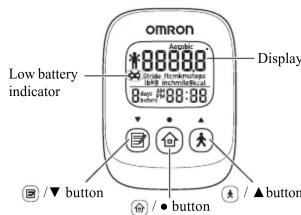
NOTE:
Remove the protective film from the face of the unit.
Back of the main unit
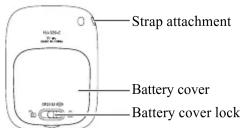
Components
Strap and Clip
How to attach How to connect How to release and
the strap to the main unit the strap and the clip fasten with a clip
Create a loop
to attach the
strap.

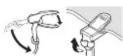
To release To fasten
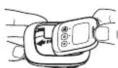
Holder
Attach/remove the holder as illustrated below.

OPTIONAL STRIDE LENGTH
MEASUREMENT
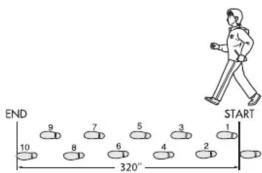
This pedometer contains a feature to calculate your walking stride, if you would like to adjust it, please follow these instructions.
How to measure your stride length
- Walk 10 steps with your normal stride as illustrated below.
-
Measure the distance from START to END in inches.
-
Calculate your stride length by dividing the total distance by 10.
Example:
Total distance = 320"
320 ÷ 10 = 32 inches (2 feet 8 inches)
Conversion Chart
12 inches = 1 foot
24 inches = 2 feet
36 inches = 3 feet
48 inches = 4 feet
SETTINGS
The unit comes with the battery installed. When you use the unit for the first time, follow the steps below. For setting range details refer to "SPECIFICATIONS".
NOTE:
If the initial settings are not correct, the measurement results may not be accurate.
- Press and hold any button for 2 seconds.
After "HELLO" has been displayed, "lb" and "kg"
flash on the display.

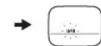
- Setting the weight units.
A) Press ☑ to select
the mode.
B) Press to confirm the
set
- To set the height/stride
length unit, repeat steps A)
and B) in step 2 above.
- To set the distance unit,
repeat steps A) and B) in
step 2 above.
- Setting the weight.
A) Press ☑ to select the desired value for a
setting
- Press Ⓐ toadvance (go back) one.
- Hold ④ down to advance (go back)
rapidly.
B) Press Ⓞ confirm the setting.
-
To set the height, repeat steps A) and B) in step 5 above.
-
To set the stride length, repeat steps A) and B) in step 5 above.
-
To set the hour, repeat steps A) and B) in step 5
above.
- To set the minute, repeat steps A) and B) in step 5 above.
All the settings are completed.
Adjust the settings
- Press and hold and at the same time.
“lb” or “kg” flash on the display.
- Follow the procedure from step 2 of "SETTINGS".
USING THE UNIT
The unit accurately counts in a pocket, bag or anywhere you want to put it. The unit may be placed in the upper front pocket of your clothing, in the front pocket of your pants, in a bag, or attached to your belt or pants.
Simply bring the unit with you wherever you go.
NOTE
In order to avoid counting steps that are not part of a walk, the unit does not display the step count for the first 4 seconds of walking. If you continue walking for more than 4 seconds, it displays the step count for the first 4 seconds and then continues to count.
The unit may not count steps correctly in the following conditions:
- The unit moves irregularly.
- When the unit is placed in a bag and the bag moves irregularly.
- When the unit swings from your belt, the top of your pants or a bag.
- Walking at an inconsistent pace.
- When you shuffle or wear sandals.
- Starting and stopping or other forms of inconsistent walking.
- Up and down movement.
• Standing up and/or sitting down
movement.
- Playing sports other than walking.
• Ascending or descending
movement on stairs or on a steep
slope.
- Vibrations from a moving vehicle.
- Such as riding a bicycle, automobile, train or bus.
- Walking extremely slowly.
READING THE CURRENT DISPLAY
Press to view the various measurements.
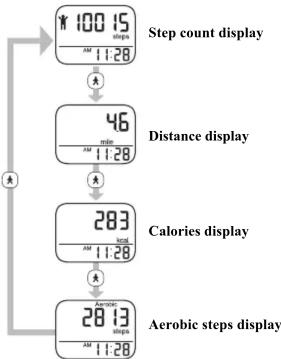
flowchart
graph TD
    A["100 15 steps"] --> B["46"]
    B --> C["283"]
    C --> D["Aerobic steps display"]
Calories
By measuring the intensity of your activity, the unit can calculate the amount of calories burned.
Aerobic steps
Aerobic steps are the physical exercise that helps us stay healthy. Aerobic steps are counted separately when walking more than 60 steps per minute and more than 10 minutes successively. If a rest of less than 1 minute is taken after a continuous walk of more than 10 minutes, this will be regarded as part of “a continuous walk”.
The battery saving mode
After 5 minutes with no button being pressed, the display will automatically turn off. However, the unit continues counting steps. This mode extends the battery life. Press ☐ of ☐ to activate the display again.
MEMORY FUNCTION
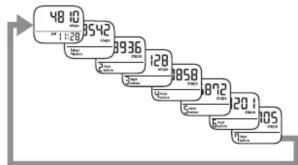
The unit stores up to 7 days of data on the unit. The current day's data is automatically stored in memory when the time reaches 12:00AM (0:00). The display will return to 0.
NOTE:
The time must be correctly set in the unit.
- Press to select the type of measurement you
want to see (steps, distance, etc.).
- Press to view the results (days 1-7) in memory.
The display changes with each press of 📋s shown below.
bar
| Category | Value | |---|---| | Category 1 | 48.10 | | Category 2 | 35.42 | | Category 3 | 89.36 | | Category 4 | 128 | | Category 5 | 85.8 | | Category 6 | 87.2 | | Category 7 | 20.1 | | Category 8 | 20.5 |NOTE:
If no button is pressed for more than 1 minute, the display will return to the current day's data.

BATTERY LIFE
Low battery indicator
When the low battery indicator appears on the display, immediately replace the battery with a new CR2032 battery.
| Blinking Battery power is low. | |
| Appears continuously | Battery power exhausted.The unit stops measurement. |
NOTES:
- Do not remove the battery around 12:00AM. The measurement results of the day when the battery was removed will be added to the measurement results for the day the battery was inserted. (It is assumed that the battery will be removed and replaced with a new one on the same day.)
- The measurement results are automatically stored in memory on the hour (e.g. at 12:00AM, 1:00AM, 2:00AM, ... 9:00PM, 10:00PM, 11:00PM). The measurement results from the hour until the time the battery is replaced will be deleted for that day.
- When the battery is removed, the time will be reset to "12:00AM". Reset the time after inserting the new battery. Refer to "SETTINGS". (The measurement results stored in memory and the weight, height and stride length settings are not deleted.)
BATTERY REPLACEMENT
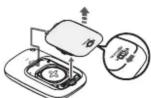
- To unlock the battery cover move the lock to the left. Then pull the cover off by pulling it away from the unit.
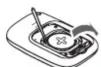
- Remove the battery with a toothpick.
NOTE:
Do not use any type of metal object to remove the battery.
CAUTION
Dispose of the device, battery, and components according to applicable local regulations. Unlawful disposal may cause environmental pollution.
CAUTION
Do not throw the battery into fire. The battery may explode.
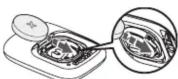
- Insert the battery (CR2032) with the positive (+) side face up.
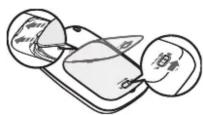
- Replace the battery cover by sliding the catch in first, then press down on the battery cover firmly so it is closes. Once this is complete, slide the lock to the right.
DELETING ALL RESULTS AND SETTINGS
Follow the procedure below to delete all the previous measurement results and settings, including the time, weight, height, and stride length.
-
Press and hold and at the same time. “lb” or “kg” flashes on the display.
-
Press and hold and at the same time again.
After “Clr” has been displayed, “lb” and “kg” flash on the display.
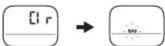
The measurement results stored in memory and the settings for the time, weight, height and stride length are deleted. To continue using the unit, reset time, weight, height, and stride length (refer to "SETTINGS").
CARE AND MAINTENANCE
To keep the unit in the best condition and protect the unit from damage follow the directions listed below:
CAUTION
Do not disassemble or modify the unit. Changes or modifications not approved by Omron Healthcare will void the user warranty.
Clean the unit with a soft dry cloth.
Do not use any abrasive or volatile cleaners.
Do not immerse the unit or any of the components in water.
The unit is not waterproof. Do not wash it or touch it with wet hands. Be careful that water does not get into the unit.
Store the unit in a safe and dry location.
Avoid the unit being exposed to direct sunlight, high temperatures, high humidity, water and/or dust.
Do not subject the unit to strong shock, drop, or step on it.
Replace a worn battery with a new one immediately. Remove the battery if the unit will not be used for three months or longer.
Use of the unit must be consistent with the instructions provided in this manual.
TROUBLESHOOTING TIPS
| Problem Probable Cause How to Correct | ||
| The low battery indicator blinks or appears continuously. | The battery is low or worn. | Replace the battery with a new one (CR2032), refer to “BATTERY REPLACEMENT”. |
| Nothing is displayed. | Battery saving mode active. | Press either of ☐ or ☑ refer to “The battery saving mode” in “READING THE CURRENT DISPLAY”. |
| The polarities of the battery (+ and -) are aligned in the wrong directions. | Insert the battery in correct alignment, refer to “BATTERY REPLACEMENT”. | |
| The battery is worn. | Replace the battery with a new one (CR2032), refer to “BATTERY REPLACEMENT”. | |
| The displayed values are incorrect. | The unit is positioned incorrectly. | Refer to “The unit may not count steps correctly in the following conditions:” in “USING THE UNIT”. |
| Irregular movement. Inconsistent pace. Up and down movement. | ||
| The set values are wrong. | Check the settings, refer to “SETTINGS”. | |
| The display is unusual or the buttons do not operate normally. | Replace the battery with a new one (CR2032), refer to “BATTERY REPLACEMENT”. | |
| Device error. | Reinstall the battery, refer to “BATTERY REPLACEMENT”. | |
NOTE:
If a malfunction has occurred and you need to repair your unit, all settings and measurement results are deleted. We recommend that you record measurement results.
SPECIFICATIONS
| Model: HJ-329 | |
| Product Name Avita Ultimate | |
| Power Supply: 3VDC (1 lithium battery CR2032) | |
| Measurement Range: | Steps: 0 to 99,999 stepsDistance: 0.0 to 621.3 miles /0.0 to 999.9 kmCalories: 0 to 59,999 kcalAerobic steps: 0 to 99,999 stepsTime: 12:00AM to 11:59PM |
| Memory: | Previous 7 days on display |
| Setting Range: Time: 12:00AM to 11:59PWeight: 66 to 300 lb (in increments of 1 lb) / 30 to 136 kg (in increments of 1 kg)Height: 3"4" to 6"6" (in increments of 1 inch) / 100 to 199 cm (in increments of 1 cm)Stride length: 12" to 48" (in increments of 1 inch) / 30 to 120 cm (in increments of 1 cm) | |
| Operating Temperature/Humidity: | 14°F to 104°F (-10°C to +40°C) / 30% to 85% RH |
| Battery Life: | Approx. 6 months* (when used for 14 hours a day)NOTE:The supplied battery is for initial use. This battery can run out within 6 months. |
| External Dimensions: | Approx. 1.65"(w) × 2.24"(h) × 0.51"(d)(42.0(W) × 57.0(H) × 13.0(D) mm) |
| Weight: | Approx. 0.8 oz / 23 g (battery included) |
| Contents: | Pedometer, Holder, Battery (CR2032 installed), Strap, Clip and Instruction manual |
- Specifications are subject to change without notice.
* New battery life based on OMRON testing.
FCC STATEMENT
NOTE:
POTENTIAL FOR RADIO/TELEVISION INTERFERENCE (for U.S.A. only)
This product has been tested and found to comply with the limits for a Class B digital device, pursuant to part 15 of the FCC rules.
These limits are designed to provide reasonable protection against harmful interference in a residential installation.
The product generates, uses, and can radiate radio frequency energy and, if not installed and used in accordance with the instructions, may cause harmful interference to radio communications.
However, there is no guarantee that interference will not occur in a particular installation. If the product does cause harmful interference to radio or television reception, which can be determined by turning the product on and off, the user is encouraged to try to correct the interference by one or more of the following measures:
• Reorient or relocate the receiving antenna.
- Increase the separation between the product and the receiver.
- Connect the product into an outlet on a circuit different from that to which the receiver is connected.
- Consult the dealer or an experienced radio/TV technician for help.
Changes or modifications not expressly approved by the party responsible for compliance could void the user's authority to operate the equipment.
LIMITED WARRANTY
Your OMRON HJ-329 Pedometer, excluding the battery, is warranted to be free from defects in materials and workmanship appearing within 1 year from the date of purchase, when used in accordance with the instructions provided with the unit. The above warranties extend only to the original retail purchaser.
We will, at our option, repair or replace without charge any Pedometer covered by the above warranties. Repair or replacement is our only responsibility and your only remedy under the above warranties.
To obtain warranty service contact Omron's Customer Support at 1-800-634-4350. Information for warranty service is available on our website at www.omronhealthcare.com.
Enclose the Proof of Purchase. Include a letter, with your name, address, phone number, and description of the specific problem. Pack the product carefully to prevent damage in transit. Because of possible loss in transit, we recommend insuring the product with return receipt requested.
THE FOREGOING IS THE SOLE WARRANTY PROVIDED BY OMRON IN CONNECTION WITH THIS PRODUCT, AND OMRON HEREBY DISCLAIMS ANY OTHER WARRANTIES, EXPRESS OR IMPLIED, INCLUDING IMPLIED WARRANTIES OF MERCHANTABILITY AND FITNESS FOR A PARTICULAR PURPOSE. IMPLIED WARRANTIES AND OTHER TERMS THAT MAY BE IMPOSED BY LAW, IF ANY, ARE LIMITED IN DURATION TO THE PERIOD OF THE ABOVE EXPRESS WARRANTY.
OMRON SHALL NOT BE LIABLE FOR LOSS OF USE OR ANY OTHER SPECIAL, INCIDENTAL, CONSEQUENTIAL OR INDIRECT COSTS, EXPENSES OR DAMAGES.
This warranty provides you with specific legal rights, and you may have other rights that vary by jurisdiction. Because of special local requirements, some of the above limitations and exclusions may not apply to you.
FOR CUSTOMER SERVICE
Visit our web site at: www.omronhealthcare.com Call toll free: 1-800-634-4350
Visit our web site at: www.omronhealthcare.com Call toll free: 1-800-634-4350
DISTRIBUTED BY:
OMRON HEALTHCARE, INC.
1925 West Field Court
Lake Forest, IL 60045 U.S.A.
www.omronhealthcare.com
© 2014 OMRON HEALTHCARE, INC.
Made in China
- OMRON
- INSTRUCTION MANUAL
- Pedometer
- Model: HJ-329
- Alvita Ultimate
- INTRODUCTION
- IMPORTANT SAFETY INFORMATION
- SAFETY SYMBOLS USED IN THIS
- OPERATING THE DEVICE
- KNOW YOUR UNIT
- OPTIONAL STRIDE LENGTH
- MEASUREMENT
- SETTINGS
- USING THE UNIT
- READING THE CURRENT DISPLAY
- MEMORY FUNCTION
- BATTERY LIFE
- Low battery indicator
- NOTES:
- BATTERY REPLACEMENT
- NOTE:
- CAUTION
- DELETING ALL RESULTS AND SETTINGS
- CARE AND MAINTENANCE
- Clean the unit with a soft dry cloth.
- Do not immerse the unit or any of the components in water.
- Store the unit in a safe and dry location.
- FCC STATEMENT
- LIMITED WARRANTY
- FOR CUSTOMER SERVICE
- DISTRIBUTED BY:
Marke : OMRON
Modell : Alvita Ultimate HJ-329
Kategorie : Schrittzähler