Fader FPX7 - Monitor Fluid - Kostenlose Bedienungsanleitung
Finden Sie kostenlos die Bedienungsanleitung des Geräts Fader FPX7 Fluid als PDF.


Benutzerfragen zu Fader FPX7 Fluid
0 Frage zu diesem Gerät. Beantworten Sie die, die Sie kennen, oder stellen Sie Ihre eigene.
Eine neue Frage zu diesem Gerät stellen
Laden Sie die Anleitung für Ihr Monitor kostenlos im PDF-Format! Finden Sie Ihr Handbuch Fader FPX7 - Fluid und nehmen Sie Ihr elektronisches Gerät wieder in die Hand. Auf dieser Seite sind alle Dokumente veröffentlicht, die für die Verwendung Ihres Geräts notwendig sind. Fader FPX7 von der Marke Fluid.
BEDIENUNGSANLEITUNG Fader FPX7 Fluid
natural_image
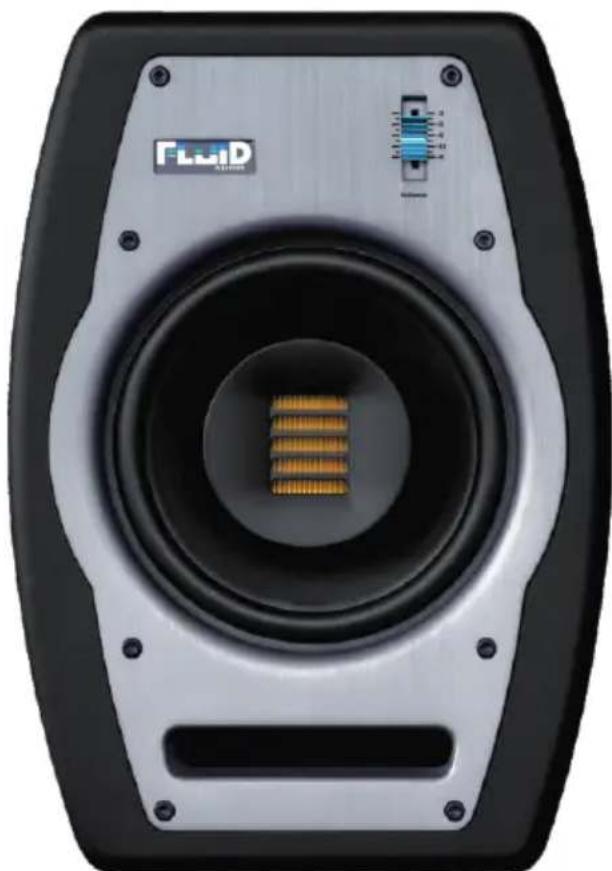
Close-up of a black and silver electronic speaker with a gold-colored central button and a blue indicator dial (no visible text or symbols on the speaker body)FADER PRO SERIES FPX7
User Guide
Table of Contents
English
Introduction 1
What's inside? 1
Fader Pro Series FPX7 Features 1
Front and Rear Panel Features 3
Installation 3
Connecting to Preamp or Computer Outputs 5
Warranty 5
Introduction
Thank you for choosing the Fader Pro Series FPX7 bi-amplified near field studio monitor. Fluid Audio may not seem like a house-hold name but the founders of the company have been designing speakers for over 25 years. They are also songwriters and musicians just like you and know exactly what is needed for tracking and mixing great music. Now, after painstaking tuning and voicing, Fluid Audio is proud to present the FPX7 monitor.
Following in the footsteps of the successful FX8, the Fader Pro Series FPX7 is another coaxial design monitor, but with an AMT tweeter. Air Motion Transformer tweeters have been legendary in the audio industry because of their transparent sound, fast attack and high efficiency. Designed by Dr. Oskar Heil, the pleated diaphragm of the AMT acts somewhat like bellows that "squeeze" the sound out in accordian-like fashion. This design results in an extremely fast response and fine detail.
Mounting the AMT tweeter in the center of the woofer gives the FPX7 all the benefits of a coax design: A compact footprint and great off-axis response (which translates into a more expansive "sweet-spot"). This coupled with a high-output, 7" woofer creates a powerful, full frequency monitor. The specially designed MDF cabinet is shaped in a way to minimize internal standing waves that create distortion. The 140W custom designed amplifier incorporates two new options for EQ flexibility: The Tweeter Trim switch and Acoustic Space switch, to account for placement issues you may face in your mixing space. Like the other Fader models, the amp also has a generous heat sink, and auto-off Standby function. All of these features make the FPX7 monitor a credit to any Professional studio.
What's inside?
Your Fader Pro Series FPX7 box contains:
• One (1) FPX7 studio monitor
• Detachable AC power cord
• This users guide
• Acoustic isolation pads
Fader Series FPX7 Features
1.Woofer
The woofer driver is 7"(178mm) in diameter and utilizes a low distortion, magnet structure. That magnet drives a high temperature voice coil, which is mounted to a polypropylene coated, paper pulp cone. The cone is anchored to the frame with a pliant butyl rubber surround which minimizes high frequency resonant peaks that may be transmitted from the cone. Although many claim to use "space age" materials in their cones, since the 1920's, the most popular material for woofer cones has been paper pulp. Why? Not only it's great strength-to-weight ratio, but because of its excellent damping characteristics - leaving the woofer to reproduce pure tones, not the ringing resonances.
2.Tweeter
The FPX7 tweeter is what makes this speaker so unique and sound so extraordinary. The yellow part in the middle of the speaker is a 28mm x 43mm Air Motion Transformer (AMT) tweeter with a neodymium magnet. AMT tweeters have long been known for their precise detail and lightning fast attack. What makes the FPX7 so unique, however, is that it is mounted in the center of the woofer, in a coaxial configuration. Not only does this make the "acoustic center" the same for both the woofer and tweeter, which drastically improves the speaker's vertical off axis response, but it also allows the speaker cabinet to be a little shorter and more compact. Besides it's extremely refined detail, the AMT provides outstanding imaging and depth.
1.Bass-Reflex Slot Port
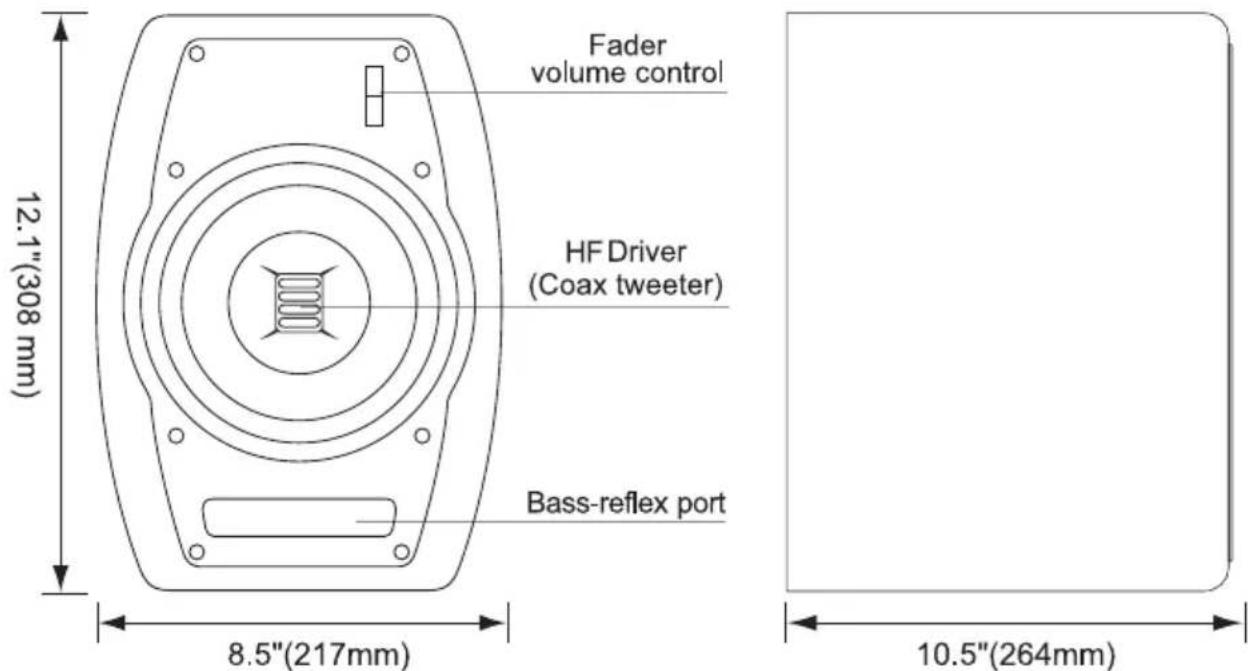
The wide and narrow slot at the bottom of the front panel of the FPX7 is the bass-reflex vent port. It is designed to effectively tune the speaker cabinet to a certain frequency, and maximize the bass output of the speaker. It is put on the front panel in order to fire directly at the listener, and also to allow for flexibility of placement (as a rear firing port may interfere with the wall behind it).
4.Enclosure and Fader Volume Control
The enclosure design of the FPX7 has a very important role in shaping the overall sonic response of the speaker. Besides being made of acoustically efficient MDF material, it has rounded sides which, besides looking unique, also greatly reduces internal standing waves inside the cabinet. This lowers audible distortion which can cloud up the imaging of the speaker. Of course the FPX7 also features our trademark fader volume control - placed on the front of the speaker where it can be easily reached. It has 3 detents to allow for 4 position settings.
5.Amplification and Crossover Network
The specially designed Class A/B bi-amplifier separately drives the low and high frequency drivers - allowing each to work independently and more efficiently. For the Fader Pro series, we raised the ante - using an oversized toroid transformer for the power supply. This provides plenty of clean power, with a ton of headroom. Utilizing an external heat sink on the amplifier keeps the heat outside of the enclosure, which allows both the amps and the drivers to operate at lower temperatures. When the speaker are not being used, there is an integrated standby function that powers down the amplifier to conserve energy. Combined with phase-optimized crossover networks, the drivers blend together, resulting in a coherent soundstage across the entire audio spectrum.
Front and Rear Panel Features
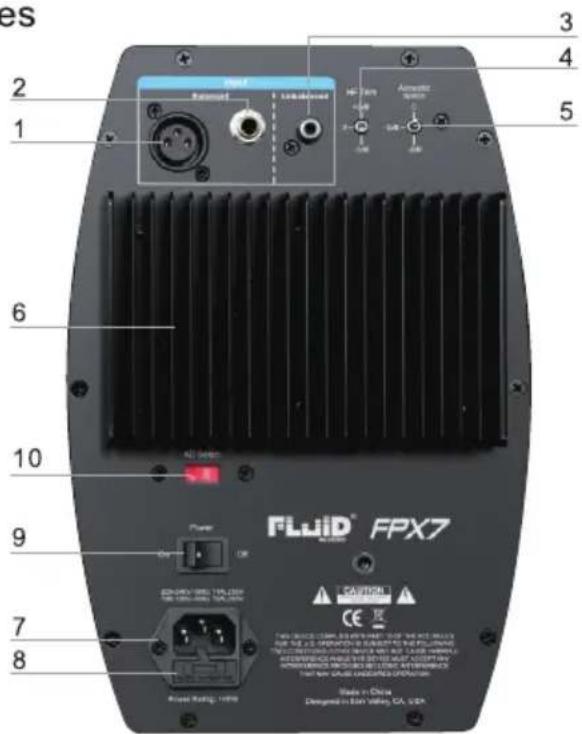
Rear Panel Features
text_image
es 2 1 6 10 9 7 8 Fluid® FPX7 FLUID® FPX7 AIRS RATING: 1000 3 4 5 Airplane Control Control Control Control Control Control Control Control Control Control Control Control Control Control Control Control Control Control Control Control Control Control Control Control Control Control Control Control Control Control Control Control Control Control Control Control Control Control Control Control Control Control Control Control Control Control Control Control Control Control CER CE K State in China Designed in EAN Wireless, CA, USA-
XLR INPUT: This jack accepts XLR input connections with either balanced or unbalanced wiring. The input wiring of an XLR connector should be as follows:
-
XLR PIN 1 . . . . . signal ground (shield)
• XLR PIN 2 . . . . . signal positive(+)
• XLR PIN 3 · · · · · signal negative(-) -
TRS INPUT: This jack accepts 1/4" connections with either balanced or unbalanced wiring. For balanced wiring, a three-conductor TRS plug is necessary. The input wiring of a TRS connector should be as follows:
• TRS TIP ..... signal positive (+)
- TRS RING .... signal negative (-)
- TRS SLEEVE .... signal ground (shield)
Fader Pro Series FPX7 Monitor
Unbalanced 1/4" wiring can be done with either a two- or three-conductor (TS or TRS) plug. A two-conductor (TS) plug automatically grounds the signal negative input, whereas a three-conductor (TRS) plug, wired unbalanced, provides the option of leaving the negative input open or grounded. We recommend that you ground the unused negative input (this can be done by wiring the ring and sleeve of the TRS plug together).
The TRS input is summed through a balanced input amplifier with the XLR input, allowing both inputs to be used simultaneously. Input specifications apply to both.
3.RCA INPUT: This jack accepts RCA input connections with unbalanced wiring.
4.HF (or High Frequency) TRIM SWITCH: Allows for adjustment of the tweeter output: +2dB, 0 (Flat) and -2dB.
5.ACOUSTIC SPACE SWITCH: Minimizes boundary effects by applying a low frequency shelf below 200Hz (0db, -2dB and -4dB)
6.AMPLIFIER HEATSINK: External heat sink on the amplifier keeps heat outside the enclosure.
7. POWER RECEPTACLE: Accepts a detachable 3-circuit line cord in order to power the monitor.
8.FUSE HOLDER: Holds the external main fuse. (Which also houses a spare.)
9. POWER SWITCH: This switch turns the monitor on and off.
10.VOLTAGE SELECT SWITCH: Provides two selections, 100-120V AC and 220-230V AC, and should be set to match the "house supply" (receptacle) voltage of the country or location in which the speaker is used. The 100-120V setting is correct for the USA and Canada, while the 220-230V setting is correct for most of the UK and Europe.
Front Panel Features
On the front panel is our new illuminated Fluid Audio logo. It also acts as the "power on" LED indicator. When the speaker is turned on and there is signal playing, it will be brightly illuminated. If there is no signal after 20 minutes, it will dim to a lower intensity, which indicates that it is in standby mode.
text_image
Fader volume control 12.1"(308 mm) HF Driver (Coax tweeter) Bass-reflex port 8.5"(217mm) 10.5"(264mm)Installation
For optimal performance of your FPX7 monitors, please read the following thoroughly and carefully prior to installation.
Precautions
Handling: Please do not touch the speaker cone. The FPX7 speaker is tightly packed, so your attention is required when taking it out of the box. To avoid possible damage to the speaker units, hold both sides of the monitor while pulling it out of the box. The speaker cone should not be touched in order to avoid damage even after they are out of the box.
Correct Power Operation: Since the FPX7 monitor contains its own amplifier, it must be connected to a power outlet using the detachable AC cable provided. Before connecting power, please make sure that the Voltage-Select Switch located on the speaker's rear panel is set to the appropriate position, as described in the rear-panel features list appearing earlier in this manual.
WARNING! Use of improper Voltage-Select Switch combinations may result in hazardous conditions and/or damage to speaker components not covered by speaker warranty.
Connections: You can connect either an XLR balanced cable, TRS balanced/unbalanced cable or RCA unbalance cable from the input of FPX7 to your corresponding preamp, interface or mixer outputs. We recommend that you use high-quality balanced or unbalanced cables for input connections. Also, always turn off the power of the FPX7 and turn the volume to a minimum before making the necessary connections.
Usage: All Fluid studio monitors are designed to be used on flat, counter-top surfaces. However, the FPX7 has mounting screws built in to the bottom of the cabinet if you choose to mount them to a wall. (These screws are hidden by the vinyl covering, so you will need to cut through the vinyl to reach the M6 T-nuts). The FPX7s can be mounted using an industry standard plate with mounting dimensions of 2" x 4.25".
Caution: Never remove the rear panel of these powered monitors. To do so could result in electric shock. A qualified technician should perform any repair or service to the electronics.
Hearing protection: This product is capable of producing sounds at a level that could be damaging to hearing and result in permanent hearing loss over an extended period of time.
XLR Balanced Connection
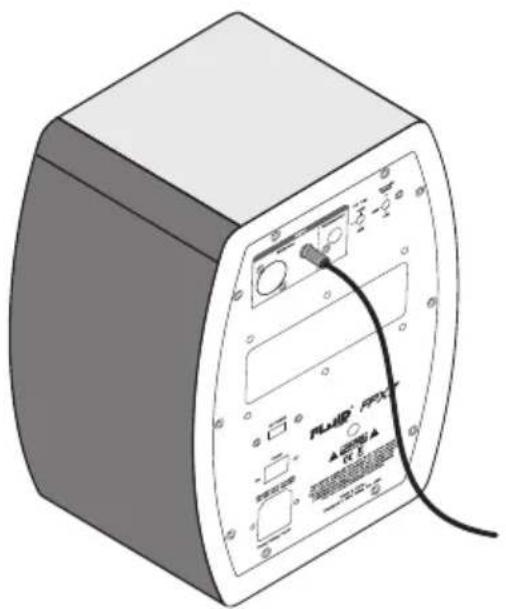
Assure that the power switch of the FPX7 is turned off and that the Fader volume control of the FPX7 is turned down to a minimum. Connect the male end of an XLR balanced cable to the balanced input of the FPX7 (refer to the following diagram for balanced connection).
TRS Balanced/Unbalanced Connection
Assure that the power switch of the FPX7 is turned to off and that the Fader volume control of the FPX7 is turned down to a minimum. Connect the male end of a TRS balanced or TS unbalanced cable to the TRS input of the FPX7 monitor.(Refer to the following diagram for TRS connection).

natural_image
Illustration of a rectangular electronic device with labeled ports and a black cable (no readable text or symbols)XLR Balanced Connection
natural_image
Illustration of a portable electronic device with labeled ports and a cable (no readable text or symbols)1/4" TRS Balanced or Unbalanced Connection
Connecting to Preamp or Computer Outputs
Before connecting, make sure the output device's power has been turned off. Plug the XLR balanced, TRS balanced or TS unbalanced or RCA cable to the corresponding output connectors of a pre amplifier, computer or game console.
FPX7 Orientation and Listening position
Placement of your speakers is one of the most important procedures in order to monitor sound accurately. To monitor with the FPX7's performing to their maximum capability, an appropriate listening environment and correct placement are required. Please refer to the following for correct FPX7 placement.
- The two speakers and the listener should basically align to form a regular triangle. Refer to the diagram below.
- Position the monitors so that the light of the LED Logo is level with your ears in a normal listening environment. As seen in the diagram below.
- Place the FPX7's vertically with the woofer on the bottom. Placing the FPX7's horizontally is not recommended.
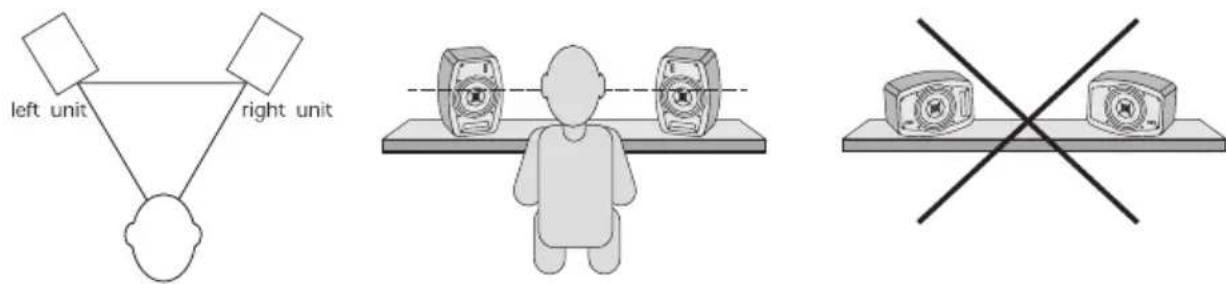
text_image
left unit right unitRemarks: DO NOT place any obstacles that may block the flow of air in front or between the monitors. Also remove reflective materials such as glass, mirrors or metal from the monitoring environment. PLACE THOSE MATERIALS AWAY FROM THE PATH OF THE SOUND FROM THE FPX7 MONITORS.
Warranty
Warranty Terms
Fluid Audio warrants products to be free from defects in materials and workmanship, under normal use and provided that the product is owned by the original, registered user.
Contact your local retailer or place of purchase for terms and limitations applying to your specific product. Terms may differ depending on country of purchase
Appendix A -Technical Specifications
| Type: | 2-way, Coaxial near-field studio reference monitors with DSP |
| LF Driver: | 7-inch composite paper cone with high temperature voice coil and damped rubber surround. |
| HF Driver: | AMT coax mounted tweeter (28mm x 43mm) |
| Frequency Response: | 42Hz -27kHz |
| Crossover Frequency: | 3.5kHz |
| LF Amplifier Power | 90W |
| HF Amplifier Power | 50W |
| S/N Ratio: | >100dB typical, A-weighted |
| MAX SPL @ 1m: | 106dB |
| Input connectors: | 1xXLRbalanced input connector1xRCAunbalance input connector1xTRSbalanced/unbalanced input connector |
| Polarity: | positive signal at + input produces outward LF cone displacement |
| Input Impedance: | 20k ohms balanced, 10k ohms unbalanced |
| Input Sensitivity: | 85mV pink noise input produces 95dBa output SPL at one meter with volume control at maximum |
| Protection: | RF interference, output current limiting, over temperature, turn-on/off transient, subsonic filter, external mains fuse. |
| Indicator: | power ON/OFF Logo LED on front panel |
| Power Requirements: | factory programmed for either 100-120V-60Hz, 220-230V-50Hz |
| Cabinet: | vinyl-laminated, high acoustic efficient MDF |
| Dimension: | 308 mm (H) x 217 mm (W) x 264 mm (D) |
| weight: | 7.5 kg/unit (without packing) |
Above specifications subject to change without notice
WARNING: This product contains chemicals, including lead, known to the State of California to cause cancer, and birth defects or other reproductive harm. Wash hands after handling.

text_image
CE©2015 Fluid Audio. All rights reserved. Product features, specifications, system requirements and availability are subject to change without notice. Fluid Audio is trademark or registered trademark of Fluid Audio in the U.S. and other countries. All other trademarks contained herein are the property of their respective owners.