
MI-2550Xp - Computermaus TRUST - Kostenlose Bedienungsanleitung
Finden Sie kostenlos die Bedienungsanleitung des Geräts MI-2550Xp TRUST als PDF.


| Produkttyp | Computermaus |
| Marke | Trust |
| Modell | MI-2550Xp |
| Schnittstelle | USB (mit PS/2-Adapter) |
| Sensor | Optisch |
| Tastenanzahl | 3 (Links, Rechts, Scrollrad-Taste) |
| Scrollrad | Ja (mit Auto-Scroll-Funktion) |
| Kabellänge | ca. 1,5 m |
| Gewicht | ca. 80 g |
| Abmessungen (ca.) | 95 x 55 x 35 mm |
| Kompatible Betriebssysteme | Windows 98(SE), ME, 2000, XP, X64 |
| Software | Trust Easy Mouse Configuration (Treiber und Einstellungen) |
| Lieferumfang | Maus, USB-zu-PS/2-Adapter, Installations-CD, Bedienungsanleitung |
| Besondere Eigenschaften | Mini-Design, optischer Sensor, autoscroll |
| Reinigung | Sensor vorsichtig mit weicher Bürste reinigen |
| Sicherheitshinweise | Nicht öffnen oder reparieren; vor Flüssigkeiten schützen |
| Garantie | 2 Jahre Herstellergarantie |
| CE-Kennzeichnung | Ja |
Häufig gestellte Fragen - MI-2550Xp TRUST
Benutzerfragen zu MI-2550Xp TRUST
0 Frage zu diesem Gerät. Beantworten Sie die, die Sie kennen, oder stellen Sie Ihre eigene.
Eine neue Frage zu diesem Gerät stellen
Laden Sie die Anleitung für Ihr Computermaus kostenlos im PDF-Format! Finden Sie Ihr Handbuch MI-2550Xp - TRUST und nehmen Sie Ihr elektronisches Gerät wieder in die Hand. Auf dieser Seite sind alle Dokumente veröffentlicht, die für die Verwendung Ihres Geräts notwendig sind. MI-2550Xp von der Marke TRUST.
BEDIENUNGSANLEITUNG MI-2550Xp TRUST
Product information

A: Scroll-wheel and third mouse button (push down for autoscroll or program with included software)
B: Right mouse button
C: Cable pulley
D: Left mouse button
E: USB to PS/2 converter
Installation

When using the USB to PS/2 converter: (1) turn off PC; (2) connect mouse; (3) turn on PC; (4) finished.
1

Computer on
2

Connect USB
Windows ME/2000/XP/X-64: go to 7
Windows 98(SE): go to 3
MI-2550 Xp OPTICAL MINI MOUSE
Trust
| 3 |  | Press [Enter] key |
| 4 | 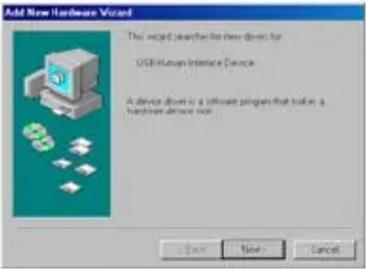 | Next |
| 5 | 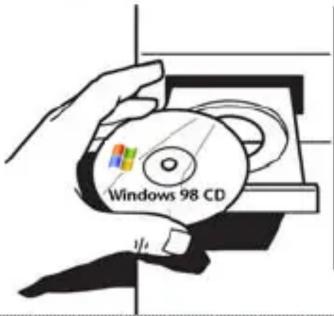 | Place Windows 98(SE) CD in CD-ROM |
| 6 |  | Finish |
7
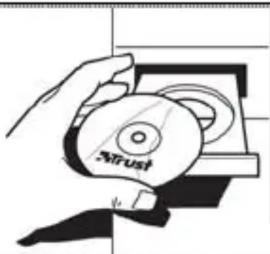
natural_image
Hand holding a CD with 'Strust' branding, no visible text or symbols on the object itselfPlace Trust Installation CD in CD-ROM player
UK
8
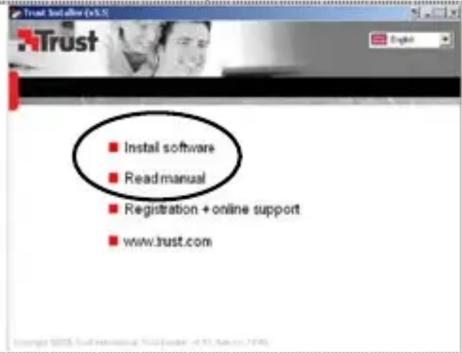
Install Trust Easy Mouse Configuration software and read the software manual.
Reminders
Installation

Windows XP SP2, X64 and higher: For correct software installation, make sure DEP (Data Execution Prevention) is set to: "Turn on DEP for Essential Windows programs and services only". (This is the default Windows setting.)
Usage tips

Adjust the speed of mouse pointer: (1) Open Windows Help (Start → Help). (2) Search “adjust the speed of mouse pointer”. (3) Follow instructions

Do not use mouse on highly reflective or transparent surfaces like glas

Use soft brush to clean the sensor when it's dusty.
If you have any problems, go to www.trust.com/14184 for FAQ, drivers and manuals.
Safety
- Do not open or repair this device.
- Keep this device away from liquids, such as water.
CE
- This device meets the essential requirements and other relevant conditions of the applicable European directives. The Declaration of Conformity (DoC) is available at www.trust.com/14184/ce
Warranty & copyright
- This product has a two-year manufacturer's warranty which is effective from the date of purchase. For more information see www.trust.com/warranty
- Reproduction of this manual or any part of it is prohibited without permission from Trust International B.V.


Marke : TRUST
Modell : MI-2550Xp
Kategorie : Computermaus