
BT-210 - Kopfhörer MONOPRICE - Kostenlose Bedienungsanleitung
Finden Sie kostenlos die Bedienungsanleitung des Geräts BT-210 MONOPRICE als PDF.


Benutzerfragen zu BT-210 MONOPRICE
0 Frage zu diesem Gerät. Beantworten Sie die, die Sie kennen, oder stellen Sie Ihre eigene.
Eine neue Frage zu diesem Gerät stellen
Laden Sie die Anleitung für Ihr Kopfhörer kostenlos im PDF-Format! Finden Sie Ihr Handbuch BT-210 - MONOPRICE und nehmen Sie Ihr elektronisches Gerät wieder in die Hand. Auf dieser Seite sind alle Dokumente veröffentlicht, die für die Verwendung Ihres Geräts notwendig sind. BT-210 von der Marke MONOPRICE.
BEDIENUNGSANLEITUNG BT-210 MONOPRICE
Specifications
| BT Distance | 10M |
| Support Format | A2DP ,AVRCP, HFP, HSP |
| Speaker | D=40mm dynamic driver |
| Speaker Sensitivity | 92+/-3dB |
| Mic Sensitivity | -40+/-3dB(@1KHZ) |
| Battery | 3.7V/250mAh Li-battery |
| Playing Time | 8hrs @ 70% volume. |
| Standby Time | 76hrs |
| Accessories | 1pcs audio cable, 1pcs USB cable for charging |
MONOPRICE
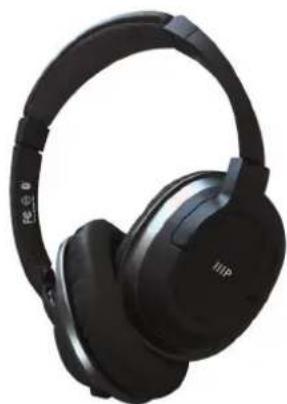
natural_image
Black outdoor headphones with earbuds and black plastic headband (no visible text or symbols)www.monoprice.com
BT-210 On Ear Lightweight BLUETOOTH™ WIRELESS HEADPHONES
Need Help? We're here for you!
Contact us: www.monoprice.com/contactus
Product pictures are for reference only.
Specifications described herein are subject to change without prior notification.
All trademarks are the sole property of their respective companies.
Copyright © 2018 Monoprice, Inc. All rights reserved.
P/N 34705
User's Manual
Features and Functions
- On/Off, Play, Pause, Answer/Hang up phone calls
- Long press is volume up, short press is next track
- Long press is volume down, short press is previous track
- LED status
- 3.5mm Audio Input
- Micro USB jack for charging
- Internal Microphone
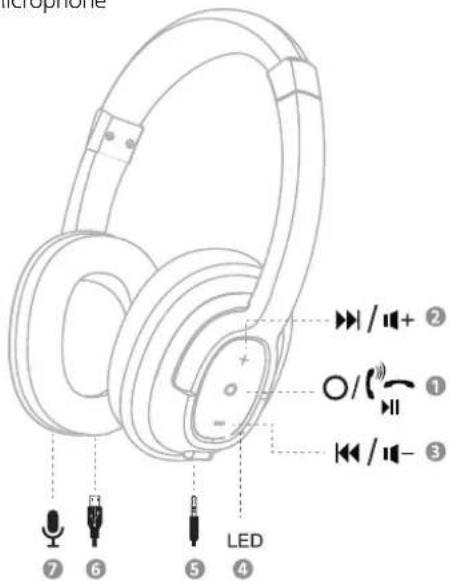
text_image
microphone 7 6 5 LED 4 + / / + 2 O / (") - 1 + / / - 3Charging
Connect the USB cable to micro USB jack
Powering
Power On: Press and hold On/Off button for 1 second, the blue LED light will be on.
Power Off: Press and hold On/Off button for 2 seconds until the LED light off.
Pairing
Make sure there is power remaining in the headphone.
- Press and hold power button for 1 second, the blue and red LEDs will flash alternately, this indicates that the headphone has entered pairing mode
- Select Bluetooth Pairing "MP34705" from your Bluetooth device list, once paired, the LED status will show blue and flash every five seconds.
Playing Music
When your headphones are paired and connected with a phone, you can play music, answer and hang-up calls by pressing and releasing relevant function buttons.
If you are in an area that does not allow Bluetooth, or if you simply wish to conserve battery power, connect the 3.5mm stereo cable. This requires no battery power, but will deactivate the premium features of the headphone.