
LP-TW4001 - Projektor HITACHI - Kostenlose Bedienungsanleitung
Finden Sie kostenlos die Bedienungsanleitung des Geräts LP-TW4001 HITACHI als PDF.


| Produkttyp | Ultra-Kurzdistanz-Laserprojektor |
| Modell | LP-TW4001 |
| Marke | Hitachi |
| Abmessungen (B x T x H) | 424 mm x 860 mm x 193 mm |
| Gewicht | 3,2 kg |
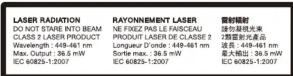
| Lichtquelle | Laser (Laserklasse 1) |
| Helligkeit | 4.200 Lumen |
| Lebensdauer Lichtquelle | bis zu 20.000 Stunden (Standard), bis zu 40.000 Stunden (LONG LIFE 2) |
| Projektionstechnologie | 3LCD |
| Projektionsverhältnis | Ultra-Kurzdistanz: 2,0 m (80 Zoll) ab 55 cm |
| Interaktive Funktion | Integrierte Zeichenfunktion, optionaler Finger-Touch, bis zu 6 interaktive Stifte |
| Eingebauter Lautsprecher | 16 W |
| Stromverbrauch | ca. 300 W (typisch) |
| Standby-Stromverbrauch | < 0,5 W (Energiesparmodus) |
| Betriebstemperatur | 0 °C bis 40 °C |
| Lagerfeuchtigkeit | 20 % - 80 % (nicht kondensierend) |
| Anschlüsse | HDMI, VGA, USB, LAN (RJ-45), Audio Ein-/Ausgang |
| Netzwerkfunktionen | Drahtloses Dualband-WLAN (optional), Crestron Connected, Planungsfunktion |
| Reinigung und Wartung | Staubresistente Optik, regelmäßige Reinigung der Lüftungsschlitze empfohlen |
| Besondere Merkmale | Schnellstart, DICOM-Simulationsmodus, PC-loses Zeichnen, Speicherfunktion für gezeichnete Bilder |
Häufig gestellte Fragen - LP-TW4001 HITACHI
Benutzerfragen zu LP-TW4001 HITACHI
0 Frage zu diesem Gerät. Beantworten Sie die, die Sie kennen, oder stellen Sie Ihre eigene.
Eine neue Frage zu diesem Gerät stellen
Laden Sie die Anleitung für Ihr Projektor kostenlos im PDF-Format! Finden Sie Ihr Handbuch LP-TW4001 - HITACHI und nehmen Sie Ihr elektronisches Gerät wieder in die Hand. Auf dieser Seite sind alle Dokumente veröffentlicht, die für die Verwendung Ihres Geräts notwendig sind. LP-TW4001 von der Marke HITACHI.
BEDIENUNGSANLEITUNG LP-TW4001 HITACHI
Specifications
| Model name | LP-TW4001 | LP-TW3001 | |
| Display system | 3LCD | ||
| Display device | Size of effective display area | 0.59', aspect ratio 16: -10 | |
| Number of pixels | 1,024,000 pixels(1,280 horizontal + 800 vertical) | ||
| Lens | Zoom | Digital zoom (1.35×) | |
| Focus | Powered | ||
| Light source | Laser diode | ||
| Screen size | 60 ~ 100 inch (80 ~ 130 inch when no interactive function is used) | ||
| Light output (Brightness) | 4,200 lm | *1, 3,300 lm | |
| Contrast ratio (full white / full black) | 500.000: 1 | *1 | |
| Speaker | 16 W × 1 mono | ||
| Displayable scanning frequency | Horizontal Vertical | 15 ~ 106 Hz | |
| 50 ~ 120 Hz | |||
| Display resolution | Computer Video | VGA, SVGA, XGIA, WXGA, SXGA, WXGA+, WXGA++, WXGA+ , UXGA Full HD, Mac 16"NTSC, NTSCA,43 PAL, SECAM, PAL-M, PAL-N, PAL80 hit, 480@60, 480@60, 576@50, 576@60, 720@60/500, 108@60@500, 108@60@500 | |
| Terminals | HDMI IN | HDMI connector = 2 (HDMI IN 1 supports MHL input) | |
| COMPUTER IN 1 | Mini D-sub 15-pin connector = 1 | ||
| COMPUTER IN 2' | Mini D-sub 15-pin connector = 1 | ||
| MONITOR OUT | RCA connector = 1 | ||
| VIDEO IN | 3.5 mm stereo mini connector = 2. RCA connector L/R = 1 | ||
| AUDIO OUT | 3.5 mm stereo mini connector = 1 | ||
| CONTROL IN IRS-232Q | D-sub 9-pin connector = 1 | ||
| LAN | RL=45 connector = 1 | ||
| USB-A | USB type A = 2 (PCI-C LESS PSENTATION or optional wireless adapter) | ||
| USB-B | USB type B = 1. USB Display and USB mouse control | ||
| Operating temperature | 0 ~ 40 °C2 (The brightness of light source may be reduced automatically over 35 °C) | ||
| Power requirements | AC 100 ~ 120 V (50/60 Hz), 3.9 A | AC 100 ~ 120 V (50/60 Hz), 3.0 A | |
| AC 220 ~ 240 V (50/60 Hz), 2.0 A | AC 220 ~ 240 V (50/60 Hz), 1.6 A | ||
| Power consumption | AC 100 ~ 120 V : 380 W | AC 100 ~ 120 V : 300 W | |
| AC 220 ~ 240 V : 380 W | AC 220 ~ 240 V : 300 W | ||
| Standby mode power consumption | Less than 0.5 W2 | ||
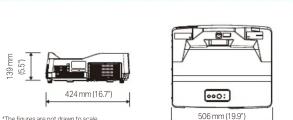
| Standard outside dimensions (W × H × D) | 512 mm × 155 mm × 424 mm (20.1" × 6.1" × 16.7") (Including protrusions) | ||
| 506 mm × 139 mm × 424 mm (19.9" × 5.5" × 16.7") (Including protrusions) | |||
| Weight | Approx. 7.6kg (17.2 lbs) | Approx. 7.6kg (16.8 lbs) | |
| Accessories | Remote control with batteries, Power cord, Computer cable, Adapter cover, User's manual, Security label, USB cable, Interactive pen/2, AAA battery(v4), Pen tps(4), Application DVD, Hook metal, Screw, Cable tie, HDMI cable holder, Ferrite core | ||
| Optional parts | Filter set | UX43251 | |
| Mounting accessories | HAS-WM06 (Wall mount, supported image size : 70–110 inch) HAS-9110 Bracket (for fixing mount) HAS-304HI (Long adapter for fixing mount) | ||
| USB wireless adapter | USB-ML-50542 | ||
| Interactive pen | I-PEN4 | ||
| Finger touch unit | FT-018 | ||
Network Wired: 10UBASE-1X1 TUBASE-1, Wireless (option): IEEE 6U2.11dB/g/n/ac *1: When PICTURE MODE is set to DYNAMIC, and LIGHT OUTPUT is set to NORMAL 100%. *2: 0 - 40 °C at altitude from 0m to 1,600 m. 0 - 35°C at altitude from 1,600 m to 3,048 m. *3: SAVING mode disables the functions of MONITOR OUT, AUDIO OUT, speaker sound, network communication, RS-232C control except POWER ON command, etc. in standby. *4: The availability of the USB-VL-5G varies depending on the country and the region.
— Design and specifications are subject to change without notice.
- The projected images and comparison photos in this catalog are simulations. LCD panels, polarizers and other optical components and cooling fans may need replacement after prolonged usage. For more details, please visit a Hitachi sales representative. *Do not use in places where there is a lot of water, dampness, stems, or soil or tobacco costs. It may result in the use of the 100% light source for the next three types of electronic devices. **If the light source is limited to these items, they must be repaired or replaced if they use for a long period of time.* During use and immediately after use, do not touch anywhere near the vents as these parts are extremely hot. *Opital components other than the light source: If the projector is used for six hours or more per day, they may need to be replaced in less than a year. * LCD panel: If the projector is used continuously for six hours or more per day, they may need to be replaced in less than a year. * On the right side, it is also a part of the electronic devices. * In the United States and other countries. * DICOM is the registered trademark of the National Electrical Manufacturers Association for its standards publications relating to digital communications of medical information. * MHL: the MHL logo, and Mobile High-Definition Link are trademarks or registered trademarks of MHL, LLC in the United States and other countries. * In addition, it is also a part of the electronic devices that are trademarks or registered trademarks of MHL, LLC in the United States and other countries. * In addition, it is also a part of the electronic devices that are trademarks or registered trademarks of MHL, LLC in the United States and other countries. * In addition, it is also a part of the electronic devices that are trademarks or registered trademarks of MHL, LLC in the United States and other countries.
HITACHI
Hitachi America, Ltd., Digital Media Division
Hitachi Home Electronics Asia (S) Pte. Ltd.
Hitachi Sales (Malaysia) Sdn. Bhd
Hitachi Sales (Thailand), Ltd
Hitachi (Hong Kong), Ltd. Hitachi Sales Group of Taiwan
Hitachi Sales Corp. of Taiw Hitachi Australia Pty Ltd
Hitachi Australia Pty Ltd. Hitachi Europe Ltd. Digital Media
Hitachi Europe Ltd, Signal Media Hitachi Consumer Marketing, Inc.
Development and Manufacture : Maxell, Ltd.
October 2018
Dimensions
Projection Distance
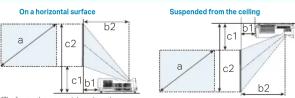
(1,280 × 800) (± 8%)
| Screen sizes (bponal) | Projection distance | Screen height | |||||||
| b1 | b2 | c1 | c2 | ||||||
| type(n/col) | m | m | inch | m | inch | m | inch | m | inch |
| 60 | 1.5 | 0.079 | 3.1 | 0.413 | 16.3 | 0.237 | 9.3 | 1.044 | 41.1 |
| 70 | 1.8 | 0.149 | 5.9 | 0.483 | 19.0 | 0.261 | 10.3 | 1.203 | 47.4 |
| 80 | 2.0 | 0.219 | 8.6 | 0.553 | 21.8 | 0.285 | 11.2 | 1.362 | 53.6 |
| 90 | 2.3 | 0.289 | 11.4 | 0.623 | 24.5 | 0.309 | 12.2 | 1.521 | 59.9 |
| 100 | 2.5 | 0.359 | 14.1 | 0.693 | 27.3 | 0.334 | 13.1 | 1.680 | 66.1 |
| 110 | 2.8 | 0.428 | 16.9 | 0.763 | 30.0 | 0.358 | 14.1 | 1.839 | 72.4 |
| 120 | 3.0 | 0.498 | 19.6 | 0.833 | 32.8 | 0.382 | 15.0 | 1.997 | 78.6 |
| 130 | 3.3 | 0.568 | 22.4 | 0.903 | 35.5 | 0.406 | 16.0 | 2.156 | 84.9 |
Terminals
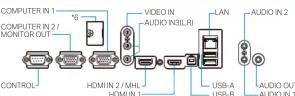
*6 Terminal for the optional finger touch unit (inside the cover)
Environment


2420 Fenton Street, Suite 200 Chula Vista, CA 91914, U.S.A. and Canada Tel: +1-800-448-2244 www.hitachi-america.us/digitalmedia
438A Alexandra Road #01-01/02/03, Alexandra Technopark, 119967, Singapore Tel: +65-6536-2520 www.hitachiconsumer.com.sg
Lot 12, Jalan Kemajuan, Bangi Industrial Estate, 43650 Bandar Baru Bangi, Selangor Darul Ehsan, Malaysia Tel: +60-3-8911-2670 www.hitachiconsumer.com.my
333, 333/1-B Moo 13, Bangna-Trad Road km 7, Bangkaew, Bangplee, Samutprakam 10b40, Thailand Tel: +66-2335-b455 www.hitachi-th.com 18th Floor, EverGain Centre, 28 On Muk Street, Shatin, N.T., Hong Kong Tel: +852-2113-8883 www.hitachi-hk.com.hk
10th Floor, Everi Glam Centre, 20-Off Mark Street, Shabri, N.Y., Hong Kong Tel: 1052-2115 0005 WWW.huaShi HK/comm.2nd Floor, No.65, Nanking East Road, Section 3, Taipei 104, Taiwan Tel: +886-2-2516-0500 www.brct.com.tw
Suite 801, Level 8, 123 Epping Road, North Ryde NSW 2113, Australia Tel: +61-2-9888-4100 www.hitachi.com.
umer Affairs Department Whitebrook Park, Lower Cookham Road, Maidenhead, Berkshire, 5L6 8YA, UK Tel: +44-844-481-0297 www.hitachidigitsmedia.com
http://www.hitachi.co.jp/proj/
NM-E515 102018
Ultra Short Throw Laser Projector
HITACHI Inspire the Next
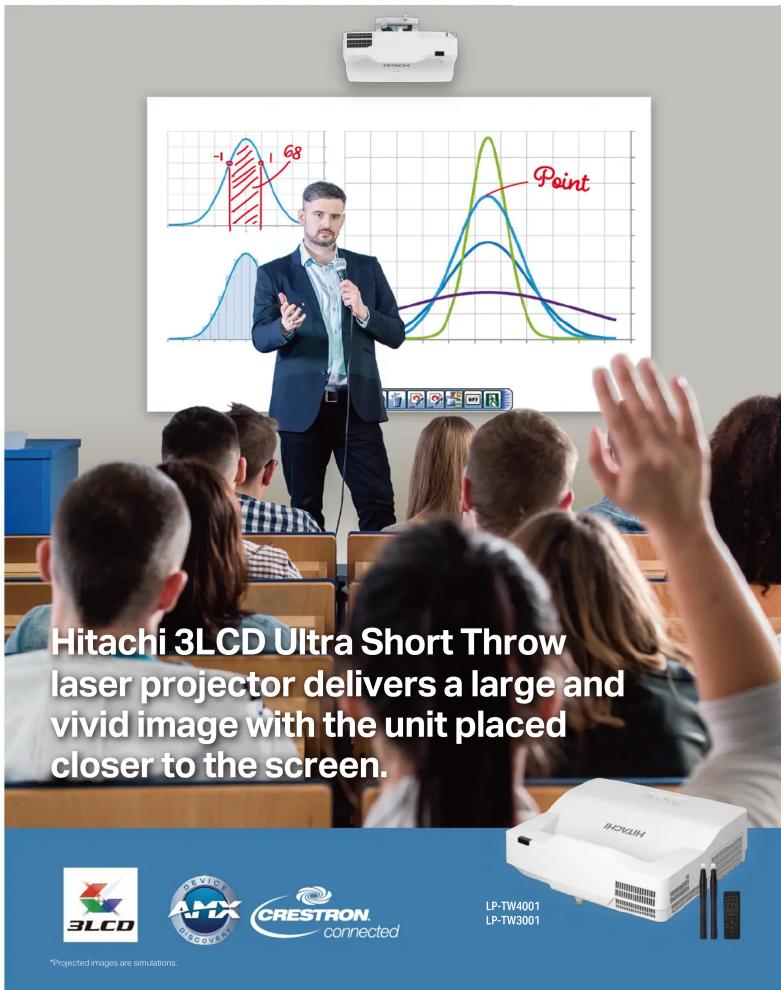
An interactive function with enhanced operability and functionality
*Projected images are simulations.
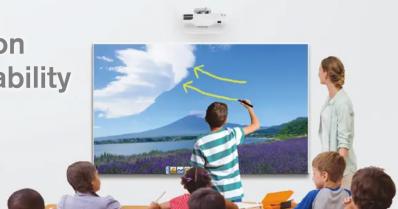
Advanced Writing/Drawing Capabilities
PC less Drawing
T Series projector comes with a built-in drawing function allowing you to directly draw and write on the projected screen without a PC.
Convenient Painter Tool
Equipped with the Pen, Eraser, Undo, Redo functions. You can also change the pen color and thickness. With the easy-to-use Painter tool bar, you can teach classes smoothly.

Save and Open Drawn Screens
You can save the image drawn on the projector screen. This enables you to easily manage what you've taught in the past.
Multiple Interactive Pens Finger Touch (Option)
With up to 6 interactive pens pupils can do more than just watch - they can interact with the onscreen content. Let them enjoy providing answers, showing their understanding and becoming involved in lessons as never before.
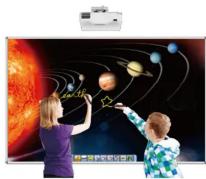
The T Series projector incorporates the optional finger touch unit that enables the projector to detect finger touch activity on the screen area. It allows users to annotate and interact with the material presented. Instead of simply showing static images, students and teachers can interact with on screen material for hands-on interactivity that brings learning to life.
* When using the finger touch unit at bright environment, auto calibration may not be used.
* Please use the finger touch unit on a flat screen. * The finger touch unit may not be used in locations where there is sunlight or light from an incandescent light source.
Interactive Software
This product includes a drawing application that offers more sophisticated drawing functions.
Neatly Convert Letters or Figures
You can automatically convert freehand shapes into geometric objects and handwriting into text on the projected image. These operations are easily
accomplished with the interactive pen.

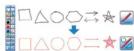
Select a Variety of Useful Tools
The interactive pen lets you operate a compass, ruler, protractor, stopwatch and other useful tools on the projected image, making lessons even easier to understand.


System requirements for drawing application ■ Windows®
• CPU: Intel Core™ Duo (1.8GHz or faster) ; HDD: 2 GB free space; Memory: 2 GB or more ; Display: 32 bit OS; Windows® 7 (32/64bit), Windows® 8 (32/64bit), Windows® 10 (32/64bit) (The drawing application has been verified with the latest service pack at the time of release. The drawing application does not support Windows® Tablet PC Edition and Server Edition . Network: Internet-connected environment - Application: Internet Explorer® 11, Microsoft® Word 2013/2016, Microsoft® Exce® 2013/2016, Microsoft® PowerPoint® 2013/2016, Adobe Reader® XXI, Adobe® Acrobat® Reader® DC, Adobe Flash® Player 18 - Others: DVD-ROM, Video lines, cards displaying superhero overlay feature (for using the movie features) [When using the Webcom function] (V) Digital video devices (DV, camera, D-VHS etc.) Captuating shares which support Director/SPM/SPM drivers [For hosting a remote conference] - CPUs: Core™ 3" or greater - HDD: 2 GB or more; Open: 500x500x500x500x500x500x500x500x500x500x500x500x500x500x500x500x500x500x500x500x500x500x500x500x500x500
Macintosh
- CPU: Intel® Core™ Duo (1.8GHz or faster) • HDD: 2 GB free space • Memory: 2 GB or more - Display: High Color (16 bit) or more • OS: Mac OS X 10.10/10.11/10.12/10.13 • Network: Internet-connected environment • Application: Apple QuickTime 7.6 or later, Adobe® Flash® Player 18 • Others: DVD-ROM drive [For hosting a remote conference] • CPU: Intel® Core™ i3 or greater • HDD: 2 GB or more free space • Memory: 2 GB or more • Others: TCP/IP Network of 54 Mbps or greater
LINE UP
T series Ultra Short Throw
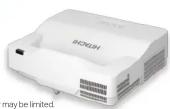
LP-TW4001
4,200 lmV


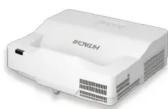
LP-TW3001
3,300 lmV


High Reliability and Stability
Long Life 20,000 hour Laser Light Source
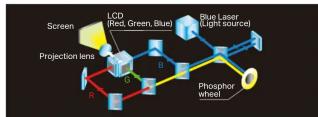
Hitachi's laser light source projectors have 20,000 hours ^1 of light source life. Use for 40,000 hours ^4-1 can be achieved in LONG LIFE 2 mode. Also, users may select their desired operation mode. Furthermore, in addition to the light source, the phosphor wheel is also dust resistant, suppressing brightness level reduction by preventing dust from coming into contact with the optical parts. Users can enjoy using the projector for long periods of time while maintaining its brightness.
^1 For laser light source. The value is an estimate and may vary depending on the use environment or use condition.
| LIGHT OUTPUT | Brightness ^2 | Light source life ^3 | Noise ^4 | |
| LP-TW4001 | LP-TW3001 | |||
| NORMAL | 4,200 lm | 3,300 lm | 20,000 hours | 34 dB |
| LONG LIFE 1 | 3,150 lm | 2,470 lm | 30,000 hours | |
| LONG LIFE 2 | 2,100 lm | 1,650 lm | 40,000 hours | |
| WHISPER | 2,100 lm | 1,650 lm | 20,000 hours | 28 dB |
Brightness Deterioration Comparison between Light Output Modes
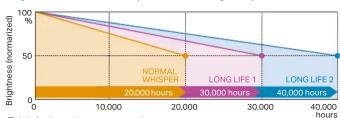
estimate and may vary depending on the use environment or use condition, by the projector model, installation environment, and use condition.
Installability
Reduced Glare and Shadows
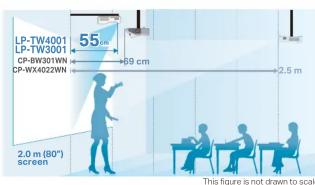
These projectors feature Ultra Short Throw, for projecting a 2.0 m (80 inch) image from only 55 cm (21.8 inches) onto a wall or screen. The Ultra Short Throw greatly reduces glare from the projector's light source, making it easier for a teacher or presenter to see the audience. The audience also has a clearer view because the shadows of the teacher's or presenter's hands and body are minimized. The result is a better classroom or meeting room experience for everyone.
Convenient Functions
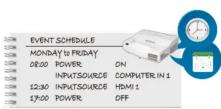
Easy Schedule Setting
You can schedule routine and special projector events, including power on, power off, input selection and other settings.
* This function requires a coin battery for the internal clock or connecting to an SNTP server on network. * When STANDBY MODE is set to NETWORK (WOL) or SAVING, this function (ex. POWER ON) at standby mode will not be operated.
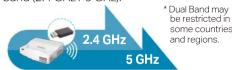
Wireless Dual Band Support (Option)
Provides a stable wireless network environment by supporting wireless dual band (2.4 GHz / 5 GHz).
Other Functions
- Quick Start - DICOM® Simulation Mode*5 - 16W Internal Speaker - MHL connectivity - Smart Device Control & Monitoring - Moderator Control Mode - PIN lock - Key lock
*5 This projector is not a medical device and is not compliant to the DICOM standard, and neither the projector nor this function should be used for medical diagnosis.


- — Design and specifications are subject to change without notice.
- HITACHI
- Dimensions
- Terminals
- Environment
- Ultra Short Throw Laser Projector
- HITACHI Inspire the Next
- An interactive function with enhanced operability and functionality
- Advanced Writing/Drawing Capabilities
- PC less Drawing
- Convenient Painter Tool
- Save and Open Drawn Screens
- Multiple Interactive Pens Finger Touch (Option)
- Interactive Software
- Neatly Convert Letters or Figures
- Select a Variety of Useful Tools
- System requirements for drawing application ■ Windows®
- Macintosh
- High Reliability and Stability
- Long Life 20,000 hour Laser Light Source
- Installability
- Reduced Glare and Shadows
- Convenient Functions
- Easy Schedule Setting
- Wireless Dual Band Support (Option)
- Other Functions
Marke : HITACHI
Modell : LP-TW4001
Kategorie : Projektor