X103 - Smartphone Micromax - Kostenlose Bedienungsanleitung
Finden Sie kostenlos die Bedienungsanleitung des Geräts X103 Micromax als PDF.


Benutzerfragen zu X103 Micromax
0 Frage zu diesem Gerät. Beantworten Sie die, die Sie kennen, oder stellen Sie Ihre eigene.
Eine neue Frage zu diesem Gerät stellen
Laden Sie die Anleitung für Ihr Smartphone kostenlos im PDF-Format! Finden Sie Ihr Handbuch X103 - Micromax und nehmen Sie Ihr elektronisches Gerät wieder in die Hand. Auf dieser Seite sind alle Dokumente veröffentlicht, die für die Verwendung Ihres Geräts notwendig sind. X103 von der Marke Micromax.
BEDIENUNGSANLEITUNG X103 Micromax
Welcome
Thank you for purchasing the Micromax X103 handset. The Micromax X103 handset provides you with the following grid array of exciting features:
Dual|SI M
Camera
Vi de oReco rder
FMRad io
MusicPlayer
LE DFlashlight
Data Security
Memorycard support
Please read this manual carefully to make the full use of its features.
Contents
1 Phone layout......3
2 Insert SIM and Memory Card....4
3 Icons and Indicators.....6
4 Switch Phone ON/OFF.8
5 Make a call....9
6 Answer a Call ......9
7 Hold a Call Conference10
8 Swap a Call ......10
9 Record a Call......10
10 Make an International Call ....11
11 Send and View
Messages ......11
12 Use the LED Flashlight11
13 Listen to Music ...... 12
14 Listen to FM Radio.....12
15 Record Videos......13
16 Take Photos....13
17 Video Player ....13
18 Connect to Bluetooth Devices ....14
19 Secure your Phone .....14
20 Privacy for messages,
phonebook, call logs...14
21 Fixed dialing No. .....15
22 Choose Phone Language....15
23 Choose Bangla Input Method ....15
Health & Safety
Information......16
Taking Care of Your Device
19
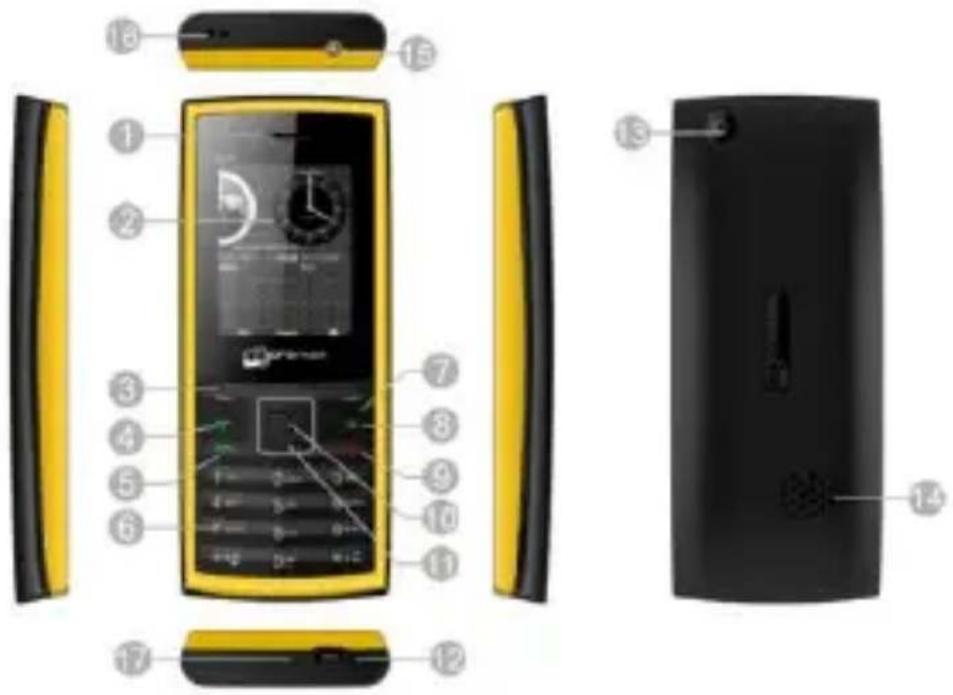
1 Phone layout
text_image
Exploded view diagram of a yellow and black mobile phone with numbered parts for identification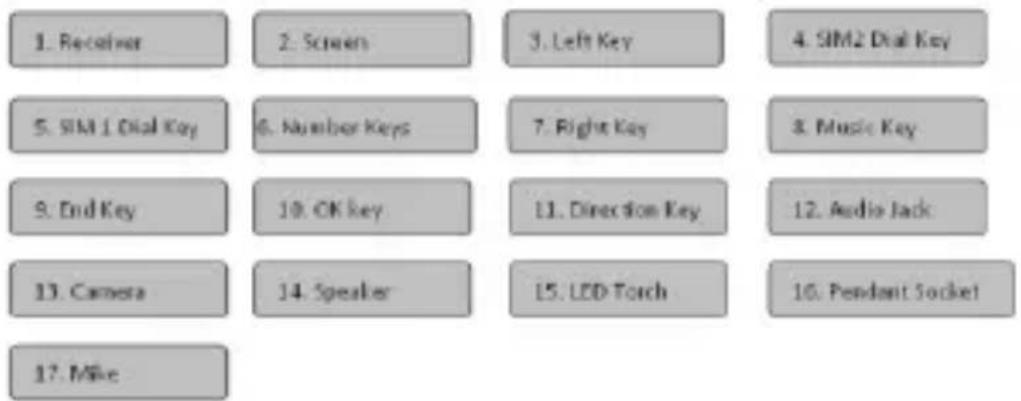
text_image
1. Receiver 2. Screen 3. Left Key 4. SIM2 Dial Key 5. SIM1 Dial Key 6. Number Keys 7. Right Key 8. Music Key 9. End Key 10. OK Key 11. Direction Key 12. Audio Jack 13. Camera 14. Speaker 15. LED Torch 16. Pendant Socket 17. Mike2 Insert SIM and Memory Card
You can use your phone with one or two SIM cards inserted.
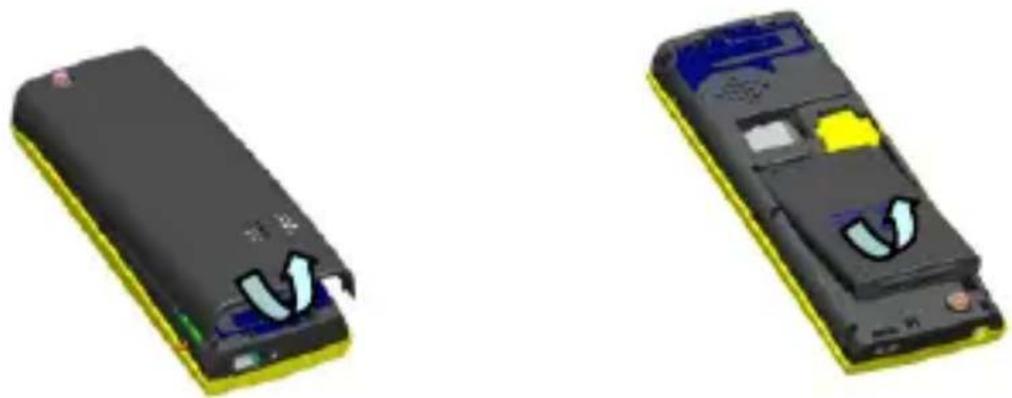
1 Press the left and right side keys simultaneously too open the cover and remove the battery a shown below.
natural_image
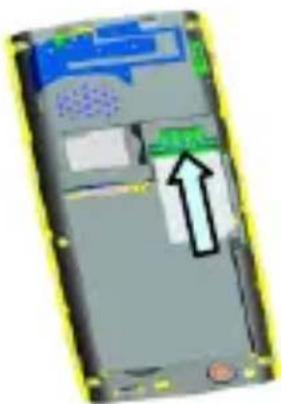
Two 3D-rendered electronic devices with visible internal components and wiring (no text or symbols)② Insert the SIM card correctly in the card slot(s))asshown below.
Model X103 Page 4
natural_image
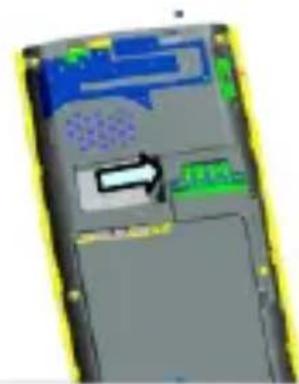
3D model of a smartphone showing internal components and a directional arrow (no text or symbols)③ Open the memory card slot, and insert the memory card into the slot with the gold colored contacts facing down.
natural_image
3D model of a mobile phone showing internal components and a directional arrow (no text or symbols)
Use only compatible memory cards approved by Micromax. In compatible cards may damage the slot or corrupt the data stored in the card.

Please charge the battery before you use the newly purchased phone. We suggest you to charge the battery for at least 4 hours continuously for the first time.
3 Icons and Indicators
Your phone displays the following status indicators on top of the screen.
| Indicators | Description |
| Battery charging in progress | |
| Signal strength of SIM1 & SIM 2. | |
| Signal not received |
Model X103 Page 6
| GPRS is in use | |
| Battery status | |
| Call in progress | |
| Unread messages | |
| Message full | |
| SIM 1 message full | |
| SIM 2 message full | |
| A new MMS has not read | |
| Download MMS | |
| Alarm activated | |
| General mode | |
| Silent mode | |
| Meeting mode | |
| Indoor mode | |
| Outdoor | |
| Airplane mode is ON | |
| Earphone |
4 Switch Phone ON/OFF

* To switch ON your phone, press and hold the End key for a few seconds.
* To turn OFF your phone, press and hold down the End key for a few seconds.
If the phone lock has been activated in the phone's security settings, you need to enter the 4-digit password to unlock the phone. (The preset unlock code is 0000.)

Warning: if you enter a wrong PIN code three times in a row, the SIM card will be locked and you need to enter the P UK code to unlock it. In this case, you need to contact your network provider for the PIN and P UK code.
5 Make a call

You can make a call in the following ways:
■ Enter the desired number in stand by mode and press the Call key.
- Go to Men u> Phonebook and then select and dial the desired number.
- Just press the Call1 or Call2 key in stand by mode to dial the contacts listed in Calllog s.
- You can also dial a contact from the messages.
6 Answer a Ca ll
PresstheAnswerkeytoanswer a call.
Model X103 Page 9
7 Hold a Call Conference
While on a call, go to phonebook and dial a contact. Once the new call gets connected, the first call will be put on hold.
② After this press menu and then choose Set up Call Conference.
8 Swap a Call
While on a call, goto phonebook and dial a contact. Once connected, the first call will be put on hold.
② After this, pres sMenu and then choose Swap. The eactive call and the call on hold will be swapped
9 Record aC all
While on a call, press the Menu and then select Start Recording to record a call.
10 Make an International Call
① Pressthe* key more than once til "+" appears on the screen.
② Enter the country code, a reacode and phonenumber, and press the dial key.
For example, to date a number in France, press and hold the 0 key (until the “+” sign appears), input 33 (French code) and then enter the complete phone number.
11 Send and View Messages

Menu > Messages
You can read messages and compose/send messages. You can forward, delete, backup or delete selected messages and so on You can read messages in the Draft, outbox,sent, messages folder and so on.
12 Use the LED Flash light
Menu > Applications > Flashlight

In stand by screen, bngpress0 key to turn on/off the flash light.
Model X103 Page 11
13 Listen to Music


Menu > Multimedia > Music
The Micromax X103 comes with an inbuilt music player that plays all your favorite music stored in your memory card. It gives you a host of settings to make your listening experience interesting
Short cut keys:
■ Pres OK key to play/pause the song
■ Press Left/Right key to changesongs
■ Pres the *an d# keys to adjust volume
14 Listen to FM Radio
Menu > Multimedia > FM Radio
■ Plug the headset into the phone.
■ Pres the * and d# keys to adjust volume.
Model X103 Page 12
- Press the number keys on your keypad to switch between channels.
- Press the OK keyto start or stop the radio
15 Record Videos
Menu > Multimed a > Vide o rec or der
Shortoutkeys:
■ OK key or Camera key to ta lev ide os
■ Press Left key for setting preferences.
16 Take Photos

Menu > Camera
■ Press the OK key or Camera key to take photos.
■ Press Left key for setting preferences
17 Video Player
Menu > Multimedia > Video Player
Let you play videos stored in your memory card
Model X103 Page 13
Press 0 key while playing a video to display it in full screen mode.
18 Connect to Blue to oth Devices
Menu > Connectivity Bluetooth

Your phone enables you to connect the phone wirelessly to other Bluetooth devices and exchange data with them, or talk hands-free.
19 Secure your Phone
Menu > Settings > Security settings > Phone Look
Let you lock your phone via a security password which you can change anytime.
The default security code to unlock the phone is 0000.
Note: After you activate the phone lock, you would be asked for a password when you power on your phone next time.
20 Privacy for messages, phonebook, call logs...
Menu > Settings > Security settings > Privacy Protection
a. Enter the default password 000 0t to set the privacy lock
Model X103 Page 14
c. Select and enable the desired objects to protect and save the choice.
Each time you access the protected feature such as messages, you will be asked for the password.
Note: You can also change the default password to a password of your choice. The new password will be required to access the protected objects (messages/phone book/call logs).
21 Fixed daling No.
Menu > Setting > Security settings > FixedialNo.
Outgoing calls from your phone can be restricted by making a fixed calling list that allows only numbers on that list to be dialed from the phone.
22 Choose ePhone Language
Menu >Setting s> Phone Setting s> Select Language
You can choose to interact with the phone using the available languages listed under the Select Language option.
23 Choose Bang la Input Method
Menu >Settings> Phone Settings> Input Method Settings
Model X103 Page 15
You can also choose Bangla input for your text input such as SMS, or other text entry from here.
Alternatively you can short press #key 5 times in a row to enable Bangla input method.
■ You can then use the keypad to enter Banglachar acters.
■ Use* for special symbols and Bangajoiner
■ Long pres # to come out of Bangl a nput method.

He alt h & Safety Information
Please read the following guidelines regarding the use of your phone. Not following them may be dangerous or illegal.

SAR Compliance
- Your phone is designed not to exceed the limits of emission of radio waves recommended by international guidelines.
■ SAR (specific absorption rate) is the measurement of body-absorbed RF quantity when the phone is in use. SAR value is ascertained according to the highest RF level generated during laboratory tests.
■ The SAR value of the phone may depend on factors such as
proximity to the network tower, use of accessories or other accessories.
■ The highest tSAR value of the device at the head and body are 0.534 W/kg and 0.687 W/kg respectively averaged over 1 gm of human tissue.

SAR Recommendations
■ Use a wireless handsfree system (headphone, headset) with a low power Bluetooth emitter.
■ Make sure the cell phone has a low SAR.
■ Please keep your calls short and use SMS whenever more convenient. This advice applies especially to children, adolescents and pregnant women
■ Prefer to use your cell phone when the signal quality is good.
■ People having active medical implants should preferably keep the cell phone at least 15 cm away from the implant
- Maintain a preferable distance of 15 mm from the device.

Safe Driving
- Do not use the phone while driving. When you have to use the phone, please use the personal hands-free kt.
- Please do not put the phone onto any passenger seat or any place from which it may fall down in case of vehicular collision or emergency braking

During Flight
Flight is influenced by interference caused by the phone. It is illegal to use a phone on the airplane. Please turn off your phone or switch to flight mode during a flight

In Hospitals
Your Phone's radio waves may interfere with the functioning medical devices.
- Consult a physician or the manufacturer of the medical device to determine whether they are adequately shielded from external Radio Frequency. Switch off your device when regulations posted instruct
Model X103 Page 18
you to do so.
- Do not carry the wireless device in a breast pocket.
- Turn off the phone if there is any reason to suspect that interference is taking place.
Un safe Areas
Please turn off your phone when you are coseto a gas station or in the vicinity of any place where fuel and chemical preparations, or any other dangerous goods are stored.
Taking Care of Your Device
Your device is a product of superior design and craftsmanship and should be handled with care: The following suggestions will help you protect your phone:
- Keep the device dry. If your device gets wet, remove the battery without turning on the device, wipe it with a dry do th and take it the service center.
-
Do not store the device in high or cold temperature. High temperatures can shorten the life of electronic devices and damage batteries.
-
Do not use or store the device in dusty, dirty areas. Its moving parts and electronic components can be damaged
- Do not attempt to open the device other than as instructed in this guide. Repairing the phone by yourself other than our authorized service agent centers goes against the warranty rules.
- Do not drop, knock, or shake the device. Rough handling can break internal circuit boards and fine mechanics.
- Do not use harsh chemicals, cleaning solvents, or strong detergents to clean the device. Only use a soft, clean, dry cloth to clean the surface of the device.
- Donot store your device near magnetic fields or allow your device to come in contact with magnetic fields for extended period of time.

Battery Recommendations
- Please put the battery in a well-ventilated place out of direct sunlight. Charge the battery at room temperature range.
-
If the time span of the battery after charging becomes much shorter than usual, the battery life is at an end. Replace the battery with a new battery of the same make and specification.
-
Do not discard the battery with household trash. Please dispose of used battery according to your local environmental laws and guidelines.
- Use manufacturer approved batteries, chargers, accessories and supplies. Micromax will not be responsible for user's safety when using unapproved batteries or accessories.
RecycleYourPhone
natural_image
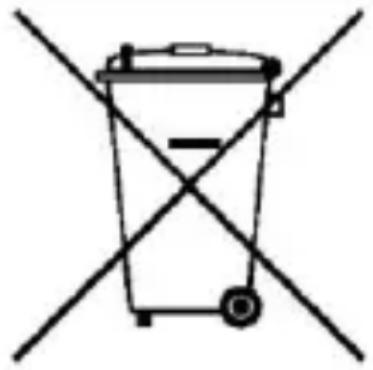
Simple line drawing of a trash bin with two crossed x-axes (no text or symbols)The WEE E logo (shown at the left) appears on the product (batter y, hand set, and charger) to indicate that this product must not be disposed off or dumped with your other household wastes. You are liable to dispose of all your electronic or electrical waste equipment by relocating over to the specified collection point for recycling of such hazardous waste.
Specified collection points for recycling of such hazardous waste. Collection and proper recovery of your electronic waste equipments at the time of disposal will allow us to help preserve the environment. Recycling of the electronic waste equipment will ensure safety of human health and environment.
Disclaimers
- The cd ors and specifications shown/mentioned in the user manual may differ from the actual product Images shown are for representation purpose only. Other product logos and company names mentioned herein may be trademarks or trade names of their respective owners.
■ Micromax keeps the right to make modifications to any of the content in this user guide with out public announcement in advance. The content of this manual may vary from the actual content displayed in the mobile phone. In such a case, the latter shall govern..
Copyrights
- All rights reserved. Reproduction, transfer, distribution or storage of part or all of the contents in this document in any form without the prior written permission of Micromaxis strictly prohibited.