
Q Sport - Smartwatch FOSSIL - Kostenlose Bedienungsanleitung
Finden Sie kostenlos die Bedienungsanleitung des Geräts Q Sport FOSSIL als PDF.


Benutzerfragen zu Q Sport FOSSIL
0 Frage zu diesem Gerät. Beantworten Sie die, die Sie kennen, oder stellen Sie Ihre eigene.
Eine neue Frage zu diesem Gerät stellen
Laden Sie die Anleitung für Ihr Smartwatch kostenlos im PDF-Format! Finden Sie Ihr Handbuch Q Sport - FOSSIL und nehmen Sie Ihr elektronisches Gerät wieder in die Hand. Auf dieser Seite sind alle Dokumente veröffentlicht, die für die Verwendung Ihres Geräts notwendig sind. Q Sport von der Marke FOSSIL.
BEDIENUNGSANLEITUNG Q Sport FOSSIL
Q SMARTWATCH
QUICK-START GUIDE
To get started, put your Fossil Q on the magnetic charger to power it. Download the latest version of the Android Wear™ App onto your smartphone, then open the app, enable Bluetooth and follow the steps on your smartwatch.
NAVIGATION
SWIPE DOWN: Quick Settings
SWIPE LEFT OR RIGHT: Watch Faces
SWIPE UP: Notifications
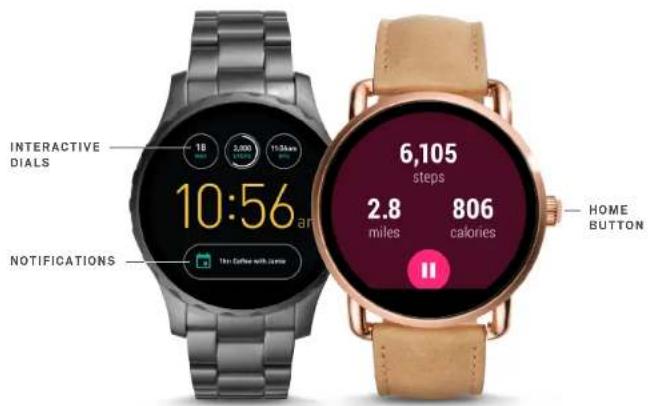
INTERACTIVE DIALS
Tap once on each sub-dial individually to see information at a glance. Double tap the sub-dials to change.
NOTIFICATIONS
Tap on a notification to expand it.
View multiple notifications by swiping up and down.
To dismiss a notification, swipe right.
Tap "Reply" on the notification and respond using your preferred keyboard.
HOME BUTTON
■ Press for features and settings menu.
— Press and hold to access Google Assistant™.
← Use it to go back to main watch dial.
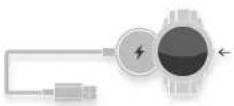
CHARGING
Place smartwatch on the magnetic charger. The battery will last up to 24 hours, based on usage.
ACTIVITY
Press the button, scroll through the app launcher, and tap the Google Fit™ icon.
APPS
Download third-party apps like Uber or Spotify through your watch.
GOOGLE PLAY
The all-in-one app store for your watch—Android users can directly download content without a Wi-Fi connection. IOS users will need to be connected to Wi-Fi.
FOSSIL ^Q
text_image
INTERACTIVE DIALS 18 2,000 11:30 am 10:56 am 10m Cathered with corner 7 6,105 steps 2.8 miles 806 calories NOTIFICATIONS HOME BUTTONCHANGING STRAPS
Flip the watch over and release the pin on the strap. Place the new strap in one link at a time. Lock the pin strap by securing it to the right.
To remove links on a bracelet, please visit your nearest Fossil store.
CUSTOM WATCH FACES
On main dial screen, swipe right or left to browse options and simply tap to update. Once you've chosen a dial, tap and hold to change the color.
Download new watch faces from the Google Play™ store to your smartwatch.
STAYING CONNECTED
Having trouble keeping your smartwatch connected? Here are a few steps you can take:
• Make sure the Android Wear™ App is running in the background.
- Try turning Bluetooth on and off.
- Keep your smartphone and smartwatch updated with the latest firmware. On your watch, go to System, then About and click on System Updates to see if it's the most recent.