
Q Commuter - Smartwatch FOSSIL - Kostenlose Bedienungsanleitung
Finden Sie kostenlos die Bedienungsanleitung des Geräts Q Commuter FOSSIL als PDF.


| Produkttyp | Hybrid-Smartwatch |
| Marke | Fossil |
| Modell | Q Commuter |
| Kompatible Betriebssysteme | iOS und Android (über Fossil Q App) |
| Stromversorgung | Austauschbare Knopfzelle (Typ CR2032) |
| Funktionen | Benachrichtigungen, anpassbare Tasten, Aktivitätsverfolgung (Schritte, Distanz, Kalorien, Schlaf), Zielsetzung |
| Konnektivität | Bluetooth |
| Armband | Austauschbar (Standard-Federsteg) |
| Gehäusematerial | Edelstahl (typisch) |
| Zifferblatt | Analog mit Zeigern |
| Wasserdichtigkeit | Spritzwassergeschützt (nicht zum Schwimmen geeignet) |
| Batterielebensdauer | Ca. 6 Monate (abhängig von der Nutzung) |
| Paketinhalt | Smartwatch, Schnellstartanleitung |
| Wartung | Batteriewechsel und Armbandwechsel möglich; Gehäuse mit weichem Tuch reinigen |
| Entsorgung | Batterie getrennt entsorgen; Elektrogeräte gemäß lokalen Vorschriften |
Häufig gestellte Fragen - Q Commuter FOSSIL
Benutzerfragen zu Q Commuter FOSSIL
0 Frage zu diesem Gerät. Beantworten Sie die, die Sie kennen, oder stellen Sie Ihre eigene.
Eine neue Frage zu diesem Gerät stellen
Laden Sie die Anleitung für Ihr Smartwatch kostenlos im PDF-Format! Finden Sie Ihr Handbuch Q Commuter - FOSSIL und nehmen Sie Ihr elektronisches Gerät wieder in die Hand. Auf dieser Seite sind alle Dokumente veröffentlicht, die für die Verwendung Ihres Geräts notwendig sind. Q Commuter von der Marke FOSSIL.
BEDIENUNGSANLEITUNG Q Commuter FOSSIL
Q HYBRID SMARTWATCH
QUICK-START GUIDE
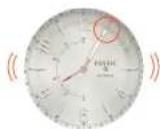
To get started, download the Fossil Q App and follow the prompts on your phone. To set your watch in pairing mode, make sure to hold the middle button on the smartwatch until the device vibrates and the hands move.
NOTIFICATIONS
Scroll through the Settings list to Notifications on the app.
Press Select a Contact and choose a contact in your address book.
Choose the hour on the smartphone to identify with the contact.
When you get a notification from that contact, the smartwatch will vibrate, and its hour and minute hands will point to the hour chosen.
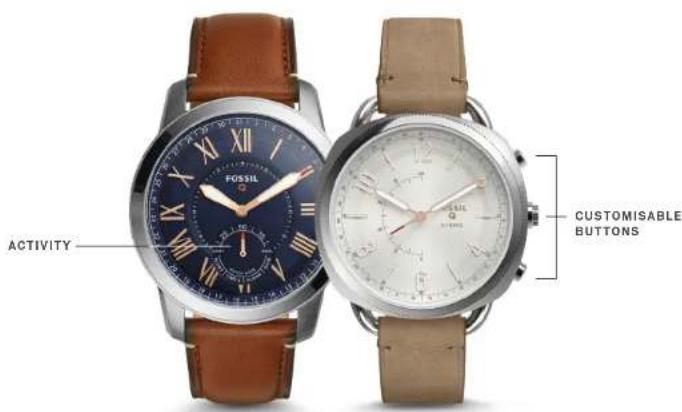
CUSTOMISABLE BUTTONS
Select Customise Device from the app navigation.
Pick a button to edit.
Assign a feature for that button to do.
Press the button on the smartwatch to perform the assigned feature.
CHANGING BATTERY
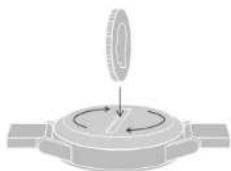
When the battery is low, both hands will point to "6". To replace...
- Turn the watch over, revealing the caseback with two dots lining up.
- Using a coin, turn the caseback anticlockwise.
- Apply light pressure on one side and pry it open on the other.
- Remove the used battery and replace with a new one, minus side down and plus side up.
- Close and tighten the caseback, re-aligning the dots and eliminating the gap around the watch.
Need a new battery? Contact Customer Care at the number below.
FOSSIL ^Q
text_image
FOSSIL ACTIVITY CUSTOMISABLE BUTTONSCHANGING STRAPS
Flip the watch over and release the pin on the strap. Place the new strap in one link at a time. Lock the pin strap by securing it to the right.
To remove links on a bracelet, please visit your nearest Fossil store.
ACTIVITY & GOALS
Track everyday accomplishments: steps, distance, calories burned and sleep duration and quality. Set a goal and press the assigned button to log your progress, whether it's drinking eight glasses of water or exercising once a day.
STAYING CONNECTED
Having trouble keeping your smartwatch connected? Here are a few steps you can take:
- Make sure Bluetooth is on. If it's already on, try turning it off and on again.
- Keep your smartwatch and smartphone updated with the latest firmware.
- Restart the Fossil Q App if it doesn't connect immediately.