S-4020 - Nicht kategorisiert SWIT - Kostenlose Bedienungsanleitung
Finden Sie kostenlos die Bedienungsanleitung des Geräts S-4020 SWIT als PDF.


Benutzerfragen zu S-4020 SWIT
0 Frage zu diesem Gerät. Beantworten Sie die, die Sie kennen, oder stellen Sie Ihre eigene.
Eine neue Frage zu diesem Gerät stellen
Laden Sie die Anleitung für Ihr Nicht kategorisiert kostenlos im PDF-Format! Finden Sie Ihr Handbuch S-4020 - SWIT und nehmen Sie Ihr elektronisches Gerät wieder in die Hand. Auf dieser Seite sind alle Dokumente veröffentlicht, die für die Verwendung Ihres Geräts notwendig sind. S-4020 von der Marke SWIT.
BEDIENUNGSANLEITUNG S-4020 SWIT
Congratulations on your purchase of this product. Please read this user manual carefully.
Warning
- Never expose this product to rain or moisture.
- Never attempt to open this product, please contact the local agent if have problems.
- Never use metal or other conductors to touch the inside of this product.
- Never use the charger not provided by the manufacturer to charge the Li-ion batteries in order to avoid damage.
- Never short-circuit the output socket.
- Never put this product in unstable place, it may fall and cause serious damage.
Introduction
It adopts PP+ Fiber glass case which is high intensity, high toughness and high temperature resistant. It can install 4 pieces of V-mount batteries which can provide more power and longer power supply time comparing to single Li-ion battery. It can meet the demand of different users, and is very suitable for Cine cameras, lightings for Film & Television and mobile studios.
Caution
- Only limited to charge/discharge specified size of batteries.
- Only work in the temperature between 0°C-40°C.
- Keep the terminals clean and ensure the reliable connection.
♦ Do not cover the cooling vent.
◆ Use the specified fuse to avoid damage.
◆ Not support charge and discharge at the same time.
◆ Pay attention to the selection of the output socket.
Feature
- PP+ Fiber glass case, strong and durable
- Install 4 x V-mount batteries
- Charging without take out batteries by provided 4-pin XLR DC charging socket
- LED panel to display real-time voltage and low voltage warning
- Intelligent protective circuit design, safe and reliable
Charging Discharging
- Use the provided battery charger to charge (Only limited to charge/discharge specified batteries). It may cause danger if charge other batteries due to incompatibility problem, see details as showed in "Applicable Battery". It can charge maximum 4 V-mount batteries simultaneously.
- Make sure the batteries and battery plates are well connected before charging.
- During charging process, pls refer to "LED panel instruction" to check the status.
-
When the indicator turns green, it means fully charged.
-
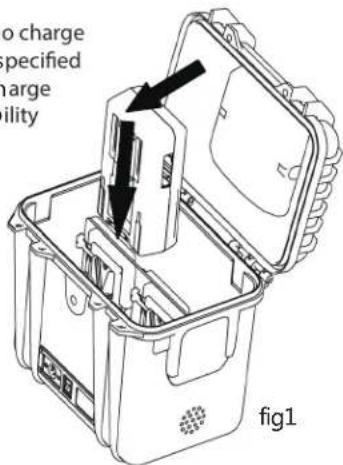
Install the V-mount battery following the arrow direction as shown in figure 1. Battery and battery plate are well connected with cracking sounds.
text_image
no charge specified charge ility fig1- Install the V-mount battery following the arrow direction as shown in figure 1. Battery and battery plate are well connected with cracking sounds.
- To ensure continuous power supply and maximum power output, it is recommended to use 4 pieces of the same model and fully charged V-mount batteries to discharge, otherwise the loading capacity will reduce or cause battery and adapter protection.
- S-4020 can output 12V or 24V according to the demands:
①. Dial up the power switch to “—”, 12V will be activate, DC 11-16.8V has output while DC 22-33.6V has no output.
②. Dial down the power switch to "=" , 24V will be activate, DC 22-33.6V has output while DC 11-16.8V has no output. - For S-4030, the sum of 2 channels maximum output load is 15A.
- Please choose the proper XLR cable. Make sure this product and load equipment are well connected and no short circuit before loading.
- Please change or charging the Li-ion batteries if the LED low battery warning displays.
Applicable Battery
All SWIT V-mount batteries no larger than 168x101x68mm
Storage
- Please turn off the power switch if it is not used for a long time and take out the inside V-mount batteries.
- Keep in cool and dry place.
- Please avoid contact with corrosive substances, away from fire and heat source.
Product appearance
text_image
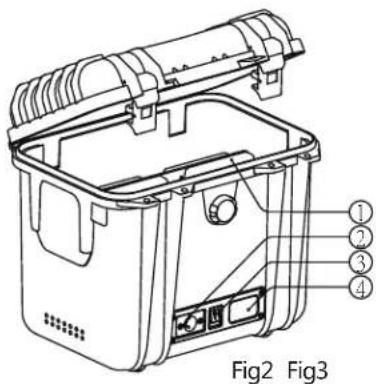
Fig2 Fig3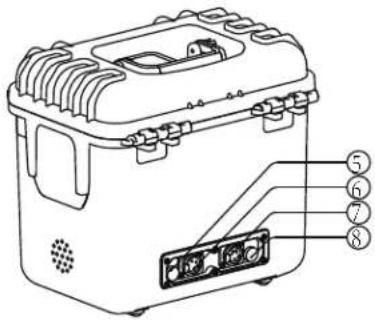
text_image
Technical diagram of a device with numbered parts labeled 5 to 8, showing internal components and mounting features.① Battery plate
② 4-pin XLR DC charging socket (Pin 1: Negative, Pin 3: Positive)
③ On/Off
| S-4010 | “O”: OFF |
| S-4030 | “|”: ON |
| S-4020 | “—”: 12V working mode |
| “O”: OFF | |
| “==”: 24V working mode |
④ LED display panel
⑤⑧ Fuse holder
⑥⑦ DC output
| S-4010 | 67 4-pin XLR DC output socket (Pin 1: Negative, Pin 4: Positive) | S-4020 | 6 3-pin XLR DC output socket (Pin 1: Negative, Pin 2: Positive) |
| S-4030 | 67 3-pin XLR DC output socket (Pin 1: Negative, Pin 2: Positive) | 7 4-pin XLR DC output socket (Pin 1: Negative, Pin 4: Positive) |
LED Panel Instruction
| Function Model ON/OFF state LED panel State | |||
| Charging | S-4010 | O | No Display |
| I | The outermost ring of the LED panel displays in recycling show way and after each circle, it will display the current voltage. | ||
| S-4020 | — | The outermost ring of the LED panel displays in recycling show way and after each circle, it will display the current voltage. | |
| O | No Display | ||
| S-4030 | = | No Display | |
| O | No Display | ||
| I | No Display | ||
| Discharge | S-4010S-4020S-4030 | Not in "O" position | Normal Working Status:The outermost ring of the LED panel displays in recycling show way and after each circle, it will display the current voltage. |
| Under Voltage Alarm:The LED panel display and flash “L____”, it indicates that the voltage of the current batteries is lower than the under-voltage protection value.Note:(1). The under-voltage protection value for 12V operating mode is 13V;(2). The under-voltage protection value for 24V operating mode is 26V. | |||
Specification Packing List
| Model | S-4010(Dual 12V output) | S-4020(12V/24V output) | S-4030(Dual 24V output) |
| Input | DC 16.8V 5A (Charging) | DC 16.8V 5A (Charging) | DC 16.8V 5A (Charging) |
| Output | DC11-16.8V 15Ax2 (180Wx2) | DC 11-16.8V 15A (180W) Or DC 22-33.6V 15A (360W) | DC 22-33.6V x2 Together 15A(360W) |
| Dimension | 290mm x 221mm x 278mm | ||
| Net weight | 3.45Kg | ||
| Working environment | Working temperature: 0°C ~ +40°C Working humidity: 10% ~ 90% Storage temperature: -15°C ~ +60°C | ||
| Item Name | Quantity |
| Power Station Box | x1 |
| Fuse(65TS-150H/L) | x2 |
| Charger | x1 |
| Power Cable | x1 |
| Warranty Card | x1 |
| User Manual | x1 |
| Certificate of Quality | x1 |
Trouble-shooting
| Description Possible Cause | Solution | |
| Can not output to power equipments, but the LED panel display voltage | Fuse has been damaged Change fuse | |
| DC output socket is not connected to the equipment or not reliable connected | Reconnect the XLR cable. |