PB-S220A - Batterie pour caméra SWIT - Kostenlose Bedienungsanleitung
Finden Sie kostenlos die Bedienungsanleitung des Geräts PB-S220A SWIT als PDF.


Benutzerfragen zu PB-S220A SWIT
0 Frage zu diesem Gerät. Beantworten Sie die, die Sie kennen, oder stellen Sie Ihre eigene.
Eine neue Frage zu diesem Gerät stellen
Laden Sie die Anleitung für Ihr Batterie pour caméra kostenlos im PDF-Format! Finden Sie Ihr Handbuch PB-S220A - SWIT und nehmen Sie Ihr elektronisches Gerät wieder in die Hand. Auf dieser Seite sind alle Dokumente veröffentlicht, die für die Verwendung Ihres Geräts notwendig sind. PB-S220A von der Marke SWIT.
BEDIENUNGSANLEITUNG PB-S220A SWIT
Rechargeable Li-ion Battery Pack
Ver:B
USER MANUAL
SWIT Electronics Co., Ltd.
Tel:+86-25-85805753
Fax:+86-25-85805296
http://www.swit.cc
E-mail: contact@swit.cc
Congratulations on your purchase of this product. Please read this user manual carefully.
Warning
Keep in mind the following precautions to avoid fire and other safety hazards!
- Do not use battery in fire or hot places to prevent overheating, cracking and other hazards.
- Please do not pierce the battery shell or try to open the shell and decompose the battery.
- Do not use battery beyond charge, discharge and storage environment temperature.
- Do not charge the battery in the car or in direct sunlight.
-
Do not use damaged battery.
-
Do not squeeze the battery shell which may cause physical damage.
- Make sure the power-consuming equipment(s) meet the battery specifications.
- Use SWIT charger or SWIT recommended charger to charge the battery to avoid overheating or beak.
- Keep out of the reach of children.
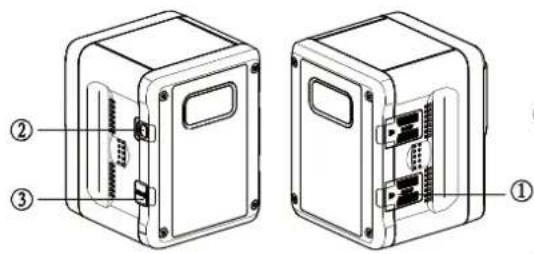
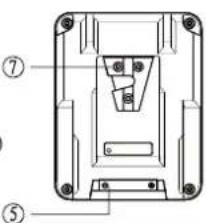
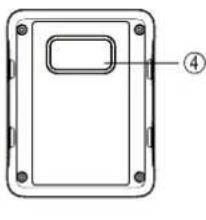
Description of appearance
text_image
Technical diagram of two labeled electronic device boxes with internal components and numbered annotationsFig 1: PB-S220S/A
text_image
Technical diagram of a mechanical component with numbered parts labeled ⑤ and ⑦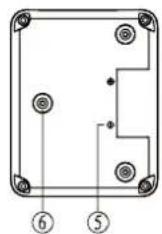
natural_image
Technical line drawing of a rectangular device with mounting holes and a labeled component (no text or symbols)① D-TAP socket
② Button
③ USB socket
④ LCD screen
⑤ Electrode interface
⑥ Gold-mount shape lock
⑦ V-shape lock
Caution
- Fully charged battery will discharge naturally and please use it as soon as it gets charged.
- The battery may become warm in use or while being charged. This is normal.
- Never expose the battery to temperature above 60°C.
- Keep the battery terminals clean and never short-circuit the battery terminals.
- When stored for a long time, please keep the battery power between 50% and 90%.
- Battery will automatically enter the sleep mode if rest in 10 days, the output will be shut off. Press the button to restore output.
Features
- High performance rechargeable lithium ion battery, no memory effect.
- LCD screen display battery capacity and remaining running time.
- Built in multiple control circuit, to protect the battery all-round regarding temperature, voltage and current.
- D-tap DC output, to power the camera and other equipment simultaneously.
- USB 5V/2A output, which can be used to charge mobile phones, tablets and other portable devices.
- 6A fast charging (only PB-S220A/S by using SWIT fast charging charger).
Charging
- After the battery is plugged into the charger, LCD flashes to indicate the charging state.
- The battery can be charged at a temperature range of 0\~40°C, but we recommend charging at a temperature range of 10\~30°C to ensure the best performance of the battery.
- During battery charging, press the button to turn on the USB output.
Discharging
- It is recommended to be used in the temperature range of 0\~40°C to ensure the best performance of the battery.
- During the battery discharge process, press the button to light the backlight and to activate the USB output, the LCD displays the battery remaining working time by default, long press 2s to switch and lock to display the capacity percentage, long press again to switch back.
- In low temperature, the internal resistance of the battery will increase, the discharging time will be shortened, and the load may be automatically cut off when the load is heavier.
- The USB output will shut off if the load is too heavy, press the button to restore.
LCD display instruction
1. LCD display area
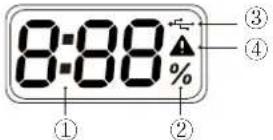
① Remaining working time
② Capacity percentage
③ USB output
④ Battery alarm
2. Battery in rest or charging status
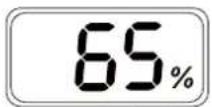
① ② ③
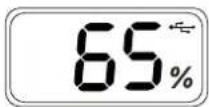
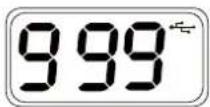
① Display Capacity percentage;
② Press button for 1 second to turn on the USB output,
③ Press button for 5 seconds to display battery cycle time from 0 \~ 999;
3. Battery in discharging status
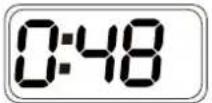
① ② ③ ④
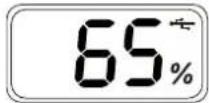
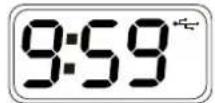
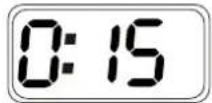
① Display remaining working time;
② Press button for 1 second to display the remaining capacity percentage and turn on the USB output;
③ remaining working time display as 0 \~ 9:59, if it is over 10 hours, it will also display as 9:59;
④ If the remaining working time is lower than 15 minutes, the characters on the LCD will flash to hint and the USB can not be used.
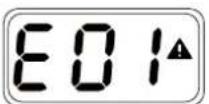
4. LCD alarm code description
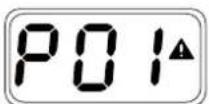
① ② ③
① P01 \~ P13: The battery trigger protection function and it can be recovered;
② When the battery rests over 10 days or runs out of power, it will enter sleep mode and the LCD will not display.
③ E01 \~ E03: Not recoverable error, please contact manufacturers to repair, do not disassemble the battery.
Common battery protection code:
| P01 | Run out of power, please charge the battery asap. | P02 | Over-voltage when charging, please remove the battery, discharge the battery to decrease the battery voltage to restore. |
| P03 | Over-current when charging, please remove the battery, and it will restore after 30 seconds' standing. | P05 ~ P07 | The load is too heavy, please remove the battery, and it will restore after 30 seconds' standing. |
| P08 ~ P09 | Battery short circuit, please make sure that there is no foreign body between the electrodes or remove the battery, and it will restore after 30 seconds' standing. | P10 ~ P13 | Temperature protection, please remove the battery and place at room temperature to recover |
Specification
| Model | PB-S98S | PB-S98A | PB-S220S | PB-S220A | |
| Battery plate | V-mount | Gold-mount | V-mount | Gold-mount | |
| Nominal voltage | 14.4V | 14.4V | 14.4V | 14.4V | |
| Capacity | 98Wh,6.8Ah | 98Wh,6.8Ah | 220Wh,15.3Ah | 220Wh,15.3Ah | |
| Max output | Electrodes | 100W,8A | 100W,8A | 150W,12A | 150W,12A |
| D-TAP | 100W,8A | 100W,8A | 120W,10A | 120W,10A | |
| USB | 10W,5V/2A | 10W,5V/2A | 10W,5V/2A | 10W,5V/2A | |
| In total | 100W | 100W | 150W | 150W | |
| Dimension | 121×95×59mm | 121×95×62mm | 121×95×96mm | 121×95×99mm | |
| Net weight | 0.809kg | 0.800kg | 1.44kg | 1.435kg | |
| Max charging current | 3A | 3A | 6A | 6A | |
| D-TAP socket number | 2 | 2 | 4 | 4 | |
| USB socket number | 1 | 1 | 1 | 1 | |