
SSM6000 - Projektor Zubehör Chief - Kostenlose Bedienungsanleitung
Finden Sie kostenlos die Bedienungsanleitung des Geräts SSM6000 Chief als PDF.


| Produkttyp | Montagehalterung (Interface Bracket) für Projektoren |
| Modell | SSM6000 |
| Marke | Chief (Milestone AV Technologies) |
| Kompatibilität | Chief® Series Projektorhalterungen |
| Enthaltene Komponenten | 1 Interface-Halterung, 3 Schrauben (M4x10mm), 1 Schraube (M4x20mm), 1 Satz Sicherheitsschrauben, 4 Unterlegscheiben (M4), 1 Abstandshalter (1/2") |
| Material | Stahl (vermutlich) |
| Abmessungen (ca.) | 200 x 200 x 25 mm (geschätzt) |
| Gewicht (ca.) | 0,5 kg (geschätzt) |
| Farbe | Schwarz (typisch) |
| Montage | Befestigung an der Unterseite des Projektors mit mitgelieferten Schrauben |
| Befestigungsart | Verschraubt, mit optionalen Sicherheitsschrauben |
| Verwendungszweck | Zur Verbindung des Projektors mit einer Chief-Projektorhalterung |
| Sicherheitshinweise | Schrauben nicht übermäßig festziehen; nur mitgelieferte Hardware verwenden |
| Installationshinweise | Separate Anleitung der Halterung beachten; korrekte Ausrichtung erforderlich |
| Wartung | Keine regelmäßige Wartung erforderlich; gelegentlich auf festen Sitz prüfen |
| Reinigung | Mit weichem, trockenem Tuch abwischen; keine aggressiven Reinigungsmittel |
| Reparatur | Keine reparablen Teile; bei Defekt Ersatzteil vom Hersteller beziehen |
| Ersatzteile | Schraubensets und Halterungen über Chief erhältlich |
| Garantie | Standard-Herstellergarantie (Details siehe Handbuch) |
| Zertifizierungen | Konform mit relevanten Sicherheitsstandards (nicht explizit genannt) |
Häufig gestellte Fragen - SSM6000 Chief
Benutzerfragen zu SSM6000 Chief
0 Frage zu diesem Gerät. Beantworten Sie die, die Sie kennen, oder stellen Sie Ihre eigene.
Eine neue Frage zu diesem Gerät stellen
Laden Sie die Anleitung für Ihr Projektor Zubehör kostenlos im PDF-Format! Finden Sie Ihr Handbuch SSM6000 - Chief und nehmen Sie Ihr elektronisches Gerät wieder in die Hand. Auf dieser Seite sind alle Dokumente veröffentlicht, die für die Verwendung Ihres Geräts notwendig sind. SSM6000 von der Marke Chief.
BEDIENUNGSANLEITUNG SSM6000 Chief
INSTALLATION INSTRUCTIONS
SSB-6000, SSM-6000, SLB-6000 and SLM-6000 Interface Brackets
SSB-6000, SSM-6000, SLB-6000 and SLM-6000 Interface Brackets are designed for use with Chief® Series Projector Mounts. See the specific installation instructions provided with the mount for additional installation information.
Unpack carton and verify kit contents. If any listed parts are missing, immediately contact a Chief Customer Service representative.

WARNING: IMPROPER INSTALLATION CAN LEAD TO EQUIPMENT FALLING CAUSING SERIOUS PERSONAL INJURY AND DAMAGE TO EQUIPMENT! DO NOT substitute hardware. Use only hardware supplied by manufacturer!
(1) Interface Bracket (3) Screw, Phillips Pan Head, Machine, M4 x 10mm
(6) 10 - 24 Thumb Nuts** (1) Screw, Phillips Pan Head, Machine, M4 x 20mm****
(1) All-Points Security Kit (4) Washer, Flat, M4
(1) 1/2" x .194" x 1/2" Round Spacer****

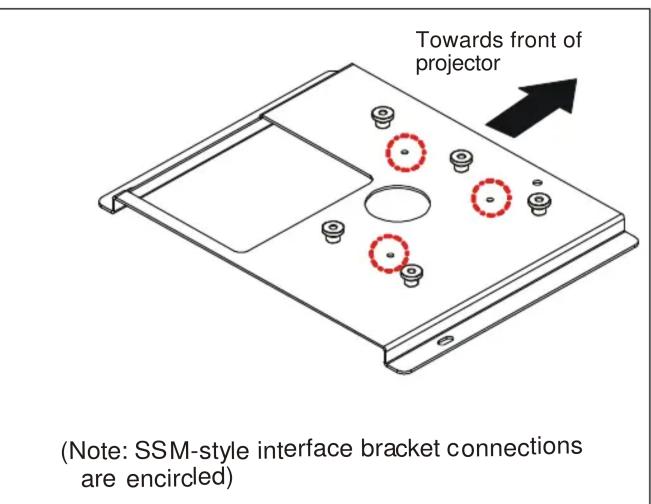
**Only used when installing SLB/SSB interface brackets. ****Used when mounting surface of projector is recessed.
NOTE: Specific to SSB-style and SSM-style interface bracket installation, all appropriate screws come pre-installed as reflected in the encircled locations above. DO NOT attempt to substitute and USE ONLY this pre-installed hardware for SSB-style and SSM-style interface bracket installation.
Installation Instructions

WARNING: OVER TIGHTENING OF SCREWS CAN DAMAGE PARTS AND CAN LEAD TO SERIOUS PERSONAL INJURY AND DAMAGE TO EQUIPMENT! DO NOT over tighten screws when installing interface bracket.
NOTE: Step 1 is only required when installing an SLB/SSB interface bracket. If an SLM/SSM bracket is being installed, proceed to step 2.
- Screw thumb screws onto 10-24 x 5/8" Phillips pan head screws. DO NOT fully tighten thumb screws at this time.
- Place 1/2" spacer over threaded insert in center bottom of projector.
- Place interface bracket onto bottom of projector and align spacers with mounting holes in bracket.
- Using M4 x 10mm Phillips pan head screws and M4 x 20mm Phillips pan head screws with flat washers, secure bracket to projector and tighten all fasteners at this time.
NOTE: Security Screws can be substituted when mounting interface bracket to projector by using the parts and installation instructions in the All-Points Security Kit.
Chief® is a registered trademark of Milestone AV Technologies. All rights reserved.

Milestone AV Technologies, and its affiliated corporations and subsidiaries (collectively, "Milestone"), intend to make this manual accurate and complete. However, Milestone makes no claim that the information contained herein covers all details, conditions or variations, nor does it provide for every possible contingency in connection with the installation or use of this product. The information contained in this document is subject to change without notice or obligation of any kind. Milestone makes no representation of warranty, expressed or implied, regarding the information contained herein. Milestone assumes no responsibility for accuracy, completeness or sufficiency of the information contained in this document.

CHIEF®
Our Mounts. Your Vision.
Chief Manufacturing, a products division of Milestone AV Technologies
8401 Eagle Creek Parkway, Savage, MN 55378
• P: 800.582.6480 / 952.894.6280 • F:877.894.6918 / 952.894.6918
8850-000185 Rev01
©2009 Milestone AV Technologies,
a Duchossois Group Company
05/09


Marke : Chief
Modell : SSM6000
Kategorie : Projektor Zubehör