VZ-Rock-PZFI - Régulateur VariZoom - Kostenlose Bedienungsanleitung
Finden Sie kostenlos die Bedienungsanleitung des Geräts VZ-Rock-PZFI VariZoom als PDF.


Benutzerfragen zu VZ-Rock-PZFI VariZoom
0 Frage zu diesem Gerät. Beantworten Sie die, die Sie kennen, oder stellen Sie Ihre eigene.
Eine neue Frage zu diesem Gerät stellen
Laden Sie die Anleitung für Ihr Régulateur kostenlos im PDF-Format! Finden Sie Ihr Handbuch VZ-Rock-PZFI - VariZoom und nehmen Sie Ihr elektronisches Gerät wieder in die Hand. Auf dieser Seite sind alle Dokumente veröffentlicht, die für die Verwendung Ihres Geräts notwendig sind. VZ-Rock-PZFI von der Marke VariZoom.
BEDIENUNGSANLEITUNG VZ-Rock-PZFI VariZoom
Thanks for buying our new ZOOM/FOCUS/IRIS control for Panasonic camcorders. We think you will enjoy this product, but before using it please read the instructions thoroughly.
WARNING: THIS IS NOT A "LANC" CONTROL DEVICE. DO NOT PLUG THE VZ-ROCK-PZFI INTO ANY CAMCORDER OTHER THAN APPROVED PANASONIC UNITS. THIS REMOTE CONTROL SHOULD ONLY BE PLUGGED INTO THE SPECIFIED 'CAM REMOTE' JACKS ON THE CAMCORDER BODY.
- First, loosen the brass clamp nuts and fix the controller to your tripod handle, jib, or shoulder support.
- The split Y-cable has two connectors, one for the zoom/record/pause circuit and another for the focus/iris circuit. The zoom/record/pause connector is the smaller plug that fits into the 'ZOOM S/S' jack. The focus/iris connector is the larger plug that fits into the 'FOCUS/IRIS' jack.
- ZOOM CONTROL - To zoom in (telephoto) press the zoom rocker right, and to zoom out (wide) press the rocker left. The farther you press the rocker, the faster the lens will zoom. The zoom characteristics of the ROCK-PZFI are determined by the camera (e.g., the slowest zoom speed attainable with the DVX100B takes 30 seconds from end-to-end).
- RECORD/PAUSE CONTROL - Start and stop recording by pressing the "R" button.
- FOCUS CONTROL - To operate the remote focus control feature properly, the 'FOCUS' switch on the side of the camera lens should be set to 'A'. Additionally, if there is a master "AUTO/MANUAL" switch on the camera, set it to "MANUAL." To switch between autofocus and manual focus using your ROCK-PZFI, simply slide the switch marked 'Focus' between 'A' (auto) and 'M' (manual). While the switch is set to 'M', you can adjust the focus precisely using the large knurled dial on the left side of the control.
-This dial has been designed so that you may either roll it using your operating thumb or adjust it separately with your free hand.
-Note that your camera has addressable focus points indicated in the viewfinder by "MF00 – MF99" (when in autofocus mode, it will read "AF00 – AF99"). This means you can precisely rehearse or repeat focal adjustments without any guessing.
-Special note - While it is certainly possible to switch into autofocus mode for instant quick-focus grabs using the controller, it is important to remember that when you switch back to manual mode the camera will return to the focal point dictated by the position of the dial on the controller. In other words, if your manual focus were set far out to MF87 and you wanted to grab focus on a nearby moving object, you could do so by switching into 'A' on the controller and letting the camera do the focusing, but when you switch back to 'M' on the controller the camera will instantly return to MF87 (the position in which the dial was left). 'Push Auto' is not available through the remote
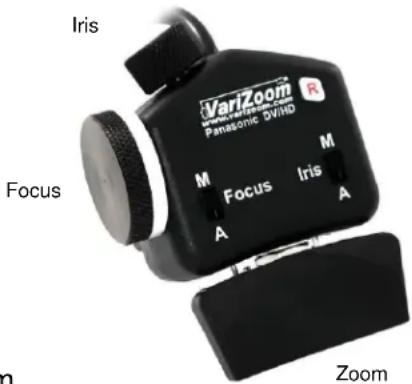
text_image
Iris VarZoom Panasonic DVHD Focus M Focus Iris A A Zoominterface. These are limitations of the camera's remote circuit design, and should be kept in mind if you intend to switch between auto and manual focus modes regularly.
- IRIS CONTROL – Operating the iris control is fairly simple – you do not need to set anything on the camera first. Note that the ROCK-PZFI's iris dial allows the operator to adjust iris to a limited extent even when the remote is set to auto iris 'A'. With some cameras like the AG-UX180, you may have to change the Auto Iris menu setting to "OFF." To adjust the iris manually through the full range of F-stops, simply set the remote iris switch to 'M' and turn the iris dial (smaller knurled dial on top of the control). Switching it back to 'A' will cause the camera to take over and slowly adjust the iris automatically to an appropriate level. Note that when you switch back to 'M' on the remote the camera will reset the iris to the position dictated by the iris dial (the same as with the focus dial).
Care and Maintenance of the VZ-ROCK-PZFI
Although the unit is designed to easily withstand normal wear and tear, it should be cared for and protected just like your camera. As normal precautions, avoid dropping or crushing the unit and try to keep it as dry as possible. While it can withstand some of this type of treatment, it will last longer and operate consistently if you take these precautions. If you have any problems or questions, feel free to email or call us.
Troubleshooting: 1) Zoom Creeping (unwanted zooming): Recalibrating the zoom center is easy. With the controller connected to your camera, loosen the brass set screw on the underside of the rocker with a 5/64" hex key (alan wrench), holding the rocker firmly in place. On the backside of the rocker is a hole with a slotted shaft, and this is where you adjust the zoom center with a flat screwdriver. Turn it slightly left and right and you'll see the camera zoom in and out – find the centermost point between the zoom in/out start positions, then tighten the brass set screw (don't overcrank it).
Warranty Info: Do not open your control device, as this may void your warranty and possibly damage the control. If you need service, contact VariZoom for a Return Merchandise Authorization (RMA #). All controls have a 2-year parts and labor warranty. Please save your receipt and send us your comments and suggestions. Thanks! www.varizoom.com / 512-219-7722