F22 - Système de contrôle d'accès sécurisé ZKTeco - Kostenlose Bedienungsanleitung
Finden Sie kostenlos die Bedienungsanleitung des Geräts F22 ZKTeco als PDF.


Benutzerfragen zu F22 ZKTeco
0 Frage zu diesem Gerät. Beantworten Sie die, die Sie kennen, oder stellen Sie Ihre eigene.
Eine neue Frage zu diesem Gerät stellen
Laden Sie die Anleitung für Ihr Système de contrôle d'accès sécurisé kostenlos im PDF-Format! Finden Sie Ihr Handbuch F22 - ZKTeco und nehmen Sie Ihr elektronisches Gerät wieder in die Hand. Auf dieser Seite sind alle Dokumente veröffentlicht, die für die Verwendung Ihres Geräts notwendig sind. F22 von der Marke ZKTeco.
BEDIENUNGSANLEITUNG F22 ZKTeco
F22
Ultra thin fingerprint time attendance and access control terminal
natural_image
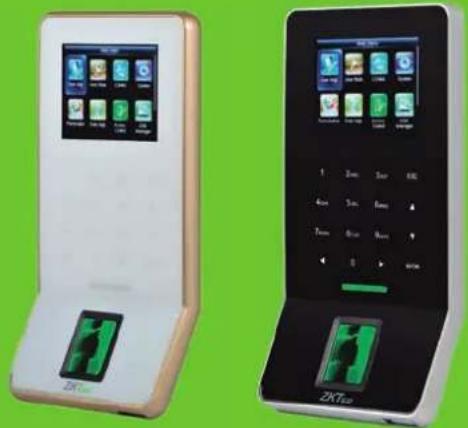
Two modern mobile phone models with green and black buttons, displayed against a green background (no visible text or symbols on devices)F22 is an ultra-thin fingerprint time attendance and access control terminal with BioID sensor and Wi-Fi, which offers unparalleled performance with advanced algorithm for reliability, precision and excellent matching speed. F22 features the fastest commercial-based fingerprint matching algorithm and ZK high-performance, high-image quality infrared detection fingerprint sensor.
F22 provides a superior touching experience with touch keypad, and offers flexibility for standalone installation or with any third-party access control panel that supports standard wiegand signal. TCP/IP, RS485 and Wi-Fi are also available that the device can be used in different networks.
Features
• 2.4-inch TFT color screen and Touch keys
• Ultra thin and elegant design
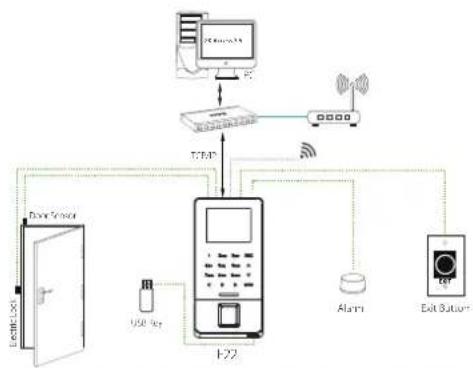
• Full Access Control Features: Anti-passback, access control interface for 3rd party electric lock, door sensor, exit button, alarm
- Standard Wi-Fi
• Network interface by TCP/IP or RS485
• Built-in auxiliary input with enhanced flexibility to link with wired detector or emergency switch
- Multiple Verification Modes: Multi-verification methods (card is optional) providing user various choices
Specifications
| Display | 2.4-inch TFT LCD Color Screen |
| Fingerprint Capacity | 3000 |
| Card Capacity | 5000(Optional) ID or mifare card |
| Transaction Capacity | 30,000 |
| Sensor | BiolD Sensor/ SilkID Sensor (optional) |
| Algorithm Version | ZKFinger VX10.0 |
| Communication | RS232/485, TCP/IP, USB-host,Wi-Fi |
| Access Control Interface | 3rd Party Electric Lock, Door Sensor, Exit Button, Alarm |
| Wiegand Signal | Input, Output |
| Aux. Input | 1ea for linkage function |
| Functions | DST, Automatic Status Switch, Record query, T9 input, 14 digit user ID,Anti-passback, Scheduled-Bell, Printer(Optional), ADMS(Optional) |
| Power Supply | 12V DC,3A |
| Operating Temperature | 0 °C- 45 °C |
| Operating Humidity | 20%-80% |
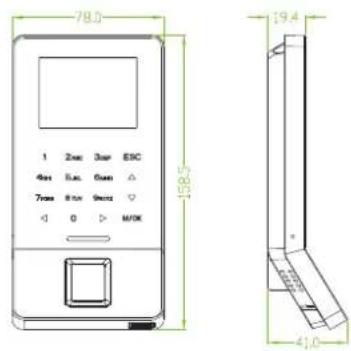
| Dimension(LxWxH) | 158.5x78.0x19.4mm |
| SDK and software | Standalone SDK,ZKAccess3.5 software |
Optional Accessories

Dimensions (mm)Configura
flowchart
graph TD
    A["User"] --> B["E22"]
    B --> C["Router"]
    C --> D["Security System"]
    D --> E["Data Sensor"]
    E --> F["Device 1"]
    F --> G["USB 92"]
    G --> H["Alarm"]
    H --> I["Exit Button"]
    I --> J["Data Router"]
    J --> K["TERP"]
    K --> L["Data Gateway"]
    L --> M["Computer"]