
MSD-CAN1 - Klimaanlage SAMSUNG - Kostenlose Bedienungsanleitung
Finden Sie kostenlos die Bedienungsanleitung des Geräts MSD-CAN1 SAMSUNG als PDF.


| Produkttyp | Klimaanlage (Innengerät) |
| Modell | MSD-CAN1 |
| Marke | Samsung |
| Kompatible Innengeräte | 4-Wege-Kassetten-, 360-Kassetten-Innengerät |
| Nachrüstoption | S-Plasma Ion Kit (optional) |
| Funktionen | Kühlen, Heizen, Luftreinigung mit S-Plasma Ion |
| Bedienung | Kabellose Fernbedienung |
| Installation | Nur durch qualifizierten Installateur |
| Sicherheitshinweise | Keine Selbstreparatur, keine eigenmächtige Demontage |
| Lieferumfang S-Plasma Ion Kit | Ion-Baugruppe, Klebeband, Installationsanleitung, Verbindungskabel |
| Optionseinstellung | Über Fernbedienung (Codes CD2160/CD2161) |
| Stromversorgung | Über das Innengerät (230 V, 50 Hz) |
| Wartung | Regelmäßige Filterreinigung, Überprüfung durch Fachpersonal |
| Reparatur | Nur durch autorisierten Samsung-Service |
| Entsorgung | Gemäß örtlichen Vorschriften; Kontakt mit qualifiziertem Installateur |
Häufig gestellte Fragen - MSD-CAN1 SAMSUNG
Benutzerfragen zu MSD-CAN1 SAMSUNG
0 Frage zu diesem Gerät. Beantworten Sie die, die Sie kennen, oder stellen Sie Ihre eigene.
Eine neue Frage zu diesem Gerät stellen
Laden Sie die Anleitung für Ihr Klimaanlage kostenlos im PDF-Format! Finden Sie Ihr Handbuch MSD-CAN1 - SAMSUNG und nehmen Sie Ihr elektronisches Gerät wieder in die Hand. Auf dieser Seite sind alle Dokumente veröffentlicht, die für die Verwendung Ihres Geräts notwendig sind. MSD-CAN1 von der Marke SAMSUNG.
BEDIENUNGSANLEITUNG MSD-CAN1 SAMSUNG
Safety precaution
This installation manual explains how to install the S-plasma ion kit to a indoor unit.
Please read the installation manual carefully before installing the S-plasma ion Kit. (Please refer to the corresponding installation manual for any optional product installation.)

WARNING
Hazards or unsafe practices that may result in severe personal injury or death.

CAUTION
Hazards or unsafe practices that may result in minor personal injury or property damage.

Warning
- Contact a qualified installer or a service center for the installation.
- Do not attempt to repair, disassemble, or modify the appliance yourself. Failure to do so may result in product malfunction, electric shock, or fire. So when repairing the product, contact a qualified installer or a service center.
- When detaching or disposing of an S-Plasma ion kit, contact a qualified installer or a service center.
- Install an S-Plasma ion kit securely in a designated place, using the installation accessories.
- If the S-Plasma ion kit is not installed securely, the component might fall off get damaged.
- Do not touch the pin of an S-Plasma ion kit with hands nor insert foreign matter.
- Failure to do so may result in product malfunction or electric shock.
5-plasma ion kit installation
Accessories
| Name | S-plasma ion assembly | Tape | Installation manual | Connecting cable |
| Quantity 1 | 1 1 1 | |||
| Shape |

Caution
- When installing an S-Plasma ion kit, you must use the specified components.
Installing the S-plasma ion kit into the 4-way cassette indoor unit

Caution
- S-Plasma ion kit should be placed into position before the panel installation.
1 Push the 5-Plasma ion kit into the designated place on the discharge part until you hear click sound.

Note
The appearance of the indoor unit may be different from the picture depending on the model.
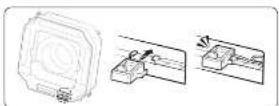
2 Position the connection cable through the groove and connect its connector.
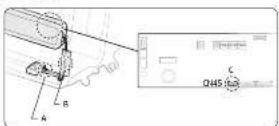
A Insert the connection cable completely into the groove.
B Put the connection cable into the groove and fix it with tape.
C Push the connecting cable of the S plasma ion kit into the cable duct.

Caution
- Fix the connection cable closely so that the connection cable does not rise up.
- Connector should be connected after S-Pasma ion kit installation is completed.
3 Set the operating options for the 5-plasma ion kit by using the wireless remote control. (For more information, see Setting the operating options for the 5-plasma ion kit.)
Installing the S-plasma ion kit into the 360 cassette indoor unit

Caution
- Ensure to finish the S plasma ion kit installation before insulating the panel.
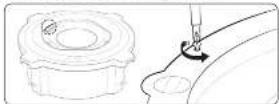
1 Remove the screw securing the cover
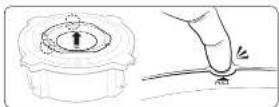
2 Insert your fingers into the two holes with PULL printed on the cover, squeeze the hook gently, and then lift up the top cover to remove it.
Note
- When reassembling the cover, match the latches with PULL printed on the cover, and then push HOOK until it is firmly assembled.
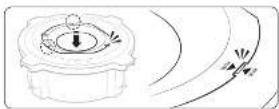
3 Remove the three screws securing the cover.
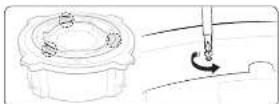
- Insert a flat-blade screw driver into five joints and the tilt it to the directions as shown in the figure one at a time.
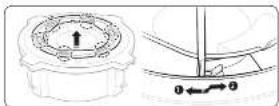

Caution
• Excessive force may damage the product.
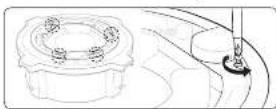
5 Remove the four screws securing the cover.
6 Remove the screw securing the indicator light PBA cover.
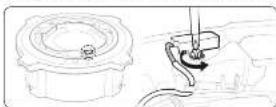
7 Pull the hook to remove the cover.
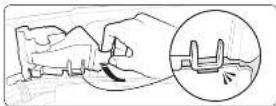
8 Squeeze the latches and push them downwards to remove the cover.
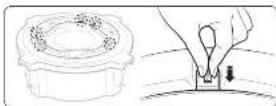
9 Remove the screw securing the cover of the indicator light and remove the cover.
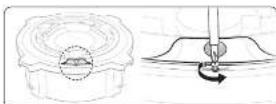
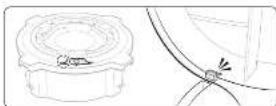
10 Cut off the lower part of the cable duct so that the connecting cable of the S-plasma Ion kit can be passed through.
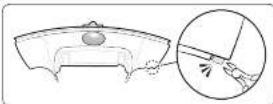
11 Cut off the end of the indicator cover so that the connecting cattle of the S-plasma ion kit can be passed through.
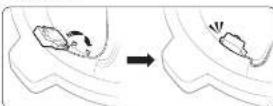
12 Push the 5 plasma ion kit into the holder on the air outlet until you hear a click sound.
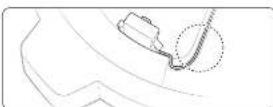
13 Push the connecting cable of the S plasma ion kit into the table duct to fix it.
14 Connect the provided connecting cable to the connecting cable of the 5 plasma ion kit.
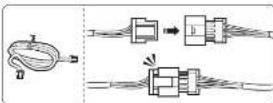
15 Open the PBA cover and connect the connecting cable of the S-pasma ion kit to the CN801 connector.
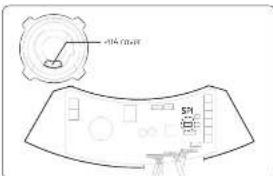
text_image
PAA COA 571Caution
- When reassembling the 5 plasma ion kit, ensure to make the connecting cable pass through the cable hole on the cover.
- Ensure the connecting cable of the 5-plasma ion kit fixed firmly to the cable duct.
- Ensure to finish the 5-plasma ion kit installation before connecting the cable.
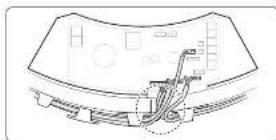
16 Set the operating options for the S-plasma ion kit by using the wireless remote control.
Setting the operating options for the S-plasma ion kit
- S-Plasma ion kit is an optional part, so factory default setting of an indoor unit is "Disuse of S-Plasma ion kit. When you install the S-Plasma ion kit additionally, you need to set the option for correct operation of S-Plasma ion kit as listed below."
• Input the setting option more than twice. - For the correct operation, please reset the power supply after inputting an option.
Note
- The S-plasma on Kit does not operate until you set the operating options after installation.
| Category 4-way / 360 cassette indoor unit | |
| Operating options for disabling the S-plasma ion kit | CD2160 |
| Operating options for enabling the S-plasma ion kit | CD2161 |
| Instruction | S-plasma ion ON/OFF control is available with the button on the remote controller.If there is an operation malfunction, refer to the set service manual.Input the option by using the remote controller. |