
RM169 - Mixer ROLLS - Kostenlose Bedienungsanleitung
Finden Sie kostenlos die Bedienungsanleitung des Geräts RM169 ROLLS als PDF.


Benutzerfragen zu RM169 ROLLS
0 Frage zu diesem Gerät. Beantworten Sie die, die Sie kennen, oder stellen Sie Ihre eigene.
Eine neue Frage zu diesem Gerät stellen
Laden Sie die Anleitung für Ihr Mixer kostenlos im PDF-Format! Finden Sie Ihr Handbuch RM169 - ROLLS und nehmen Sie Ihr elektronisches Gerät wieder in die Hand. Auf dieser Seite sind alle Dokumente veröffentlicht, die für die Verwendung Ihres Geräts notwendig sind. RM169 von der Marke ROLLS.
BEDIENUNGSANLEITUNG RM169 ROLLS
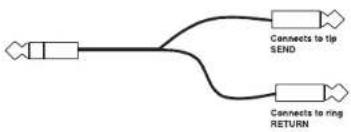
flowchart
graph LR
    A["Input"] --> B["Connects to tip SEND"]
    A --> C["Connects to ring RETURN"]
USING THE MIC EFFECTS INSERT
In order to add effects to the microphone signal, an insert cable is needed. The Tip of the plug acts as the Send, the Ring is the Return.
Connect the insert cable's TRS end to the Mic FX Insert jack on the rear of the RM169. Connect the Tip connection to your effects processor's Input jack, and the Ring connection to the Output of the effects processor. The RM169 effects insert is mono, so if the effects processor is stereo - choose a Mono output. You may need to refer to your effects processor owners manual for more information about operating it in mono.
Make sure a microphone is properly connected to the RM169 and the unit is on. Speak into the microphone and adjust the levels of your effects processor for the desired process and level of effect.
ROLLS
www.rolls.com
Rolls Corporation
Salt Lake City, UT
9/19
ROLLS
RM169
Professional Bluetooth Mixer

text_image
ROLLS MADE IN USA WWW.BOS.COM INPUT MIC ONE TONE TONE MIC TWO 1 2 3 4 5 6 7 8 9 10 11 12 13 14 15 16 17 18 19 20 21 22 23 24 25 26 27 28 29 30 31 32 33 34 35 36 37 38 39 40 41 42 43 44 45 46 47 48 49 50 51 52 53 54 55 56 57 58 59 60 61 62 63 64 65 66 67 68 69 70 71 72 73 74 75 76 77 78 79 80 81 82 83 84 85 86 87 88 89 90 91 92 93 94 95 96 97 98 99 100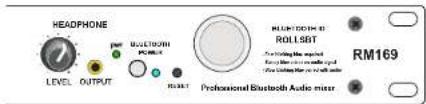
text_image
HEADPHONE LEVEL OUTPUT ROLLSTONE ROLLSTONE ID ROLLSBT Professional Bluetooth Audio mixer RM169SPECIFICATIONS
Input Impedance: Mic: 600 Ohms XLR balanced
Source:
22K Ohms RCA
Mic Insert: 22K Ohms 1/4" TRS insert
Max Input Level: Mic: -14 dBV Mic level
Source: 24 dBV
Headphone Output Impedance: >8 Ohms
Total - In/Out Connectors: 5: XLR, 5: Stereo RCA, 1: 1/4" TRS, 2: 3.5mm
Phantom Power: +15 VDC
Output Level: +17 dBV max
Output Impedance: 100 Ohms Balanced
Max Gain: Mic: 60 dB
Source: 26 dB
Tone Controls: +/-12 dB 100 Hz Bass
+/-12 dB 11kHz Treble
Noise Floor: -80 dB, THD: <.025%,
S/N Ratio: 96 dB
Size: 19" x 1.75" x 4" (48.3 x 4.5 x 10 cm)
Weight: 5 lbs. (2.3 kg)
QUICK START OPERATION GUIDE
FRONT PANEL
INPUT: Balanced XLR jack for connection to a dynamic or condenser microphone. This jack parallels the Channel 1 Microphone Input on the rear panel.
NOTE: The following two descriptions are for Mic 1 and Mic 2.
LEVEL: Adjusts the amount of signal from the Microphone Input channel to the Main Outputs.
TONE: Adjusts the relative frequency components of the Mic signal. Turning this control clockwise from the center (detent) position decreases the low frequencies. Turning the control counterclockwise from center decreases the high frequencies.
SOURCE LEVEL CONTROLS 1 - 4: Adjust the amount of signal from the indicated Source channel to the Main Outputs.
IN 4: 1/8" (3.5 mm) Source Input jack. This jack parallels the Source 4 Input on the rear panel.
BASS: Varies the amount of the low frequency portion (150 Hz) of the Source signals.
TREBLE: Varies the amount of the high frequency portion (10 kHz) of the Source signals.
HEADPHONE LEVEL: Adjusts the amount of signal to the Headphone Output.
HEADPHONE OUTPUT: 1/8" Tip-Ring-Sleeve jack for connection to any standard pair of audio headphones.
pwr LED: Indicates that the RM169 is powered on.
To pair a device to the RM169 simply find the RM169 (ROLLSBT) on your device and connect. After the device is connected to the RM169 a steady blue led will light indicating that the RM169 is paired to a device, but no audio is present. A slow blinking blue light indicates that audio is being sent when paired.
The reset button can be used to stop a device from being paired so a different device can be paired. The previously paired device must be off, its Bluetooth disconnected from the RM169, or out of range as the RM169 remembers the device it was previously connected to and will continually search for that device until a different device is paired.
When powered off the RM169 will remember the device it was previously paired with. On power up will search for that device and reconnect to it.
Bluetooth input section
Bluetooth power indicator and switch are to turn off the Bluetooth section of the RM169. The RM169 mixer section will function as normal when the Bluetooth has been turned off.
Reset button for disconnection of a paired device that is no longer on, has disconnected form the RM169 or is out of range. If the previously connected device is still on and in range the RM169 will reconnect with the previously paired device.
CH 4 level controls the Bluetooth input signal.

text_image
ROLLS MADE IN USA www.rollx.com MIC ONE TONE MIC TWO 1 2 3 4 INPUT LEVEL 10 LEVEL 10 LEVEL 10 LEVEL 10 IN 4 MONO BASS TREBLE HEADPHONE PMP BLUETOOTH POWER RESET Professional Bluetooth Audio mixer BLUETOOTH ID ROLLSBT RM169
text_image
ROLLS MADE IN USA www.rolls.com MODEL RM109 MADE IN USA ROLLS 15 VDC SERIAL NUMBER MAIN OUTPUTS 4 3 2 1 LEFT RIGHT SOURCE INPUTS MIC FX INSERT MICROPHONE 2 MICROPHONE 1 20000000000000000000000000000000000000000000000000000000000000000000000000000000000000000000000000000 R-1 CEREAR PANEL
DC INPUT: Connects to the included Rolls PS27s power adapter.
LINE OUTPUTS RCA: Unbalanced output jacks
XLR: balanced output jacks
SOURCE INPUTS: Unbalanced RCA input jacks.
FX INSERT: 1/4" Tip-Ring-Sleeve jack for connection to an insert plug (see diagram) and to an effects processor. Allows for effects to be added to the microphone signals.
PHANTOM POWER: Dip switches for applying phantom power to the indicated microphone.
MICROPHONE INPUTS 1 and 2: Balanced XLR jacks for connecting to dynamic or condenser microphones.