
RM316 - Mixer ROLLS - Kostenlose Bedienungsanleitung
Finden Sie kostenlos die Bedienungsanleitung des Geräts RM316 ROLLS als PDF.


Benutzerfragen zu RM316 ROLLS
0 Frage zu diesem Gerät. Beantworten Sie die, die Sie kennen, oder stellen Sie Ihre eigene.
Eine neue Frage zu diesem Gerät stellen
Laden Sie die Anleitung für Ihr Mixer kostenlos im PDF-Format! Finden Sie Ihr Handbuch RM316 - ROLLS und nehmen Sie Ihr elektronisches Gerät wieder in die Hand. Auf dieser Seite sind alle Dokumente veröffentlicht, die für die Verwendung Ihres Geräts notwendig sind. RM316 von der Marke ROLLS.
BEDIENUNGSANLEITUNG RM316 ROLLS
text_image
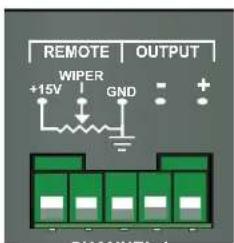
REMOTE | OUTPUT +15V WIPER GNDThe remote volume section on the rear panel of the RM316 allows the installer to place remote volume controls in any or all of the zones connected to the RM316. Wiring information is silk screened above each remote volume connector.
Q: Does the remote volume wire carry audio signal?
A: No, the remote volume wire only carries a DC control voltage that varies according to the position of the remote volume pot (10-100K Ohm linear potentiometer recommended). Use of the remote volume feature will not introduce any noise or cause any signal loss.
Q: What is the maximum length that I can run a remote volume wire?
A: Wire size can affect the maximum length. You can run up to 200 feet reliably, and with high quality wire up to 1000 feet.
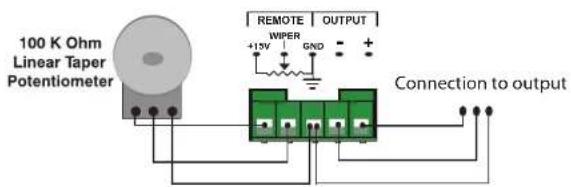
Below is a diagram of how to connect the pots to the remote volume Phoenix connectors.
REMOTE PAD: 5 pin Phoenix connector for connection to a remote potentiometer for remote volume control. A 100K Ohm potentiometer is recommended (others will work).
+15: Connection to potentiometer.
WIPER: Connection to potentiometers wiper (middle pin).
COMM: Common Ground for connection to pots.
As a note: If the potentiometer pad is working opposite of what you intended just reverse the wires going to that potentiometer.
text_image
100 K Ohm Linear Taper Potentiometer REMOTE | OUTPUT +15V GND + Connection to outputROLLS
ROLLS CORPORATION SALT LAKE CITY, UTAH 01/19
ROLLS
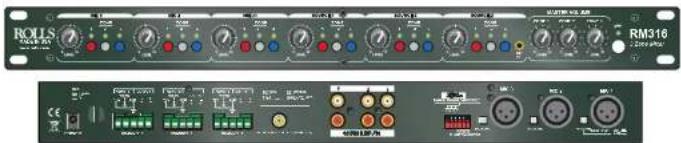
RM316 3 Zone Mixer
text_image
ROLLS RMS16 2.000 MHz OFF 500 OFF 400 OFF 300 OFF 200 OFF 100 OFF 50 OFF 20 OFF 10 OFF 5 OFF 2 OFF 1 OFF 5 OFF 2 OFF 1 OFF 5 OFF 2 OFF 1 OFF 5 OFF 2 OFF 1 OFF 5 OFF 2 OFF 1 OFF 5 OFF 2 OFF 1 OFF 5 OFF 2 OFF 1 OFF 5 OFF 2 OFF 1 OFF 5 OFF 2 OFF 1 OFF 6 OFF 2 OFF 1 OFF 5 OFF 2 OFF 1 OFF 6 OFF 2 OFF 1 OFF 5 OFF 2 OFF 1 OFF 6 OFF 2 OFF 1 OFF 5 OFF 2 OFF 1 OFF 6 OFF 2 OFF 1 OFF 5 OFF 2 OFF 1 OFF 6 OFF 3 OFF 2 OFF 1 OFF 5 OFF 2 OFF 1 OFF 6 OFF 3 OFF 2 OFF 1 OFF 5 OFF 2 OFF 1 OFF 6 OFF 3 OFF 2 OFF 1 OFF 5 OFF 2 OFF 1 OFF 6 OFF 3 OFF 2 OFF 1 OFF 5 OFF 3 OFF 2 OFF 1 OFF 6 OFF 3 OFF 2 OFF 1 OFF 5 OFF 3 OFF 2 OFF 1 OFF 6 OFF 3 OFF 2 OFF 1 OFF 5 OFF 3 OFF 2 OFF 1 OFF 6 OFF 3 OFF 2 OFF 1 OFF 5 OFF 3 OFF 3SPECIFICATIONS
Input Impedance: 10K Ohms balanced Line
600 Ohms balanced Mic
10K Ohms unbalanced RCA
Output Impedance: 50 Ohms balanced
Max Input Level: Mic: -30 dB
Source: +22 dB
Phantom Power: +15 Volts DC
Input Connectors: XLR and RCA
Outputs: 3 ea. Phoenix connector
Max Gain: 60 dB mic
30 dB line
S/N Ratio: >75 dB
THD: <.3%
IMD (SMPTE): < .3%
CMRR: 60 dB
Frequency Response: 20Hz to 20kHz +/- 0 dB
Power Adapter: 15VDC
Weight: 7 lbs (3KG)
Size: 19" x 1.75" x 6.5"
(48cm x 4.5cm x 17cm)
Quick Start Guide
text_image
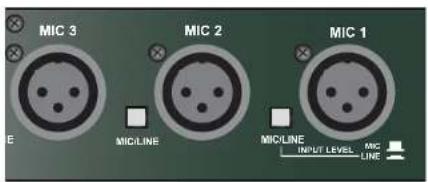
MIC 3 MIC 2 MIC 1 E MICLINE MICLINE INPUT LEVEL MIC LINEThe XLR input for MIC 1.2 and 3 can be configured to be Microphone level or line level. Follow the silk screening on the unit for proper use of the mic/line switch.
Q: When I plug a mic into the RM316 I can barely hear it?
A: The MIC/LINE switch is set to LINE level and you are using a MIC, set the switch to MIC. Make sure other volumes of the unit are set properly.
text_image
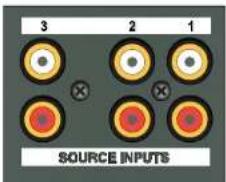
3 2 1 SOURCE INPUTSChannel Source 1-3 inputs are line level RCA's.
Q: I only have a single mono RCA to connect to the source inputs do I need to get a "Y" type adapter?
A: No, the RM316 will accept a mono or stereo signal into the RCA inputs, and will convert all signals to mono. No "Y" adapter is needed.
text_image
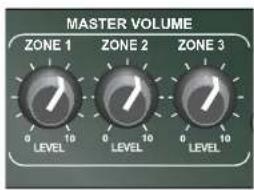
MASTER VOLUME ZONE 1 ZONE 2 ZONE 3 LEVEL LEVEL LEVELThe MASTER VOLUME controls on the front of the RM316 function just as the name implies. NOTE: With channel volumes, master volumes and possibly remote volumes there are plenty of opportunities to get distortion on the outputs. It is best to set all volumes at half (white pointer facing up). Then make adjustments from there as needed.
Q: When using a remote volume does the MASTER VOLUME control still work?
A: Yes, when using a remote volume both the remote volume and master volumes are active. We suggest if you are using a remote volume to set the master volume to 10 (all the way up) to give the remote volume access to the full volume potential of the RM316.
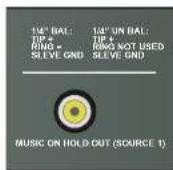
MUSIC ON HOLD:
The music on hold is a constant output from RCA input 1. Meaning whatever signal is plugged into RCA input 1 will be summed to mono and sent to the "music on hold" output, regardless of any switch position setting on the RM316.
TALK OVER:
The talk over is designed to allow mic 1,2 or 3 to talk over any signal on the selected main channel outputs.
EX: If the talk over assignment is engaged for CH.1 output, whenever signal is present mic 1,2 or 3 it will talk over all source material on CH.1.
The designation on the rear of the RM316 is for engaging/selecting the talk over for one of the three output channels. You can have the RM316 talk over function only on the output channels you select from the rear of the unit.
Q: Will mic 1 talk over mic 2 or 3?
A: No, mic 1,2 or 3 will only talk over the RCA source inputs.
Q: I can not get the TALK OVER to function?
A: In addition to having everything selected properly make sure you have enough signal present on the Mic 1,2 or 3 inputs to activate the Talk Over circuit. If the signal to those channels is to low it will not activate the circuit. To try and remedy this, turn the level of the mics/inputs up.
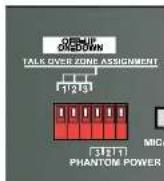
DIP SWITCH SETTINGS:
- PHANTOM POWER: This applies 15 volts phantom power to the indicated microphone.
- Talk Over Zone Assignment 1: When in the ON position, all program material on Channel 1 output will be "ducked" or muted when signal is present on MICROPHONE 1,2 or 3. This function is used for paging.
- Talk Over Zone Assignment 2, and 3 are the same as above when signal is present on MICROPHONE 1,2 or 3 they will be "ducked" or muted.
PHANTOM POWER:
The RM316 provides 15 volts of phantom power to the selected channel (Mic 1, 2 OR 3). These are selected independently of each other from the rear panel of the unit, see above illustration. Q: I cannot hear my mic. It is not a phantom power (condenser) type mic. Does it matter that I have the phantom power turned on?
A: Yes, it does matter. If you are using a dynamic mic (one that does not require phantom power), you must have the phantom power turned off. When the phantom power is on it will not allow you to hear the mic. It also may damage the RM316, or your mic, to have the phantom power engaged when using a dynamic mic.