
Nikkor AF DC-Nikkor 135mm f/2D - Objektiv NIKON - Kostenlose Bedienungsanleitung
Finden Sie kostenlos die Bedienungsanleitung des Geräts Nikkor AF DC-Nikkor 135mm f/2D NIKON als PDF.


| Produkttyp | Objektiv |
| Marke | Nikon |
| Modell | Nikkor AF DC-Nikkor 135mm f/2D |
| Brennweite | 135 mm |
| Maximale Blende | f/2 |
| Objektivaufbau | 7 Elemente in 6 Gruppen |
| Bildwinkel | 18° |
| Entfernungsmessbereich | 1,1 m bis unendlich |
| Filtergewinde | 72 mm |
| Abmessungen (Durchmesser x Länge) | ca. 79 mm x 120 mm (Gesamtlänge ca. 128 mm) |
| Gewicht | ca. 815 g |
| Bajonett | Nikon F |
| Fokussierung | Nikon Rear Focusing (RF) System |
| Blendensteuerung | Vollautomatisch |
| Defokus-Bildsteuerung | DC-Ring zur Steuerung von Vorder- und Hintergrundunschärfe |
| Eingebauter Gegenlichtblende | Ja, ausziehbar und drehbar |
| Entfernungsinformation | Wird an die Kamera übermittelt |
| Kompatible Zubehörteile | 72 mm Filter, Hartschalenkoffer CL-38 |
| Naheinstellgrenze | 1,1 m |
| Mindestblende | f/16 |
| Pflege | Reinigung mit Blasebalg und Ethanol; nicht mit organischen Lösungsmitteln |
| Sicherheitshinweise | Nicht zerlegen, nicht in die Sonne blicken, vor Feuchtigkeit schützen |
Häufig gestellte Fragen - Nikkor AF DC-Nikkor 135mm f/2D NIKON
Benutzerfragen zu Nikkor AF DC-Nikkor 135mm f/2D NIKON
0 Frage zu diesem Gerät. Beantworten Sie die, die Sie kennen, oder stellen Sie Ihre eigene.
Eine neue Frage zu diesem Gerät stellen
Laden Sie die Anleitung für Ihr Objektiv kostenlos im PDF-Format! Finden Sie Ihr Handbuch Nikkor AF DC-Nikkor 135mm f/2D - NIKON und nehmen Sie Ihr elektronisches Gerät wieder in die Hand. Auf dieser Seite sind alle Dokumente veröffentlicht, die für die Verwendung Ihres Geräts notwendig sind. Nikkor AF DC-Nikkor 135mm f/2D von der Marke NIKON.
BEDIENUNGSANLEITUNG Nikkor AF DC-Nikkor 135mm f/2D NIKON
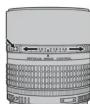
图A
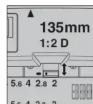
图B
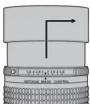
图C



照片3:DC环被向“F”(前)旋转
照片1: DC 环处于中间位置
照片2: DC 环被向 "R" (后) 旋转
| ■景深 | (m) | ||||||||
| 对焦距离 | 景深 | 复制比率 | |||||||
| f/2 | f/2.8 | f/4 | f/5.6 | f/8 | f/11 | f/16 | |||
| 1.1 1.10~ | 1:10.11~1.09 | .11~1.09~1.11 | 1:09.12~1.08 | 1:12~1.08~1.13 | .07 | 1/7 | |||
| 1.2 1.20~ | 1:20.1~1.19 | .21~1.19~1.21 | 1:19.22~1.18 | 1:23~1.17~1.24 | .16 | 1/8 | |||
| 1.3 1.31~ | 1:29.1~1.29 | .31~1.29~1.32 | 1:28.1~1.28 | 1:33~1.27~1.35 | .26 | 1/9 | |||
| 1.5 1.51~ | 1:49.1~1.49 | .52~1.48~1.52 | 1:48.1~1.47 | 1:54~1.46~1.56 | .44 | 1/10 | |||
| 2.0 1.00~ | 1:69.1~1.69 | .72~1.68~1.73 | 1:67.1~1.66 | 1:76~1.65~1.78 | .62 | 1/12 | |||
| 2.0 2.01~ | 1:99.2~1.98 | 1:03~1.97~2.04 | 1:96.20~1.95 | 2:08~1.93~2.12 | .89 | 1/14 | |||
| 2.5 2.52~ | 2:48.25~2.47 | 2:55~2.46~2.56 | 2:44.59~2.41 | 2:63~2.58~2.69 | .23 | 1/18 | |||
| 3.0 3.03~ | 2:97.305~2.96 | 2:07~2.94~3.09 | 2:91.34~2.88 | 3:19~2.83~3.29 | .276 | 1/22 | |||
| 4.0 4.06~ | 3:94.408~3.92 | 3:12~3.89~4.17 | 3:84.25~3.78 | 4:35~3.71~4.53 | .59 | 1/29 | |||
| 5.0 5.09~ | 4:91.513~4.88 | 3:19~4.825~2.77 | 4:79.35~4.66 | 5:56~4.55~5.86 | .37 | 1/36 | |||
| 7.0 7.18~ | 6:83.726~6.76 | 3:38~6.66~5.54 | 6:53.780~6.35 | 7:15~6.41~8.81 | 5.82 | 1/51 | |||
| 10.0 | 10.38~9.65 | 10.54~9.51 | 10.79~9.32 | 11.14~9.92 | 11.72~8.73 | 12.53~8.33 | 14.17~7.75 | 1/74 | |
| 15.0 | 15.8~14.2 | 16.25~13.93 | 16.85~13.52 | 17.73~13.00 | 19.24~13.30 | 21.53~11.53 | 26.88~10.44 | 1/111 | |
| 20.0 | 21.58~18.64 | 22.29~18.14 | 23.44~17.45 | 25.17~16.00 | 28.32~15.48 | 33.58~14.27 | 48.71~12.64 | 1/148 | |
| ∞ | 273~∞ | 195~∞ | 137~∞ | 98~∞ | 68~∞ | 50~∞ | 34~∞ | 1/∞ | |
| ■近摄(cm) | ||||||
| 配件 | 近摄 | 近摄(镜头反装) | ||||
| 复制比率 | 拍摄对象范围 | 对焦距离 | 复制比率 | 拍摄对象范围 | 对焦距离 | |
| PK环 ^2 | 1/16.9~1/1.8 | 40.5×60.7~4.4×6.6 | 248~50.2 | - | - | - |
| PN环 | 1/2.6~1/1.7 | 6.2×9.2~4.2×6.3 | 59.3~49.6 | - | - | - |
| 伸缩镜腔PB-4、PB-5 | 1/3.1~1.4 | 7.5×11.3~1.7×2.6 | 66.0~47.8 | - | - | - |
| 伸缩镜腔PB-6 | 1/2.8~1.5 | 6.7×10.1~1.6×2.3 | 62.1~49.0 | - | - | - |
| 延伸镜腔PB-6E | 1/2.8~3.2 | 6.7×10.1~0.74×1.1 | 62.1~67.4 | - | - | - |
- 镜头反装时无法使用。
- 第一个数据适用于单独使用 PK-11A 时,其他数据则适用于一起使用从 PK-11A 到 PK-13、PK-11 到 PK-13 或 PK-1 到 PK-3 的 PK 环时。请注意,PK-11 和 PK-1 无法直接安装于镜头。
中文版(简体)
感谢您选购尼康产品。该AF DC-尼克尔135mm f/2D镜头结合了尼康散焦图像控制(DC)和圆形光圈,允许您在虚化前景或背景中物体的同时使未清晰对焦的图像部分看起来更自然。它还具备一个可提高耐用性和拉动对焦反应的后组对焦(RF)系统;镜头后部元件在镜筒内部滑动,因此镜头的总长度在对焦过程中不会改变。内置镜头遮光罩可使明亮阳光下的杂光减少到最低程度。本镜头还可为照相机机身提供距离信息以进行即时3D矩阵测光或3D多传感器均衡补充闪光的闪光控制。在使用本产品前,请仔细阅读这些指南和照相机说明书,以便您在现在和今后都能充分利用您的镜头。
使用产品前请仔细阅读本使用说明书
安全须知
请在使用前仔细阅读“安全须知”,并以正确的方法使用。本“安全须知”中记载了重要的内容,可使您能够安全、正确地使用产品,并预防对您或他人造成人身伤害或财产损失。请在阅读之后妥善保管,以便本产品的所有使用者可以随时查阅。
有关指示
本节中标注的指示和含义如下
警告 表示若不遵守该项指示或操作不当,则有可能造成人员死亡或负重伤的内容。 注意 表示若不遵守该项指示或操作不当,则有可能造成人员伤害、以及有可能造成物品损害的内容。
本节使用以下图示和符号对必须遵守的内容作分类和说明:
图示和符号的实例
△符号表示唤起注意(包括警告)的内容
在图示中或图示附近标有具体的注意内容(左图之例为当心触电)。
符号表示禁止(不允许进行的)的行为。
在图示中或图示附近标有具体的禁止内容(左图之例为禁止拆解); 符足主二强制执行(必需进行)的行为
在图元中或图云附近标有具体的强制执行内容(左图之例为取出电池)。
警告
禁止拆解 切勿自行拆解、修理或改装。否则将会造成触电、发生故障并导致受伤。
禁止触碰 当产品由于跌落而破损使得内部外露时,切勿用手触碰外露部分。否则将会造成触电、或由于破损部分而导致受伤。取出照相机电
立即委托修理池,并委托经销商或尼康授权的维修服务中心进行修理。
取出电池 当发现产品变热、冒烟或发出焦味等异常时,请立刻取出照相机电池。若在此情况下继续使用,将会导致火灾或灼伤。取出电池时,请小心勿被烫伤。取出电池,并委托经销商或尼康授权的维修服务中心进行修理。立即委托修理
禁止接触水 切勿浸入水中或接触到水,或被雨水淋湿。否则将会导致起火或触电。
禁止使用 切勿在有可能起火、爆炸的场所使用。在有丙烷气、汽油、可燃性喷雾剂等易燃性气体、粉尘的场所使用产品,将会导致爆炸或火灾。
切勿用镜头或照相机直接观看太阳或强光。
禁止观看 否则将会导致失明或视觉损伤
注意
当心触电 切勿用湿手触碰。 否则将有可能导致触电。
禁止放置 切勿在婴幼儿伸手可及之处保管产品。否则将有可能导致受伤。
小心使用 进行逆光拍摄时,务必使太阳充分偏离视角。阳光会在照相机内部聚焦,并有可能导致火灾、太阳偏离视角的距离微小时,也有可能会导致火灾
一 聚点,并有可能导致入火。太阳满离视角的距离微小时,也有
不使用时请差上镜头差,或保存在没有阳光照射处
妥善保存 不使用时请盖上镜头盖,或保存阳光会聚焦,并有可能导致火灾。
注意
① 小心移动 进行移动时,切勿将照相机或镜头安装在三脚架上
① 小心移动 挪倒、碰撞时将有可能导致受伤。
禁止放置 切勿放置于封闭的车辆中、直射阳光下或其它异常高温之处。
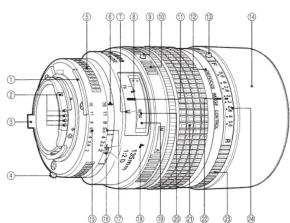
■镜头部件
①测光耦合脊 ⑩A-M模式环
②CPU接点 ⑪对焦距离标记
③光圈传递杆 ⑫镜头镜同 ⑳对焦环
④EE伺服耦合杆 ⑬DC环锁定按钮(按住 ⑰DC环标记
⑤光圈环 时解除DC环的锁定) ②DC环(向“R”旋转可
⑥光圈/镜头安装标记 ⑭内置镜头遮光罩 模糊背景,向“F”旋转
⑦景深指示(显示f/16时 ⑮光圈且读刻度 则可模糊前景)的景深 ⑯最小光圈锁定杆 ⑰用于控制图像模糊的光
的景深)
⑯最小光圈锁定杆
⑳用于控制图像模糊的光
⑴红外线补偿标记(白色)
⑰光圈刻度
圈刻度
⑨ A-M模式环释放按钮 ⑱ A-M模式标记
■注意事项
· 请保持 CPU 镜头接点清洁并小心不要损坏 CPU 接点。
- 不要将以下配件直接安装至本镜头:PK-1或PK-11自动延伸环、K1或K2环、BR-4自动环、BR-2微距适配环(PK-1A、BR-6和BR-2A可分别代替PK-11、BR-4和BR-2使用)。若不遵守此注意事项,可能会导致损坏本镜头的CPU接点或其他部件。其他镜头配件可能与照相机不兼容;请务必在使用前先查阅照相机的说明书。
·本镜头无法与用于尼康F3AF照相机的DX-1取景器一起使用。
■散焦图像控制:使用DC环(图A)
若要使用散焦图像控制,请在按DC环锁定解除按钮的同时旋转DC环。若要模糊背景物体,请将DC环向“R'(后)旋转。向“F”旋转则可模糊前景物体。通过旋转DC环使DC环标记与光圈当前所选的f值对齐,您可在巧妙模糊背景或前景中物体的同时使摇位置清晰对焦;将DC环旋转至更值可获得集焦效果。请始终在对焦前定位好焦,在对焦后或对焦距设定过程中旋转DC环将会会使拍摄对象失焦。请注意,当DC环标记与2个f/位置之间的点时齐时可获得最大分辨率,并且DC环处于其他位置时,对焦距离指示不显示的距离可能不同于实际对焦距离。散焦图像控制处于有效状态时,对焦环可旋转甚至超过无穷远的位置,并且根握DC环位置的不同,最近对焦距离可能会大于1.1m。
散焦图像控制的效果根据拍摄环境(包括拍摄对象与背景或前景之间的距离)的不同而异。若其效果在取景器中难以分辨,请试拍一张照片并根据需要调整 DC 环。
■对焦
本镜头支持A-M模式选择。若要选择A-M模式,请按住A-M模式环释放按钮并同时旋转A-M模式环。选择A可进行自动对焦,选择M则可进行手动对焦。选择不符合照相机对焦模式的A-M模式可能会损坏照相机。
■对焦屏
以下照相机支持用于不同镜头或不同情况下的多种对焦屏。以下对焦屏适用于本镜头(当将B2/B3、E2/E3或K2/K3对焦屏用于非此处所列照相机时,请分别参考B、E或K列):
| 照相机F6 | EC-E | A/L | B | C | D | E | G1 | G2 | G3 | G4 | H1 | H2 | H3 | H4 | J | K | P | M | R | T | U | F |
| ◎ | ◎ | ◎ | ||||||||||||||||||||
| F5+DP-30 | ◎ | ◎ | ◎ | ○ | ◎ | ○(+0.5) | ◎ | |||||||||||||||
| F5+DA-30 | ◎ | ◎(+0.5) | ◎ | ○(+0.5) | ◎ | ○(+1.0) | ◎(+0.5) | |||||||||||||||
| F4+DP-20 | ◎ | ◎ | ◎(-1.0) | ◎ | ◎ | ◎ | ◎ |
| 照相机\对焦屏EC-B/ | A/L | B | C | D | E | G1 | G2 | G3 | G4 | H1 | H2 | H3 | H4 | J | K | P | M | R | T | U | F |
| F4+DA-20 | ◎ | ◎ | ◎[-1,0] | ◎ | ◎ | ◎ | ◎ | ||||||||||||||
| F3 | ◎ | ◎ | ○ | ○ | ◎ | ○ | ◎ | ◎ | ◎ | ◎ | ◎ | △ | ◎ | ◎ |
@:推荐使用。
U. 在取景器中可见渐晕(照片不会受到影响)
乙. 分屏显示不会提问对焦准确度。
():括号中的数据是指用于中央重点测光的曝光补偿值。当调整F6的曝光补偿时,请在自定义设定b6(“对焦屏补偿”)中选择“其他对焦屏”;请注意,使用B或E以外的对焦屏时,即使曝光补偿值为0,也必须选择“其他对焦屏”。F5和F4的用户可分别使用自定义设定18和对焦屏曝光补偿拨盘调整曝光补偿;有关详细信息,请参阅照相机的说明书。
空白单元格:不适用于本镜头。请注意,在放大倍率为1或更高时,M型对焦屏仍可用于显微拍摄和微距拍摄。
■最小光圈锁定杆(图B)
在程序自动或快门优先自动模式下进行拍摄时将光圈锁定为f/16。
1 将光圈环旋转至最小光圈设定 (f/16)。
2 朝光圈环滑动锁定杆,以便锁定杆上的自点与橙点对齐。
若要解除锁定,请按相反方向滑动锁定杆。
■使用内置镜头遮光罩(图C)
若要伸出遮光罩,请将其拉出并逆时针旋转到位。顺时针旋转并将其往回按即可缩回
遮光罩。
■镜头保养
· 用吹气球去除镜头表面的灰尘和浮屑。若要去除污点和指纹,可使用一块滴有少许乙醇或镜头清洁剂的干净软棉布或镜头清洁纸,以圆周运动方式从里向外进行清洁。注意不要留下污渍,也不要用手指触碰玻璃。
·切勿使用涂料稀释剂或苯等有机溶剂清洁镜头。
·镜头遮光罩或NC滤镜可用于保护镜头前部元件。
·不使用镜头时,请美上镜头前后美
·保持镜头干燥。内部构造生锈将导致无法挽回的损坏。
·若在较长时间内不使用镜头,请将其存放在阴凉干燥的地方以防止发霉和生锈。切
不可存放在直射阳光下,也不可与石脑油或樟脑丸一起存放。
·将镜头放置在过于炎热的地方将会使强化塑料部件受损或变形。
·运输产品时,请在包装箱内装入足够多的缓冲材料,以减少(避免)由于冲击导致产品损坏。
■兼容的配件
·72mm旋入式滤镜
·镜头硬套CL-38
■技术规格
| 焦距 | 135mm |
| 最大光圈 | f/2 |
| 镜头结构 | • 6组7片 • 镜头保护玻璃片 |
| 视角 | 18° |
| 对焦距离指示 | 从1lm至无穷远(∞),以米和英尺为单位 |
| 距离信息 | 输出到照相机 |
| 光圈刻度 | 标准和光圈直读刻度上均为f/2至f/16 |
| 最小光圈锁定 | 备有 |
| 光圈 | 全自动 |
| 对焦 | 尼康后组对焦(RF)系统 |
| 测光 | ·CPU/AI照相机:全开光圈测光 ·其他照相机:最小光圈测光 |
| 卡口 | 尼康F卡口 |
| 滤镜附件尺寸 | 72mm(P=075mm) |
| 尺寸 | 约79mm(最大直径)×120mm(从照相机镜头卡口边缘开始的距离):总体长度约为128mm |
重量 约815g
尼康公司保留可随时更改说明书内载之硬件技术规格的权利,而无须事先通知。
产品中有害物质的名称及含量
| 标志 | 部件名称 | 有害物质 | |||||
| 铅(Pb) | 汞(Hg) | 镉(Cd) | 六价铬(Cr(VI)) | 多溴联苯(PBB) | 多溴二苯醚(PBDE) | ||
| 外壳 | ○ | ○ | ○ | ○ | ○ | ○ | |
| 机械元件 | × | ○ | ○ | ○ | ○ | ○ | |
| 光学元件 | ○ | ○ | ○ | ○ | ○ | ○ | |
| 电子元件 | × | ○ | ○ | ○ | ○ | ○ | |
本表格依据SJ/T11364的规定编制
○:表示该有害物质在该部件所有均质材料中的含量均在GB/T26572规定的限量要求以下。
×:表示该有害物质至少在该部件的某一均质材料中的含量超出 GB/T 26572规定的限量要求。但是,以现有的技术条件要使照相机相关产品完全不含有上述有害物质极为困难,并且上述产品都包含在《关于电气电子设备中特定有含物质使用限制指令2011/65/EU》的豁免范围之内。
进口商:尼康映像仪器销售(中国)有限公司
(上海市茂名南路205号瑞金大厦22楼,200020)
尼康客户支持中心服务热线:400-820-166
(周一至周日9:00-18:00,除夕下午休息)
http://www.nikon.com.cn/
在日本印刷
出版日期:2015年3月1日
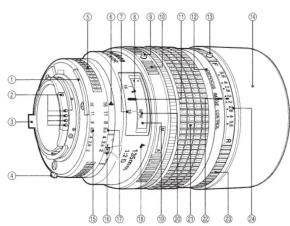
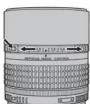
Figure A
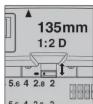
Figure B
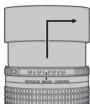
Figure C

Photo 1: DC ring in
neutral position

Photo 2: DC ring
rotated toward "R"
(rear)

Photo 3: DC ring
rotated toward "F"
(front)
■ Depth of Field (Metric)
| Focus distance | Depth of fit old | Reproduction ratio | ||||||
| f/2 | f/2.8 | f/4 | f/5.6 | f/8 | f/11 | f/16 | ||
| 1.1 1.10– | -1.10 1.11– 1.09 | 1.11–1.09 1.1– | 1.1–1.09 1.2– | 1.08 1.12 – 1.08 | 1.13 – 1.07 | 1/7 | ||
| 1.2 1.20– | -1.20 1.21– 1.19 | 1.21–1.19 1.2– | 1.1–1.19 1.2– | 1.18 1.23 – 1.17 | 1.24 – 1.16 | 1/8 | ||
| 1.3 1.31– | -1.29 1.31– 1.29 | 1.31–1.29 1.3– | 1.28–1.32– | 1.28 1.33 – 1.27 | 1.35 – 1.26 | 1/9 | ||
| 1.5 1.51– | -1.49 1.51 – 1.49 | 1.52 – 1.48 1.5– | 1.48 1.53 – | 1.47 1.54 – 1.46 | 1.56 – 1.44 | 1/10 | ||
| 1.7 1.71– | -1.69 1.71 – 1.69 | 1.72–1.68 1.7– | 1.73 – 1.67 1.74– | 1.66 1.76 – 1.65 | 1.78 – 1.62 | 1/12 | ||
| 2.0 2.01– | -1.99 2.02 – 1.98 | 2.03 – 1.97 2.04 – | 1.96 2.06 – | 1.95 2.08 – 1.93 | 2.12 – 1.89 | 1/14 | ||
| 2.5 2.52– | -2.48 2.53 – 2.47 | 2.55 – 2.46 2.56 – | 2.44 2.59 – | 2.41 2.63 – 2.38 | 2.69 – 2.33 | 1/18 | ||
| 3.0 3.03– | -2.97 3.05 – 2.96 | 3.07 – 2.94 3.09 – | 2.91 3.14 – | 2.88 3.19 – 2.83 | 3.29 – 2.76 | 1/22 | ||
| 4.0 4.06– | -3.94 4.08 – 3.92 | 4.12 – 3.89 4.1– | 3.84 4.25 – | 3.78 4.35 – 3.71 | 4.53 – 3.59 | 1/29 | ||
| 5.0 5.09– | 4.91 5.13 – 4.88 | 5.19 – 4.82 5.27 – | 4.79 5.39 – | 4.66 5.56 – 4.55 | 5.86 – 4.37 | 1/36 | ||
| 7.0 7.18– | -6.83 7.26 – 6.76 | 3.38 – 6.66 3.7– | -6.53 7.80 – | 6.35 8.15 – 6.14 | 8.81 – 5.82 | 1/51 | ||
| 10.0 | 10.38 – 9.65 | 10.54 – 9.51 | 10.79 – 9.32 | 11.14 – 9.07 | 11.72 – 8.73 | 12.53 – 8.33 | 14.17 – 7.75 | 1/74 |
| 15.0 | 15.87 – 14.22 | 16.25 – 13.93 | 16.85 – 13.52 | 17.73 – 13.00 | 19.24 – 13.30 | 21.53 – 11.53 | 26.88 – 10.44 | 1/111 |
| 20.0 | 21.58 – 18.64 | 22.29 – 18.14 | 23.44 – 17.45 | 25.17 – 16.00 | 28.32 – 15.48 | 33.58 – 14.27 | 48.71 – 12.64 | 1/148 |
| ∞ 273–∞ 195 = ∞ 137 = ∞ 98 – ∞ 68 = ∞ 50 = ∞ 34 = ∞ | 1/∞ | |||||||
■ Close-up Photography (Metric)
(cm)
| Accessory | Close-up photography | Close-up photography (lens reversed)1 | ||||
| Reproduction ratio | Subject fi eld | Focus distance | Reproduction ratio | Subject fi eld | Focus distance | |
| Ring PK2 | 1/16.9–1/1.8 | 40.5 × 60.7 – 4.4 × 6.6 | 248–50.2 | – | – | – |
| Ring PN | 1/2.6–1/1.7 | 6.2 × 9.2–4.2 × 6.3 | 59.3–49.6 | – | – | – |
| Bellows PB-4, PB-5 | 1/3.1–1.4 | 7.5 × 11.3–1.7 × 2.6 | 66.0–47.8 | – | – | – |
| Bellows PB-6 | 1/2.8–1.5 | 6.7 × 10.1–1.6 × 2.3 | 62.1–49.0 | – | – | – |
| Extension Bellows PB-6E | 1/2.8–3.2 | 6.7 × 10.1–0.74 × 1.1 | 62.1–67.4 | – | – | – |
- First figure is for PK-11A when used alone, remaining figures for rings PK-11A through PK-13, PK-11 through PK-13, or PK-1 through PK-3 used together. Note the PK-11 and PK-1 can not be attached directly to the lens.
■ Depth of Field (Imperial)
(ft)
| Focus distance | Depth of ef eld | Reproduction ratio | ||||||
| f/2 | f/2.8 | f/4 | f/5.6 | f/8 | f/11 | f/16 | ||
| 4 ft | 4 ft 3% in-3 ft 11 % in. | 4 ft 3% in-3 ft 11 % in. | 4 ft 5% in-3 ft 11 % in. | 4 ft 5% in-3 ft 11 % in. | 4 ft 5% in-3 ft 11 % in. | 4 ft 5% in-3 ft 11 % in. | 4 ft 5% in-3 ft 10 % in. | 1/8.1 |
| 5 ft | 5 ft 3% in-4 ft 11 % in. | 5 ft 3% in-4 ft 11 % in. | 5 ft 5% in-4 ft 11 % in. | 5 ft 5% in-4 ft 11 % in. | 5 ft 5% in-4 ft 10 % in. | 5 ft 5% in-4 ft 10 % in. | 5 ft 5% in-4 ft 9 % in. | 1/10.4 |
| 6 ft | 6 ft 3% in-5 ft 11 % in. | 6 ft 3% in-5 ft 11 % in. | 6 ft 5% in-5 ft 11 % in. | 6 ft 5% in-5 ft 11 % in. | 6 ft 5% in-5 ft 10 % in. | 6 ft 5% in-5 ft 9 % in. | 6 ft 5% in-5 ft 9 % in. | 1/12.8 |
| 7 ft | 7 ft 3% in-6 ft 11 % in. | 7 ft 3% in-6 ft 11 % in. | 7 ft 5% in-6 ft 10 % in. | 7 ft 5% in-6 ft 10 % in. | 7 ft 5% in-6 ft 9 % in. | 7 ft 5% in-6 ft 8 % in. | 7 ft 5% in-6 ft 7 % in. | 1/15.1 |
| 8 ft | 8 ft 3% in-7 ft 11 % in. | 8 ft 5% in-7 ft 10 % in. | 8 ft 5% in-7 ft 10 % in. | 8 ft 5% in-7 ft 9 % in. | 8 ft 5% in-7 ft. | 8 ft 5% in-7 ft 7 % in. | 8 ft 5% in-7 ft 6 % in. | 1/17.3 |
| 10 ft | 10 ft 1%-9 ft 10 % in. | 10 ft 1% in-9 ft 9 % in. | 10 ft 2% in-9 ft 9 % in. | 10 ft 3% in-9 ft 8 % in. | 10 ft 5% in-9 ft 7 % in. | 10 ft 7% in-9 ft 5 % in. | 10 ft 10% in-9 ft 2 % in. | 1/21.9 |
| 12 ft | 12 ft 1%-11 ft 10 %. | 12 ft 2% in-11 ft 9 %. | 12 ft 3% in-11 ft 8 %. | 12 ft 5% in-11 ft 7 %. | 12 ft 7% in-11 ft 5 %. | 12 ft 10% in-11 ft 2% | 13 ft 4% in-10 ft 10 %. | 1/26.5 |
| 15 ft | 15 ft 2% in-14 ft 9 %. | 15 ft 4% in-14 ft 9 %. | 15 ft 5% in-14 ft 6 %. | 15 ft 8% in-14 ft 4 %. | 16 ft-14 ft 1 %. | 16 ft 5% in-13 ft 9 %. | 17 ft 2% in-13 ft 3 %. | 1/33.3 |
| 20 ft | 20 ft 5% in-19 ft 6 %. | 20 ft 7% in-19 ft 2 %. | 20 ft 10% in-19 ft 2 %. | 21 ft 3% in-18 ft 10 %. | 21 ft 10% in-18 ft 5 %. | 22 ft 8% in-17 ft 10 %. | 24 ft 2% in-17 ft 1 %. | 1/44.6 |
| 30 ft | 3 ft 1% in-28 ft 9 %. | 3 ft 5% in-28 ft 9 %. | 3 ft 1% in-28 ft 1 %. | 33 ft 2% in-26 ft 9 %. | 34 ft 6% in-25 ft 9 %. | 36 ft 7% in-25 ft 9 %. | 40 ft 8% in-23 ft 9 %. | 1/67.2 |
| 50 ft | 52 ft 10% in-47 ft 4 %. | 54 ft 2% in-46 ft 5 %. | 56 ft 2% in-45 ft. | 59 ft 1% in-43 ft 4 %. | 64 ft 1% in-41 ft. | 71 ft 9% in-38 ft 5 %. | 89 ft 7% in-34 ft 9 %. | 1/112.4 |
| ∞ | 896 ft ∼∞ | 640 ft ∼∞ | 448 ft ∼∞ | 320 ft ∼∞ | 224 ft ∼∞ | 163 ft ∼∞ | 112 ft ∼∞ | 1/∞ |
■ Close-up Photography (Imperial)
(in.)
| Accessory | Close-up photography | Close-up photography (lens reversed)2 | ||||
| Reproduction ratio | Subject fi eld | Focus distance | Reproduction ratio | Subject fi eld | Focus distance | |
| Ring PK1 | 1/16.9 – 1/1.8 | 15.9 × 23.9 – 1.7 × 2.69 | 7.5 – 19.8 | – | – | – |
| Ring PN | 1/2.6 – 1/1.7 | 2.4 × 3.6 – 1.6 × 2.5 | 23.4 – 19.5 | – | – | – |
| Bellows PB-4, PB-5 | 1/3.1 – 1.4 | 3.0 × 4.4 – 0.69 × 1.0 | 26.0 – 18.8 | – | – | – |
| Bellows PB-6 | 1/2.8 – 1.5 | 2.7 × 4.0 – 0.16 × 0.92 | 24.5 – 19.3 | – | – | – |
| Extension Bellows PB-6E | 1/2.8 – 3.2 | 2.7 × 4.0 – 0.29 × 0.44 | 24.5 – 26.5 | – | – | – |
- Can not be used when PKS is leveled.
- First figure is for PK-11A when used alone, remaining figures for rings PK-11A through PK-13, PK-11 through PK-13, or PK-1 through PK-3 used together. Note the PK-11 and PK-1 can not be attached directly to the lens.
English
Thank you for purchasing a Nikon product. This AF DC-Niktor 135 mm f/2D lens combines Nikon defocus image control (DC) with a rounded diaphragm, allowing you to defocus objects in the foreground or background while making the out-of-focus elements appear more natural. It also features a rear focusing (RF) system to improve durability and autofocus response; the rear lens elements slide inside the barrel so that the overall length of the lens does not change during focusing. A built-in lens hood minimizes flare in bright sunlight. The lens also supplies distance information to the camera body for instantaneous 3D matrix metering or 3D multi-sensor balanced fill-flash flash control. Before using this product, please carefully read both these instructions and the camera manual so you get the maximum value from your lens now and for years to come.
■ For Your Safety
CAUTIONS
- Do not disassemble. Touching the internal parts of the camera or lens could result in injury. In the event of malfunction, the product should be repaired only by a qualified technician. Should the product break open as the result of a fall or other accident, remove the camera battery and/or disconnect the AC adapter and then take the product to a Nikon-authorized service center for inspection.
- Turn the camera off immediately in the event of malfunction. Should you notice smoke or an unusual smell coming from the equipment, immediately unplug the AC adapter and remove the camera battery, taking care to avoid burns. Continued operation could result in fire or injury. After removing or disconnecting the power source, take the equipment to a Nikon-authorized service center for inspection.
- Do not use in the presence of flammable gas. Operating electronic equipment in the presence of flammable gas could result in explosion or fire.
- Do not look at the sun through the lens or the camera viewfinder. Viewing the sun or other bright light source through the lens or viewfinder could cause permanent visual impairment.
- Keep out of reach of children. Particular care should be taken to prevent infants from putting the batteries or other small parts into their mouths.
- Observe the following precautions when handling the lens and camera:
- Keep the lens and camera dry. Failure to observe this precaution could result in fire or electric shock. - Do not handle the lens or camera with wet hands. Failure to observe this precaution could result in electric shock.
- Keep the sun well out of the frame when shooting backlit subjects. Sunlight focused into the camera when the sun is in or close to the frame could cause a fire.
- If the lens will not be used for an extended period, attach the front and rear lens caps and store the lens out of direct sunlight. If left in direct sunlight, the lens could focus the sun's rays onto flammable objects, causing fire.
■ Parts of the Lens
① Meter coupling r
② CPU contacts
③ Aperture indexing post
④ EE servo coupling post
⑤ Aperture ring
⑥ Aperture/mounting index
⑦ Depth-or-field indicators (show depth or held at t/16) ⑧ Infrared compensation index (white)
⑤ Infrared compensation index (white ⑨ A-M mode ring release button
⑤ A-M mode ring 10 A-M mode ring
⑪ Focus distance
⑫ Lens barrel
⑬ DC ring lock button (unlocks DC ring while pressed)
■ Notices
- Keep the CPU lens contacts clean and be careful not damage the CPU contacts.
- Do not attach the following accessories directly to the lens: PK-1 or PK-11 auto extension rings, K1 or K2 rings, BR-4 auto rings, or BR-2 macro adapter rings (the PK-11A, BR-6, and BR-2A can be used in place of the PK-11, BR-4, and BR-2, respectively). Failure to observe this precaution will result in damage to the CPU contacts or other parts of the lens. Other lens accessories may not be compatible with the camera; be sure to consult the camera manual before use.
• The lens can not be used with the DX-1 viewfinder for Nikon F3AF cameras.
■ Defocus Image Control: Using the DC Ring (Figure A)
To use defocus image control, keep the DC ring lock release button pressed while rotating the DC ring. To blur background objects, rotate the ring toward "R" (rear). To blur foreground objects, rotate the ring toward "F". Rotating the ring so that the DC ring index aligns with the f-number currently selected for aperture throws your subject into sharp relief while artfully blurring objects in the background or foreground; for a soft-focus effect, rotate the ring to a higher number. Always position the ring before focusing; rotating the DC ring after focusing or while focus is locked will throw your subject out of focus.
Note that the highest resolution is achieved when the ring index is aligned with the dot between the two f/2 positions, and that the distance shown by focus distance indicator may differ from the actual focus distance when the ring is other positions. When defocus image control is in effect, the focus ring can be rotated past infinity and the minimum focus distance may, depending on the position of the DC ring, be greater than 1.1 m (4 ft.).
The effects of defocus image control vary with shooting conditions, including the distance between the subject and the background or foreground. If the effects are difficult to discern in the viewfinder, take a test shot and adjust the ring as necessary.
■ Focus
This lens supports A-M mode selection. To choose the A-M mode, rotate the A-M mode ring while pressing the A-M mode ring release button. Select A for autofocus and M for manual focus. Choosing an A-M mode that does not match the camera focus mode may damage the camera.
■ Focusing Screens
The cameras below support a variety of focusing screens for use with different lenses or in different situations. The following screens are suited for use with this lens (when using B2/B3, E2/E3, or K2/K3 screens with cameras not listed here, refer respectively to columns B, E, or K):
| Camera\Screen EC-B/ | |||||||||||
| F6 | ◎ | ◎ | ◎ | ||||||||
| F5+ DP-30 | ◎ | ◎ | ◎ | ○ | ◎ | ○(+0.5) | |||||
| F5+ DA-30 | ◎ | ◎(+0.5) | ◎ | ○(+0.5) | ◎ | ○(+1.0) | |||||
| F4+ DP-20 | ◎ | ◎ | ◎(-1.0) | ||||||||
| F4+ DA-20 | ◎ | ◎ | ◎(-1.0) | ||||||||
| F3 | ◎ | ◎ | ○ | ○ | ◎ | ○ | ◎ | ||||
| Camera\Screen | H2 | H3 | H4 | J | K | P | M | R | T | U | F | |
| F6 | ◎ | |||||||||||
| F5+ DP-30 | ◎ | |||||||||||
| F5+ DA-30 | ◎(+0.5) | |||||||||||
| F4+ DP-20 | ◎ | ◎ | ◎ | ◎ | ||||||||
| F4+ DA-20 | ◎ | ◎ | ◎ | ◎ | ||||||||
| F3 | ◎ | ◎ | ◎ | ◎ | △ | ◎ | ◎ | |||||
Recommended.
O: Vignetting visible in viewfinder (photographs are not affected).
△: Split-screen display does not improve focus accuracy.
( ): Figures in parentheses give the exposure compensation for center-weighted metering. Select "Other screen" for Custom Setting b6 ("Screen comp.") when adjusting exposure compensation for the F6; note that with screens other than B or E, "Other screen" must be selected even when the value for exposure compensation is 0. Users of the F5 and F4 can adjust exposure compensation using Custom Setting 18 or the focusing screen exposure compensation dial, respectively; see the camera manual for details.
Empty cell: Not suited to use with this lens. Note that type M screens can however be used for photomicrography and macro photography at magnifi cations of 1 : 1 or higher.
■ The Minimum Aperture Lock Lever (Figure B)
Lock aperture at f/16 when shooting in programmed auto or shutter-priority auto mode.
1 Rotate the aperture ring to the minimum aperture setting (f/16).
2 Slide the lock lever toward the aperture ring so that the white dot on the lock lever aligns with the orange dot.
To release the lock, slide the lever in the opposite direction.
■ Using the Built-in Lens Hood (Figure C)
To extend the hood, pull it out and rotate it counterclockwise until it stops. To retract the hood, turn it clockwise and press it back.
■ Lens Care
- Use a blower to remove dust and lint from the lens surfaces. To remove smudges and fingerprints, apply a small amount of ethanol or lens cleaner to a soft, clean cotton cloth or lens-cleaning tissue and clean from the center outwards using a circular motion, taking care not to leave smears or touch the glass with your fingers. - Never use organic solvents such as paint thinner or benzene to clean the lens.
• The lens hood or an NC filter can be used to protect the front lens element.
- Attach the front and rear caps when the lens is not in use.
- Keep the lens dry. Rusting of the internal mechanism can cause irreparable damage.
- If the lens will not be used for an extended period, store it in a cool, dry location to prevent mold and rust. Do not store in direct sunlight or with panchtha or camphor moth balls.
- Leaving the lens in extremely hot locations could damage or warp parts made from reinforced plastic.
■ Compatible Accessories
- 72 mm screw-in filter
- Hard Lens Case CL-38
| ■ Specifications | |
| Focal length | 135 mm |
| Maximum aperture | 1/2 |
| Lens construction | • 7 elements in 6 groups• Protective-glass lens covering |
| Angle of view | 18° |
| Focus distance indicator | Graduated in meters and feet from 1.1 m (4 ft.) to infinity (=) |
| Distance information | Output into camera |
| Aperture scale | 1/2 to 7/16 on both standard and aperture-direct readout scales |
| Minimum aperture lock | Provided |
| Diaphragm | Fully automatic |
| Fequing | Nikon Rear Focusing (RF) system |
| Metering | • CPU/A cameras: Full aperture• Other cameras: Minimum aperture |
| Mount | Nikon F mount |
| Filter-attachment size | 72 mm (P = 0.75 mm) |
| Dimensions | Approx. 99 mm (maximum diameter) × 120 mm (distance from camera lens mount fl angle); overall length is approx. 128 mm |
| Weight | Approx. 815 g (lb. 12.7 oz.) |
Nikon reserves the right to change the specifications of the hardware described in this manual at any time and without prior notice.
© 1995 Nikon Corporation