
SRS-88 - Lautsprecher SONY - Kostenlose Bedienungsanleitung
Finden Sie kostenlos die Bedienungsanleitung des Geräts SRS-88 SONY als PDF.


| Produkttyp | Stereo-Aktivlautsprechersystem |
| Marke | Sony |
| Modell | SRS-88 |
| Ausgangsleistung | 2 × 10 W (10 % Klirrfaktor, 1 kHz) |
| Lautsprechertreiber | Vollbereichsmagnetisch abgeschirmt, 55 mm Durchmesser |
| Nennimpedanz | 8 Ohm |
| Abmessungen (B × H × T) | Ca. 106 × 235 × 125 mm |
| Gewicht | Ca. 1,1 kg pro Lautsprecher |
| Betriebsspannung | 220–240 V AC, 50/60 Hz |
| Leistungsaufnahme | 25 W |
| Stromversorgung | Netzanschluss über Netzkabel |
| Eingangsanschluss | Cinch (über mitgeliefertes Kabel), Kopfhöreranschluss mit Steckadapter |
| Besondere Merkmale | DES (Dynamic Equalizing Sound) Schaltung, Falt-Bassreflex-System, magnetisch abgeschirmt |
| Mitgeliefertes Zubehör | Verbindungskabel, Steckadapter |
| Reinigung | Mit weichem, leicht feuchtem Tuch und mildem Reinigungsmittel |
| Sicherheitshinweise | Von Wärmequellen fernhalten, nicht Regen oder Feuchtigkeit aussetzen, bei längerem Nichtgebrauch Netzstecker ziehen |
| Hersteller | Sony Corporation |
| Baujahr | 1991 |
| Lautsprechertyp | Aktiv (mit eingebautem Verstärker) |
Häufig gestellte Fragen - SRS-88 SONY
Benutzerfragen zu SRS-88 SONY
0 Frage zu diesem Gerät. Beantworten Sie die, die Sie kennen, oder stellen Sie Ihre eigene.
Eine neue Frage zu diesem Gerät stellen
Laden Sie die Anleitung für Ihr Lautsprecher kostenlos im PDF-Format! Finden Sie Ihr Handbuch SRS-88 - SONY und nehmen Sie Ihr elektronisches Gerät wieder in die Hand. Auf dieser Seite sind alle Dokumente veröffentlicht, die für die Verwendung Ihres Geräts notwendig sind. SRS-88 von der Marke SONY.
BEDIENUNGSANLEITUNG SRS-88 SONY
Precautions
Before operating the speaker system, check that the operating voltage of your system is identical with the voltage of your local power supply.
| Where purchased | Operating voltage |
| The United Kingdom | 240 V AC, 50 Hz |
| The United States | 120 V AC, 60 Hz |
The nameplate indicating operating voltage, power consumption, etc. is located on the bottom exterior.
The unit is not disconnected from the AC power source (mains) as long as it is connected to the wall outlet even if the unit itself has been turned off.
Linplug the unit from the wall outlet when it is not to be used for an extended period of time. To disconnect the cord, pull it out by grasping the plug. Never pull it out by the cord. Do not open the cabinet. Refer servicing to qualified personnel only.
Do not leave the unit in a location near heat sources, or in a place subject to direct sunlight, excessive dust, moisture, rain or mechanical shock.
Should any solid object or liquid fall into the unit, disconnect the AC power cord and have the unit checked by qualified personnel before operating it any further.
When the cabinet becomes soiled, clean it with a soft cloth slightly moistened with a mild detergent solution. Never use alcohol, benzine or thinner as they may mar the finish.
Although this speaker system is magnetically shielded, do not leave recorded tapes, watches, personal credit cards or floppy disks using magnetic coding in front of the unit for an extended period of time for precaution.
you have any questions or problems concerning your unit that are not covered in this manual, please consult the nearest Sony dealer.
If the TV picture or monitor display is magnetically distorted
Although this speaker system is magnetically shielded, the picture on some TV sets/personal computer sets may be magnetically disoriented. In such a case, turn off the power of the TV set/personal computer set once, and after 15 to 30 minutes turn it on again. For the personal computer set, take the appropriate measures such as data storage before turning it off. When a sign of improvement does not appear, locate the speakers away from the TV set/personal computer set. Furthermore, be sure not to place things in which the magnets are attached or used, such as audio racks, TV stands, toys. These may cause magnetical distortion in the picture due to their interaction with the speaker.
Troubleshooting Guide
| Distorted sound | The input level is too high. | Turn down the volume on the connected equipment |
| Weak or no sound from one or both speakers | • The POWER switch is set to STANDBY• The VOLUME control is turned down completely• Input cords are not connected securely• The level of the input signal is too low | • Set it to ON• Adjust the VOLUME control• Connect the cords securely• Turn up the volume on the connected equipment |
Specifications

POWER OUTPUT AND TOTAL HARMONIC DISTORTION: With 8 ohm loads, both channels driven, from 60 - 20,000 Hz; rated 8 watts per channel minimum RMS power, with no more than 10% total harmonic distortion.
| Power output | 10W × 10W (at 10 % harmonic distension, 1 kHz) | Dimensions | Approx. 100 × 235 × 125 mmWHH (4 = 12 m2 + 5 in.) | |
| Input | Speaker cord equipped with stereo minipug (1.5 m) | Weight | Approx. 1,500 g (3 lb to 5 oz) per speaker | |
| Input impedance | 47 voltam (at 1 kHz) | |||
| Output | MHz/Hz | Supplied accessories | Connecting cord (t)Plug adaptor (t) | |
| Speaker section | ||||
| System | Full range: bass-vertex exclusive type | Optional accessories | ||
| Speaker unit | Full range (magnetically shedded)650 mm ( e^2 / m ) | Extension cord RK GS1(stereo minipug) + stereo minipus, 3ms, RK C111 (two phonotypes + two phonopings, 1.5 m) | ||
| Nominal impedance | 8 ohms87 dB/W/m | System selector SB is(Soul inputs/two outputs with stereo minipus) | ||
| Sensitivity | ||||
| General | Your dealer may not handle some of the above noted optional accessories. Please ask the dealer for detailed information | |||
| Where purchased | Power requirement | Power consumption | ||
| The United Kingdom | 240 V AC, 50 Hz | 20 W | Design and specifications subject to change without notice | |
| The United States | 120 V AC, 60 Hz | 23 W | This appliance controls with EEC Directive 897006E.EC regarding relevance suppression | |
SONY
3-754-615-22(1)
Stereo Active Speaker System

Operating Instructions
Before operating the unit, please read this manual thoroughly and retain it for future reference.
Owner's Record
The model and serial numbers are located on the bottom. Record the serial number in the space provided below. Refer to them whenever you call upon your Sony dealer regarding this product
Model No ____ Serial No ____

Sony Corporation - 1991 Printed in Japan
WARNING
To prevent fire or shock hazard, do not expose the unit to rain or moisture.
To avoid electrical shock, do not open the cabinet. Refer servicing to qualified personnel only.
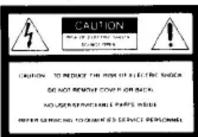

This symbol is intended to alert the user to the presence of uninsulated "dangerous voltage" within the product's enclosure that may be of sufficient magnitude to constitute a risk of electric shock to persons.

This symbol is intended to alert the user to the presence of important operating and maintenance (servicing) instructions in the literature accompanying the appliance.
Features
The Sony SRS-88/SRS-88PC are compact-size speaker system with a built-in power amplifier. It can be connected to a Disoman, Walkman*, personal computer, etc.
- Power output of 10 W + 10 W (all 10 % harmonic distortion)
- DES (Dynamic Equalizing Sound) circuit enables you to obtain powerful bass and clear treble, regardless of the volume setting.
- The "folding bass reflex system" assures a rich and powerful bass
NOTICE FOR THE CUSTOMERS IN THE UNITED KINGDOM
IMPORTANT
The wires in this mains lead are coloured in accordance with the following code:
Blue: Neutral
As the colours of the wires in the mains lead of this apparatus may not correspond with the coloured markings, identifying the terminals in your plug proceed as follows:
The wire which is coloured blue must be connected to the terminal which is marked with the letter N or coloured black. The wire which is coloured brown must be connected to the terminal which is marked with the letter L or coloured red
Do not connect either wire to the earth terminal in the plug which is marked by the letter E or by the safety earth symbol 12 or coloured green or green-and-yellow.
• The magnetically shielded unit has little effect on a TV screen or recorded tapes, etc. placed near the unit.
*Walkman is a trademark of Sony Corporation.
Power Requirements
The power source is required when the unit is used.

- The unswitched AC outlets remain live, independently of the POWER switch setting, at all time when the unit is connected to the AC power supply
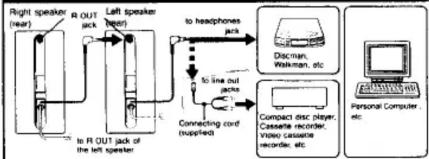
- The AC outlet can supply AC power to equipment with a power consumption of less than 100 watts. When the speakers are connected as illustrated, connect only the equipment whose power consumption does not exceed 100 watts less whatever wattage is consumed by the speaker itself.
For the customers in the United Kingdom This model is not equipped with the AC outlet at the rear. Connect the AC power cords of both speakers to wall outlets.
Connections
flowchart
graph TD
    A["Right speaker (rear)"] --> B["R OUT jack"]
    B --> C["Left speaker (rear)"]
    C --> D["Connecting cord (upplied)"]
    D --> E["to line out jacks"]
    E --> F["to headphones juts"]
    F --> G["Discman, Walkerman, etc"]
    G --> H["Compact disc player, Cassette recorder, mono cassette recorder, etc"]
    H --> I["Personal Computer, etc"]
- The sound of a left channel is heard from the speaker connected to the sound source. Be sure to place it on the left. - No signal is output from the R OUT jack of the right speaker.
Connection to a stereo phone-type headphones jack Use the supplied plug adaptor. Connection to a monaural mini jack The sound may only be heard from the left speaker if the speakers are connected to a monaural jack of the sound source. Use the optional PC-236MS plug adaptor.
Operation
The power source is required. See "Power requirements"

1 Depress the POWER switch on each speaker to ON. The POWER indicator will light up.
2 Adjust the volume with the VOLUME control on each speaker.
3 Adjust the sound with the DES control on each speaker.
To Adjust the Volume
Before playing the connected equipment, set the VOLUME control on the speaker to MAX, then set the volume control on the connected equipment to a medium position. Start playing the connected equipment and adjust the volume to your preference: use the VOLUME control on the speaker to turn down the volume, or use the volume control on the connected equipment to turn up the volume.
For powerful bass and clear treble Turn the DES control clockwise (to MAX) to obtain powerful bass and clear treble. When turning up the VOLUME control while keeping the DES control near to MAX, low sound distortion may occur. In this case, turn the DES control to MIN.

Marke : SONY
Modell : SRS-88
Kategorie : Lautsprecher