
SRS-PC35 - Lautsprecher SONY - Kostenlose Bedienungsanleitung
Finden Sie kostenlos die Bedienungsanleitung des Geräts SRS-PC35 SONY als PDF.


| Produkttyp | Aktivlautsprechersystem mit eingebautem Verstärker |
| Modell | Sony SRS-PC35 |
| Abmessungen (B × H × T) | Ca. 95 × 185 × 125 mm |
| Gewicht (ohne Batterien) | Linker Lautsprecher: ca. 440 g, Rechter Lautsprecher: ca. 360 g |
| Stromversorgung | Gleichstrom 9 V: 6× AA-Batterien (R6) oder mit mitgeliefertem Netzadapter |
| Ausgangsleistung | 3 W + 3 W (bei 10 % Klirrfaktor, 500 Hz – 1 kHz, 8 Ω, mit Netzadapter) |
| Eingangsimpedanz | 4,7 kΩ (bei 1 kHz) |
| Lautsprechertyp | Fullrange-Bassreflex-System, magnetisch abgeschirmt |
| Treiberdurchmesser | 57 mm (2 1/4 Zoll) |
| Nennimpedanz | 8 Ω (OFF/DIRECT) |
| Nenneingangsleistung | 3 W (OFF/DIRECT) |
| Frequenzweiche | Keine (Fullrange) |
| Besondere Funktionen | MEGA BASS / IBB (Intelligent Bass Boost), dynamischer Sound-Duct |
| Anschlüsse | Linker Lautsprecher: Stereoministecker (2,0 m), Rechter Lautsprecher: Monoministecker (1,5 m) |
| Batterielebensdauer (bei 5 mW + 5 mW) | Ca. 7 h (Sony R6P), ca. 24 h (Sony LR6 Alkaline) |
| Reinigung | Mit einem trockenen, weichen Tuch abwischen; keine Lösungsmittel wie Alkohol, Benzin oder Verdünner verwenden |
| Sicherheitshinweise | Nicht Regen oder Feuchtigkeit aussetzen; nur mitgelieferten Netzadapter verwenden; Gehäuse nicht öffnen; bei Beschädigung nur vom Fachpersonal reparieren lassen |
| Lieferumfang | Netzadapter (1 Stück) |
| Optionales Zubehör | Steckeradapter PC-236HG, Verbindungskabel RK-G138HG |
Häufig gestellte Fragen - SRS-PC35 SONY
Benutzerfragen zu SRS-PC35 SONY
0 Frage zu diesem Gerät. Beantworten Sie die, die Sie kennen, oder stellen Sie Ihre eigene.
Eine neue Frage zu diesem Gerät stellen
Laden Sie die Anleitung für Ihr Lautsprecher kostenlos im PDF-Format! Finden Sie Ihr Handbuch SRS-PC35 - SONY und nehmen Sie Ihr elektronisches Gerät wieder in die Hand. Auf dieser Seite sind alle Dokumente veröffentlicht, die für die Verwendung Ihres Geräts notwendig sind. SRS-PC35 von der Marke SONY.
BEDIENUNGSANLEITUNG SRS-PC35 SONY
Active Speaker System
Operating Instructions
Before operating the unit, please read this manual thoroughly and retain it for future reference.
Manual de instrucciones
Antes de utilizar la unidad, lea este manual detenidamente y consérvelo para futuras referencias.
SRS-A35
SRS-PC35
Sony Corporation © 1998 Printed in Philippines
WARNING
To prevent fire or shock hazard, do not expose the unit to rain or moisture.
To avoid electrical shock, do not open the cabinet. Refer servicing to qualified personnel only.
Owner's Record
The model number is located on the front of the unit and the serial number is located inside the battery compartment. Record the model number and the serial number in the space provided below. Refer to them whenever you call upon your Sony dealer regarding this product.
Model No. ____ Serial No. ____
Features
The Sony SRS-A35/PC35 is a compact-size speaker system with a built-in power amplifier. This system can be connected to a Discman, WALKMAN ^® headphone stereo, personal computer, etc.
• The magnetically shielded speakers should have little effect on a TV screen or recorded tapes, etc. when placed close to them.
- MEGA BASS, IBB (Intelligent Bass Boost) circuit enables you to obtain powerful bass, regardless of the sound volume.
• Power output of 3 W + 3 W
- The "dynamic sound duct" assures a rich and powerful bass.
* WALKMAN is a registered trademark of Sony Corporation.
Precautions
- Operate the system only on 9 V DC. For AC operation, use only the supplied AC power adaptor. Do not use any other AC power adaptor.
• After operating the system with the AC power adaptor, disconnect the AC power adaptor from the wall outlet if the system is not to be used for an extended period of time. The POWER switch on the system does not turn the AC power adaptor off.
- If the system is not to be used for a long period of time or is to be operated extensively on AC power, remove the batteries to avoid damage caused by battery leakage and corrosion.
- Do not open the cabinet. Refer servicing to qualified personnel only.
- Do not leave the system in a location near heat sources, or in a place subject to direct sunlight, excessive dust, moisture, rain or mechanical shock.
- Should any solid object or liquid fall into the system, remove the batteries and have the system checked by qualified personnel before operating it any further.
- Do not use alcohol, benzine or thinner to clean the cabinet.
- Although this system is magnetically shielded, do not leave recorded tapes, watches, personal credit cards or floppy disks using magnetic coding in front of the system for an extended period of time.
If the TV picture or monitor display is magnetically distorted
Although this system is magnetically shielded, there may be cases that the picture on some TV sets/personal computer sets may become magnetically distorted. In such a case, turn off the power of the TV set/personal computer set once, and after 15 to 30 minutes turn it on again. For the personal computer set, take the appropriate measures such as data storage before turning it off.
When there seems to be no improvement, locate
the system further away from the TV set/personal computer set. Furthermore, be sure not to place objects in which magnets are attached or used near the TV set/personal computer set, such as audio racks, TV stands, toys etc. These may cause magnetic distortion to the picture due to their interaction with the system.
If you have any questions or problems concerning your system that are not covered in this manual, please consult your nearest Sony dealer.
Specifications
Amplifier section
Power output 3 W + 3 W 10% THD. 500 Hz - 1 kHz, 8 ohms using with the supplied AC power adaptor
Input impedance 4.7 kilohms (at 1 kHz)
Speaker section
System Full-range bass reflex type
Speaker unit Full-range (magnetically shielded) 0.57 mm (2 / in.)
Nominal impedance 8 ohms (OFF/DIRECT)
Rated input power 3 W·(OFF/DIRECT)
General
Power requirement
DC 9 V, six size AA (R6) batteries (left speaker only)
Input cord SRS-A35
left: stereo miniplug (1.0 m) right: monaural miniplug (1.0 m)
SRS-PC35 left: stereo miniplug (2.0 m) right: monaural miniplug (1.5 m)
Battery life (at 5 mW + 5 mW output)
Approx. 7 hours with Sony batteries R6P (SR),
Approx. 24 hours with Sony alkaline batteries LR6 (SG)
Dimensions Approx. 95 × 185 × 125 mm (w/h/d) (3^1/4 × 7^1/5 × 5 in.)
Mass Left speaker: Approx. 440 g (16.0 oz.), Right speaker: Approx. 360 g (13.0 oz.) not incl. batteries
Supplied accessory AC power adaptor (I)
Optional accessories Plug adaptor PC-236HG Connecting cord RK-G138HG
Design and specifications are subject to change without notice.
Power Sources
Using on house current
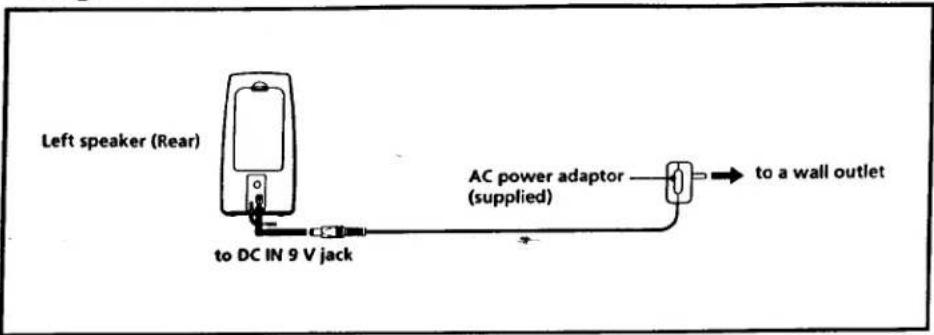
When the AC power adaptor is connected to the system, internal batteries are automatically disconnected.
Note on the AC power adaptor
Use only the supplied AC power adaptor. Do not use any other AC power adaptor.
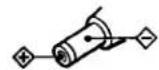
Polarity of the plug
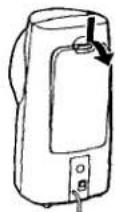
Battery installation
1
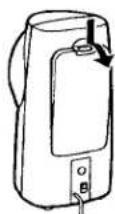
Left speaker (Rear)
2
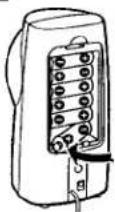
Six size AA (R6) batteries (left speaker only)
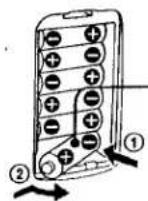
side
Note
Remove the batteries as illustrated.
Battery Replacement
When the batteries are weak, the POWER indicator will start flickering and become faint, or the playback sound will be distorted or unstable.
In such a case, replace all the batteries with new ones.
For battery life, see "Specifications".
Connections
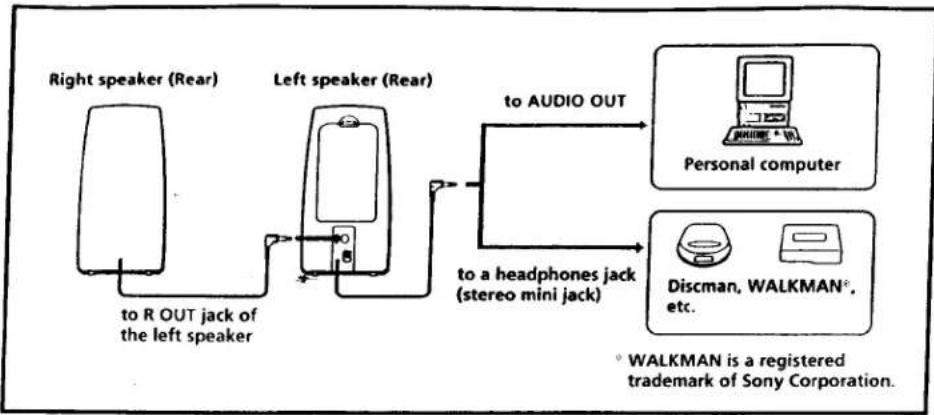
flowchart
graph LR
    A["Right speaker (Rear)"] -->|to R OUT jack of the left speaker| B["Left speaker (Rear)"]
    B --> C["to AUDIO OUT"]
    C --> D["Personal computer"]
    B --> E["to a headphones jack (stereo mini jack)"]
    E --> F["Discman, WALKMAN*, etc."]
    style A fill:#f9f,stroke:#333
    style B fill:#f9f,stroke:#333
    style C fill:#ccf,stroke:#333
    style D fill:#cfc,stroke:#333
    style E fill:#fcc,stroke:#333
    style F fill:#ffc,stroke:#333
Connect the left speaker to the source equipment.
When the system is connected to a monaural jack of a radio, etc., the sound may only come through the left speaker. In such a case, use the optional Sony plug adaptor PC-236HG.
The sound will come through both speakers.
To connect to a stereo phone-type headphones jack
Use the optional Sony RK-G138HG connecting cord.
How to Use
Listening to the sound through the built-in amplifier
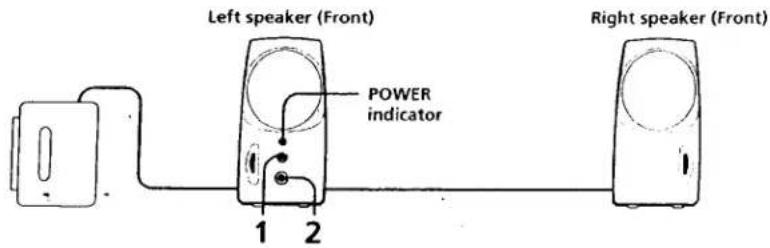
1 Press the POWER switch (ON). The POWER indicator lights up.
2 Adjust the VOLUME control.
Turn off the MEGA BASS (Walkman, Discman, etc.) function as it may cause sound distortion.
After listening, press the POWER switch ( OFF/DIRECT).
The POWER indicator goes off.
Listening to the sound without the built-in amplifier
Set the POWER switch (Ω OFF/DIRECT). In this case, the VOLUME control does not operate. Adjust the volume with the connected equipment.
ADVERTENCIA
Para evitar incendios o el riesgo de electrocución, no exponga la unidad a la lluvia ni a la humedad.
Para evitar descargas eléctricas, no abra la unidad. En caso de averia, solicite los servicios de personal cualificado.
Particularidades
El SRS-A35/PC35 es un sistema de altavoces compacto, tamaño bolsillo, con un amplificador de potencia incorporado. El sistema podrá conectarse a un Discman, un WALKMAN* de cascos auriculares, un ordenador personal, etc.
- Los altavoces están magnéticamente apantallados y su presencia cerca de un televisor o de cintas grabadas no les afectará.
- Circuito de refuerzo de graves (MEGA BASS), y de refuerzo inteligente de graves (IBB), que le permitirán obtener graves potentes independientemente del volumen del sonido.
- Salida de potencia de 3 W + 3 W
- El "conducto de sonido dinámico" asegura graves ricos y potentes.
* WALKMAN es marca registrada de Sony Corporation.
Precauciones
- Alimente le sistema solamente con 9 V CC. Para alimentarlo con CA, utilice solamente el adaptador de alimentación de CA suministrado. No utilice ningún otro adaptador de alimentación de CA.
- Después de haber alimentado el sistema con el adaptador de alimentación de CA, desconecte este de la toma de la red cuando no vaya a utilizar el sistema durante mucho tiempo. El interruptor POWER-del altavoz izquierdo no desconectará el adaptador de alimentación de CA.
- Cuando no vaya a utilizar el sistema durante mucho tiempo, o cuando vaya a utilizarlo con alimentación de CA, extráigale las pilas para evitar el daño que podría causar el electrólito de las mismas.
- No abra las cajas acústicas. En caso de avería solicite los servicios de personal cualificado.
- No deje el sistema cerca de fuentes térmicas, ni en lugares sometidos a la luz directa, polvo excesivo, humedad, lluvia, o choques.
- Si dentro del sistema cae algún objeto sólido o líquido, extráigale las pilas y haga que sea revisado por personal cualificado.
- No emplee alcohol, bencina, ni diluidor de pintura para limpiar las cajas acústicas.
- Aunque este sistema tiene un blindado antimagnetismo, no deje sus cintas grabadas, relojes, tarjetas de crédito o discos floppy con cintas o codificación magnética, delante del sistema durante largos períodos de tiempo.
Si la imagen del televisor o del monitor aparece distorsionada debido al magnetismo
Aunque este sistema tiene un blindado antimagnetismo, a veces la imagen de algunos aparatos de TV/monitor de computadora pueden verse distorsionadas por el magnetismo. En estos casos, desconecte una vez el aparato de TV/ computadora y vuelva a conectar después de 15 a 30 minutos. En el caso de la computadora, tome las precauciones del caso, para no perder datos importantes.
Si esto no parece solucionar el problema, instale el sistema alegado del aparato de TV/computadora. No acerque objetos que contengan imanes cerca del aparato de TV/computadora, un mueble de audio o mesa de TV, juguetes, etc. La distorsión de la imagen puede deberse a la combinación de estos imanes con el efecto del sistema.
Si tiene alguna pregunta o problema en relación con su sistema que no pueda resover este manual, póngase en contacto con su proveedor Sony.
Especificaciones
Sección del amplificador
Salida de potencia 3 W + 3 W 10% de distorsión armónica total 500 Hz - 1 kHz, 8 ohmios utilizando el adaptador de alimentación de CA suministrado Impedancia de entrada
4,7 kiloohmios (a 1 kHz)
Sección de los altavoces
Sistema Tipo reflector de graves de gama completa
Unidad de altavoz Gama completa (blindado antimagnetismo): 57 mm
Impedancia nominal 8 ohmios (OFF/DIRECT)
Potencia nominal de entrada 3 W (OFF/DIRECT)
Generales
Alimentación
Entradas
9 V CC, seis pilas R6 (tamaño AA) (altavoz izquierdo solamente) Cable de entrada
SRS-A35
Izquierdo: miniclavija estéreo (1,0 m)
Derecho: miniclavija monoaural (1,0 m)
SRS-PC35
Izquierdo: miniclavija estéreo (2,0 m)
Derecho: miniclavija monoaural (1,5 m)
Duración de las pilas (a una salida de 5 mW + 5 mW)
Aprox. 7 horas con pilas R6P (SR) Sony
Aprox. 24 horas con pilas alcalinas LR6 (SG) Sony
Dimensiones Aprox. 95 × 185 × 125 mm (an/al/prf)
Masa Altavoz izguierdo: Aprox. 440 g, Altavoz derecho: Aprox. 360 g,
excl.
las pilas
Accesorio suministrado Adaptador de alimentación de CA (1)
Accesorios opcionales Adaptador de clavija PC-236HG Cable conector RK-G138HG
Diseño y especificaciones sujetos a cambio sin previo aviso.
Alimentación
Alimentación con la corriente de la red
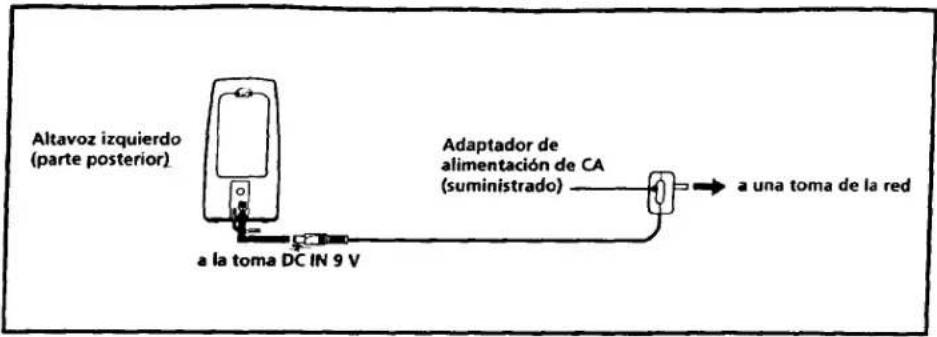
Cuando conecte el adaptador de CA al sistema, las pilas internas se desconectarán automáticamente.
Nota sobre el adaptador de alimentación de CA
Utilice solamente el adaptador de alimentación de CA suministrado. No utilice ningún otro adaptador de alimentación de CA.
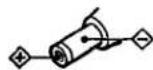
Polaridad de la clavija
Reemplazo de las pilas
1
2
Altavoz izquierdo (parte posterior)
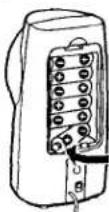
Seis pilas R6 (tamaño AA)
(Altavoz izquierdo)
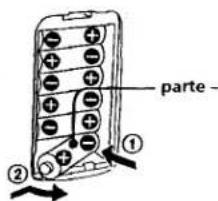
Nota
Extraiga las pilas como se muestra en la ilustración.
Reemplazo de las pilas
Cuando las pilas se debiliten, el indicador POWER comenzará a parpadear y se iluminará débilmente, o el sonido de reproducción se volverá distorsionado o inestable. En este caso, reemplace todas las pilas por otras nuevas.
Con respecto a la duración de las pilas, consulte "Especificaciones".
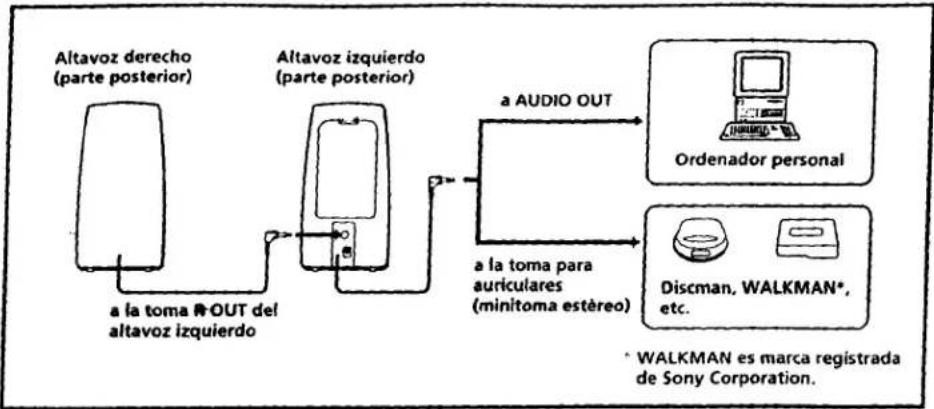
flowchart
graph LR
    A["Altavoz derecho (parte posterior)"] --> B["a la toma R-OUT del altavoz izquierdo"]
    B --> C["Altavoz izquierdo (parte posterior)"]
    C --> D["a AUDIO OUT"]
    D --> E["Ordenador personal"]
    D --> F["a la toma para auriculares (minitoma estéreo)"]
    F --> G["Discman, WALKMAN*, etc."]
    style A fill:#f9f,stroke:#333
    style B fill:#ccf,stroke:#333
    style C fill:#cfc,stroke:#333
    style D fill:#fcc,stroke:#333
    style E fill:#cff,stroke:#333
    style F fill:#ffc,stroke:#333
    style G fill:#fcf,stroke:#333
    note right of F: *WALKMAN es marca registrada de Sony Corporation.
Conecte el altavoz izquierdo al equipo fuente.
Cuando conecte el sistema a una toma monoaural de una radio, etc., es posible que el sonido salga solamente a través del altavoz izquierdo. En tal caso, utilice un adaptador de clavija PC-236HG Sony opcional. El sonido saldrá a través de ambos altavoces.
Conexión a una toma para auriculares telefónica estéreo
Emplee un cable conector RK-G138HG opcional.
Forma de empleo
Escucha de sonido a través del amplificador incorporado
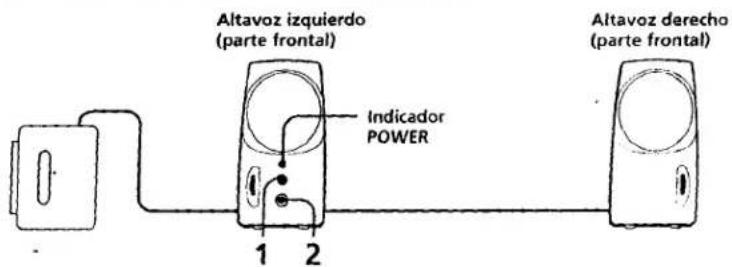
1 Presione el interruptor POWER (ON). El indicador de alimentación (POWER) se encenderá.
2 Ajuste el control VOLUME.
Desactive la función MEGA BASS (Walkman, Discman, etc.) ya que podría causar la distorsión del sonido.
Después de la escucha, presione el interruptor POWER (Ω OFF/DIRECT). El indicador POWER se apagará.
Escucha de sonido sin el amplificador incorporado
Presione el interruptor POWER (Ω OFF/DIRECT). En este caso, el control VOLUME funcionará. Ajuste el volumen con el control de volumen del equipo conectado.


- Active Speaker System
- WARNING
- Owner's Record
- Features
- Precautions
- If the TV picture or monitor display is magnetically distorted
- When there seems to be no improvement, locate
- Specifications
- Amplifier section
- Speaker section
- General
- Power Sources
- Using on house current
- Note on the AC power adaptor
- Battery installation
- Battery Replacement
- Connections
- To connect to a stereo phone-type headphones jack
- How to Use
- Listening to the sound without the built-in amplifier
- ADVERTENCIA
- Particularidades
- Precauciones
- Si la imagen del televisor o del monitor aparece distorsionada debido al magnetismo
- Especificaciones
- Sección del amplificador
- Sección de los altavoces
- Generales
- Alimentación
- Entradas
- SRS-PC35
- Alimentación con la corriente de la red
- Nota sobre el adaptador de alimentación de CA
- Reemplazo de las pilas
- Conexión a una toma para auriculares telefónica estéreo
- Forma de empleo
- Escucha de sonido sin el amplificador incorporado
Marke : SONY
Modell : SRS-PC35
Kategorie : Lautsprecher