
SRS-PC40 - Lautsprecher SONY - Kostenlose Bedienungsanleitung
Finden Sie kostenlos die Bedienungsanleitung des Geräts SRS-PC40 SONY als PDF.


| Produkttyp | Aktiv-Lautsprechersystem mit eingebautem Verstärker |
| Marke | Sony |
| Modell | SRS-PC40 |
| Farbe | Schwarz (typisch) |
| Abmessungen (B x H x T) | Ca. 82 x 193 x 132 mm (pro Lautsprecher) |
| Gewicht (linker Lautsprecher) | Ca. 580 g (ohne Batterien) |
| Gewicht (rechter Lautsprecher) | Ca. 500 g (ohne Batterien) |
| Stromversorgung | DC 9 V, 6x AA-Batterien (nur linker Lautsprecher) oder mit mitgeliefertem AC-Netzteil |
| Batterielebensdauer (bei 5 mW + 5 mW) | Ca. 17 h (Sony SUM-3 NS) / ca. 35 h (Sony AM3 Alkaline) |
| Ausgangsleistung | 3 W + 3 W |
| Eingangsimpedanz | 3,9 kΩ (bei 1 kHz) |
| Lautsprechersystem | Breitband-Bassreflex |
| Lautsprecherdurchmesser | 65 mm (magn. abgeschirmt) |
| Nennimpedanz | 6 Ω |
| Nenneingangsleistung | 3 W |
| Anschlüsse | Eingänge: 2x Stereo-Miniklinke (INPUT 1 & 2), Ausgang: R OUT zum rechten Lautsprecher |
| Magnetschirmung | Ja – geringe Beeinträchtigung von Bildschirmen |
| Bass-Boost | Einschaltbar (ON/OFF-Schalter) |
| Verwendung | PC, Discman, Walkman, etc. |
| Mitgeliefertes Zubehör | AC-Netzteil |
| Optionale Accessoires | Anschlusskabel RK-G136HG, RK-G138; Adapter PC-234S, PC-236MS |
| Besonderheiten | Versetzte Lautsprecherblende reduziert Schallreflexion; „Dynamic Sound Duct“ für kräftige Bässe |
| Pflegehinweise | Nicht mit Alkohol, Keramid oder Inhibitor reinigen; vor Feuchtigkeit und Hitze schützen |
| Sicherheitshinweise | Nur mitgeliefertes Netzteil verwenden; bei längerem Nichtgebrauch Batterien entfernen |
Häufig gestellte Fragen - SRS-PC40 SONY
Benutzerfragen zu SRS-PC40 SONY
0 Frage zu diesem Gerät. Beantworten Sie die, die Sie kennen, oder stellen Sie Ihre eigene.
Eine neue Frage zu diesem Gerät stellen
Laden Sie die Anleitung für Ihr Lautsprecher kostenlos im PDF-Format! Finden Sie Ihr Handbuch SRS-PC40 - SONY und nehmen Sie Ihr elektronisches Gerät wieder in die Hand. Auf dieser Seite sind alle Dokumente veröffentlicht, die für die Verwendung Ihres Geräts notwendig sind. SRS-PC40 von der Marke SONY.
BEDIENUNGSANLEITUNG SRS-PC40 SONY
Active Speaker System
SRS-PC40
Operating Instructions
Before operating the unit, please read this manual thoroughly and retain it for future reference.
Owner's Record
The model numbers are located on the bottom exterior and the serial number is located in the battery compartment of the left speaker.
Record the serial number in the space provided below. Refer to them whenever you call upon your Sony dealer regarding this product.
Model No.SRS-PC40 Serial No. ____
WARNING
To prevent fire or shock hazard, do not expose the unit to rain or moisture.
To avoid electrical shock, do not open the cabinet. Refer servicing to qualified personnel only.
Features
The Sony SRS-PC40 is a compact-size speaker system with a built-in power amplifier designed for the use with a computer. This system can be connected to a Discman, WALKMAN* headphone stereo, etc.
- The magnetically shielded speakers should have little effect on a TV screen or recorded tapes, etc. when placed close to them.
• Power output of 3 W + 3 W
- Off-set speaker grille reduces the reflected sound-wave to produces the more realistic sound stage.
- The "dynamic sound duct" assures a rich and powerful bass.
* WALKMAN is a registered trademark of Sony Corporation.
Precautions
- Operate the system only on 9 V DC. For AC operation, use only the supp
power adaptor. Do not use any other AC power adaptor.
• After operating the system with the AC power adaptor, disconnect the AC power adaptor from
the wall outlet if the system is not to be used for
an extended period of time. The POWER switch on the left speaker does not turn the AC power
adaptor off.
- If the system is not to be used for a long period, time or is to be operated extensively on AC
power, remove the batteries to avoid damage
caused by battery leakage and corrosion.
qualified personnel only.
- Do not leave the system in a location near heat
excessive dust, moisture, rain or mechanical
shock.
- Should any solid object or liquid fall into the
checked by qualified personnel before operating it
any further.
- Do not use alcohol, ceramide, or inhibitor to check the cabinet.
- Although this system is magnetically shielded, do
not leave recorded tapes, watches, personal credit
front of the system for an extended period of time.
the Thelion composites display is
magnetically distorted
Although this system is magnetically shielded,
there may be cases that the picture on some TV sets/personal computer sets may become
sets/personal computer sets may become magnetically distorted. In such a case, turn off the
power of the TV set/personal computer set once, and after 15 to 30 minutes turn it on again. For the
personal computer set, take the appropriate
measures such as data storage before turning it off.
When there seems to be no improvement, locate
the system further away from the TV set/personal
computer set. Furthermore, be sure not to place objects in which magnets are attached or used near
objects in which magnets are attached or used near the TV set/personal computer set, such as audio
the TV set, personal computer set, such as data racks, TV stands, toys etc. These may cause
magnetic distortion to the picture due to their
interaction with the system.
If you have any questions or problems concerning
please consult your nearest Sony dealer.
Connecting to a Discman, Walkman, etc.
Note
When
are played at the same time, the sound from both of them will
come out of the speakers. When you wish to play Only one
equipment, make sure that the other equipment is turned on
or its volume is turned down.
[Non-Text]
[Non-Text]
[Non-Text]
[Non-Text]

flowchart
graph TD
    A["Headphone"] -->|Connecting cord RK-G136HG (not supplied)| B["Rear"]
    B -->|to the INPUT 2 jack| C["Left speaker"]
    C --> D["Computer"]
    D --> E["Right speaker"]
    F["Headphone"] -->|to the headphones jack (stereo mini jack)| B
    G["Computer"] --> H["Right speaker"]

flowchart
graph LR
    A["Right speaker (Rear)"] -->|to R OUT jack of the left speaker| B["Left speaker (Rear)"]
    B -->|to a headphones jack (stereo mini jack)| C["Computer"]
To connect to a stereo phone-type headphones jack Use the optional PC-234S plug adaptor or RK-G138 connecting cord.
Connections
Connect the left speaker to the source equipment.
When the system is connected to a monaural jack of a
radio, etc., the sound may only come through the left
speaker. In such a case, use the optional Sony plug
The sound will come through both speakers.
To connect to a store phone two headphones
Jack
connecting cord.
Note
When two types of equipment are connected to the system, we are played at the same time, the sound from both of them will
come out of the speakers. When you wish to play only one
or its volume is turned down.
[Non-Text]
[Non-Text]
[Non-Text]
[Non-Text]
[Non-Text]
Power Sources
Using on house current
Battery installation
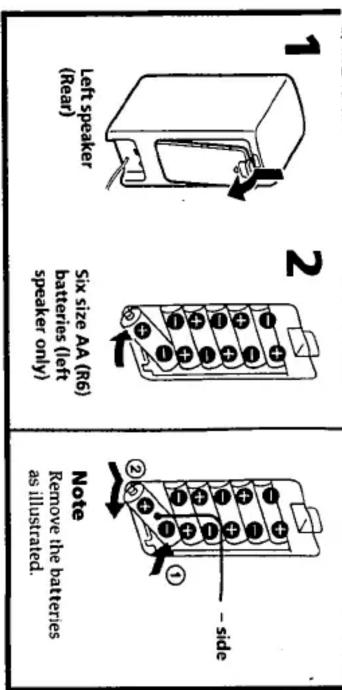
When the AC power adaptor is connected to the system, internal batteries are automatically
Note on the AC power adaptor

Use only the supplied AC power adaptor. Do not use any other AC power adaptor. Polarity of the plug
"Specifications".
In such a case, replace all the batteries with new ones. For battery life, see
-
become faint, or the playback sound will be distorted or unstable.
。
广力云智慧零售收银系统
[Non-Text]
[Non-Text]
[Non-Text]
[Non-Text]
[Non-Text]
[Non-Text]
[Non-Text]
[Non-Text]
Battery Replacement
(1)
(1) 2017年1月1日
-
广力云智慧零售收银系统
广力云智慧零售收银系统
。
-
-
[Non-Text]
[Non-Text]
[Non-Text]
[Non-Text]
[Non-Text]
[Non-Text]
[Non-Text]
[Non-Text]
[Non-Text]
[Non-Text]
[Non-Text]
[Non-Text]
[Non-Text]
[Non-Text]
[Non-Text]
[Non-Text]
[Non-Text]
[Non-Text]
[Non-Text]
[Non-Text]
[Non-Text]
[Non-Text]
[Non-Text]
[Non-Text]
[Non-Text]
[Non-Text]
[Non-Text]
[Non-Text]
[Non-Text]
[Non-Text]
[Non-Text]
[Non-Text]
[Non-Text]
[Non-Text]
[Non-Text]
[Non-Text]
[Non-Text]
[Non-Text]
[Non-Text]
[Non-Text]
[Non-Text]
[Non-Text]
[Non-Text]
[Non-Text]
[Non-Text]
[Non-Text]
[Non-Text]
[Non-Text]
[Non-Text]
[Non-Text]
[Non-Text]
[Non-Text]
[Non-Text]
[Non-Text]
[Non-Text]
[Non-Text]
[Non-Text]
[Non-Text]
[Non-Text]
[Non-Text]
[Non-Text]
[Non-Text]
[Non-Text]
[Non-Text]
[Non-Text]
[Non-Text]
[Non-Text]
[Non-Text]
[Non-Text]
[Non-Text]
[Non-Text]
[Non-Text]
[Non-Text]
[Non-Text]
[Non-Text]
[Non-Text]
[Non-Text]
[Non-Text]
[Non-Text]
[Non-Text]
[Non-Text]
[Non-Text]
[Non-Text]
[Non-Text]
[Non-Text]
[Non-Text]
How to Use

1 Press the POWER switch (ON). The POWER indicator lights up.
2 Adjust the VOLUME control.
3 Press the BASS BOOST switch (ON) to reinforce the bass.
Press the switch again (OFF) to cancel the bass boost function.
After listening, press the POWER switch (Ω OFF).
The POWER indicator goes off.
Listening to the sound without the built-in amplifier
Set the POWER switch (Ω OFF). In this case, the VOLUME control and the BASS BOOST switch do not operate. Adjust the volume with the connected equipment.
Also, the sound from equipment connected to the INPUT 2 jack cannot be heard.
Specifications
Amplifier section
Power output
$$ 3 W + 3 W $$
Input impedance
$$ 3. 9 \text { kilohms (at } 1 \text { kHz) } $$
Speaker section
System
$$ \text { Full - range bass reflex type } $$
Speaker unit
$$ \begin{array}{l} \text { Full - range (magnetically shielded): } \ \varnothing 6 5 \mathrm{mm} (2 ^ {5 / 8} \text { in. }) \end{array} $$
Nominal impedance
$$ 6 \text { ohms (OFF) } $$
Rated input power
$$ 3 \mathrm{W} (\text { O F F }) $$
General
Power requirement
$$ \begin{array}{l} \text {DC 9 V , six size AA (R6) batteries} \ \text {(left speaker only)} \end{array} $$
Battery life (at 5 mW + 5 mW output)
$$ \begin{array}{l} \text { Approx. 17 hours with Sony } \ \text { batteries SUM - 3 (NS) }, \ \text { Approx. 35 hours with Sony } \ \text { alkaline batteries AM3 (N) } \end{array} $$
Dimensions
$$ \begin{array}{l} \text { Approx. } 8 2 \times 1 9 3 \times 1 3 2 \mathrm{mm} (\mathrm{w/h/} \ \text { d) } (3 ^ {1 / _ {4}} \times 7 ^ {5 / _ {8}} \times 5 ^ {1 / _ {4}} \text { in. }) \end{array} $$
Mass
$$ \begin{array}{l} \text { Left speaker: Approx. 580g } \ (1 \text { lb.4oz.), Right speaker: Approx. } \ 5 0 0 \text { g(1lb2oz.)notincl.batteries } \end{array} $$
Supplied accessories
$$ A C \text { power adaptor } $$
Optional accessories
$$ \begin{array}{l} \text {Connecting cord RK - G136HG,} \ \text {RK - G138} \ \text {Plug adaptor PC - 234S, PC - 236MS} \end{array} $$
Design and specifications are subject to change without notice.

- Active Speaker System
- SRS-PC40
- Operating Instructions
- Owner's Record
- WARNING
- Features
- Precautions
- Connecting to a Discman, Walkman, etc.
- Connections
- Power Sources
- Using on house current
- Battery installation
- Battery Replacement
- How to Use
- Listening to the sound without the built-in amplifier
- Specifications
- Amplifier section
- Speaker section
- General
Marke : SONY
Modell : SRS-PC40
Kategorie : Lautsprecher