Walkman WM-F2078 - Kassettenabspieler SONY - Kostenlose Bedienungsanleitung
Finden Sie kostenlos die Bedienungsanleitung des Geräts Walkman WM-F2078 SONY als PDF.


Benutzerfragen zu Walkman WM-F2078 SONY
0 Frage zu diesem Gerät. Beantworten Sie die, die Sie kennen, oder stellen Sie Ihre eigene.
Eine neue Frage zu diesem Gerät stellen
Laden Sie die Anleitung für Ihr Kassettenabspieler kostenlos im PDF-Format! Finden Sie Ihr Handbuch Walkman WM-F2078 - SONY und nehmen Sie Ihr elektronisches Gerät wieder in die Hand. Auf dieser Seite sind alle Dokumente veröffentlicht, die für die Verwendung Ihres Geräts notwendig sind. Walkman WM-F2078 von der Marke SONY.
BEDIENUNGSANLEITUNG Walkman WM-F2078 SONY
specifications
in section
anyx wnoe FM: 875-108 MHz
AM 538-1.710 kHz (10 kHz step)
531-1,802 kHz (9 kHz each)
TM: Headphone cord syndrome AM: Sub-in beta bar response
(1) 2017年1月1日
1 player section
www.rexpress (Doby MIB off)
30-15,000 Hz
e output 10mW+10mW 15 ohms at DC operation
Headphones (stereo minjacks) load impedance 5 - 300 ohms
r requirements 3 V DC
Mo Size AX (106) Delivered DC (2.3 inch units)
DC IN 3 V pack capacity Original Box: SIM-40
Operators SKRY ETR-0000 battery class 16-204 with size D: 1520 batteries
Optional Sony AG/DM AC power adaptor for use on 120 V
AC. 80 Hz
Optional Sony DCC-70 car battery cord for use with 12 V car
batterly
vry life Approx. 6 hours of tape playback and approx. 10 hours of FM
receptors, using Sony engine (demoned) MKL (N)
In millions Approx. 50 x 115 x 43.6mn (millions) 40% x 47% x 17% (inches)
and local, existing parts and controls
(1) 2017年1月1日
pH Appetica 300 g
- Galaxies women supplied Steve beashouses (3)
Habes stavens harso rink Belt clip (1)
2017年1月1日
gn and specifications subject to change without notice.
- 2017年
lional accessories
www.abc.com, AC-DOM
KY-009, ENE-1008
JIMIKY (002) DCC-70
sunny are 200-
darker may not handle some of the above listed optional accessories. Please
Use display for detailed information
Theorem 4. (38.25) (1962).
p: Use only the recommended AC power adaptor or car battery cord
a denuded by Slury. Polarity of the plugs of other manufacturers may be different
(1) 2017年1月1日




On Maintenance
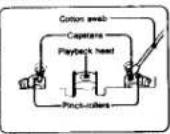
can the range head after every 10 hours of use to enjoy optimum
no sound. Molaten a cotton swab or a soft cloth with alcohol and wipe head, pinch-rollers and capstars.
seeing the unit's anterior
van your unit's exterior with a water moistened soft cloth. Do not use chalk, bench or thinness.
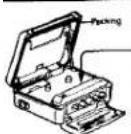
orrows any dust or sand from the packing
"Have any door or table, the parking will prevent the cassette
Y band of dust on the rubber packing with steers the thickness empanners to from snutting tightly, and water may leak in. Brush off the last price in a while.
vital life of the rubber packing
though it depends on the maintenance and the length of use, we recommend changing the packing every year. Replacement packing is available at an authorized Sony Service Facility.
'eaning the headphone plug
SONY
ALORD TAPE RECORDER
LIMITED WARRANTY
SONY CORPORATION OF AVENUE C'SOXY! wements this product against defects in mineral
in ownership as follows
- Int a parent of 80 days from the case of birth, 2007, who did not change to your 2007 supported stock factors to raise the defective product. After this 80 day (point, v/v):
must use for all labor charges.
-
In addition, other investments in mortgage rates of financial research and the interest rate have been a period of 1 year from the current firm of purchase.
-
-
-
-
-
-
-
-
-
-
-
-
-
-
-
-
-
-
-
-
-
-
-
-
-
-
-
-
-
-
-
-
-
-
-
-
-
-
-
-
-
-
-
-
-
-
-
-
-
-
-
-
-
-
-
-
-
-
-
-
-
-
-
-
-
-
-
-
-
-
-
-
-
-
-
-
-
-
-
-
-
-
-
-
-
-
-
-
- 90.
-
-
-
-
-
-
-
-
-
-
-
-
-
-
-
-
-
-
-
-
-
-
-
-
-
-
-
-
-
-
-
-
-
-
-
-
-
-
-
-
-
-
-
-
-
-
-
-
-
-
-
-
-
-
-
-
-
-
-
-
-
-
-
-
-
-
-
-
-
-
-
-
-
-
-
-
-
-
-
-
-
-
-
-
-
-
-
Labour and Parts
By single support, service needs are 100% to 50% per year, and they have the 100% of the product applied to a COMY authorized move (COMY)
Bore, Ohio
Parts Only
During the generation of the quarterly period and collection part of the operational work is required to deliver results in a 100% operating cycle. Labor by general and consideration is available from
(1) 2007, a total of \$3.4M, service revenue from the company's operations, net of 100% of total revenue, operating expenses and other operating expenses, operating expenses and other operating expenses, operating expenses and other operating expenses, operating expenses and other operating expenses, operating expenses and other operating expenses, operating expenses and other operating expenses, operating expenses and other operating expenses, operating expenses and other operating expenses, operating expenses and other operating expenses, operating expenses and other operating expenses, operating expenses and other operating expenses, operating expenses and other operating expenses, operating expenses and other operating expenses, operating expenses and other operating expenses, operating expenses and other operating expenses,
The company does not use LOAFS features and displays due to area of God, important measures.
also is preference to the product, including the sales. This warranty is sold only in the United
State of Advisors
Proof of purchase in the form of a bill of sale or registration which is ordered that the U
it either the women paid must be presented in other specialty services.
This women is rated only if the social number appears in the market.
WALOR FOR ACTION TO PREVIDED WORKS THE WARRANTY IS THE EXCLUSIVE URL
OR ON THE CONSUMER, SOYA SHALL NOT BE LIABLE FOR ANY INDICENTAL ORCONSENS
TML DAMAGES FOR SPREAD IN ANY EXPRESS OR IMPLIED WARRANTY ON THIS PRODUCT
ACCEPT TO THE EXTENT PROMOTED BY APPLICABLE LAW. ANY PROCESSED WORKS OF
GENE, INSTRUMENTS OF FITNESS FOR A HEALTHY BEANS OF THIS PROJECT IS EXCITED.
H. (2) 1947
Some dates by not after the intersection to situation of material or transmembrane damage,
allow limitations on how long an applied monthly life, at the above limitations or consumers are
not apply to one in addition. A mix notes into a double connection with the same reference of
where it was given that the number of people is, in which there is a number of people who are in your home, the number of people who are in your home, the number of people who are in your home, the number of people who are in your home, the number of people who are in your home, the number of people who are in your home, the number of people who are in your home, the number of people who are in your home, the number of people who are in your home, the number of people who are in your home, the number of people who are in your home,
which very then shee to come
for your consumer, Sony Corporation of America has established for Customer Information
Farmers
SONY CUSTOMER INFORMATION CENTER
201830 GOWY 17699
- 与你
Sun Capture Information Cases
Sure Drive Mail Drop #101
Per Rojo 6) OTISU
SONY CORPORATION OF AMERICA
Sony Grove, Port Bridge Home Jersey 07658
Sony Service Centers
| Avenue | Hotel | Mission |
| Phoenix | Chicago | St James |
| San Diego County Hospital, Suite, CA 501831 | Chicago, State Street | 12401111111111111111111111111111111111111111111111111111111111111111111111111111111111111111111111111111 |
| Cincinnati | Detroit | New Jersey |
| Buenos Bay, San Francisco Blvd, Suite, CA 501831 | Minnesota, State Street | Nashville, NY (Newcastle Ave) |
| Minnesota, State Street | Nashville, NY (Newcastle Ave) | |
| Baltimore, DC 606122 | Montau, NC 50049 | Nashville, NC (50049) |
| Montau, NC 50049 | Nashville, NC (50049) | |
| Buffalo Beach, Chicago St. Paul | Buffalo, Chicago 4 Wt | Ohio |
| Columbus, OH 606122 | Columbus, OH 606122 | Oklahoma |
| Columbus, OH 606122 | Columbus, OH 606122 | Oklahoma Road |
| San Diego, CA 501831 | San Diego, CA 501831 | PacIFIC, OH 606122 |
| San Diego, CA 501832 | San Diego, CA 501832 | PacIFIC, OH 606122 |
| San Diego, CA 501832 | San Diego, CA 501832 | PacIFIC, OH 606122 |
| San Diego, CA 501832 | San Diego, CA 501832 | PacIFIC, OH 606122 |
| San Diego, CA 606122 | San Diego, CA 606122 | PacIFIC, OH 606122 |
| San Diego, CA 606122 | San Diego, CA 606122 | PacIFIC, OH 606122 |
| San Diego, CA 606122 | San Diego, CA 606122 | PacIFIC, OH 606122 |
| San Diego, CA | San Diego, CA 606122 | PacIFIC, OH 606122 |
| San Diego, CA 606122 | San Diego, CA 606122 | PacIFIC, OH 606122 |
| San Diego, CA 606122 | San Diego, CA 606122 | PacIFIC, OH 600122 |
| San Diego, CA 606122 | San Diego, CA 606122 | PacIFIC, OH 606122 |
| San Diego, CA 606122 | San Diego, CA 606122 | PacIFIC, OH 606122 |
| San Diego, CA 606122 | San Diego, NC 50049 | PacIFIC, OH 606122 |
| San Diego, CA 606122 | San Diego, CA 606122 | PacIFIC, OH 606122 |
| San Diego, CA 606122 | San Diego, CA 606122 | PacIFIC, OH 606122 |
| San Diego, CA 501832 | San Diego, CA 501832 | PacIFIC, OH 606122 |
| San Diego, CA 501832 | San Diego, CA 501832 | PacIFIC, OH 606122 |
| San Diego, CA | San Diego, CA 501832 | PacIFIC, OH 606122 |
| San Diego, CA 501832 | San Diego, CA 501832 | PacIFIC, OH 606122 |
| San Diego, CA 501832 | San Diego, CA 501832 | PacIFIC, OH 600122 |
| San Diego, CA 501832 | San Diego, CA 501832 | PacIFIC, OH 606122 |
| San Diego, CA 501832 | San Diego, CA 501832 | PacIFIC, OH 606122 |
| San Diego, CA 501832 | San Diego, NC 50049 | PacIFIC, OH 606122 |
| San Diego, CA 501832 | San Diego, CA 501832 | PacIFIC, OH 606122 |
| San Diego, CA 501832 | San Diego, CA 501832 | PacIFIC, OH 606122 |
| San Diego, CA 301832 | San Diego, CA 301832 | PacIFIC, OH 606122 |
| San Diego, CA 301832 | San Diego, CA 301832 | PacIFIC, OH 606122 |
| San Diego, CA 301832 | San Diego, CA 301832 | PacIFIC, OH 606122 |
| Los Angeles, CA | Los Angeles, CA 50049 | PacIFIC, OH 606122 |
| Los Angeles, CA 501832 | Los Angeles, CA 501832 | PacIFIC, OH 606122 |
| Los Angeles, CA 501832 | Los Angeles, CA 501832 | PacIFIC, OH 606122 |
| Los Angeles, CA 501832 | Los Angeles, CA 501832 | PacIFIC, OH 606122 |
| Los Angeles, CA 301832 | Los Angeles, CA 301832 | PacIFIC, OH 606122 |
| Los Angeles, CA 301832 | Los Angeles, CA 301832 | PacIFIC, OH 606122 |
| Los Angeles, CA 301832 | Los Angeles, CA 301832 | PacIFIC, OH 606122 |
| San Diego, CA | San Diego, CA 50049 | PacIFIC, OH 606122 |
| San Diego, CA 501832 | San Diego, CA 501832 | PacIFIC, OH 606122 |
| San Diego, CA 501832 | San Diego, CA 501832 | PacIFIC, OH 606122 |
SONY
3-751-662-21 (1)
Radio Cassette Player
WM-F2078
_n+1^2 = 12 _n^2
- 1
D. tel. trans. 56
Operating Instructions
Before operating the unit, please read this manual thoroughly and main it for future reference.

Owner's Record
The model number is located at the rear and the serial number is located on the back of the cassette compartment lid. Record the serial number in the space provided below. Refer to these numbers whenever you call upon your Sony dealer regarding this product
Model No WM-F2075 Serial No.
Features
• The synthesized tuned can:
— receive a station automatically
The following is each FM and AM
— International 100% of the U.S. and U.K.
• Auto-reverse function changes the tape playback direction without
turning the cassette of
- Water-resistant design
- Order: HMI system reduces noise, blue noise during playback.
- Ducky NRT system 100000 taps that has being performed
• TAPE selectix for optimum placebo with standard spot as well as
high-performance metal tapes.
1Dolby oil price reduction manufactured under license from Dolby Laboratories
Licensing Corporation
"DOUHY" and the double-0 symbol (0) are trademarks of Dolby Laboratories
Licensing Corporation
Lending Corporation
INFORMATION
This equipment generates and uses radio frequency energy and if not installed and used properly, that is, in strict accordance with the manufacturer's instructions, may cause interference to radio and television reception. It has been type tested and found to comply with the limits for a Class B computing device in accordance with the specifications in Subpart J of Part 15 of FOC Rules, which are designed to provide reasonable protection against such interference in a residential installation. However, there is no guarantee that interference will not occur in a person who can be able to use the equipment does not require interference to radio or television reception, which can be determined by turning the equipment off and on, the user is encouraged to try to correct the interference by one or more of the following measures:
Approve the receiving antenna
Delocate the environment with respect in the receiver
Residual the equipment was impacted to the
Move the equipment away from the receiver. Plug the equipment into a different outlet so that equipment and receiver are on different branch circuits.
If necessary, the user should consult the dealer or an experienced radiostelevision technician for additional suggestions. The user may find the following booklet prepared by the Federal Communications Commission helpful:
"How to identify and Resolve Radio-TV Interference Problems". This booklet is available from the U.S. Government Printing Office, Washington, DC 20402, Stock No. 004-000-00345-4.
text_image
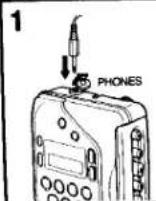
Scanned text fragment with heavily pixelated and distorted characters, possibly from a scanned document or low-resolution scan.Tape Playback
| 1 |
| Insert a cassette. |
| 2 | Connect the headphones to the PHONES jack. |
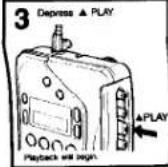
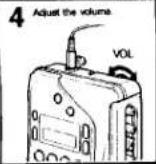
On tape operation
| To listen to the other side of the cassette | |
| To stop the tape | |
| To wind the tape rapidly |
Notes on playback
- Do not open the cassette compartment lid while the tape is running
- No auto to press ■ STOP after winding the tape.
On playback mode
| To play back both sides of the cassette once | |
| To play back both sides of the cassette repeatedly |
*If you begin playback on the reverse side, the unit will shut off at the end of the tape.
To get the best performance from your tape
| For DOLBY NR-processed tapes: | DOLBY MAP OF |
| For normal (TYPE 0) tapes | |
| For CrOz (TYPE 6) or metal (TYPE IV) tapes |
Radio Reception
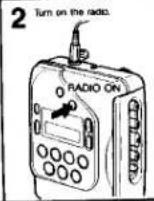
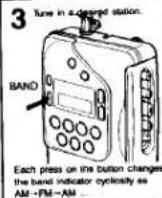
text_image
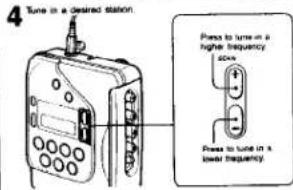
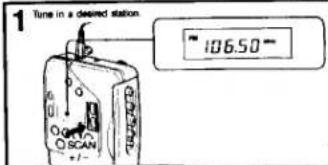
4 Tune in a desired station. Pens to turn in a higher frequency side Power to turn in a lower frequency.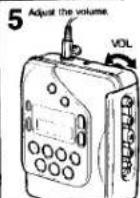
text_image
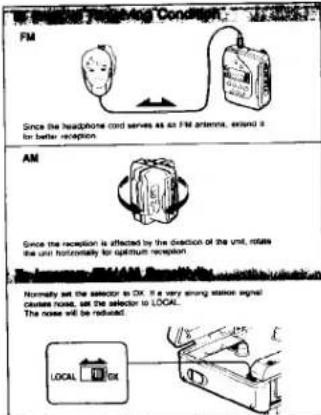
No longer warning condition. AM FM Since the headphone cord serves as an FM antenna, extend it for better reception. AM Since the reception is affected by the direction of the unit, rotate the unit horizontally for optimum reception. Normally set the selector to DK. It is very strong signal noise, noise next, set the selector to LOCAL. The noise will be reduced.To some the statements

There are these ways to scan the stations
—One step scan
Press a SCAN button repeatedly. You can scan a desired station
manually. A deep sound follows each press and the frequency changes
in the steps shown below
AM: 10 kHz
FM 01 MHz
- Seeking scan
When you press the SCAN + or - button for more than half a
second, the automatic tuning begins, and then stops automatically.
when a station is received.
To stop automatic tuning, press the SCAN + or - button again.
- Feet scan
Use this function to rapidly scan a station
Keep a SCAN button pressed. Fast scanning starts. Release the button
when the scanning comes near a desired frequency. The scanning
continues in the seeing scan mode
Notes on radio reception
- When you press the tape operation button ( A PLAY, ½ or Ⅱ ) during radio
reception, the indications on the display window will change to the corner side display. The radio will be turned off and the unit will go in the base operation mode
Display, the disk will be turned on and the disk is go to the To action circle motion, gives the BACIO ON button screen
• The automatic tuning function may occasionally miss the best setting for a radio
station. If this happens, press the SCAN + or - button to adjust the tuning
- You should remove the cassette tape if it has a metallic case.
such material may have accordance or comply with
When the battery becomes week while listening to the radio
The radio will be turned off. In this case, try playing back a tape. If the "E"
indicator appears on the display, replace the batteries with new ones
公司董事会、监事会及全体董事保证本公告内容不存在任何虚假记载、误导性陈述或者重大遗漏,并对其内容的真实性、准确性和完整性承担个别及连带责任。
When you press the RADIO ON button while listening to the radio, the
current time will appear for about two seconds
[Unreadable]
The AM tuning interval is factory present to 9 kHz or 10 kHz in order to match the local frequency allocation system. If you use the receiver in an area where the frequency allocation system is based on another interval, change the position of the switch with a thin instrument.
Notes
• If you change the interval, all preset stations, current time, and alarm time are
canvoked.
+ When you change the AM tuning interval from 5 kHz to 10 kHz, the FM tuning
interval (
![SONY Walkman WM-F2078 - [Unreadable] - 1](/content/2026/05/805558/images/d3a6b4edcdfd24e51f88c6dc9bb1254b4d79a45d35ce1c6f9354312853cacd4f.jpg)
The quick brown fox jumps over the lazy dog.
- 2017年1月1日
text_image
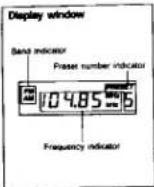
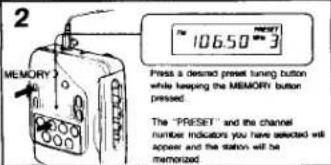
1 106.50-

text_image
2 MEMORY Press a desired preset tuning button while keeping the MEMORY button pressed. The "PRESET" and the channel number indicators you have selected will appear and the station will be memorized.Repeat steps 1 to 2 for both AM and FM. Up to 7 seconds each can be
nomerized for each band
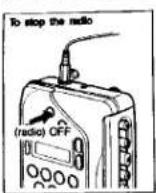
To turn off the radio, press the (radio) OFF button
To tune in a preset station
1 Press the RADIO ON button to turn on the radio.
2. Select a desired band by pressing the BAND button.
3 Press a desired pipe turbo button
4. Actus the volume
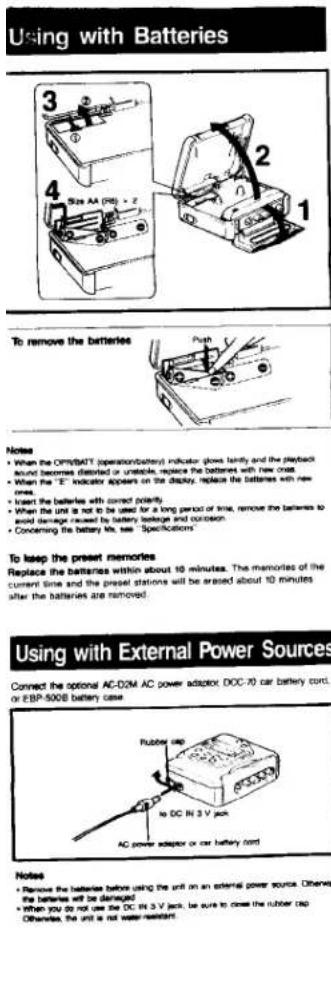
Notes
- When the OPMSATT (operation/battery) indicator glows faintly and the playback sound becomes distorted or unstable, replace the batteries with new ones.
- When the "E" indicator appears on the display, replace the batteries with new ones.
- Insert the batteries with correct polarity
- When the unit is not to be used for a long period of time, remove the batteries to avoid damage caused by battery leakage and corrosion
- Concerning the battery life, see "Specifications"
To listen the present memories
Replace the batteries within about 10 minutes. The memories of the current time and the preset stations will be erased about 10 minutes after the batteries are removed.
Connect the optional AC-D2M AC power adaptor, DOC-70 car battery cord, or EBP-500B battery case
Notes
- Remove the batteries before using the unit on an external power source. Otherwise, the batteries will be damaged
- When you do not use the DC in 3 V jack, be sure to close the rubber cap. Otherwise, the unit is not water-resistant.
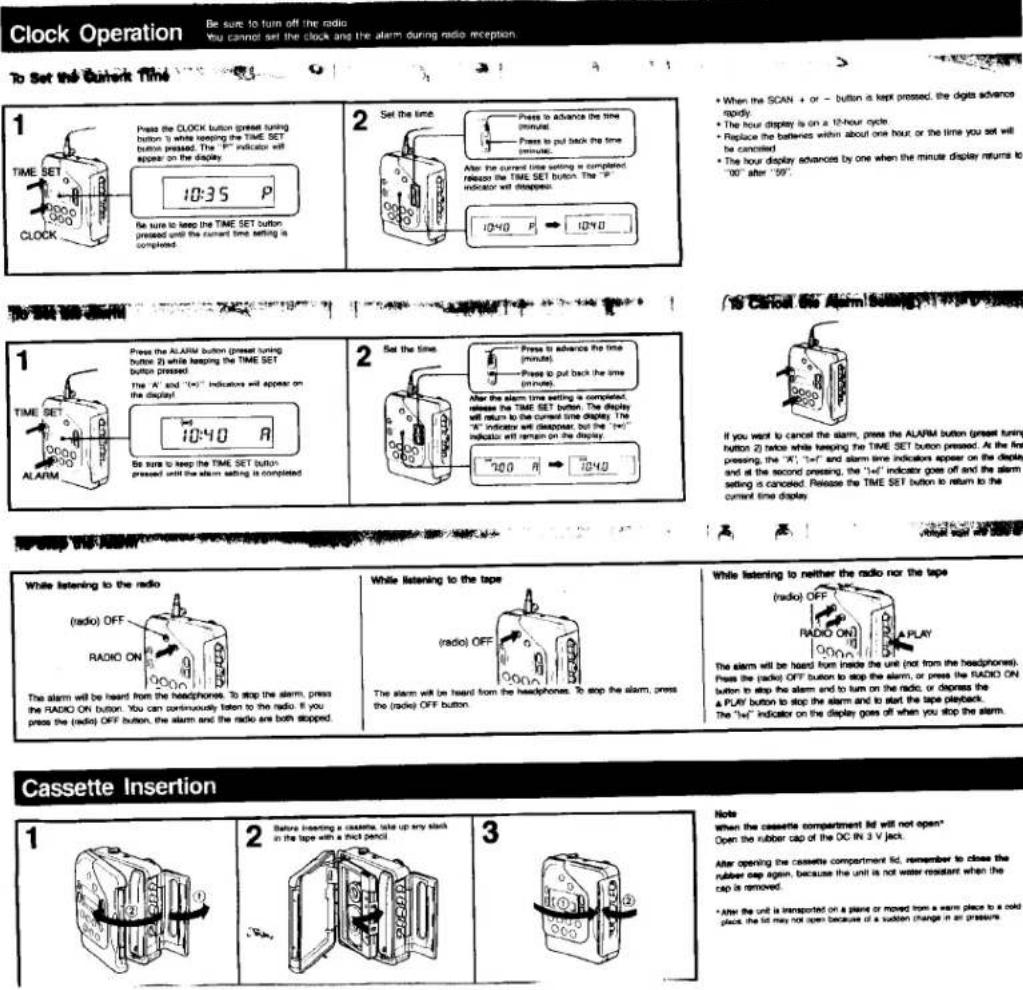
Be sure to turn off the radio
You cannot set the clock and the alarm during radio reception.
+ When the SCAN + or - button is kept pressed, the digits advance
rapidy.
* The hour display is on a 10-hour clock. + Replace the batteries within about one hour or the time you set will
be carried
• The hour display advances by one when the minute display returns to
"00" after "50"
If you want to cancel the alarm, press the ALARM button (press tuning button 2) twice while keeping the TIME SET button pressed. At the first pressing, the "A", "I+F" and alarm time indicators appear on the display and at the second pressing, the "I+F" indicator goes off and the alarm setting is canceled. Release the TIME SET button to return to the current time display

While listening to the radio
The alarm will be heard from the headphones. To stop the alarm, press the RADIO ON button. You can continuously listen to the radio. If you press the (radio) OFF button, the alarm and the radio are both stopped.
While listening to the tape
The alarm will be heard from the headphones. To stop the alarm, press the (radio) OFF button.
While listening to neither the radio nor the tape
The alarm will be heard from inside the one (not from the Headphones). Press the (radio) OFF button to stop the alarm, or press the RADIO ON button to stop the alarm and to turn on the radio, or depress the A PLAY button to stop the alarm and to start the tape playback. The "left" indicator on the display goes off when you stop the alarm.
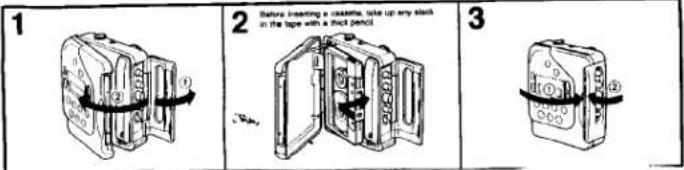
2 Before inserting a cassette, take up any slice in the tape with a thick pencil
Notes
when the cassette compartment bid will not open.
Open the rubber cap of the OC-IN 3 V jack.
After opening the cassette compartment lid, remember to close the rubber gap again, because the unit is not water resistant when the gap is removed.
After the unit is transported on a plane or moved from a warm place to a cold place, the lid may not open because of a sudden change in air pressure.
(二)本次股东大会的召集和召开程序
[Non-Text]
[Non-Text]
[Non-Text]
[Non-Text]
[Non-Text]
[Non-Text]
[Non-Text]
[Non-Text]
[Non-Text]
[Non-Text]
[Non-Text]
[Non-Text]
[Non-Text]
[Non-Text]
[Non-Text]
[Non-Text]
[Non-Text]
[Non-Text]
Precautions
• Activate the unit only on 3 V DC.
For AC operation or car battery operation, use the accessories recommended by the unit.
- Avoid exposure to temperature extremes, direct sunlight, moisture, sand, dust or mechanical shock. Never leave the unit in a car parked
- Should any solid object or liquid fall into the unit, remove the batteries and disconnect the AC power adaptor or the car battery cord, and have the unit checked by qualified personnel before operating it any
- If the unit has not been used for a long time, set it in the playback mode and warm it up for a few minutes before inserting a cassette.
About the headphones
• Avoid listening with your headphones
- white driving, cycling, etc.
— for an extended time at a high volume
• Remember not to disturb those doses to job and the
coming from your telephone
• Never blow on the ear pieces.
DO NOT IMMERSE IN WATER
Before opening or shutting the cassette compartment id, be sure to
- Beavers opening of a small wing off water dust or sand on the outside of the unit.
Wipe off wall, all of the head. I am a few men. I have been in the headphones lack may cause full, cover it with
• Since wall is the headphones, it is reached rubber can when the headphones are not used.
the reached wooden step dropped in the windows, the headphones have been dropped in salt water. Be
- if the unit of the transpiration is a
sure to wash them in the water.
Slower was
detergent.
• The supplied transducers are not available. If they are accidentally
some in continuous contact with water, dry them with a soft cloth.
dropped into water or it will go
Never use an electric hair dryer
Notes on the display
The digital display will become accessible if you place the next screen.
location which is extremely hot or cold.
Do not place the unit in:
a plate continuously subject to direct survey of the following
samples, on the seaside, etc.)
a temperature below 0°C (32°F) or over 40°C (104°F). In a hot period
the display will be seen as 25.8:60, and in a case please, the delay,
you change slowly. (However, this is not a trouble. Use the data of
noval wtohous
- a seven places (for example, in a bathroom, etc.) is the same
saturation
— a piece subject to mechanical vibration or shock.
2.1.3.2017
Note on cigarettes longer than 90 minutes
The use of crashes longer than 90 minutes is not recommended.
The use of transactions for a exempt for ionga continuous playback.
Figure 1. The next part of the
If you have any question or problem concerning your unit that is not
If you here any quality, you are ready to be satisfied in this manual, please consult your nearest Sony dealer.
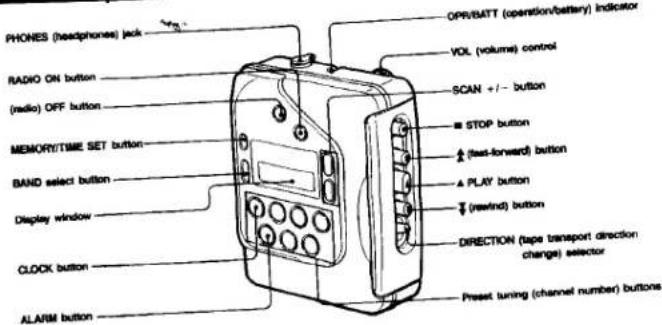
Parts Identification
text_image
PHONES (headphones) jack RADIO ON button (radio) OFF button MEMORY/TIME SET button BAND select button Display window CLOCK button ALARM button OPR/BMTT (operation/battery) indicator VOL (volume) control SCAN +/- STOP button (see-forward) button PLAY button (redwind) button DIRECTION (tape transport direction change) selector Preset tuning (channel number) buttons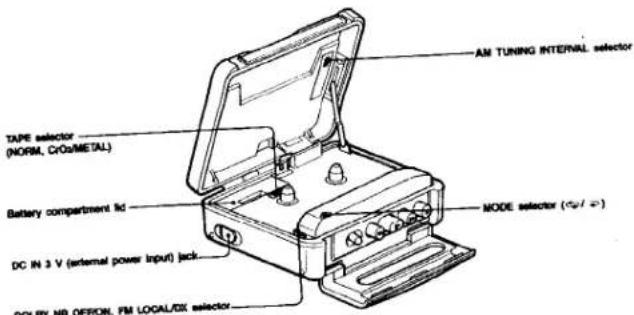
text_image
AM TUNING INTERNAL selector TAPE selector (NORM, CRO/METAL) Battery compartment lid DC IN 3 V (external power Input) lack DOLBY NR OFFON, FM LOCAL/DX selector MODE selector (Φ/Φ)Using the Belt Clip