
Walkman WM-SXF10 - Kassettenabspieler SONY - Kostenlose Bedienungsanleitung
Finden Sie kostenlos die Bedienungsanleitung des Geräts Walkman WM-SXF10 SONY als PDF.


Benutzerfragen zu Walkman WM-SXF10 SONY
0 Frage zu diesem Gerät. Beantworten Sie die, die Sie kennen, oder stellen Sie Ihre eigene.
Eine neue Frage zu diesem Gerät stellen
Laden Sie die Anleitung für Ihr Kassettenabspieler kostenlos im PDF-Format! Finden Sie Ihr Handbuch Walkman WM-SXF10 - SONY und nehmen Sie Ihr elektronisches Gerät wieder in die Hand. Auf dieser Seite sind alle Dokumente veröffentlicht, die für die Verwendung Ihres Geräts notwendig sind. Walkman WM-SXF10 von der Marke SONY.
BEDIENUNGSANLEITUNG Walkman WM-SXF10 SONY
SONY
3-755-632-22(
Radio Cassette Player
WM-SXF10
Operating Instructions
Before operating the unit, please read this manual thoroughly and retain it for future reference.
Owner's Record
The model number is located at the rear and the serial number is located inside of the cassette compartment lid. Record the serial number in the space provided below. Refer to these numbers whenever you call upon your Sony dealer regarding this product.
Model No. WM-SXF10
Serial No.
Sony Corporation © 1992
Printed in Taiwan R.O.C.
text_image
B PFeature
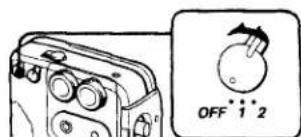
AVLS (Automatic Volume Limiter System)
The AVLS selector allows you to limit the maximum volume of your WALKMAN personal stereo without degrading its sound quality.
- When the AVLS selector is set to either position 1 or 2, (around 95 dB respectively) the volume will be kept at a moderate level without degradation of the sound quality, even if you attempt to turn the volur up higher.
- When the AVLS selector is turned off, you will be able to enjoy the full volume capability of your WALKMAN personal stereo.
text_image
OFF 1 2Precautions
Notes on batteries
- Insert the batteries with correct polarity.
- When the unit is not to be used for a long time, remove the batteries to avoid the damage caused by battery leakage and corrosion.
- When the batteries become weak, the BATT indicator will glow faintly and playback sound will be distorted or unstable. In this case, replace both batteries with new ones.
Concerning the battery life, see "Specifications".
Handling your WALKMAN
- Do not drop nor give a shock to the unit. Doing so may cause malfunction of the unit.
- Do not leave the unit in a location near heat sources or in a place subject to direct sunlight or sand, excessive dust, moisture, rain, mechanical shock, or in a car with its windows closed.
- If the unit has not been used for a long time, set it in the playback mode and warm it up for a few minutes before inserting a cassette.
- Before opening or closing the cassette compartment lid, be sure to wipe off water, dust or sand on the exterior of the unit.
- Since water in the headphones jack may cause rust, cover it with the attached rubber cap when the headphones are not in use.
- If the unit or the headphones are immersed in salt water, be sure to wash them in still fresh water. Never wash them under running water, and never use soap or detergent.
- The supplied headphones are not meant to be immersed in water or come in continuous contact with water. If they are accidentally dropped into water or get wet, dry them with a soft cloth. Never use an electric hair dryer.
- The use of cassettes longer than 90 minutes is not recommended except for a long continuous playback.
Notes on Headphones
- Road safety
Do not use headphones while driving, cycling, or operating any motorized vehicle. It may create a traffic hazard and is illegal in many areas. It can also be potentially dangerous to play your headsets at high volume while walking, especially at pedestrian crossings. You should exercise extreme caution or discontinue use in potentially hazardous situations.
• Preventing hearing damage
Avoid using headphones at high volume. Hearing experts advise against continuous, loud and extended play. If you experience a ringing in your ears, reduce volume of discontinue use.
• Caring for others
Keep the volume at a moderate level. This will allow you to hear outside sounds and to be considerate to the people around you.
About the rubber packing
- Any sand or dust on the rubber packing will prevent the cassette compartment lid from closing tightly, and water may leak in. Brush off the dust once in a while.
• We recommend the packing to be changed every year. Replacement packing is available at an authorized Sony Service Facility.
If you have any questions or problems concerning your unit, please consult your nearest Sony dealer.
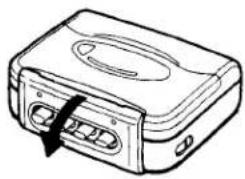
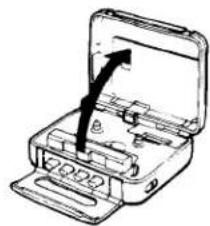
Opening and Closing the Cassette Compartment Lid
To Open
1
natural_image
Line drawing of a device with a black arrow pointing to a button (no text or symbols)2
natural_image
Line drawing of an open hard drive with a black arrow indicating direction (no text or symbols)To Close
1
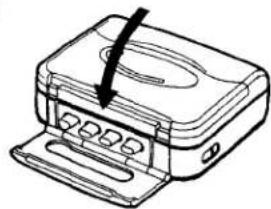
natural_image
Line drawing of a printer with a paperclip inserted (no text or symbols)2

natural_image
Line drawing of a device with a scroll wheel and a black arrow pointing to a button (no text or symbols)If the cassette compartment lid cannot be opened*
Follow the steps in the illustration on the right.
When the cassette compartment lid opens, remember to close the rubber cap. (The unit is not water-resistant with the lid open.)
* Since the unit is airtight, you may not be able to open the lid because of a sudden change in air pressure inside the unit which happens after being transported on a plane or moving from a warm place to a cold place.
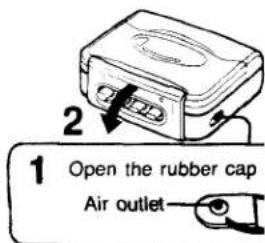
text_image
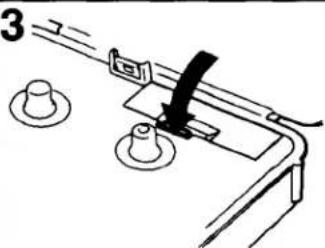
1 Open the rubber cap Air outletInstalling the Batteries
1
Battery
compartment
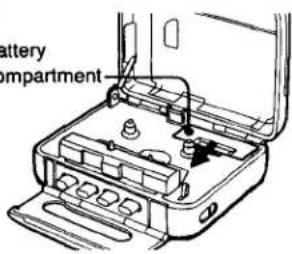
text_image
battery mpartment2
Two size AA (R6) bat
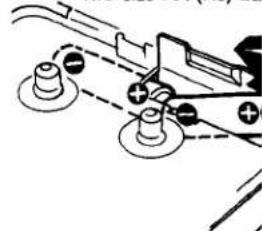
natural_image
Pure mechanical diagram showing two bolted components connected by dashed lines, no text or symbols present3
natural_image
Simple line drawing of a mechanical device with two circular components and a lever (no text or symbols)Removing the batteries
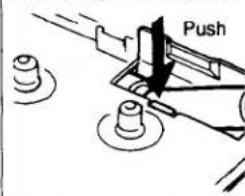
text_image
PushInserting a Cassette
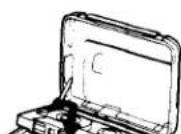
Take up any slack in the tape before insertion.
Playing a Tape (See "Inserting a Cassette")
1
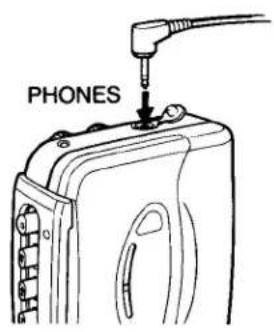
text_image
PHONES2
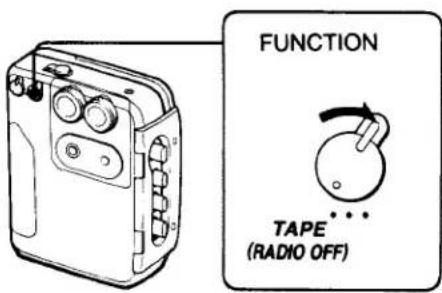
text_image
FUNCTION TAPE (RADIO OFF)3
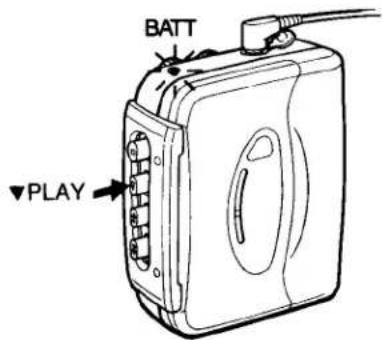
text_image
BATT ▼PLAY4
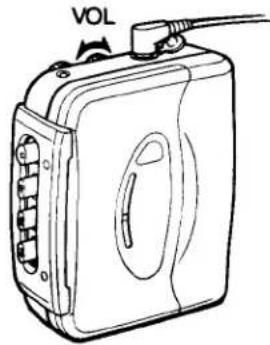
text_image
VOL
text_image
To stop the tape ■ STOP To rewind the tape ▲REW To advance the tape rapidly ▼FFAt the end of the ta The tape stops. The button will be released. The locked ▲ or ▼ but released by pressin
To get the best performance from your tape
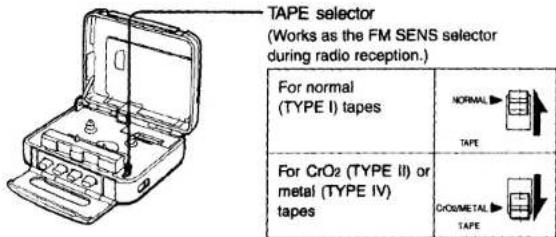
text_image
TAPE selector (Works as the FM SENS selector during radio reception.) For normal (TYPE I) tapes NORMAL TAPE For CrO2 (TYPE II) or metal (TYPE IV) tapes CRO2/METAL TAPE
text_image
TAPE selector (Works as the FM SENS selector during radio reception.) For normal (TYPE I) tapes NORMAL TAPE For CrO2 (TYPE II) or metal (TYPE IV) tapes CRO2/METAL TAPEReceiving Radio
1
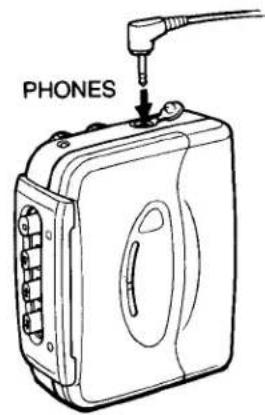
text_image
PHONES2
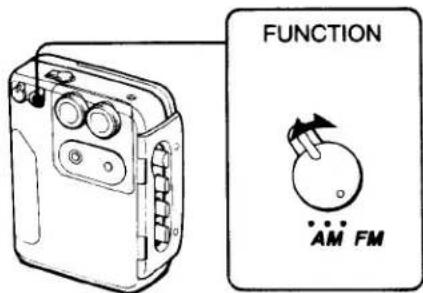
text_image
FUNCTION AM FM3
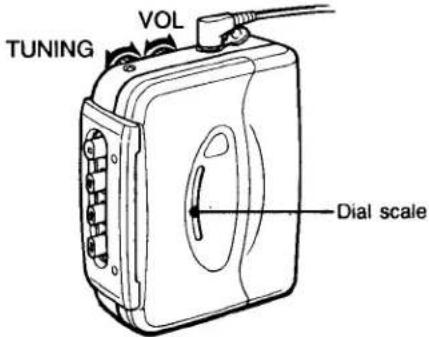
text_image
TUNING VOL Dial scaleTo turn off the radio
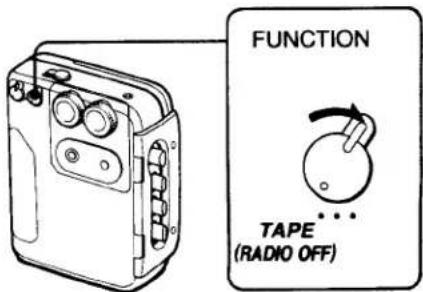
text_image
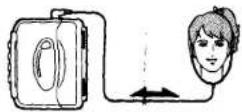
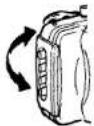
FUNCTION TAPE (RADIO OFF)| FMSince the headphone cord serves as an FM antenna, extend it for better reception. | AMSince the reception is affe the unit, rotate it horizonta reception. |
 |  |
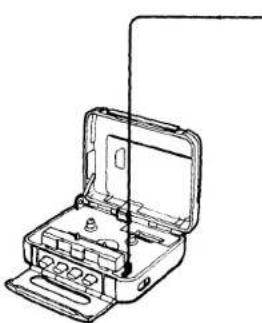
To improve FM sensitivity
natural_image
Line drawing of an open electrical switch device with internal components and wiring (no text or symbols)FM SENS (sensitivity) selector (Works as the TAPE selector during tape
| For normal FM reception | DXFM SENS |
| When a very strong FM station signal causes noise. The noise will be reduced. | LOCALFM SENS |
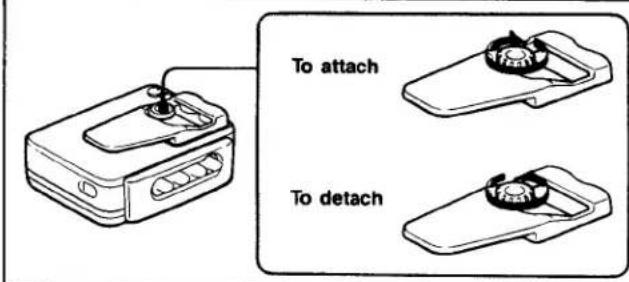
Attaching the Belt Clip
text_image
To attach To detachCleaning
- Clean the tape head after every 10 hours of use to enjoy optimum stereo sound. Moisten a cotton swab or a soft cloth with alcohol and wipe the head, pinch-rollers and the capstans.
- Do not use alcohol, benzine, or thinner to clean the case.
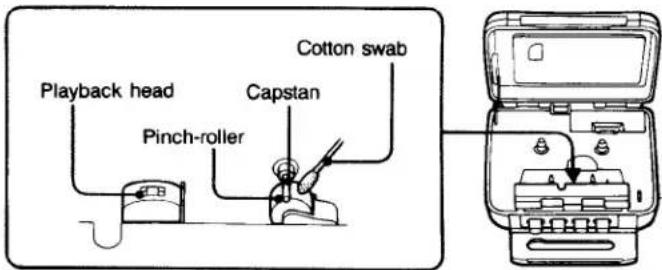
text_image
Playback head Pinch-roller Capstan Cotton swabSpecifications
Frequency range
FM: 87.6 - 108 MHz
AM: 530 - 1.710 kHz
Power requirement
3 V DC, two size AA (R6) batteries
Battery life (hours)
| Batteries | Radio reception | Playback |
| Sony battery SUM-3 (MS) | approx. 13 | approx. 3 |
| Sony alkaline battery AM3 (N) | approx. 30 | approx. 7 |
Accessories supplied
Stereo headphones (open-air type, 1)
Belt clip (1)
Design and specifications subject to change without notice.
SONY®
AUDIO TAPE RECORDER
COMPACT DISC COMPACT PLAYER
ELECTRONIC STILL VIDEO CAMERA
AND PLAYBACK ADAPTOR
LIMITED WARRANTY
SONY ELECTRONICS INC. ("SONY") warrants this product against defects in material or workmanship, as follows:
-
For a period of 90 days from the date of purchase, SONY will pay the labor charges of your SONY authorized service facility to repair the defective product. After this 90-day period, you must pay for all labor charges.
-
In addition, SONY will supply, at no charge, new or rebuilt replacements for defective parts for a period of 1 year from the original date of purchase.
Labor and Parts
To obtain warranty service during the initial 90-day period, you must take the product, or deliver the product prepaid, to a SONY authorized service facility.
Parts Only
During the remainder of the warranty period, any defective part will be replaced if it is taken, or delivered prepaid, to a SONY service center. Labor for removal and installation is available from your SONY authorized service facility or SONY service center, at your expense.
This warranty does not cover cosmetic damage, and damage due to acts of God, accident, misuse, abuse or negligence to the product, including the antenna. This warranty is valid only in the United States of America.
Proof of purchase in the form of a bill of sale or receipted invoice which is evidence that the unit is within the warranty period must be presented to obtain warranty service.
This warranty is valid only if the serial number appears on the product.
REPAIR OR REPLACEMENT AS PROVIDED UNDER THIS WARRANTY IS THE EXCLUSIVE REMEDY OF THE CONSUMER. SONY SHALL NOT BE LIABLE FOR ANY INCIDENTAL OR CONSEQUENTIAL DAMAGES FOR BREACH OF ANY EXPRESS OR IMPLIED WARRANTY ON THIS PRODUCT. EXCEPT TO THE EXTENT PROHIBITED BY APPLICABLE LAW, ANY IMPLIED WARRANTY OF MERCHANTABILITY OR FITNESS FOR A PARTICULAR PURPOSE ON THIS PRODUCT IS LIMITED IN DURATION TO THE DURATION OF THIS WARRANTY.
Some states do not allow the exclusion or limitation of incidental or consequential damages, or allow limitations on how long an implied warranty lasts, so the above limitations or exclusions may not apply to you. In addition, if you enter into a service contract with the Sony Partnership within 90 days of the date of sale, the limitation on how long an implied warranty lasts does not apply to you. This warranty gives you specific legal rights, and you may also have other rights which vary from state to state.
For your convenience, Sony Electronics Inc. has established the Customer Information Center to supply you with product or service information.
Important: If returning product for service, please see reverse side of this card for your nearest Sony Service Center.
SONY CUSTOMER INFORMATION CENTER
201-930-SONY (7669)
714-821-SONY (7669)
708-250-SONY (7669)
or write to:
Sony Customer Information Center
Sony Drive, Mail Drop #11
Park Ridge, NJ 07658
SONY ELECTRONICS INC.
Sony Drive, Park Ridge, New Jersey 07656
Sony Service Centers
| Arizona | Hawaii | Missouri |
| Phoenix2240 North Scottsdale RoadTempe, AZ 85281(602) 943-7669 | Honolulu950 Mapunapuna StreetHonolulu, HI 96819(808) 834-6622 | St. Louis12482-D Natural Bridge RoadBridgeton, MO 63044(314) 291-2201 |
| California | Illinois | New Jersey |
| Burbank (Los Angeles area)4100 Riverside Drive, Suite A | Chicago4730 West Fullerton, Suite 4Riverpoint Shopping Center | Mahwan (N.Y. Metropolitan Area)386 Route 17 South |
| Burbank, CA 91505(818) 842-7669 | Chicago, IL 60614(312) 929-8585 | Mahwan, NJ 07430(201) 529-1655 |
| Costa Mesa (Orange County area)2728 Bristol Street SouthCosta Mesa, CA 92626(714) 549-4833 | Niles (Chicago N.W.)7540 North Caldwell AvenueNiles, IL 60648(708) 647-2400 | UnionBradlees Shopping CenterUS Highway 22 At Morris AvenueUnion, NJ 07083(201) 687-5555 |
| San Bruno (San Francisco area)751 Camino PlazaSan Bruno, CA 94066(415) 671-2810 | Westmont (Chicago S.W.)6038-38 South Cass AvenueWestmont, IL 60589(708) 969-0049 | Ohio |
| San Diego8975 Complex DriveSan Diego, CA 92123(619) 279-2724 | KansasCity11712 West 95th StreetOverland ParkKS 66214(973) 888-2622 | Cleveland6370 York RoadPyrme Heights, OH 44130(216) 845-7669 |
| San Jose1359 Old Oakland RoadSan Jose, CA 95112(408) 280-7669 | Pennsylvania | |
| Colorado | Maryland (Washington D.C.) | Philadelphia651 Park AvenueKing of Prussia, PA 19406(215) 768-8850 |
| DenverHavana Place Center10740 East Iliff AvenueAurora, CO 80014(303) 755-7669 | Washington D.C.5300 Sunnyside AvenueBeltsville, MD 20705(301) 595-1816 | PittsburghWexford Plaza10610 Perry Highway I(Rt. 19Ni)Westford, PA 15090(412) 935-8466 |
| Florida | Massachusetts | Texas |
| Fort Lauderdale2850 North 28th TerraceHollywood, FL 33020(305) 920-5600 | Boston390 University Avenue128 Westwood Industrial CenterWestwood, MA 02090(617) 329-5130 | Dallas401 Preston Valley Shopping CenterDallas, TX 75230(214) 661-3537 |
| Georgia | Michigan | Houston7639 WestheimerHouston, TX 77063(713) 783-8761 |
| Atlanta120 Interstate North Parkway EastSuite 410Atlanta, GA 30339(404) 953-5871 | Detroit43304 Eleven Mile RoadNovi, MI 48050(313) 344-4044 | Washington |
| Minnesota | ||
| Minneapolis4300 W 361⁄2 StreetSt. Louis Park, MN 55416(812) 920-8000 | Seattle835 FdalgoeSeattle, WA 98108(206) 762-6500 |
Sony District Service Offices
| Western Zone | Central Zone | Eastern Zone |
| Western DistrictSony Service Company2729 Bristol Street SouthCosta Mesa, CA 92826(714) 649-4836 | Mid-West DistrictSony Service Company1200 N. Arlington Heights Rd.Irasca, IL 60143(708) 773-7666 | Eastern DistrictSony Service Company386 Route 17 SouthMahwah, NJ 07430201 529-1616 |
| Northwestern DistrictSony Service Company1359 Old Oakland RoadSan Jose, CA 95112(408) 280-7675 | East Central DistrictSony Service Company28200 Town Center Drive,Suite 300 Novi, MI 48050(313) 347-2251 | Mid-Atlantic DistrictSony Service Company851 Park AvenueKing of Prusala, PA 19406(215) 768-8845 |
| Southwestern DistrictSony Service Company3201 Premier Ct. Suite 100Irving, TX 75063(214) 650-5270 | Southeastern DistrictSony Service Company120 Interstate North Parkway EastSuite 414Atlanta, GA 30339(404) 953-5858 |