
Walkman WM-FS393 - Kassettenabspieler SONY - Kostenlose Bedienungsanleitung
Finden Sie kostenlos die Bedienungsanleitung des Geräts Walkman WM-FS393 SONY als PDF.


Benutzerfragen zu Walkman WM-FS393 SONY
0 Frage zu diesem Gerät. Beantworten Sie die, die Sie kennen, oder stellen Sie Ihre eigene.
Eine neue Frage zu diesem Gerät stellen
Laden Sie die Anleitung für Ihr Kassettenabspieler kostenlos im PDF-Format! Finden Sie Ihr Handbuch Walkman WM-FS393 - SONY und nehmen Sie Ihr elektronisches Gerät wieder in die Hand. Auf dieser Seite sind alle Dokumente veröffentlicht, die für die Verwendung Ihres Geräts notwendig sind. Walkman WM-FS393 von der Marke SONY.
BEDIENUNGSANLEITUNG Walkman WM-FS393 SONY
SPORTS
WALKMAN
Radio Cassette Player
WM-FS393
Operating Instructions
WALKMAN is a trademark of Sony Corporation.
Sony Corporation © 1994
Printed in Taiwan, R:O.C.
OWNER'S RECORD
The model number is located at the rear and the serial number is located inside the cassette holder. Record these numbers in the spaces provided below. Refer to them whenever you call upon your Sony dealer regarding this product.
Model No. WM-FS393
Serial No.
Getting Started
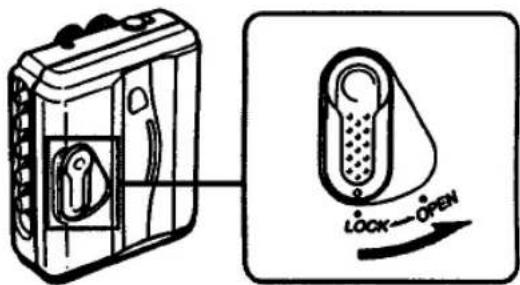
Opening the Cassette Holder
text_image
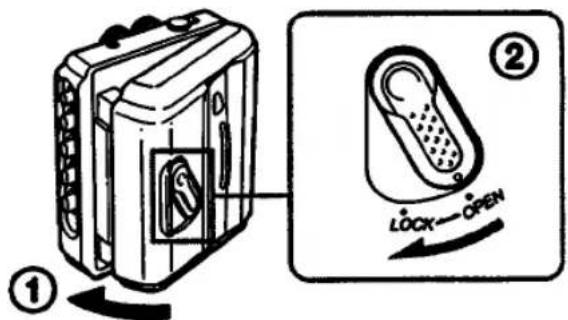
Diagram showing a device with lock and open button, illustrating the process of locking or opening.Closing the Cassette Holder
To close the cassette holder, set the lever firmly to LOCK. If you do not set the lever to LOCK, the cassette holder remains open.
text_image
Diagram showing a device with labeled parts and a lock switch operation diagramGetting Started
If the cassette holder cannot be opened\*
Open the rubber cap, then open the cassette holder.
When the cassette holder opens, remember to close the rubber cap. (The Walkman is not water-resistant with the cassette holder open.)

text_image
Air outlet Rubber cap* Since the Walkman is airtight, you may not be able to open the cassette holder because of a sudden change in air pressure inside the Walkman which happens after being transported on a plane or moving from a warm place to a cold place.
Inserting Battery
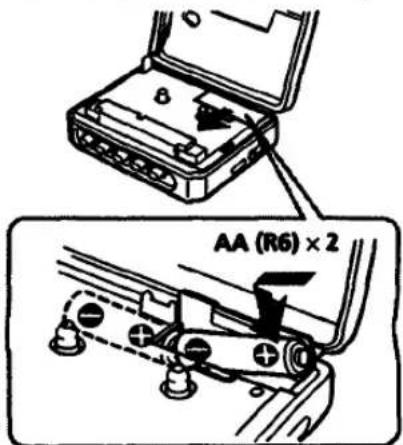
Insert two AA (R6) batteries in correct polarity.
text_image
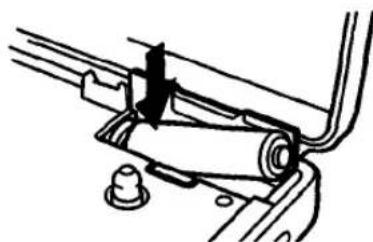
AA (R6) × 2Removing Battery
natural_image
Mechanical assembly diagram showing a lever mechanism with no visible text or symbolsNotes on battery
- When you do not use your Walkman for a long time, remove the battery to avoid any damage caused by battery leakage and subsequent corrosion.
- When the battery become weak, the BATT indicator will dim and the sound will be distorted or unstable. In such a case, replace both batteries.
- Concerning the battery life, see "Specifications".
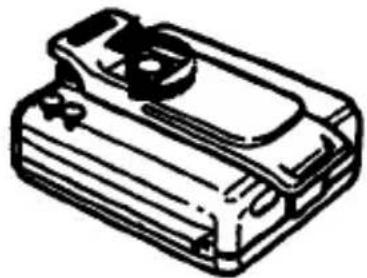
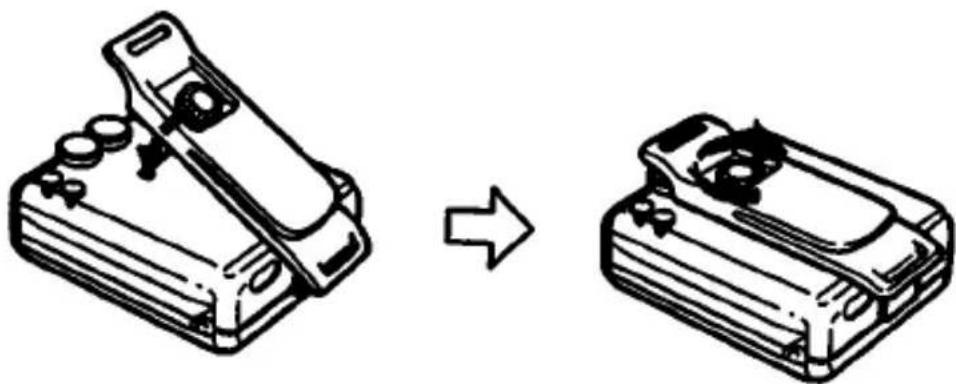
Using the Belt Clip
With the supplied belt clip, you can wear your Walkman on a belt for convenient use.
Removing the belt clip
natural_image
Line drawing of a rectangular electronic device with a circular top and side ports (no text or symbols)Attaching the belt clip
natural_image
Diagram showing a device being processed from a left-side tool to a right-side device (no text or symbols present)Playing Cassettes
natural_image
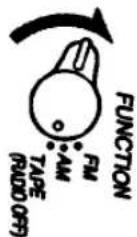
Line drawing of a portable electronic device with a coiled cable and handle (no text or symbols)1 Set the FUNCTION selector to TAPE.
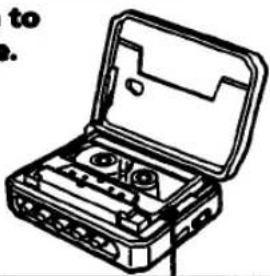
2 Insert a cassette.

natural_image
Line drawing of an open hard disk kit with internal compartments (no text or symbols)3 Set the TAPE switch to match the tape type.
natural_image
Line drawing of a portable cassette tape kit with open lid and buttons (no text or symbols)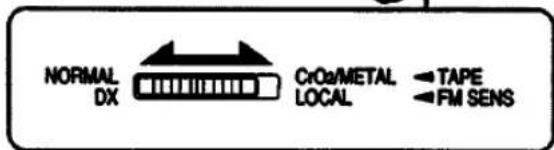
text_image
NORMAL DX CrOa/METAL LOCAL TAPE FM SENS4 Press ◀ PLAY.

Operating the Cassette Player
| To stop | Press ■ STOP. |
| To wind the tape | Press ▶▶or ◀◀. |
| To change sides | Press ◀◀▶ DIR. |
| To adjust the volume | Set the VOL control. |
Notes on the tape transport direction
The tape transport direction changes automatically at the end of a cassette, and the tape plays both sides repeatedly.
Notes on playing cassettes
- Do not use cassettes longer than 90 minutes except for long continuous playback.
- If your Walkman has not been used for a long time, run the Walkman for a few minutes before inserting a cassette.
- Avoid winding the headphones cord around the Walkman. The buttons may be kept pressed, causing unnecessary battery usage.
- Do not open the cassette holder while the tape is running.
Using MEGA BASS
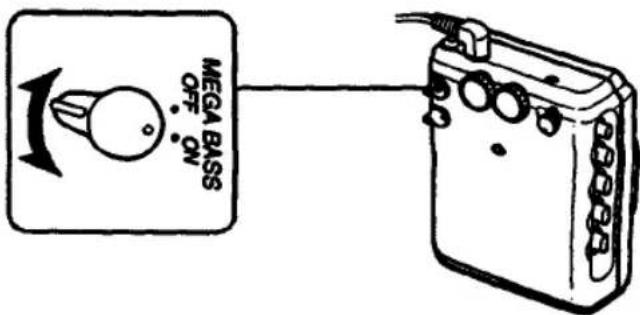
Set the MEGA BASS switch to ON to produce deep and powerful sound.
text_image
MEGA BASS OFF ONWhen using MEGA BASS
If the AVLS selector is set to 1 or 2, the MEGA BASS effect is reduced.

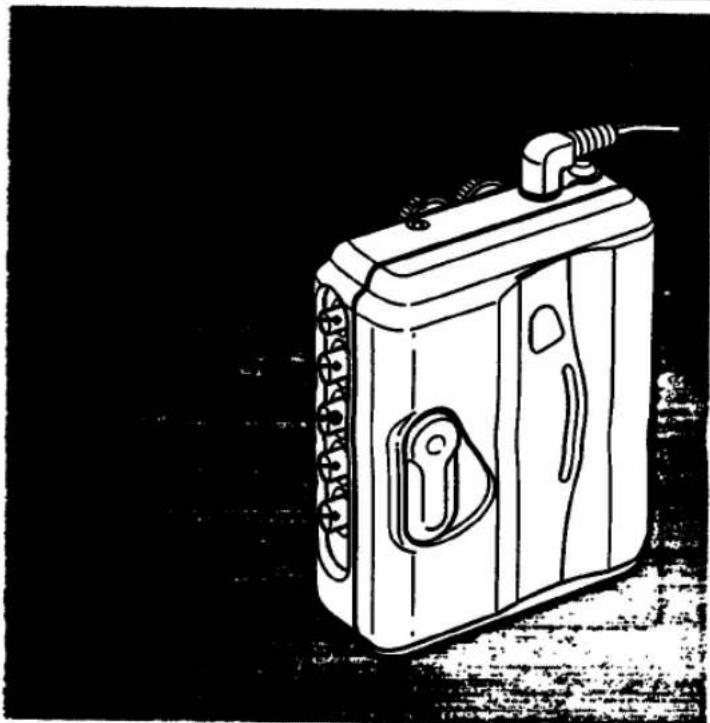
Listening to the Radio
natural_image
Line drawing of a portable electronic device with a handle and front panel, set against a textured black background (no text or symbols)
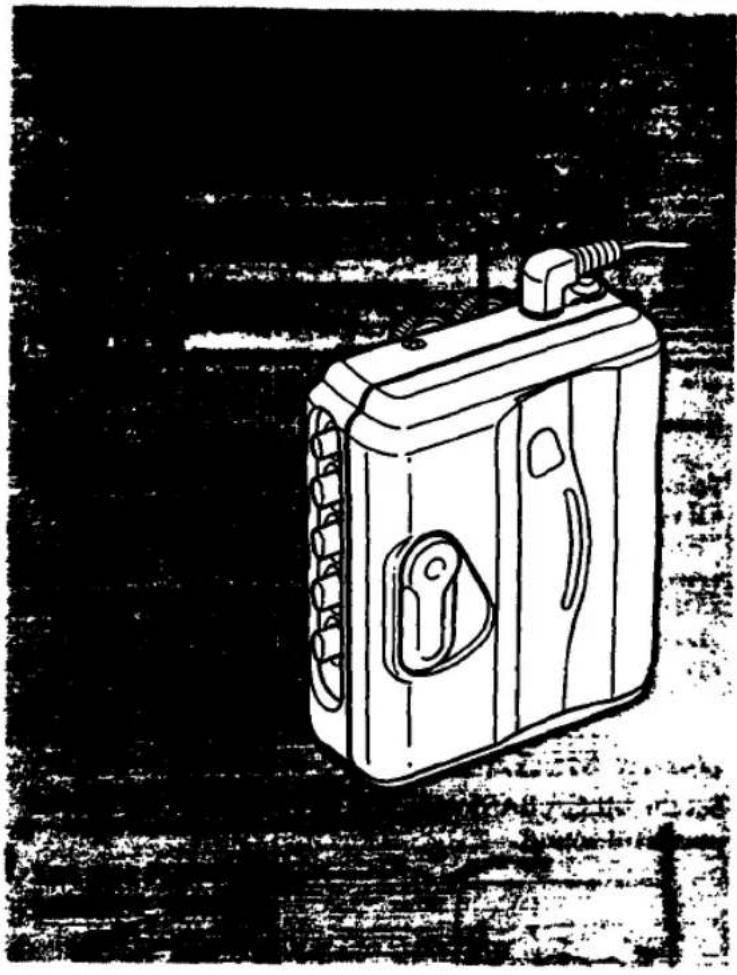
1 Set the FUNCTION selector to FM or AM.
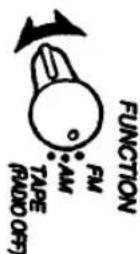
2 Tune in the desired station.

| To tune off | Set the FUNCTION selector to TAPE (RADIO OFF). |
| To adjust the volume | Set the VOL control. |
To mute the radio sound
Press and hold ■ STOP/RADIO MUTE as long as you want, during radio reception.
Release the button to resume sound.
Note
If you have inserted a cassette with a metallic shell or label, and interference in radio reception occurs, remove the cassette.
Improving Radio Reception
Improving FM reception
Extend the headphones cord or adjust the FM SENS switch.
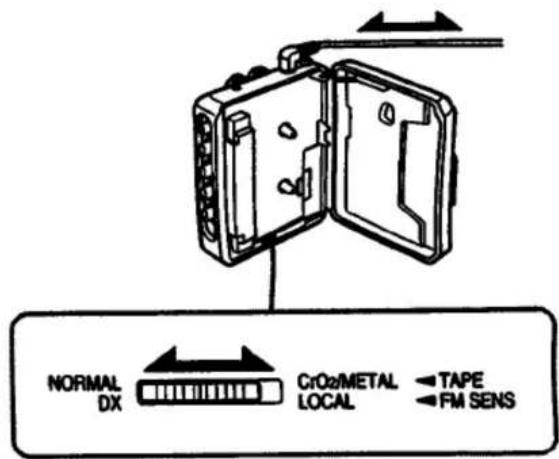
text_image
NORMAL DX CrO2/METAL LOCAL TAPE FM SENSImproving AM reception
Rotate the Walkman.

natural_image
Hand-drawn sketch of a cylindrical device with rotating arrows indicating rotation (no text or symbols)AVLS (Automatic Volume Limiter System)
The AVLS selector allows you to limit the maximum volume of your Walkman personal stereo without degrading the sound quality.
- When you set the AVLS selector to 1 or 2 (around 95 dB and 85 dB respectively), the maximum volume is kept down to protect your ears.
- When the AVLS selector is set to either position 1 or 2, the playback sound may be distorted or unstable according to the music (especially the bass boosted part). If this happens, turn down the volume.
- When the AVLS selector is turned off, you will be able to enjoy the full volume capability of your Walkman personal stereo.
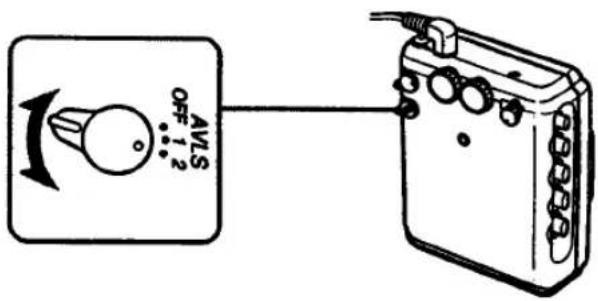
text_image
AVLS OFF 1.2Specifications
Radio Frequency
FM: 87.6 - 108 MHz
AM: 530 - 1,710 kHz
Power Requirements
3 V DC Batteries AA (R6) × 2
Battery Life
(approximate hours when using the batteries specified below)
| Battery | Playback | Radio |
| Sony Alkaline AM3 (N) | 7 hours | 30 hours |
| Sony SUM-3 (NS) | 3 hours | 13 hours |
Dimensions
104.4 × 120.5 × 50 mm (4 ½ × 4 ¾ × 2 in.) (w/h/d)
incl. projecting parts
Mass 300 g (10.6 oz) incl. batteries
Supplied Accessories
- Stereo headphones (1)
-Belt clip (1)
Design and specifications are subject to change without notice.
Precautions
Notes on Headphones
Concerning road safety
Do not use headphones while driving, cycling, or operating any motorized vehicle. It may create a traffic hazard and is illegal in many areas. It can also be potentially dangerous to play your headsets at high volume while walking, especially at pedestrian crossings. You should exercise extreme caution or discontinue use in potentially hazardous situations.
Preventing hearing damage
Avoid using headphones at high volume. Hearing experts advise against continuous, loud and extended play. If you experience a ringing in your ears, reduce volume or discontinue use.
Caring for others
Keep the volume at a moderate level. This will allow you to hear outside sounds and to be considerate to the people around you.
Taking Care of Your Walkman
- Before opening or closing the cassette holder, be sure to wipe off water, dust or sand on the exterior of the Walkman.
- Avoid exposing the Walkman to extreme temperatures, direct sunlight, moisture, sand, dust or mechanical shock. Never leave the Walkman in a car parked in the sun.
- Since water in the headphones jack may cause rust, cover it with the attached rubber cap when the headphones are not in use.
• The supplied headphones are not meant to be immersed in water or come in continuous contact with water. If they are accidentally dropped into water or get wet, dry them with a soft cloth. Never use an electric hair dryer. - If the Walkman or the headphones are immersed in salt water, be sure to wash them in non-running fresh water. Never wash them under running water, and never use soap or detergent.
- Prolonged use may contaminate the tape head. If sound drop-out or excessive noise occurs, clean the head and tape path with alcohol.
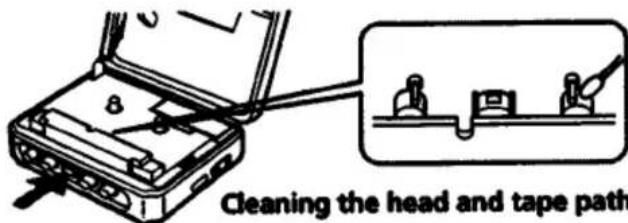
text_image
Cleaning the head and tape path- Clean the headphones plug periodically for optimum sound.
- Do not use alcohol, benzine or thinner to clean the case.
About the rubber packing
- Any sand or dust on the rubber packing will prevent the cassette holder from closing tightly, and water may leak in. Brush off the dust once in a while.
• We recommend the packing to be changed every year. Replacement packing is available at an authorized Sony Service Facility.
If you have any question or problem concerning your Walkman, please consult your nearest Sony dealer.
LIMITED WARRANTY
SONY ELECTRONICS INC. ("SONY") warrants this Product (including any accessories) against defects in material or workmanship as follows:
- LABOR: For a period of 30 days from the date of purchase, if this Product is determined to be defective, Sony will repair the Product at no charge, or pay the labor charges to any SONY authorized service facility. After the Warranty Period, you must pay for all labor charges.
- PARTS: In addition, SONY will supply at no charge, new or rebuilt replacements in exchange for defective parts for a period of one (1) year. After \$0 days from the date of purchase, labor for removal and installation is available from SONY authorized service facilities or a Sony Service Center at your expense.
To obtain warranty service, you must take the Product, or deliver the Product Insight prepaid, in either its original packaging or packaging affording an equal degree of protection, to any authorized SONY service facility.
This warranty does not cover customer instruction, installation, set up adjustments or signal reception problems.
This warranty does not cover cosmetic damage or damage due to acts of God, accident, misuse, abuse, negligence, commercial use, or modification of, or to any part of the Product, including the antenna. This warranty does not cover damage due to improper operation or maintenance, connection to improper voltage supply, or attempted repair by anyone other than a facility authorized by Sony to service the Product. This warranty does not cover Products sold AS IS or WITH ALL RAULTS, or consumables (such as fuses or betteries). This warranty is valid only in the United States.
Proof of purchase in the form of a bill of sale or accepted invoice which is evidence that the unit is within the Warranty period must be presented to obtain warranty service.
This warranty is invalid if the factory applied serial number has been altered or removed from the Product.
REPAIR OR REPLACEMENT AS PROVIDED UNDER THIS WARRANTY IS THE EXCLUSIVE REMEDY OF THE CONSUMER. SONY SHALL NOT BE LIABLE FOR ANY INCIDENTAL OR CONSEQUENTIAL DAMAGES FOR BREACH OF ANY EXPRESS OR IMPUSED WARRANTY ON THIS PRODUCT. EXCEPT TO THE EXTENT PROHIBITED BY APPLICABLE LAW, ANY IMPUSED WARRANTY OF MERCHANTABILITY OR FITNESS FOR A PARTICULAR PURPOSE ON THIS PRODUCT IS LIMITED IN DURATION TO THE DURATION OF THIS WARRANTY.
Some states do not allow the exclusion or limitation of incidental or consequential damages, or allow limitations on how long an implied warranty tests, so the above limitations or exclusions may not apply to you. In addition, if you enter into a service contract with the Sony Partnership within 80 days of the date of sale, the limitation on how long an implied warranty tests does not apply to you. This warranty gives you specific legal rights, and you may have other rights which vary from state to state.
For your convenience, SONY ELECTRONICS INC. has established telephone numbers for frequently asked questions:
To locate the service or dealer nearest you, call:
1-1800-342-5721
For service assistance or resolution of a service problem, call:
SONY CUSTOMER RELATIONS CENTER 1-1800-282-2848
For Product information or operation, call
SONY CUSTOMER INFORMATION CENTER (201)-368-9272
or write to: Sony Customer Information Center One Sony Drive Park Ridge, New Jersey 07658-8003
For an accessory or part not available from your authorized dealer, call