
Walkman WM-FS421 - Kassettenabspieler SONY - Kostenlose Bedienungsanleitung
Finden Sie kostenlos die Bedienungsanleitung des Geräts Walkman WM-FS421 SONY als PDF.


Benutzerfragen zu Walkman WM-FS421 SONY
0 Frage zu diesem Gerät. Beantworten Sie die, die Sie kennen, oder stellen Sie Ihre eigene.
Eine neue Frage zu diesem Gerät stellen
Laden Sie die Anleitung für Ihr Kassettenabspieler kostenlos im PDF-Format! Finden Sie Ihr Handbuch Walkman WM-FS421 - SONY und nehmen Sie Ihr elektronisches Gerät wieder in die Hand. Auf dieser Seite sind alle Dokumente veröffentlicht, die für die Verwendung Ihres Geräts notwendig sind. Walkman WM-FS421 von der Marke SONY.
BEDIENUNGSANLEITUNG Walkman WM-FS421 SONY
SONY.
3-229-657-13 (1)
Radio Cassette Player
Operating Instructions Manual de instrucciones (inversa)
http://www.word.sony.com/
VAN KHAJI 2. A registration institution of Sany Corporation VAN KHAJI 2017 1008/2018 01 2016 (2019) 2700
N50 The C-Tick mark on the Wallmen is valid only for the products marked in Australia.
C N50 La maría C-Itúc del Wallman, de la estevance para los productes conversión de las Australianas
sports

WM-FS422ST/FS421/FS221
Cate Corporation 2001: Pindazin Malaysia
A
B
text_image
Diagram showing mechanical assembly steps with labeled components and directional arrowsC
text_image
Diagram showing car air condition control with directional arrows and component placement, including a close-up of the air condition.D
text_image
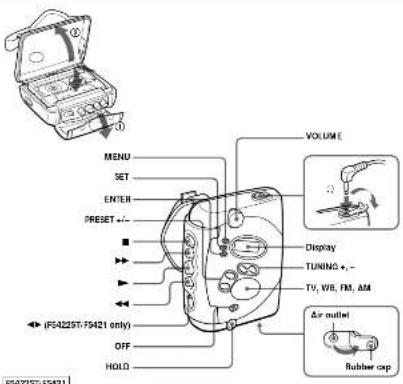
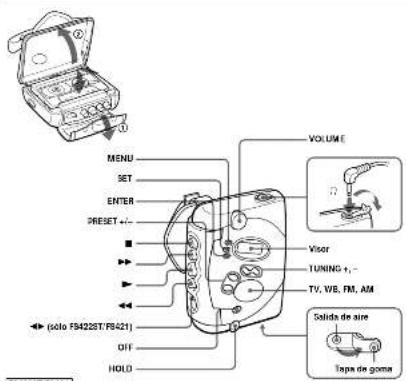
MENU SET ENTER PRESET +/- VOLUME Display TUNING + - TV, VIB, FM, AM Air outlet F5423ST-F5421 only OFF HOLD F5423ST-F5421English
For the customers in the U.S.A.
OWNER'S RECORD
The modal number is located at the rear and the serial number is located inside the cigarette folder. Record these turnches in the space provided before. Note to these numbers wherever you call even your long dealer regarding this product. Modal No. ____ Serial No. ____
INFORMATION
This equipment has been issued, and found to comply with the limits for a Closed Digital Device, pursuant to Part 15 of the TCC Rules. These limits are designed to provide reasonable protection against external interventions in a residential institution. This equipment, general way, and can contribute any frequency setting up, it is installed tool used in accordance with the instructions, only causes harmful interference to reduce environmental conditions and cause harmful interference without an additional ventilation. In this equipment does cause harmful interference to reduce elevation resonance, which can be determined by turning the equipment set and on the user as encouraged to try to avoid the interference by one or more at the following measures:
- transfer the acceptance between the way
Connect the equipment into an outlet on a direct difference from that to which the outlet is connected. Consult the device or an equipped radio TV technician for
Step This device complies with Part 13 of the ICC Rule. Operation is subject to the following two conditions: [1] This device may not cause external interference, and [2] this device must accept any interference received, including interference that may cause undamaged operation.
You are confirmed that any changes or modifications are, expressly approved in this manual could void your authority be to create this equipment.
If you have any questions about this product, you may call. Sorry Drive: Response Center 1-1(N)/225-V64
Sorry: First Response-Center (145) Gentry Blvd. Tor Mysre, 21.3913
| Declaration of Conformity |
| Trade Name: SONY |
| Mode No.: 07-07-047 (2532) |
| Responsible Party Sony Electronics Inc. |
| Address: 600 Kindergarten Road, Oncell, NJ 06W19 USA |
| Telephone: 201-8346472 |
| This device complies with Part I of the SOT Rules. Upgrades to be subject to the following two conditions: [1] The device may not cause harmful interference, and [2] this device may accept any non-jointerized, including interference that may cause uncorrected operation. |
Preparations
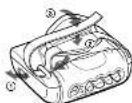
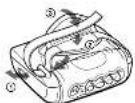
To use the carrying belt
Ajust it as illustrated.
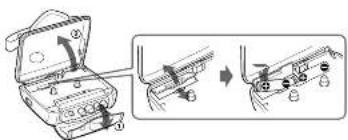
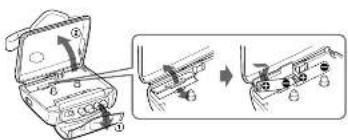
To insert batteries
1 Open the cassette holder.
2 Release the catch to open the battery compartment lid and insert two size AA (Rfi) dry batteries with correct polarity.
Battery life (approximate hours) (EITA*)
Tape Radio
playback reception
Sency alkaline 1,RS (SG) ^** 3240
Soray R&P (SR) 914
* Measured value by the standard of JLTA Japan Electronics and Information Technology Industries Association. (Using a Sony HF series cassette tape) **When using Sony Li60 (SG) "oLAMINA" alkaline dry batteries produced in Japan).
Note
- The battery life may be shorter depending on the operating condition, the mounting temperature and battery type.
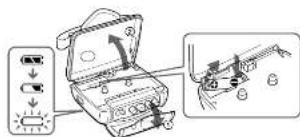
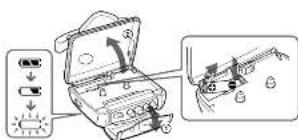
When to replace the batteries C
Replace the batteries with the new ones when ^5 flashes in the display.
To replace the batteries
1 Release the catch to open the battery
compartment lid.
2 Push the ⊕ side of the battery to remove the batteries and replace them with new ones.
Playing a Tape
1 Open the cassette holder and insert a cassette.
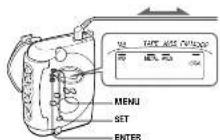
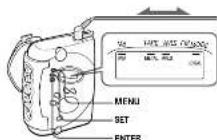
2 Press MENU repeatedly to set the cursor to TAPI in the display. Then press SET to select the tape type.
No message: normal (TYPE I) METAL: High-position (TYPE II) or metal (TYPE IV).
3 Press ▶. Adjust the volume with VOLUME.
| To | Press |
| Stop playback* | ■ |
| Wind rapidly** | ▶▶ cr ◀◀ |
* Playback will switch automatically to the opposite side when that tape reaches the end of the side (554215T/15121 or 7)
*If your lease the Walkman after the hope has been wound or rewound, the batteries will be consumed rapidly. Be sure to press ■.
Note
- Do not open the cassette holder while the tape is running.
To select the tape direction
Switch ◀ to select the desired direction.
Listening to the Radio
1 If the HOLD function is on, turn the HOLD switch in the opposite direction of the arrow
to break the control. Make sure that the tape has stopped completely.
2 Press TV, WB (Weather), FM or AM to select the desired band and to turn on the radio.
3 Press TUNING +/- to tune in to the desired station. Hold down TUNING +/- for a few seconds to scan for stations.
To turn off the radio
Press OFF
To improve the broadcast reception
- For TV/WB/FM: Extend the headphones/airphones cord (antenna). If the reception is still not good, press MENU repeatedly to set the cursor in the display to FM MODE. Then press SET to switch between "LOCAL" and none (DX) for best
reoption. D • For AM: 2-wayial the unit iself
Presetting Radio Stations
You can preset up to 40 radio stations, 7 for TV, 4 for WB, 24 for FM and 5 for AM.
Presetting Automatically Scanned Stations
- Press TV, WB (Weather), FM or AM
2 Press ENTER for more than 3 seconds. Preset number 1 will flash in the display and the Walkman starts scanning the stations from the lower frequencies and steps for about 3 seconds when a station is received.
3 If you wish to preset the received station, press ENTER while the preset number is flashing.
The received station is preset on preset number 1 and the unit starts scanning for the next receivable station.
4 Repeat Step 3 until all receivable stations are pressed.
To stop scanning
Press OFF. The radio is turned all at the same time.
Notes
- If stations are already stored, the newly preset stations replace the old times when the above procedure is completed.
- If slatians cannot be preset automatically, preset slatians manually.
Presetting Stations Manually
1 Press TV, WB (Weather), FM or AM
2 Press ENTER
The frequency digits and a preset number flash in the display.
3 While the frequency digits and the preset number are flashing, tune in to a station you wish to store using TUNING +/-. and select a preset number using PRESET +/.
4 While the frequency digits and the preset number are flashing, press ENTER.
Notes
- If you cannot complete step 3 or 4 while the
- If a station is already stored, the new station replaces the old one.
To cancel the stored station
Follow the procedure above and in step 3, press and hold TUNING +/- until "----" is displayed and select the preset number you want to cancel using PRESET +/-. Press ENTER while "...-" is flashing
Playing the preset radio stations
1 Press TV, WB (Weather), FM or AM
2 Press PRESET +/−
Using Other Functions
Locking the controls
Turn the HOLD switch to the direction of the arrow to kick the controls
The hold function only looks the radio operation
Vodafone, MEVO Umbands Net Detector
Emphasizing bass sound
Press MENU repeatedly to set the cursor to MB in the display. Then, press SET to turn MB (mega base) on. With each press, the indications change as follows.
MB (mega bass): emphasizes bass sound. No message: off (normal)
Notes
- If the sound is distorted with the mode "Mill", turn down the volume at sound normal mode.
- Base emphasis may not show great effect if the volume is turned up too high.
Protecting Your Hearing — AVLS (Automatic Volume Limiter System)
Press MENU repeatedly to set the cursor to AVLS in the display. Then press SET to show "AVLS". The maximum volume is kept down to protect your ears.
Precautions
On batteries
- Do not carry dry balances with one or other metallic objects. It can generate heat if the positive and negative terminals of the batteries are occasionally contacted by a metallic object. - When you are not going to use the Walkmen for a long time, remove the battery to work any damage caused by battery leakage and subsequent corrosion.
On handling
- Do not leave the unit in a leccaneer rear heat source, or in a place subject to direct sunlight, excessive dust, or sand, mixture, rain, mechanical shock, or in a car with its window closed.
• Do not use constant longer than 40 minutes except our long continuous playback.
- The LCD display may become hard to see or a ray device when using the unit at high temperatures above 30°C/124°F to reduce temperature (the 25°C/124°F). At room temperature, the display will return to its normal operating condition. - If the unit has not been used for a longer time, it is in the
playback made to warn it up for a new minute better you start using again.
On water resistance
- Urine opening or closing the cassette ruler, be sure to set pre-water, dust or sand on the exterior at the Walleroy. The Walleroy is not whether connected with the cassette holder open. - Since water in the hexap hens/curthenes parks may cause wood it with the industrial rubber cup that the hexap hens/curthenes are nor in use.
- Since the Walsman is a light, you may not be able to open the cassette under because of sudden change in air pressure inside the Walsman, which is uprawn after being transported on a plane or moving more a warm place in a cold place. To open the cassette under as "Trouble heating."
- The supplied headprone/sarphone are not mount to be increased in water or more in pure water contact with water. If they are accidentally dropped into water or gel wet, dry then with a soft cloth. Never use in clean hair dryer.
- it the Waterman or the headpolar/verpolar are interested in all times, so sure to seem from a non-winning mesh water. Never wash them under running water, and never use soap or sorbent.
• Any card or cust on the rubing parking will prevent the otherwise wider from closing up, and make any back in touch off the distance in a while
• We recommend the packing to be changed every year. Replacement packing is available at an outdoor Sony Service Facility.
On headphones/earphones
Road safety
Do not use headphones/suraphones while driving, cycling, or operating, more motorized vehicles. In many cases a traffic heater and is illegal in some areas. It can also be potentially dangerous to play your headphones/suraphones at high volume vehicle batteries, especially in modern operations.
You should exercise extensive instruction or disclosure use at
Preventing hearing damage
Do not use headphones, erythroes at high volume. Hearing aspects allows against continuous load and semi-rolled play, in your experience a singing in your eyes, reduce volume or discomfort.
Caring for others
Keep the volume to a moderate level. This will allow you to hear outside seconds and to be considerable to the people around you.
On maintenance
• To clean the type head and pats, Use the cleaning cassette
Use only the recommended clearing costs.
• The first science, the second theory, and the third
- Clean the headphones/syntheses plug periodically.
Troubleshooting
The display shows incorrect information.
• The gathering are weak, if you are the lowercase with new 2000.
The display and the operation are not normal. - Recourse the batteries for 30 seconds or more, and then insert from again. This does not solve the problem, renew the batteries and leave the unit without batteries for 30 minutes or
more, and then more, than again. In this case, press the stations again, since the press stations are removed from the station.
The cassette holder cannot be opened.
- Open the rubber cap, then open the zerosse holder. When the zerosse holder opens zerosse to close the rubber cap to prevent intrusion of zeros.
The sound is distorted.
- Set for ▶ within family to the service position (1542271/ F5121 entry).
Specifications
• Frequency range
14.2-15 P&I Waimbert 1-7:
TM 875-106301
- 162 MHz (Other counties)
- Power requirements
- Dimensions (w:h'd)
Approve, 10C.1: 123.1: 51.5 mm 14 ^1/2 : 4 ^1/2 : 2 mm (inert)
- May
Approve 260 g [10 Box] (male unit only)
- Suspended accessories angle headphone or
Telt clip (1)
Design and specifications are subject exchange without water
This warranty is valid only in the United States. Esta garantía es válida salamente en los EE. UU.
SONY
LIMITED WARRANTY | Portable Audio
Soc Debranch to, Flawd's ways to the French following an increased agostody's market
-
LABOS for a period of 10 days from the prior to discharge, if this product is delivered to be effective. Drop still occurs or replaces the product, at its current, an air charge, or may the labor charges in any case as submitted herein. Offers the North America Period, required by all labor charges.
-
- In addition, Stom will apply at a time point in the following reference to the above of the 40% range for a period of one 18-year, later 30 days after the same of purchase, later for removal and ventilation in
вседжет в 2016 г. 2017 г. 2018 г. 2019 г. 2020 г. 2021 г. 2022 г. 2023 г. 2024 г. 2025 г. 2026 г. 2027 г. 2028 г. 2029 г. 2030 г. 2031 г. 2032 г. 2033 г. 2034 г. 2035 г. 2036 г. 2037 г. 2038 г. 2039 г. 2040 г. 2041 г. 2042 г. 2043 г. 2044 г. 2045 г. 2046 г. 2047 г. 2048 г. 2049 г. 2050 г. 2051 г. 2052 г. 2053 г. 2054 г. 2055 г. 2056 г. 2057 г. 2058 г. 2059 г. 2060 г. 2061 г. 2062 г. 2063 г. 2064 г. 2065 г. 2066 г. 2067 г. 2068 г. 2069 г. 2070 г. 2071 г. 2072 г. 2073 г. 2074 г. 2075 г. 2076 г. 2077 г. 2078 г. 2079 г. 2080 г. 2081 г. 2082 г. 2083 г. 2084 г. 2085 г. 2086 г. 2087 г. 2088 г. 2089 г. 2090 г. 2091 г. 2092 г. 2093 г. 2094 г. 2095 г. 2096 г. 2097 г. 2098 г. 2099 г.
packaging or packaging attending an open range of protection, to any other Zony service facility. This was using tools and users customer training. Installations are also adjusted onto the platform module.
This warranty does not constitute damage or damage in any act of 2008, and will, make, share, mortgage, external use, or modifications of, or any act of the Product, including for enhancement. This warranty does not承担 damage due to proper approval or no guarantee, contrary to legal or regulatory authority, or otherwise any agent or agent who is liable for loss arising from the manner for the product. This warranty shall not be required to produce said LAD-36 in MHT-11, PAA/STS, or otherwise (see above or below). This warranty is valid for the United States.
Print of our note is the form of a bill of sale or an related invoice proof in evidence that the bill is within the Working period must be pursuant to this ownership scheme.
The security of the issues applied to total income has been created to secure loans for Payment.
Brown states are not over the exclusion of indicators of the dental care insurance. The claims are also being uncompleted, so many days, as the cause of treatment is much more than only to sale in substitution. If you can enter a similar way with the Brown Partners' law within 100 days of this site of sale, the limitation of functioning an implied monetary basis there has no right to sale. This means me given per capita legal rights, and you may have either right to which vary here to date to date.
For your company, Sony Corporation Inc. has published information on the website www.sse.com.cn. To work the service provider's contact with the service provider of a member of the service provider, or for product information services and
Sunny Cloud Response Center
in the by Green Resources
"198" Kolestan, Wed. Fair Shire, 5, 20015
For an anniversary or partner available from your own third dealer, call
■IM BONY (THIN)
- 本说明仅供参考。
A
B
text_image
Diagram showing mechanical assembly steps with numbered components and directional arrows indicating motionC
text_image
Diagram showing a device with directional arrows and a close-up of its internal components, likely illustrating a mechanical or electrical assembly.D
text_image
MENU SET ENTER RESET +/- VOLUME Visor TUNING + /- TV, WE, FM, AM Salida de sire Tapa de goma (o solo FS422ST/F8421) OIF HOLDFS422STIFS421

Preparativos
Para utilizar la correa de transporte A
Ajustela como se ilustra.
Para insertar pilas
1 Abra el portaraseles
2 Libere el enganche para abrir la lapa del compartimiento de las pilas, e inserte dos pilas secas tamaño AA (R6) con la polaridad correcta.
Duración de las pilas (horas aproximadas) (JEFA*)
Reproducción Recepción
de cintas de la radio
Sorv alcalima LR6 (5G) ^44 32 40
S### E62 (SE1914)
* Valor medido por el estándar de la FITA (Japan: Electrocos and Information Technology Industries Association). (Con una cinta de cuarto de la serie HF de Sane)
"Cuacido se utilizan pilas secu alkalivas LRi (SG) "STAMINA" Sceny (fabricadas en Japan).
Nota
- La duración de la pila puede ser infere en función de la condición de uso, la temperatura ambiente y el tipo de pila.
Cuando sustituir las pilas
Sustituya las pilos por uras nuevas cuando "parpadas en el visitor.
Para suslituir las pilas
1 Libere el enganche para abrir la tapa del compartimiento de las pilas.
2 Presione el lado ⊕ de las pilas para extraerlas y sustitúvalas por unas nuevas.
Reproducción de la cintas
1 Abra el portaraseles y inserte un casela.
2 Pulse MENC varias veces para ajustar el cursor en TAPE en el visor. A continuación, pulse SET para seleccionar el tipo de cinta. Ningón mensaje: normal (TYPE I) METAL Posición alta (TYPE II) o de metal (TYPE IV). D
3 Pulse
Ajuste el volumen con VOLUME.
Para Pulse
Detener la reproducción
Itobirar rápidamente ^** ➞ n ←
* La reproducción contretaná autonálticamente: con la cara contraria cuando la cinta llegue al final de la cara actual bello PS42257/PS4211; * Se llega el Walkman activada una vez habitada o rebozomada la cinta, las pias se cocemirán rípidamente. Asegúme de pulser ■.
Note
• No extra el postacases mientras la cinta se encuentra en funcionamiento
Para seleccionar la dirección de la cinta Ajuste ◀▶ para seleccionar la dirección que dese
Recepción de la radio
1 Si la función HOLD está activada, gire el interruptor HOLD en la dirección contrania a la flecha para desbloquear los controles. Asegúrese de que la carla se ha detenido completamente.
2 Pulse IV, WB (Meteorología), FM o AM para seleccionar la banda que desee y para activar la radio.
3 Pulse TUNING +/- para sintonizar la emisora deseada. Mantenga pulsado TUNING +/- durante unos segundos para explorar emisoras.
Para anagar la radio
Pulse OFF
Para mejorar la recepción de la emisión
- Para TV/WD/FM: Exterda el cable (antera) de los auriculares. Si la recepción aún no es buena, pulse MENU varias veces para ajustar el curso del visur en FM MODE. A coordinación, pulse SET para cambiar entre "LOCAL" y ninguno (DX) con el fin de mejorar la receptiva.
- Para AM: Combie la orientación de la propia unidad.
Memorización de
emisoras de radio
Puede memorizar hasta 40 emisionas, 7 para TV, 4 para WB. 24 para FM y 5 para AM.
Memorización de las emisoras
exploradas automaticamente
1 Pulse IV, WB (Meteorologia), FM o AM
2 Pulse ENTER durante más de 3 segundos. El número de memorización 1 parpadeará en el visar y el Walkman comenzará a explorar las emisoras desde las frecuencias más bajas, parando unos 3 segundos al recibir una emisera.
3 Si desea memorizar la emisora recibida, pulse ENTER mientras parpades el número de memorización. La emisora recibida se memorizará con el número de memorización 1 y la unidad comenzará a buscar la siguiente emisora.
4 Repita el paso 3 hasta que se memorícen
todias las emisoras que puedan recibirse
Para detener la exploración
Pulse OFF. La radio se desactivará al misma tiempo.
Notar
- Si ya las impresos almacraticas, las emisión no ¿en memorizadas susfituría a las anteriores al realizar el procedimiento anterior.
• Si no es posible menarcer los innores automáticamente, memorizadas manualmente
Memorización manual de emisoras
1 Pulse TV, WB (Meteorología), FM o AM
2 Pulse ENTER.
Parpadearán en el visor los digitos de frecuencia y un número de memorización.
3 Mientras parpadean los dígitos de frecuencia y el número de memorización, sintonice una emisora que desec almacen con TUNING +/- y seleccione un número de memorización con PRISET +/-.
4 Mientras parpedean los digitos de frecuencia y el número de memorización, pulse ENTER.
Notes
*Si no puede terminar el paso 3 o 4 mientras purpadean las indicadores, repila el procedimiento desde el paso
• Si ya hay una emisora almacenada, la emisora nevea la sulfituindi.
Para cancelar la emisera al macenada.
Siga el anterior procedimiento y en el paso 3, pulse y mantenga pulsado L. NING +/– hasta que apareza “...” y seleccione el número de memorización que desee cancelar mediante PRISET 1/. Pulse ENTER mientras parpadea “...”.
Para recibir las emisoras memorizadas
1 Pulse TV, WB (Meteorolog(a), PM o AM) 2 Pulse PRESET +/-
Uso de otras funciones
Bloqueo de los controles
Para bloquear los controles, ajuste el interruptor
HCD en la dirección de la fluxa. La función HCD sólo bloquea los balones de empleo de la radio, MENU y SET.
Potenciación de los graves
Pulse MENU varías veces para ajustar el cursor en MB en el visor. A continuación, pulse SET para activar MI (mega graves). Cada vez que lo pulse, las indicaciones combiarán de la siguiente forma: MB (mega graves): potencia los graves.
(1)
• Si el sonido se distensiona con el modo "MI"
- distintuya el volumen o máxima, el mirdo normal. - La publicación de los graves puede no percibirse si el volumen está demasiado año.
Protección de sus oídos — AVLS (Sistema de limitación automático del volumen)
Pulse MENU varias veces para ajustar el curso en AVLS en el visor. A continuación, pulse SET para que apareca "AVLS".
El volumen máximo diseminuye para proteger sus ridas.
Precauciones
Pilas
- Na transporte plas sece junto con manos de atmo ajenos actillos. Fusile gerasa se sientanizado si los leónmaxes positivos y negatos de las plas entren acsidizamente en octado con un phototactilico.
- Cazón no vaya a emplear el Walkran durante mucho tiempo entraiga los pilos para estar álbe, por Ayja y canaside de los mismos.
Manejo
- No decha unidad en los cones, proviados a húmiz-de color, el anjeto a la hue solar directo, palra-euvioño o arroa, humozad, fucia, golpe moctirios ni en un automóvil con los centarillas- cormadas.
- No utilize casos de duración superior a 30 minutos, excepto para reproducturas latra y continue.
• Es pasche que restructed in verel, triver LCD e que su rendimiento se reduceo al mitigar la unitidad con temperatura des temporoas a 40°C/304°F o seje (interfera a 20°C/20°F). Con temperature normal, al valor capacitente su tendible.
- Se no ha utilizada la unidad durante multecimiento, pángiza en el modo de reproducción para que se talente durante a genes minutos antes de empezar a venta de cuatro.
Resistencia al agua
- Anse de sindi porar el portravotec, sepliner de clínizar el agua el pelro de la ansa del estanir del Wallman (Edu: no y restante a agua con el nasecristo alista).
- Puesto, lo la votación de agua en la latre de sucubularo, puede producto lácto, cible va con la rapa de grama.
• Pusato, oral Nilkina, was not a result, so possible
Insgesar la precau del zir el muen de Walman, lo va corra tras en transporte en arten o al stop azale de un lugar adile a una lira. Por dar el potaciones, se suide "Solución de problema".
• Dos acañadas suinistrados no ciaso (exercidos para surargueser, agua ni pata valar se inclutir eclintura ove, agua si se cada agua accidentamente o si se trojo, elquellos ove, un pata suave. No utilas manta un anualter exclusivo de pala.
• Se el Wallman y los consideros se sumeran en agua selada, asiglora de lecalles en agua enca que no sea corriente. No los hue mensa en agua esciante y una utila pizón ni
- La analización de arara y pólvo en el compañada de ciamre de yena trepoetía que el partecentos se cierra al varia, que la que potieran producirse centrales de agua. Eluminó el pólvo aporta inmueble.
- Se recorlida cancelar el ortopimiento de ciere cada año. Pósá enezulna congunantes de ciere en línea colonizados de servicio lúmica SARS.
Auriculares
Seguridad en carretera
No utilice el kilnula ocholes a produce, monto en sueto o lindate o maiau cada una vez de asunción. Puede super un peligre para el birtaz y se legal en determinadas zama igualmente, puede ser potraticamente peligres overtorán o sando por los arauanas a gran ocasion maneras tama, evela ments en los puros de perforar Puede especial tamaza e dar de analciones un asunciones petraticamente polymas.
Prevención de daños a los oídos
Na insertive instrumentos en el volumen alta. La expertes en cullación deacruzaje el sec continua a gran volumen 21 represidientes periodos en los rides, se instesa el volumen a deje de utilización.
Respeta par los demás
Mantana el columnar a un nivel molecularo. De esta forma y podra, escuizar los artigos del extente y era considerado con la grache que le reduce.
Mantenimiento
• Paci lanciair al dorsal y recuería de cada, válise al sacro de limpieza CHK-PR/C-EN (no administrado cada 10 hrs de
Lúlice zinciamenta el cuero de limpuza recomendado.
Euradavide sus ugias. No utilía eluelol, barana en diflavants. • Limite perúdicarre los arachas de los curriculares.
Solución de problemas
El visor muestra información incorrecta
• Las piez adipont de poca venga. Sua buyidas por una
La indicación y el funcionamiento no son normales.
• Extrigo los pelos durante 30 segundos o más y a continuidar el extrigo a montarlas. Si el problema no se soluera mediante este operación, extrigo los pelos y cada la unidad en estas davante 30 minutos o más y a continuidar, incluido de cueroles. En caso, memoría los emisión de mares, ya que los encuentos almacrada se le arán de la muestra.
No es posible abrir el portacasetes.
- Azra la lapa de gama y apoyo elca el proclamosos. Al eleiro el parhavestos, no cibide serar la rapa de gama para elter extradas de agua.
El sonido se distorsiona.
• Ausw. el anar elas le intranada en la producción sociala (16.015-7251/15-21)
Especificaciones
- Morgen de frecuencias
WBJ Mawanduk's Carolina 1-7
TM-07.5-106 MT-2
31-1 N2 Hz (Hz/Hz)
- Recuientes de alimentación
- Dimensiones (an'al'prf)
Japrox. 107.5 - 123.5 - 51.5 mm excludas portes y ventricles
• Open
Agree 282 g (excl. radial principal)
- Exercicios fininistrados dural caleres estipo 21
Clg de anaren (1)
Delin y esplicación sucho a camlos sin per-les elio.