
Walkman WM-FX485 - Kassettenabspieler SONY - Kostenlose Bedienungsanleitung
Finden Sie kostenlos die Bedienungsanleitung des Geräts Walkman WM-FX485 SONY als PDF.


Benutzerfragen zu Walkman WM-FX485 SONY
0 Frage zu diesem Gerät. Beantworten Sie die, die Sie kennen, oder stellen Sie Ihre eigene.
Eine neue Frage zu diesem Gerät stellen
Laden Sie die Anleitung für Ihr Kassettenabspieler kostenlos im PDF-Format! Finden Sie Ihr Handbuch Walkman WM-FX485 - SONY und nehmen Sie Ihr elektronisches Gerät wieder in die Hand. Auf dieser Seite sind alle Dokumente veröffentlicht, die für die Verwendung Ihres Geräts notwendig sind. Walkman WM-FX485 von der Marke SONY.
BEDIENUNGSANLEITUNG Walkman WM-FX485 SONY
Radio Cassette Player
Operating Instructions
WALKMAN
WALKMAN is a registered trademark of Sony Corporation.
WM-FX487/FX485/FX483
Sony Corporation © 1998 Printed in Malaysia
For the customers in the U.S.A.
OWNER'S RECORD
The model number is located at the bottom and the serial number is located inside the cassette holder. Record the model and serial numbers in the spaces provided below. Refer to these numbers whenever you call upon your Sony dealer regarding this product.
Model No. ____ Serial No. ____
INFORMATION
This equipment has been tested and found to comply with the limits for a Class B digital device, pursuant to Part 15 of the FCC Rules. These limits are designed to provide reasonable protection against harmful interference in a residential installation. This equipment generates, uses, and can radiate radio frequency energy and, if not installed and used in accordance with the instructions, may cause harmful interference to radio communications. However, there is no guarantee that interference will not occur in a particular installation. If this equipment does cause harmful interference to radio or television reception, which can be determined by turning the equipment off and on, the user is encouraged to try to correct the interference by one or more of the following measures:
- Reorient or relocate the receiving antenna.
- Increase the separation between the equipment and receiver.
- Connect the equipment into an outlet on a circuit different from that to which the receiver is connected.
- Consult the dealer or an experienced radio/TV technician for help.
This device complies with Part 15 of the FCC Rules. Operation is subject to the following two conditions:
(1) This device may not cause harmful interference, and
(2) this device must accept any interference received, including interference that may cause undesired operation.
You are cautioned that any changes or modifications not expressly approved in this manual could void your authority to operate this equipment.
About This Manual
The instructions in this manual are for WM-FX487, WM-FX485 and WM-FX483. Before you start reading, check your model number. WM-FX487 is the model used for illustration purposes. Any differ2ences in operation are clearly indicated in the text, for example, "FX487 only".
▶ Getting Started
Preparing a Power Source
Dry Battery
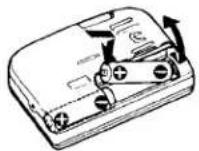
Open the battery compartment lid, and insert two size AA (R6) dry batteries with correct polarity.
If the battery compartment lid comes off
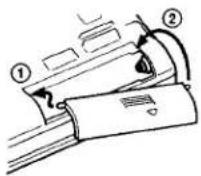
When to replace the batteries
Replace the batteries when "☐" flashes in the display. The battery remainder mark has 3 steps to show the remaining battery power.
The battery power is full.

The battery power is decreasing.

The batteries are exhausted.

Replace them with new ones.
Notes
- The battery remainder mark may temporarily show a lower level during fast forwarding or rewinding or use in extremely low temperatures.
- When replacing batteries, replace both batteries within 30 seconds; otherwise all the memories including the preset radio stations will be canceled.
Battery life (Approx. hours) (EIAJ*)
| Tape playback | Radio reception | |
| Sony alkaline LR6 (SG) | 24 | 38 |
| Sony R6P (SR) | 7.5 | 14 |
* Measured value by the standard of EIAJ (Electronic Industries Association of Japan). (Using a Sony HF series cassette tape)
Note
- The battery life may shorten depending on the operation of the unit.
For maximum performance we recommend that you use alkaline batteries.
House Current
text_image
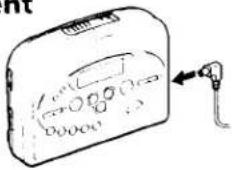
Diagram of a device with labeled ports and a connector, showing internal components and directional arrows.Connect the AC power adaptor AC-E30HG (not supplied) to the DC IN 3 V jack and to the mains. Do not use any other AC power adaptor.
Specifications for AC-E30HG varies for each area. Check your local voltage and the shape of plug before purchasing.
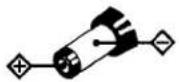
Polarity of the plug
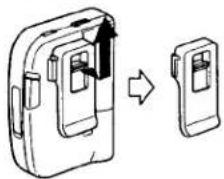
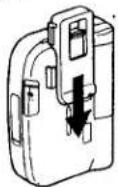
To use the belt clip
With the supplied belt clip, you can wear your Walkman on a belt for convenient use.
To remove the belt clip
natural_image
Diagram showing a device being processed into a smaller portion, with an arrow indicating the process (no text or symbols present)To attach the belt clip
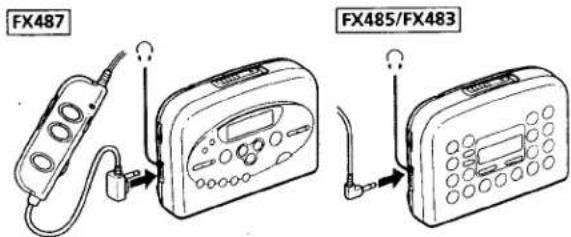
Connecting the Headphones/Earphones
text_image
FX487 FX485/FX483Connect the headphones/earphones to ☐.
2 Wear the "L" marked side to the left ear and the "R" marked side to the right ear. If the earphones do not fit to your ears or the sound is unbalanced, turn round the earphones a little to fit to your ears firmly.
▶ Operating the Walkman
Playing a Tape
text_image
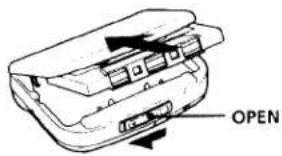
OPEN1 Open the cassette holder and insert a cassette.
FX487
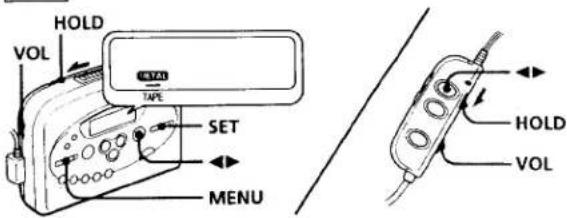
text_image
HOLD VOL SET TAPE MENU HOLD VOLFX485/FX483

text_image
HOLD VOL SET TAPE MENU2 Make sure the HOLD function is turned off. If it is on, slide the HOLD switch to turn it off.
3 Press MENU repeatedly to set the cursor to TAPE in the display.
Then press SET to select the tape type.
No message: normal (TYPE I)
METAL: CrO₂ (TYPE II) or metal (TYPE IV)
4 Press ◀▶ (play) to start playing then adjust the volume.
When adjusting the volume on the Walkman (FX487 only)
Set the VOL control on the remote control at maximum.
When adjusting the volume on the remote control (FX487 only)
Set the VOL control on the Walkman slightly above the appropriate level.
Note on the cassette holder
When opening the cassette holder, press the ■ (stop) button and make sure the tape is stopped by checking through the cassette window, then slide the OPEN switch.
If the cassette holder is opened before the tape is stopped, the tape may loosen and be damaged.
FX487

text_image
REW FF FF REWFX485/FX483
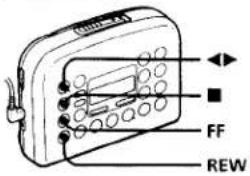
text_image
FF REW| To | Press |
| play the other side | ◀▶ (play) during playback |
| stop playback | ■ |
| fast forward | FF during stop |
| rewind | REW during stop |
| play the same side from the beginning (Rewind Auto Play function) | REW during playback |
| play the other side from the beginning (Skip Reverse function) | FF during playback |
FX487
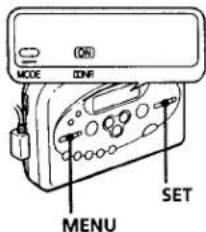
text_image
MODE ONR MENU SETFX485
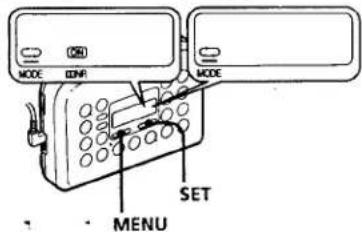
text_image
MODE DNR MODE SET MENUTo select playback mode
Press MENU repeatedly to set the cursor to MODE in the display. Then press SET to select the desired mode.
| To play | Select |
| Both sides repeatedly | |
| Both sides once from the side facing the cassette holder |
To play a tape recorded with Dolby\* NR system (FX487/FX485 only)
Press MENU repeatedly to set the cursor to ☐ NR (Dolby noise reduction) in the display. Then press SET to show "ON".
* Dolby noise reduction manufactured under license from Dolby Laboratories Licensing Corporation. "DOLBY" and the double-D symbol ☐ are trademarks of Dolby Laboratories Licensing Corporation.
Listening to the Radio
FX487
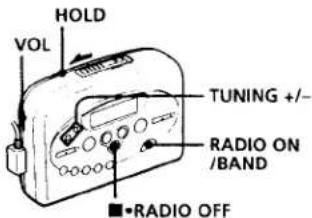
text_image
HOLD VOL TUNING +/- RADIO ON /BAND ■*RADIO OFFFX485/FX483
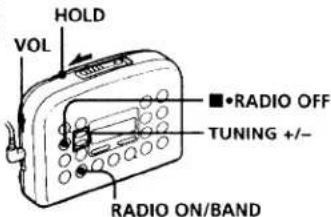
text_image
HOLD VOL ■•RADIO OFF TUNING +/- RADIO ON/BAND1 Make sure the HOLD function is turned off. If it is on, slide the HOLD switch to turn it off.
2 Press RADIO ON/BAND to turn on the radio.
3 Press RADIO ON/BAND repeatedly to select FM1, FM2, FM3 or AM.
4 Press TUNING+/- to tune in to the desired station. If you keep pressing TUNING+/- for a few seconds, the Walkman will start tuning to the stations automatically.
To turn off the radio
Press ■•RADIO OFF.
To improve the broadcast reception
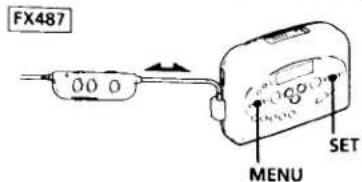
text_image
FX487 00 0 MENU SET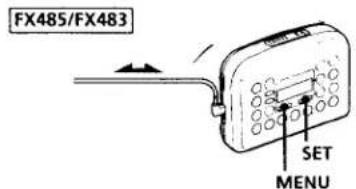
text_image
FX485/FX483 SET MENU- For FM: Extend the cord of the remote control, the aerial (FX487 only). Extend the headphones/earphones cord, the aerial (FX485/FX483 only). If the reception is still not good, press MENU repeatedly to set the cursor to FM MODE or FM SENS in the display. Then press SET to choose the mode for best reception.

text_image
(MOND ST) FW MODE or (LOCAL DO) FW SENS- For AM: The Walkman has a built-in antenna. Reorient the Walkman horizontally to obtain optimum AM reception.
Note
- Do not remove the power sources while listening to the radio, or the received stations may not be stored.
Presetting Radio Stations
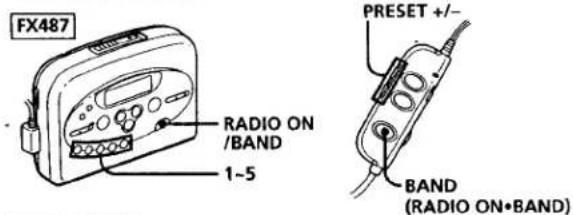
You can store radio stations into the unit's memory. You can preset up to 20 radio stations, 5 for each FM1, FM2, FM3 or AM bands.
text_image
FX487 RADIO ON /BAND 1~5 PRESET +/-/ BAND (RADIO ON•BAND)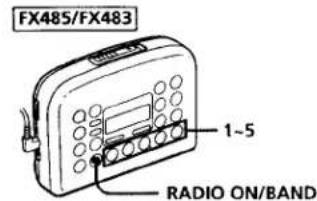
text_image
FX485/FX483 1-5 RADIO ON/BAND1 Tune in the station you wish to store. (Follow steps 1-4 in "Listening to the Radio".)
2 Press and hold one of the 1-5 buttons for more than 2 seconds. The display flashes twice with a beep sound, and the station is preset. If a station is already stored, and the new station replaces the old one.
To play the preset radio stations
1 Press RADIO ON/BAND to select the band.
2 Press the corresponding button (1-5) on the unit. Or press PRESET+/- on the remote control (FX487 only).
Receiving Stations Outside Your Country (Excluding models for Europe and Saudi Arabia)
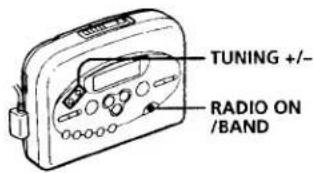
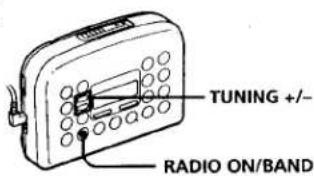
The frequency range differs depending on the area (see the chart "Area indication and frequency range"). If you listen to the radio in an area of different frequency range, change the area indication in the display.
FX487
text_image
TUNING +/- RADIO ON /BANDFX485/FX483
text_image
TUNING +/- RADIO ON/BAND1 Turn on the radio and press RADIO ON/BAND for more than 10 seconds until the area indication flashes in the display.
2 While the display is flashing, press TUNING+/- to select either "U" or "E" indication.
3 Press RADIO ON/BAND to set the area indication.
Note
- If you change the frequency range, all the preset stations will be canceled.
Area indication and frequency range
| Area* | Frequency range FM (MHz) | AM (kHz) |
| E | 87.5–108 | 531–1,602 |
| U | 87.5–108 | 530–1,710 |
* E: European and other countries U: USA, Canada, and Central and South America
Using Other Functions
FX487
text_image
MODE AVLS SOUND SET MENUFX485/FX483
text_image
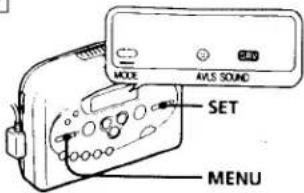
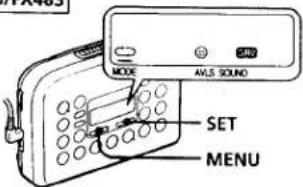
MODE AVLS SOUND SET MENUTo emphasize bass sound
Press MENU repeatedly to set the cursor to SOUND in the display. Then, press SET to select the desired mode. With each press, the indications change as follows. MB (MEGA BASS) : emphasizes bass sound GRV (GROOVE) : emphasizes deeper bass sound No message: off (normal)
Notes
- If the sound is distorted with the mode "GRV", select the mode "MB" or no message.
- Bass emphasis may not show great effect if the volume is turned up too high.
To protect your hearing—AVLS (Automatic Volume Limiter System)
When you set the AVLS function to active, the maximum volume is kept down to protect your ears.
Press MENU repeatedly to set the cursor to AVLS in the display. Then press SET to show "💡".
Notes
- If the sound is distorted when you listen to the bass-boosted sound with the AVLS function, turn down the volume.
• The AVLS setting may be canceled when you replace the batteries.
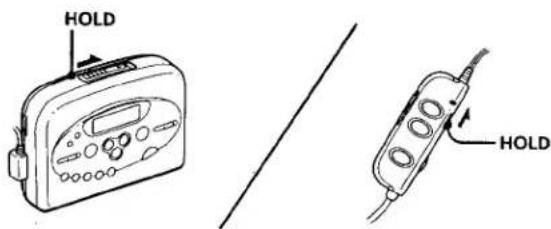
To lock the controls
text_image
HOLD HOLDjet the HOLD switch to the direction of the arrow to lock he controls.
▶Additional Information
Precautions
On batteries
- Do not charge a dry battery.
- Do not carry the dry or rechargeable batteries with coins or other metallic objects. It can generate heat if the positive and negative terminals of the batteries are accidentally contacted by a metallic object.
- When you do not use the Walkman for a long time, remove the battery to avoid any damage caused by battery leakage and subsequent corrosion.
On the unit
- Do not drop the unit or give a shock to the unit, or it may cause a malfunction.
- Do not leave the unit in a location near heat sources, or in a place subject to direct sunlight, excessive dust or sand, moisture, rain, mechanical shock, or in a car with its windows closed.
- The LCD display may become hard to see or slow down when using the unit at high temperatures (above 40^/ 104^ ) or at low temperatures (below 0^ / 32^ ). At room temperature, the display will return to its normal operating condition.
- If the unit has not been used for long, set it in the playback mode and warm it up for a few minutes before inserting a tape.
On tapes longer than 90 minutes
We do not recommend the use of tapes longer than 90 minutes except for a long continuous playback. They are very thin and tend to be stretched easily.
On the remote control (FX487 only)
Use the supplied remote control only with this unit.
On headphones/earphones Road safety
Do not use headphones/earphones while driving, cycling, or operating any motorized vehicle. It may create a traffic hazard and is illegal in some areas. It can also be potentially dangerous to play your headphones/earphones at high volume while walking, especially at pedestrian crossings.
You should exercise extreme caution or discontinue use in potentially hazardous situations.
Preventing hearing damage
Do not use headphones/earphones at high volume. Hearing experts advise against continuous, loud and extended play. If you experience a ringing in your ears, reduce volume or discontinue use.
Caring for others
Keep the volume at a moderate level. This will allow you to hear outside sounds and to be considerate to the people around you.
If you have any questions or problems concerning your unit, please consult you nearest Sony dealer.
Troubleshooting
The volume cannot be turned up.
- If “💡” appears for AVLS display, press SET so that “💡” disappears.
The sound is unstable or no audio.
- Insert two R6 (size AA) batteries properly.
-Replace all batteries if they are weak.
The display shows incorrect information.
• The batteries are weak. Replace the batteries with new ones.
Specifications
Radio section
Frequency range
FM: 65-74/87.5-108 MHz (Eastern Europe)
87.5-108 MHz (other countries)
AM: 530–1,710 kHz (North, Central and South America)
531-1,602 kHz (other countries)
Tape section
Frequency response
(Dolby NR off)
Playback: 30–14,000 Hz
Output
Headphones/earphones (Ω jack)
Load impedance 8-300 ohms
General
Power requirements
3V
Two size AA (R6) batteries
Dimensions (w/h/d)
FX487:
Approx. 115.5 x 83.5 x 35.5 mm (4½ x 3½ x 1½ inches) incl. projecting parts and controls
FX485/FX483:
Approx. 115.5 x 83.5 x 34.0 mm (4½ x 3½ x 1½ inches) incl. projecting parts and controls
Mass
Approx. 150 g (5.3 oz)/Approx. 230 g (8.2 oz) incl. batteries and a cassette
Supplied accessories
Stereo headphones or Stereo earphones with remote control (1) (FX487 only)
Stereo-headphones or Stereo earphones (1) (FX485/FX483 only)
Belt clip (1)
Design and specifications are subject to change without notice.
Maintenance
To clean the tape head and path
Use the cleaning cassette CHK-1 (not supplied) every 10 hours of use.
Note
- Use only the recommended cleaning cassette.
To clean the exterior
Use a soft cloth slightly moistened with water. Do not use alcohol, benzine or thinner.
Note
- Clean the headphones/earphones plug periodically.
For the customers in the U.S.A.
SONY,
Tape Cassette Player Recorder CD Player Mini Disc DAT Radio Head Phone Speaker MC Persons
Portable Audio
LIMITED WARRANTY
Sons Electronics Inc. ("Sony") warrants the Product (including any accessories) against defects in material or wonmanship as follows
-
LABOR: For a period of 90 days from the date of purchase, if this Product is determined to be defective. Sony will repair or replace the Product, at its option, at no charge, or pay the labor charges to any Sony authorized service facility. After the Warranty Period, you must pay for all labor charges.
-
PARTS: In addition, Sony will supply, at no charge, new or rebuilt replacements in exchange for defective parts for a period of one (1) year. After 90 days from the date of purchase, labor for removal and installation is available from Sony authorized service facilities or a Sony Service Center at your expense.
To obtain warranty service, you must take the Product, or deliver the Product freight prepaid, in either its original packaging or packaging affording an equal degree of protection, to any authorized Sony service facility.
This warranty does not cover customer instruction, installation, set up adjustments or signal reception problems.
This warranty does not cover cosmetic damage or damage due to acts of God, accident, misuse, abuse, negligence, commercial use, or modification of, or to any part of the Product, including the antenna. This warranty does not cover damage due to improper operation or maintenance, connection to improper voltage supply, or attempted repair by anyone other than a facility authorized by Sony to service the Product. This warranty does not cover Products sold AS IS or WITH ALL FALLTS, or consumables such as fuses or batteries. This warranty is valid only in the United States.
Proof of purchase in the form of a bill of sale or receipted invoice which is evidence that the unit is within the Warranty period must be presented to obtain warranty service.
This warranty is invalid if the factory applied serial number has been altered or removed from the Product.
REPAIR OR REPLACEMENT AS PROVIDED UNDER THIS WARRANTY IS THE EXCLUSIVE REMEDY OF THE CONSUMER. SONY SHALL NOT BE LIABLE FOR ANY INCIDENTAL OR CONSEQUENTIAL DAMAGES FOR BREACH OF ANY EXPRESS OR IMPLIED WARRANTY ON THIS PRODUCT, EXCEPT TO THE EXTENT PROHIBITED BY APPLICABLE LAW. ANY IMPLIED WARRANTY OF MERCHANTABILITY OR FITNESS FOR A PARTICULAR PURPOSE ON THIS PRODUCT IS LIMITED IN DURATION TO THE DURATION OF THIS WARRANTY.
Some states do not allow the exclusion or limitation of incidental or consequential damages, or allow limitations on how long an implied warranty lasts, so the above limitations or exclusions may not apply to you. In addition, if you enter into a service contract with the Sony Partnership within 90 days of the date of sale, the limitation on how long an implied warranty lasts does not apply to you. This warranty gives you specific legal rights, and you may have other rights which vary from state to state.
For your convenience, Sony Electronics Inc. has established telephone numbers for frequently asked questions.
To locate the servicer or dealer nearest you, or for service assistance or resolution of a service problem, or for product information or operation, call
Sony Direct Response Center
(800) 222-7669
Sony Direct Response Center
12451 Gateway Blvd.
For Myers, FL 33913
For an accessory or part not available from your authorized dealer, call
1-(800)-488-SONY (7669)