EF-M 11-22mm f/4-5.6 IS STM - Objektiv CANON - Kostenlose Bedienungsanleitung
Finden Sie kostenlos die Bedienungsanleitung des Geräts EF-M 11-22mm f/4-5.6 IS STM CANON als PDF.


| Produkttyp | Objektiv |
| Marke | Canon |
| Modell | EF-M 11-22mm f/4-5.6 IS STM |
| Brennweite | 11–22 mm (äquivalent zu 18–35 mm im Kleinbildformat) |
| Maximale Blendenöffnung | f/4–5.6 |
| Kleinste Blende | f/22–32 |
| Objektivaufbau | 9 Gruppen, 12 Elemente |
| Bildwinkel (diagonal) | 102°10' – 63°30' |
| Naheinstellgrenze | 0,15 m (ab Sensorebene) |
| Maximale Vergrößerung | 0,3× (bei 22 mm) |
| Filtergewinde | 55 mm |
| Maximaler Durchmesser × Länge (eingefahren) | 60,9 × 58,2 mm |
| Gewicht | ca. 220 g |
| Bildstabilisator | Ja (IS), inklusive dynamischer IS für Video |
| Fokussierung | Autofokus (STM) und manueller Fokus (Full-Time MF im AF+MF-Modus) |
| Objektivdeckel | F-55 (im Lieferumfang) |
| Staubschutzdeckel | Objektiv-Staubschutzdeckel EB (im Lieferumfang) |
| Gegenlichtblende (separat erhältlich) | EW-60E |
| Objektivtasche (separat erhältlich) | LPB14 |
| Sicherheitshinweise | Nicht in die Sonne oder helle Lichtquellen blicken; Objektiv nicht ohne Deckel in der Sonne liegen lassen. |
| Reinigung | Kontakte mit weichem Tuch reinigen; Kondensation vermeiden. |
Häufig gestellte Fragen - EF-M 11-22mm f/4-5.6 IS STM CANON
Benutzerfragen zu EF-M 11-22mm f/4-5.6 IS STM CANON
0 Frage zu diesem Gerät. Beantworten Sie die, die Sie kennen, oder stellen Sie Ihre eigene.
Eine neue Frage zu diesem Gerät stellen
Laden Sie die Anleitung für Ihr Objektiv kostenlos im PDF-Format! Finden Sie Ihr Handbuch EF-M 11-22mm f/4-5.6 IS STM - CANON und nehmen Sie Ihr elektronisches Gerät wieder in die Hand. Auf dieser Seite sind alle Dokumente veröffentlicht, die für die Verwendung Ihres Geräts notwendig sind. EF-M 11-22mm f/4-5.6 IS STM von der Marke CANON.
BEDIENUNGSANLEITUNG EF-M 11-22mm f/4-5.6 IS STM CANON
ENG EF-M LENS Instructions
EF-M11-22mm f/4-5.6 IS STM
text_image
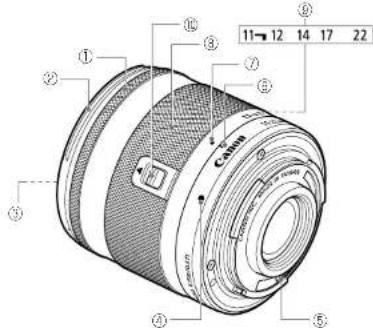
Labeled diagram of a camera lens with numbered parts and component annotationsNomenclature
① Focusing ring
② Hood mount
③ Filter Mounting Thread
④ Lens mount index
⑤ Contacts
⑥ Zoom position index
⑦ Lens retracted position index
⑨ Zoom ring
⑨ Focal length indicator
Lens-retraction switch
Thank you for purchasing a Canon product.
The Canon EF-M11-22mm f/4-5.6 IS STM is a 2x wide-angle zoom lens developed for interchangeable-lens digital cameras compatible with EF-M lenses*.
- Only the following cameras are compatible with EF-M lenses (as of June 2013): EOS M
When attaching this lens to a Canon EOS M camera with firmware earlier than version 2.0.0, there is a slight chance that the camera will not operate properly during shooting. Therefore, please be sure to update the EOS M firmware to version 2.0.0 or later (For information about updating your camera's firmware, please check the Canon website).
- "IS" stands for Image Stabilizer.
- "STM" stands for stepping motor.
Safety Precautions
Do not look at the sun or a bright light source through the lens. Doing so could result in vision loss or blindness. Whether it is attached to the camera or not, do not leave the lens under the sun without the lens cap attached. This is to prevent the lens from concentrating the sun's rays, which could cause a fire.
Handling Cautions
- If the lens is taken from a cold environment into a warm one, condensation may develop on the lens surface and internal parts. To prevent condensation in this case, first put the lens into an airlight plastic bag before taking it from a cold to warm environment. Then take out the lens after it has warmed gradually. Do the same when taking the lens from a warm environment into a cold one. - Do not leave the lens in excessive heat such as in a car in direct sunlight. High temperatures can cause the lens to malfunction. - Please also refer to the handling cautions found in your camera's instructions.
Conventions used in this instruction

Warning to prevent lens or camera malfunction or damage.

Supplementary notes on using the lens and taking pictures.
This device complies with Part 15 of the FCC Rules. Operation is subject to the following two conditions: (1) This device may not cause harmful interference, and (2) this device must accept any interference received, including interference that may cause undesired operation.
Do not make any changes or modifications to the equipment unless otherwise specified in the instructions. If such changes or modifications should be made, you could be required to stop operation of the equipment.
This equipment has been tested and found to comply with the limits for a class B digital device, pursuant to part 15 of the FCC Rules. These limits are designed to provide reasonable protection against harmful interference in a residential installation. This equipment generates, uses and can radiate radio frequency energy and, if not installed and used in accordance with the instructions, may cause harmful interference to radio communications.
However, there is no guarantee that interference will not occur in a particular installation. If this equipment does cause harmful interference to radio or television reception, which can be determined by turning the equipment off and on, the user is encouraged to try to correct the interference by one or more of the following measures: • Reorient or relocate the receiving antenna.
- Increase the separation between the equipment and receiver. - Consult the dealer or an experienced radio/TV technician for help.
This Class B digital apparatus complies with Canadian ICES-003.
1. Mounting and Detaching the Lens
See your camera's instructions for details on mounting and detaching the lens.
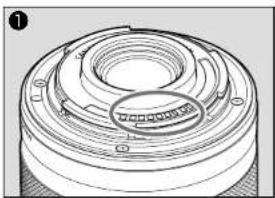
- After detaching the lens, place the lens with the rear end up to prevent the lens surface and contacts from getting scratched. (fig.●)
- If the contacts get soiled, scratched, or have fingerprints on them, corrosion or faulty connections can result. The camera and lens may not operate properly.
- If the contacts get soiled or have fingerprints on them, clean them with a soft cloth.
- If you remove the lens, cover it with the dust cap. To attach it properly, align the lens mount index and the O index of the dust cap as shown in the diagram, and turn clockwise. (fig. 2) To remove it, reverse the order.
2. Shooting Preparations and Retracting Lens Shooting Preparations: (Set the lens to the shooting position)
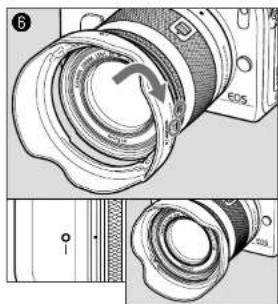
Align the lens retract position index and zoom position index. Maintain pressure on the lens-retraction switch in the [▲] direction. Slightly rotate the zoom ring in the direction of the white arrow to release the lens-retraction switch and rotate further until it clicks. The lens now ready for shooting. (The no. 11 pointing line in the focal length indicator which shows above or to the left of the zoom position index extension line.) (fig. ⑥) Retracting Lens:
Maintain pressure on the lens-retraction switch in the [▲] direction. Rotate the zoom ring in the opposite direction to the white arrow. Align the lens retract position index and the zoom position index. Release the lens-retraction switch to retract the lens.
Do not forcibly rotate the zoom ring if its movement becomes constricted at the retractable end or the wide end, as there is a danger of damaging the lens-retraction switch mechanism.
3. Zooming
Turn the lens' zoom ring to adjust the size of the photo field or subject. (fig.①)
- For wide shots, turn the zoom ring toward the wide end.
• For close-ups, turn the zoom ring toward the telephoto end.
- Be sure to finish zooming before focusing. Zooming after focusing can affect the focus.
- Blurring may temporarily occur if the zoom ring is quickly rotated.
- Zooming during still image exposure will result in delayed focus. This causes any streaks of light that are captured during exposure to be blurred.
natural_image
Technical line drawing of a mechanical component with concentric rings and mounting holes (no text or symbols)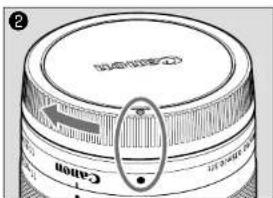
text_image
② Canon Canon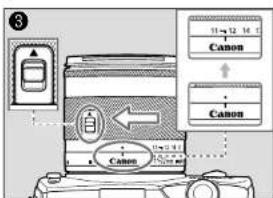
text_image
③ 11→12 16 C Canon Canon Canon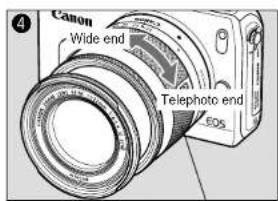
text_image
Canon Wide end Telephoto end EOSZoom ring
4. Manual Focus
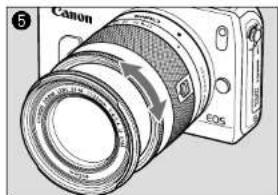
When the camera's focus mode is set to [MF]. focus manually by turning the focusing ring. (fig.③)
Quickly rotating the focusing ring may result in delayed focus.
• Focus mode is set using the camera. Please refer to the camera's instructions.
• After autofocusing in [AF+MF] mode, focus manually by pressing the shutter button halfway and turning the focusing ring (full-time manual focusing).
5. Image Stabilizer
This lens is equipped with an Image Stabilizer. This function corrects camera shake, allowing users to capture sharp images. Also, the Image Stabilizer automatically provides optimal image stabilization depending on shooting conditions (such as shooting still subjects and following shots). Please set the Image Stabilizer ON or OFF using the camera settings. See your camera's instructions for details.
- The Image Stabilizer cannot compensate for a blurred shot caused by a subject that moved.
• The Image Stabilizer may not be fully effective if you shoot from a violently shaking vehicle or other transportation.
- The Image Stabilizer consumes more power than normal shooting, so fewer shots can be taken if you use the function.
- When shooting a still subject, it compensates for camera shake in all directions.
- It compensates for vertical camera shake during following shots in a horizontal direction, and compensates for horizontal camera shake during following shots in a vertical direction.
- When you use a tripod, the Image Stabilizer should be turned off to save battery power.
• Even with a monopod, the Image Stabilizer will be as effective as during hand-held shooting. However, depending on the shooting environment, the Image Stabilizer effect may be less effective.
■ Dynamic IS Function (Movie shooting only)
The EF-M11-22mm f/4-5.6 IS STM is equipped with dynamic IS, effective when shooting while walking since it expands the IS range.
• Achieves effective IS at the wide end.
- Automatically activates when the camera is set to Movie Shooting.
6. Hood (sold separately)
The EW-60E hood cuts out unwanted light and protects the front of the lens from rain, snow, and dust.
To attach the hood, align the hood's attachment position mark with the red dot on the front of the lens, then turn the hood as shown by the arrow until the lens' red dot is aligned with the hood's stop position mark. (fig. 8)
The hood can be reverse-mounted on the lens for storage.
- If the hood is not attached properly, vignetting (darkening of the perimeter of the picture) may occur.
- When attaching or detaching the hood, grasp the base of the hood to turn it. To prevent deformation, do not grasp the rim of the hood to turn it.
7. Filters (sold separately)
You can attach filters to the filter mounting thread on the front of the lens.
Only one filter may be attached.
Specifications
| Focal Length/Aperture 11-22mm f/4-5.6 | |
| Lens Construction 9 groups, 12 elements | |
| Minimum Aperture f/22-32 | |
| Angle of View | Diagonal: 102°10'-63°30'Vertical: 68°55'-37°50'Horizontal: 91°50'-54°30' |
| Min. Focusing Distance 0.15 m/0.49 ft. | |
| Max. Magnification 0.3x (at 22 mm) | |
| Field of View | Approx. 103x155-50x74 mm/4.06x6.10-1.97x2.91 inch(at 0.15 m/0.49 ft.) |
| Filter Diameter 55 mm | |
| Max. Diameter and Length(When the lens is retracted) | 60.9x58.2 mm/2.40x2.30 inch |
| Weight Approx. 220 g/7.8 oz | |
| Hood EW-60E (Sold Separately) | |
| Lens Cap F-55 | |
| Dust Cap Lens Dust Cap EB | |
| Case LPB14 (Sold Separately) | |
- Equivalent to 18-35 mm in the 35mm film format
- The lens length is measured from the mount surface to the front end of the lens. Add 20.2 mm when including the lens cap and dust cap.
- The size and weight listed are for the lens only, except as indicated.
- Extenders cannot be used with this lens.
- Aperture settings are specified on the camera. The camera automatically compensates for variations in the aperture setting when the camera is zoomed in or out.
- All data listed is measured according to Canon standards.
- Product specifications and appearance are subject to change without notice.
natural_image
Diagram of a Canon DSLR camera with visible lens and control buttons (no text or symbols on the device itself)