
RAK-SSL404WH - Fernbedienung TECHNICS - Kostenlose Bedienungsanleitung
Finden Sie kostenlos die Bedienungsanleitung des Geräts RAK-SSL404WH TECHNICS als PDF.


| Produkttyp | Fernbedienung |
| Marke | Technics |
| Modell | RAK-SSL404WH |
| Farbe | Weiß |
| Abmessungen (ca.) | 20 cm x 5 cm x 2 cm |
| Gewicht (ca.) | 100 g (inkl. Batterien) |
| Stromversorgung | 2 x AAA-Batterien (nicht im Lieferumfang) |
| Übertragungstechnologie | Infrarot (IR) |
| Reichweite (ca.) | Bis zu 8 Meter bei direkter Sichtlinie |
| Anzahl der Tasten | 40 (Standardtasten für Audio/Video) |
| Funktionen | Lautstärke, Stummschaltung, Senderwahl, Menüsteuerung, Ziffernblock, Ein/Aus, Eingangswahl |
| Kompatible Geräte | Technics Receivers, Verstärker, CD-Player, DVD-Player, Tuner (Modelle ab 2005) |
| Programmierbarkeit | Nicht programmierbar (vorkonfiguriert für Technics-Geräte) |
| Batterielebensdauer (ca.) | 1 Jahr bei normaler Nutzung |
| Reinigung und Pflege | Mit einem trockenen, fusselfreien Tuch abwischen; keine aggressiven Reinigungsmittel verwenden |
| Sicherheitshinweise | Vor Feuchtigkeit und direkter Sonneneinstrahlung schützen; nicht fallen lassen; bei ausgelaufenen Batterien sofort ersetzen |
| Ersatzbatterien | Standard AAA-Batterien (Alkaline oder Lithium) |
| Reparatur | Keine reparierbaren Teile; bei Defekt Gerät ersetzen |
Häufig gestellte Fragen - RAK-SSL404WH TECHNICS
Benutzerfragen zu RAK-SSL404WH TECHNICS
0 Frage zu diesem Gerät. Beantworten Sie die, die Sie kennen, oder stellen Sie Ihre eigene.
Eine neue Frage zu diesem Gerät stellen
Laden Sie die Anleitung für Ihr Fernbedienung kostenlos im PDF-Format! Finden Sie Ihr Handbuch RAK-SSL404WH - TECHNICS und nehmen Sie Ihr elektronisches Gerät wieder in die Hand. Auf dieser Seite sind alle Dokumente veröffentlicht, die für die Verwendung Ihres Geräts notwendig sind. RAK-SSL404WH von der Marke TECHNICS.
BEDIENUNGSANLEITUNG RAK-SSL404WH TECHNICS
Technics®
How to use the remote control transmitter RAK-SL404WH

natural_image
Black rectangular object with horizontal lines, resembling a smartphone or mobile device (no text or symbols visible)P PC E EB GC GN
Before use
Battery installation
Insert the batteries included with this unit as shown below.

When you need to replace these batteries Use two UM-4 "AAA", IEC R03 (1.5 V) or equivalent batteries.
Method for use
Use the remote control within 60 degrees and within 7 meters (23 ft.) facing directly toward the changer's remote control signal sensor.

Note
Be sure the transmission window and the unit's sensor are free from dust. Excessive dust might affect performance.
The operation may not be correct if direct sunlight or another strong light source strikes the receiving sensor of this unit. If there is a problem, place the unit away from the light source.
Quick reference table of remote control operation
For details about each function, refer to the operating instructions for the main unit.
Basic operation

| To turn OFF/ON the main unit |  | |
| To open/close the loading drawer |  | |
| To rotate the carousel |  | |
| To select the desired disc number | 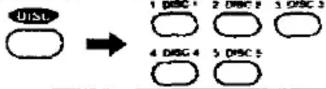 | |
| To select the desired track number |  | To select a track between 1 and 10:Press the corresponding number on the keypad.To select a two-digit track number over 10:First press >10, and then press the numbers for the two digits. |
| To start play |  | |
| To stop play temporarily |  | Press ➤ button to resume play. |
| To stop play |  | |
Random play
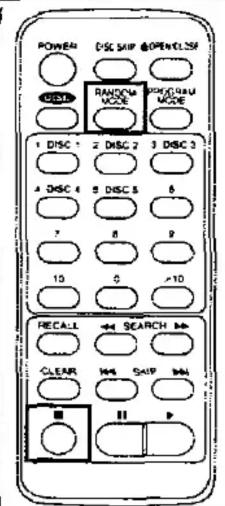
To start one disc/full random play

Each time the button is pressed, the random mode will change in the following order.


Random mode is also canceled at the same time.
Program/delete play
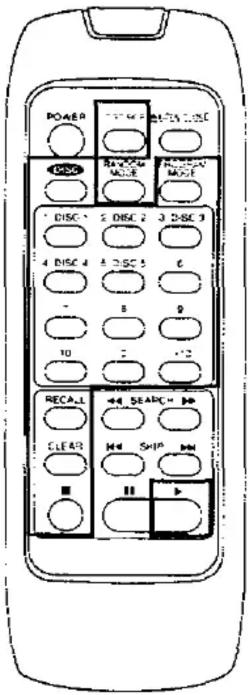 | To start program/delete play | 1 PROGRAM MODE Select program or delete mode. Each time the button is pressed, the program/delete mode will change in the following order: Program → Delete → (off) |
| 2 DISC 1 DISC 2 DISC 3 DISC 3 Select the disc number. | ||
| 3 DISC 2 DISC 2 DISC 3 Select the track number. Repeat steps 2 and 3 until you have completed the desired entry. | ||
| 4 DISC 4 DISC 5 DISC 6 | ||
| 5 DISC 5 DISC 6 | ||
| 6 | ||
| 7 | ||
| 8 | ||
| 9 | ||
| 10 | ||
| 11 | ||
| 12 | ||
| 13 | ||
| 14 Start play. | ||
| To check the entered contents | RECALL The selections entered are displayed one by one each time this button is pressed. | |
| To clear a single item of the entered contents | CLEAR Only the selection which is currently displayed is cleared. | |
| To clear all entered contents | (In the stop mode) | |
| To cancel program/delete mode | (In the stop mode)PROGRAM MODE Press twice in program mode.Press once in delete mode. |
Other functions
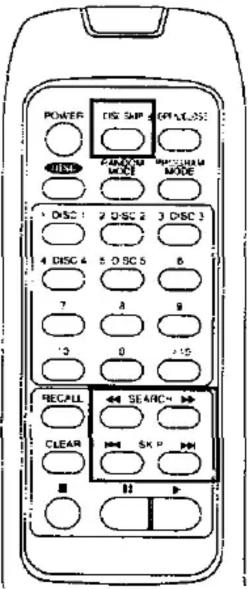 | To skip discs | DISC SKIP |
| To skip tracks | ||
| To search for a desired place | (In the play or pause mode) |
Battery notes
Do not mix old and new batteries, or batteries of different types (carbon and alkaline, etc.).
Always remove old, weak or worn-out batteries promptly and dispose of them properly.
The average battery life is about one year.
Although the battery life varies depending on how often the device is used, you should generally replace the batteries about once a year.
The batteries should be replaced if commands from the remote control transmitter do not operate the unit even when the transmitter is held close to the front panel.
Never subject batteries to excessive heat or flame; do not attempt to disassemble them; and be sure they are not short-circuited.
If you will not use the remote control for a long period of time, remove the batteries and store them in a cool, dark place
If a battery leaks, remove all batteries and dispose of them properly. Thoroughly clean the battery compartment before inserting new batteries.
If the leaking electrolyte comes into contact with skin or clothes, flush with water immediately
Keep batteries out of reach of children.
Do not use rechargeable (nickel-cadm-um) type batteries
Do not attempt to recharge alkaline or carbon batteries.
Do not dispose of used batteries in household rubbish

Troubleshooting guide
| Problem | Probable cause(s) | Suggested remedy |
| Remote control does not operate correctly. | The batteries have run out. | Replace batteries with new ones. |
| There is an obstruction between the remote control and the changer. | Remove the obstruction. | |
| The batteries are inserted incorrectly.[The (+) and (−) polarities are reversed] | Reinsert batteries so that the polarities are correct. |

Marke : TECHNICS
Modell : RAK-SSL404WH
Kategorie : Fernbedienung