
SR-EIR - Bewegungsmelder Yale - Kostenlose Bedienungsanleitung
Finden Sie kostenlos die Bedienungsanleitung des Geräts SR-EIR Yale als PDF.


| Produkttyp | Bewegungsmelder |
| Modell | SR-EIR |
| Marke | Yale |
| Abmessungen (ca.) | 60 x 60 x 30 mm |
| Gewicht (ca.) | 50 g |
| Stromversorgung | 2 x 3,6 V AA (Lithium) |
| Funkfrequenz | 868 MHz |
| Reichweite | ca. 12 m |
| Erfassungswinkel | 110° |
| Montagehöhe | 2,3 m |
| Betriebstemperatur | -10 °C bis 45 °C |
| Luftfeuchtigkeit | bis zu 95 % |
| Gehäusematerial | ABS/Polycarbonat |
| Kompatibilität | Yale Smartphone Alarmanlage |
| Anzeige- und Testtaste | Ja |
| DIP-Schalter | 8 Einstellmöglichkeiten |
| Reaktionsmodus | Hoch oder Standard einstellbar |
| Testmodus | Schalter 1 ON |
| Umweltschutz | RoHS-konform |
| Zertifizierung | ASSA ABLOY |
Häufig gestellte Fragen - SR-EIR Yale
Benutzerfragen zu SR-EIR Yale
0 Frage zu diesem Gerät. Beantworten Sie die, die Sie kennen, oder stellen Sie Ihre eigene.
Eine neue Frage zu diesem Gerät stellen
Laden Sie die Anleitung für Ihr Bewegungsmelder kostenlos im PDF-Format! Finden Sie Ihr Handbuch SR-EIR - Yale und nehmen Sie Ihr elektronisches Gerät wieder in die Hand. Auf dieser Seite sind alle Dokumente veröffentlicht, die für die Verwendung Ihres Geräts notwendig sind. SR-EIR von der Marke Yale.
BEDIENUNGSANLEITUNG SR-EIR Yale

(GB) Installation - (IT) Installazione - (DE) Installation - (NO) Installasjon - (SE) Installation - (DK) Installation.

(IT) Associazione/test -
(DE) Verbinden/Testen -
(NO) Tilkobling/Test -
(SE) Para/Testa - (DK) Tilslut/test
SR-EIR
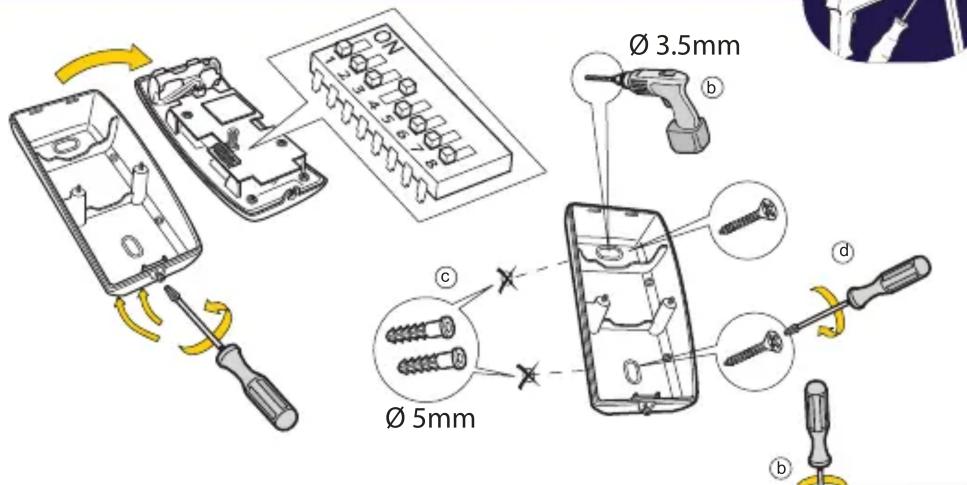


natural_image
Illustration of a screwdriver installing a wall-mounted switch component next to a door panel (no text or symbols present)


(GB) Please see your Yale Smartphone Alarm System Instruction manual for the following: Adding this component to your Alarm, Installing, Changing the batteries, Troubleshooting.
(IT) Si prega di consultare il manuale istruzioni dell'allarme Yale Smartphone Alarm per le seguenti operazioni: Aggiungere questo componente al vostro allarme, Installazione, Sostituzione batterie, Risoluzione dei problemi.
(DE) Bitte beachten Sie Ihren Yale Smartphone Alarm-System Bedienungsanleitung für folgende: Das Hinzufügen dieser Tür / Fenster-Detektor, um Ihren Alarm, Installieren, Batteriewechsel, Fehlersuche.
(NO) Vi refererer til den medfølgende brukermanualen av Yale Smartphone Alarm systemet for følgende informasjon: Legge til tilleggsutstyr, Montere enheter, Bytte batterier, Problemløsning.
(SE) För nedanstående hänvisas till Yale Smartphone Alarm system manualen: Lägga till en komponent till ditt larmsystem, Installation, Batteribyte, Felsökning.
(DK) Se hovedmanualen til Yale Smartphone Alarm System, som indeholder vejledning i flg.: tilføj komponenter, installation, batteriskift, fejlfinding.
(GB) Environment - (IT) Ambiente - (DE) Umgebung - (NO) Miljø - (SE) Miljö - (DK) Miljø.

natural_image
Simple diagram showing a house shape and a circle with an arrow pointing right (no text or symbols)Housings ABS/polycarbonate
-10°C to 45°C

95%

An ASSA ABLOGroup brand
(IT) Involucro di TUTTI i dispositivi ABS/policarbonato
(DE) Alle Geräte, Gehäuse ABS Polycarbonat
(NO) ALLE komponenter. Deksel av ABS/polykarbonat
(SE) Alla komponenter, Plasthölje ABS/Polycarbonat
(DK) Alle komponenter, ABS/polycarbonat


PACKAGING
RoHS
ASSA ABLOY

(GB) How does it work - (IT) Come funziona - (DE) Wie es funktioniert - (NO) Hvordan virker det - (SE) Hur fungerar det - (DK) Hvordan virker det


Pair and test planned location for stable radio performance (1

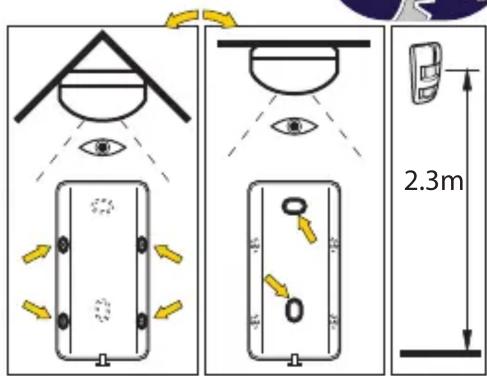
(1 (IT) Associazione nuovo dispositivo. Esegui un test della posizione programmata dei componenti - (DE) Verbinden neuer Geräte. Testen Sie Ihren gewählten Standort - (NO) Tilkobling av ekstrautstyr. Test for stabile trådløse signaler - (SE) Para in nytt tillbehör. Test radiostyrka - (DK) Tilslut ekstraudstyr. Test for stabil trådløs forbindelse


flowchart
graph TD
    A["Default"] --> B["Switch 1 ON Test mode OFF"]
    A --> C["Switch 2 OFF"]
    A --> D["Switch 3 ON <10 m OFF ~"]
    A --> E["Switch 4 ON OFF"]
    A --> F["Switch 5 OFF ON ON"]
    A --> G["Switch 6 OFF ON OFF"]
    A --> H["Switch 7 ON OFF Reaction High"]
    A --> I["Switch 8 OFF Standard"]
    B --> J["Image of test mode"]
    C --> K["Image of test mode"]
    D --> L["Image of test mode"]
    E --> M["Image of test mode"]
    F --> N["Image of test mode"]
    G --> O["Image of test mode"]
    H --> P["Image of test mode"]
    I --> Q["Image of test mode"]
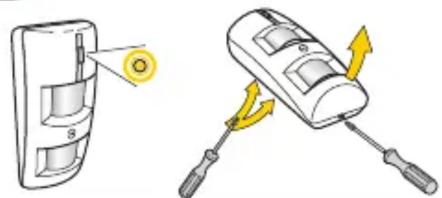
natural_image
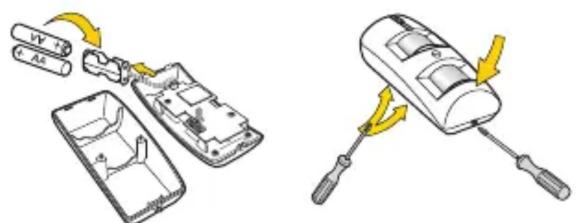
Illustration of a screwdriver and its internal components being inserted into a device (no text or symbols present)2 x 3.6v AA
(Lithium)



Marke : Yale
Modell : SR-EIR
Kategorie : Bewegungsmelder