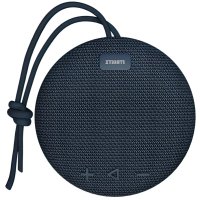
CM723 - Lautsprecher Streetz - Kostenlose Bedienungsanleitung
Finden Sie kostenlos die Bedienungsanleitung des Geräts CM723 Streetz als PDF.


Benutzerfragen zu CM723 Streetz
0 Frage zu diesem Gerät. Beantworten Sie die, die Sie kennen, oder stellen Sie Ihre eigene.
Eine neue Frage zu diesem Gerät stellen
Laden Sie die Anleitung für Ihr Lautsprecher kostenlos im PDF-Format! Finden Sie Ihr Handbuch CM723 - Streetz und nehmen Sie Ihr elektronisches Gerät wieder in die Hand. Auf dieser Seite sind alle Dokumente veröffentlicht, die für die Verwendung Ihres Geräts notwendig sind. CM723 von der Marke Streetz.
BEDIENUNGSANLEITUNG CM723 Streetz
To turn on the speaker, slide the switch (No.6).
text_image
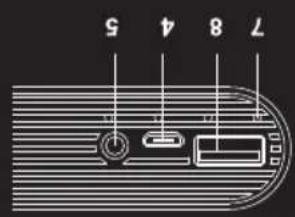
7 8 4 5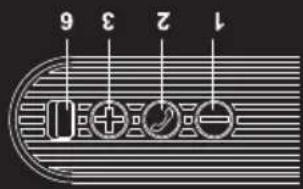
text_image
1 2 3 6USB port 5V, IA
- Charging output
7.LED light
- Power on / off
5.3.5 mm audio jack
Micro-B USB port
- Charging input.
Next track
- Turn up volume /
(Play / Pause)
- Answer / Hang up
Previouss track
- Turn down volume /
FUNCTIONALITY
also works with some tablets, but not pads.
- You can use it as a power bank for your mobile phone, it
perfect travel partner for you.
- Because of the small size and excellent sound. It is a
play time.
• Built-in 5200mAh lithium battery. Up to 20 hours of
- It can connect to almost all audio devices via Bluetooth.
through the hands free function.
- You can make calls or answer your mobile telephone
• Chat with your friends with a mobile or a tablet PC.
WHAT CAN YOU DO WITH THE SPEAKER?
STREETZ
STREETZ
MANUAL
CM723
CM724
• Weight: 400g
- Charging Time: up to 8 hours
- Battery time: UP to 20 hours
• Battery: 5200mAh lithium-ion
- Output Power: 2 x 3W
• Operating Frequency: 2.4GHz
- Bluetooth Range: 10 meters
- Bluetooth version: 2.1 + EDR
Technical specification
CHARGING
To charge the speaker, connect the USB cable to an available port on your device.
The LED light will turn red while charging, and will turn off, when it is charged.
CONNECTION
Bluetooth
Default connection is Bluetooth, when turning on the speaker.
To connect to your device, turn on Bluetooth, and find the speaker.
Click pair, and let it connect.
If you are asked for password, just put "0000".
Audio cable
You can also connect an audio device with a 3.5 mm audio cable.
Note: When the speaker is connected with cable, wireless functions will be turned off automatically.
Answer a call
When your device is connected to the speaker, you can answer by pressing the "phone" button.
Note: Any music currently playing will be paused, and automatically resumed after the phone call has ended.
PLAY AND CONTROL MUSIC/TRACKS
Turn on your device/phone, and the speaker.
Make sure they are connected. (With Bluetooth for example)
Put on some music on your device. You should hear it from the speaker now.
TTo increase volume press and hold the "+" button.
To decrease volume press and hold the "-" button.
To skip to next track press the "+" button.
To skip to previous track press the "-" button.
To pause press the play/pause button.
To continue play press the play/pause button.
INDICATOR STATUS INFORMATION
LED light
Blinking blue
Constant blue
Constant red
No light
Status information
Ready for Bluetooth mode
Connected with Bluetooth
Charging
Finished charging
FREQUENTLY ASKED QUESTIONS
I don't hear any sound from the speaker
Try turning up the volume, make sure the speaker is paired with a device that is playing music.
I can't connect to Bluetooth
Make sure your mobile has Bluetooth and that it is paired with the speaker.
Does the speaker support two Bluetooth devices?
No, it does not.
I hear crackling sounds
Supported range is up to 10 meters. Make sure there is no interfering objects or magnetic interference.
I can't answer a call
Not all mobiles phone support handsfree. Please check your user manual for your device.