
WV-CA48 - Sicherheitskamera PANASONIC - Kostenlose Bedienungsanleitung
Finden Sie kostenlos die Bedienungsanleitung des Geräts WV-CA48 PANASONIC als PDF.


Benutzerfragen zu WV-CA48 PANASONIC
0 Frage zu diesem Gerät. Beantworten Sie die, die Sie kennen, oder stellen Sie Ihre eigene.
Eine neue Frage zu diesem Gerät stellen
Laden Sie die Anleitung für Ihr Sicherheitskamera kostenlos im PDF-Format! Finden Sie Ihr Handbuch WV-CA48 - PANASONIC und nehmen Sie Ihr elektronisches Gerät wieder in die Hand. Auf dieser Seite sind alle Dokumente veröffentlicht, die für die Verwendung Ihres Geräts notwendig sind. WV-CA48 von der Marke PANASONIC.
BEDIENUNGSANLEITUNG WV-CA48 PANASONIC
Instructions
Panasonic
Before attempting to connect or operate this product, please read these instructions carefully and save this manual for future use.
RS485 Cables & Connectors
Model No.WV-CA48/10K
WV-CA48/50
WV-CA48/JN
WV-CA48/TN
This manual describes the cables and connectors used for RS-485 communication among units with Panasonic Security Data Link (PS · Data) capability.
Parts Table
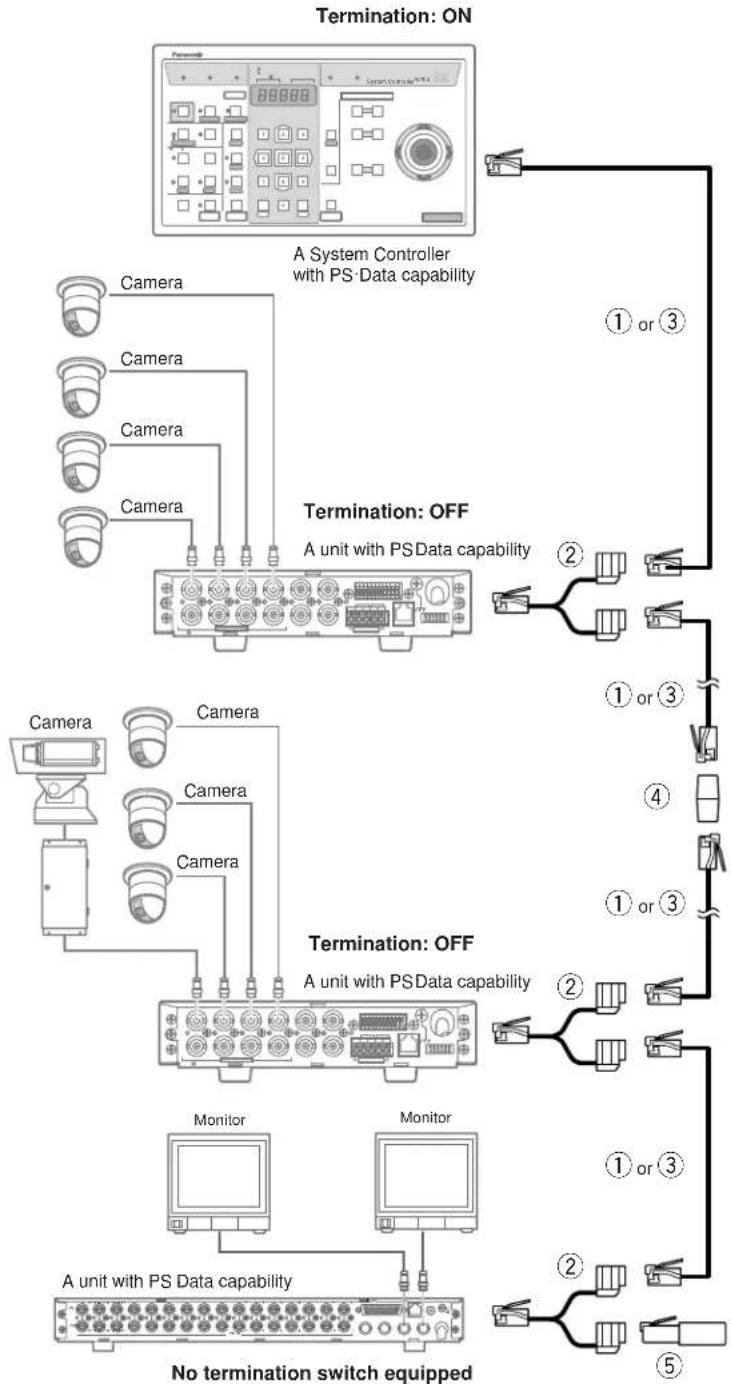
Cables and connectors are shown in the table. A 1 m cable and a branch cable are available as cable kit WV-CA48/10K. Procure the components and quantities required for your system configuration. Circled numbers are quoted in the connection diagram on the next page.
| Name & Model No. | Appearance | Description | |
| 1 | Cable KitWV-CA48/10K | 1 m cable | Length: 1 mModular-6 plug to modular-6 plug |
| 2 | 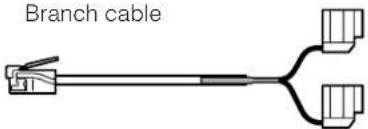 | Length: 16.5 cmModular-6 plug to modular-6 receptacles | |
| 3 | CableWV-CA48/50 | 5 m cable | Length: 5 mModular-6 plug to modular-6 plug |
| 4 | Extension ConnectorWV-CA48/JN | 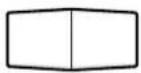 | Two modular-6 receptacles |
| 5 | TerminatorWV-CA48/TN | 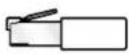 | Modular-6 plug with 150Ω |
Connection
flowchart
graph TD
    A["Camera"] --> B["PS Data Capability"]
    C["Camera"] --> B
    D["Camera"] --> B
    E["Camera"] --> B
    F["Camera"] --> B
    G["Camera"] --> B
    H["Camera"] --> B
    I["Camera"] --> B
    J["Camera"] --> B
    K["Camera"] --> B
    L["Camera"] --> M["PS Data Capability"]
    N["Camera"] --> M
    O["Camera"] --> M
    P["Camera"] --> M
    Q["Camera"] --> M
    R["Camera"] --> M
    S["Camera"] --> M
    T["Camera"] --> M
    U["Camera"] --> M
    V["Camera"] --> M
    W["Camera"] --> M
    X["Camera"] --> M
    Y["Camera"] --> M
    Z["Camera"] --> M
    AA["Camera"] --> M
    AB["Camera"] --> M
    AC["Camera"] --> M
    AD["Camera"] --> M
    AE["Camera"] --> M
    AF["Camera"] --> M
    AG["Camera"] --> M
    AH["Camera"] --> M
    AI["Camera"] --> M
    AJ["Camera"] --> M
    AK["Camera"] --> M
    AL["Camera"] --> M
    AM["Camera"] --> M
    AN["Camera"] --> M
    AO["Camera"] --> M
    AP["Camera"] --> M
    AQ["Camera"] --> M
    AR["Camera"] --> M
    AS["Camera"] --> M
    AT["Camera"] --> M
    AU["Camera"] --> M
    AV["Camera"] --> M
    AW["Camera"] --> M
    AX["Camera"] --> M
    AY["No termination switch equipped"]

    subgraph Termination: ON
        B1["A System Controller with PS-Data capability"]
        B2["Termination: OFF"]
        B3["Termination: OFF"]
        B4["Termination: OFF"]
        B5["Termination: OFF"]
        B6["Termination: OFF"]
        B7["Termination: OFF"]
        B8["Termination: OFF"]
        B9["Termination: OFF"]
        B10["Termination: OFF"]
        B11["Termination: OFF"]
        B12["Termination: OFF"]
        B13["Termination: OFF"]
        B14["Termination: OFF"]
        B15["Termination: OFF"]
        B16["Termination: OFF"]
        B17["Termination: OFF"]
        B18["Termination: OFF"]
        B19["Termination: OFF"]
        B20["Termination: OFF"]
        B21["Termination: OFF"]
        B22["Termination: OFF"]
        B23["Termination: OFF"]
        B24["Termination: OFF"]
        B25["Termination: OFF"]
        B26["Termination: OFF"]
        B27["Termination: OFF"]
        B28["Termination: OFF"]
        B29["Termination: OFF"]
        B30["Termination: OFF"]
        B31["Termination: OFF"]
        B32["Termination: OFF"]
        B33["Termination: OFF"]
        B34["Termination: OFF"]
        B35["Termination: OFF"]
        B36["Termination: OFF"]
        B37["Termination: OFF"]
        B38["Termination: OFF"]
        B39["Termination: OFF"]
        B40["Termination: OFF"]
        B41["Termination: OFF"]
        B42["Termination: OFF"]
        B43["Termination: OFF"]
        B44["Termination: OFF"]
        B45["Termination: OFF"]
        B46["Termination: OFF"]
        B47["Termination: OFF"]
        B48["Termination: OFF"]
        B49["Termination: OFF"]
        B50["Termination: OFF"]
        B51["Termination: OFF"]
        B52["Termination: OFF"]
        B53["Termination: OFF"]
        B54["Termination: OFF"]
        B55["Termination: OFF"]
        B56["Termination: OFF"]
        B57["Termination: OFF"]
        B58["Termination: OFF"]
        B59["Termination: OFF"]
        B60["Termination: OFF"]
        B61["Termination: OFF"]
        B62["Termination: OFF"]
        B63["Termination: OFF"]
        B64["Termination: OFF"]
        B65["Termination: OFF"]
        B66["Termination: OFF"]
        B67["Termination: OFF"]
        B68["Termination: OFF"]
        B69["Termination: OFF"]
        B70["Termination: OFF"]
        B71["Termination: OFF"]
        B72["Termination: OFF"]
        B73["Termination: OFF"]
        B74["Termination: OFF"]
        B75["Termination: OFF"]
        B76["Termination: OFF"]
        B77["Termination: OFF"]
        B78["Termination: OFF"]
        B79["Termination: OFF"]
        B80["Termination: OFF"]
        B81["Termination: OFF"]
        B82["Termination: OFF"]
        B83["Termination: OFF"]
        B84["Termination: OFF"]
        B85["Termination: OFF"]
        B86["Termination: OFF"]
        B87["Termination: OFF"]
        B88["Termination: OFF"]
        B89["Termination: OFF"]
        B90["Termination: OFF"]
        B91["Termination: Off"]
Termination
- Termination should be made on both ends of the chain. Never turn on the termination on a unit in the middle of the chain.
- If the unit has a termination switch set it to on or off, as may be the case.
- If the unit does not have a switch and it is at the end of the chain, provide a termination.
Notes:
- Do not fasten the cable together with the power cord or other electric power lines to prevent communication error.
- Hold only the connector body and its stopper when you plug or unplug the connector.
- If necessary, support the cable weight with wire or tape to prevent the plug from falling off.
Caution:
- Do not plug connectors into the telephone lines to avoid troubles.
Matsushita Electric Industrial Co., Ltd.
Central P.O. Box 288, Osaka 530-91, Japan