
Portable PowerBank B20A - Externe Batterie GP BATTERIES - Kostenlose Bedienungsanleitung
Finden Sie kostenlos die Bedienungsanleitung des Geräts Portable PowerBank B20A GP BATTERIES als PDF.


| Produkttyp | Tragbare Powerbank B20A |
| Marke | GP Batteries |
| Modell | B20A |
| Abmessungen (L x B x H) | 159 mm x 83 mm x 22 mm |
| Gewicht | 454 g |
| Eingang | DC 5 V / 2 A (Micro-USB) |
| Ausgang | 2 x USB-A, DC 5 V / 2,1 A (gesamt 2,1 A) |
| Akkutyp | Lithium-Ion 3,6 V |
| Kapazität | 20000 mAh / 72 Wh |
| Ladezeit | ca. 12 Stunden |
| Betriebstemperatur | 5 °C bis 40 °C |
| LED-Anzeigen | 4 LED-Leuchten für Akkustand |
| Funktionen | Gleichzeitiges Laden von bis zu 2 Geräten, Aufladen und Versorgen möglich |
| Reinigung | Mit trockenem Tuch abwischen; keine Flüssigkeiten verwenden |
| Sicherheitshinweise | Von Kindern fernhalten; nicht zerlegen; vor Hitze, Feuchtigkeit und Kurzschluss schützen |
| Reparatur | Nur durch Fachpersonal; keine vom Benutzer austauschbaren Teile |
Häufig gestellte Fragen - Portable PowerBank B20A GP BATTERIES
Benutzerfragen zu Portable PowerBank B20A GP BATTERIES
0 Frage zu diesem Gerät. Beantworten Sie die, die Sie kennen, oder stellen Sie Ihre eigene.
Eine neue Frage zu diesem Gerät stellen
Laden Sie die Anleitung für Ihr Externe Batterie kostenlos im PDF-Format! Finden Sie Ihr Handbuch Portable PowerBank B20A - GP BATTERIES und nehmen Sie Ihr elektronisches Gerät wieder in die Hand. Auf dieser Seite sind alle Dokumente veröffentlicht, die für die Verwendung Ihres Geräts notwendig sind. Portable PowerBank B20A von der Marke GP BATTERIES.
BEDIENUNGSANLEITUNG Portable PowerBank B20A GP BATTERIES
B20A PowerBank Instruction Manual

Read the instruction manual thoroughly before use. Keep the manual for future reference.
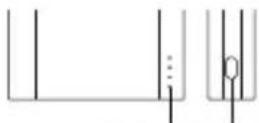
LED indicators Power button
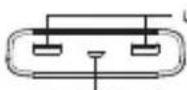
Micro-USB (input)
USB-A (output)
Operating instructions
Recharging the PowerBank
- Connect the Micro-USB port of the PowerBank with a power source (computer or USB power adapter, output: 1A or above) through the provided USB charging cable (see figures below).
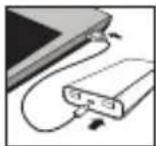
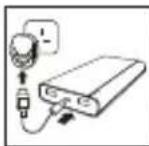
You can use the PowerBank to charge other devices (using USB-A port) while it is being recharged (see chapter "Charging other devices").
- Disconnect the USB charging cable when all LED indicators are lit.
Charging other devices
- Connect the fully-charged PowerBank with the device through the provided USB charging cable or the cable provided by the device's manufacturer. Select either one USB-A port, or use both ports for charging (see figures below).
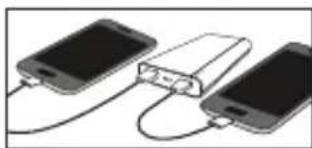
natural_image
Three smartphones connected by a USB drive (no text or symbols visible)- Disconnect the USB charging cable when charging is complete. The PowerBank will turn off automatically.
LED indicators
- Refer to the LED indicators for battery level during charging or recharging. The PowerBank has the best battery strength when all LED indicators are it. Before use, the battery level can be checked by pressing the power button once.
- Depending on the battery level, the last applicable LED indicator flashes when the PowerBank is being recharged and all applicable LED indicators remain it when it is charging other devices. When the PowerBank is being charged and charging another device at the same time, the last applicable LED indicator flashes.
Usage tips
- If the PowerBank does not work, unplug the USB charging cable and reconnect it.
- It is normal that the PowerBank gets warm during use. It will gradually cool down to room temperature after fully discharged or recharged.
Specifications
• Input DC 5V / 2A
• Output: USB-A x 2 - DC 5V / 2.1A (Total 2.1A)
• Dimension: 159 (L) × 83 (W) × 22 (H) mm
• Weight: 454g
• Operating temperature: 5 °C to 40 °C
- Battery: Lithium Ion 3.6V 20000mAh 72Wh
• Recharging time: 12 hours*
* Recharging time may vary under different operating conditions. Longer recharging time may be required when using for the first time.
Safety information
Please read below safety notes carefully before use to avoid any personal injury and property damage caused by improper use of the product. Any warranty claims or returns caused by misuses will not be accepted.
- Keep the product away from children and infirm persons.
- Keep the product away from heat sources, combustible gas, humidity and liquids.
- Do not attempt to repair, disassemble or destroy the product in any way.
- Keep the product away from metallic or conductive objects to avoid short-circuit.
- Do not operate a wet or otherwise damaged product.
This device complies with Part 15 of the FCC Rules. Operation is subject to the following two conditions: (1) this device may not cause harmful interference, and (2) this device must accept any interference received, including interference that may cause undesired operation.
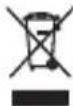
Do not dispose of electrical appliances as unsorted municipal waste, use separate collection facilities. Contact your local government for information regarding the collection systems available. If electrical appliances are disposed of in landfills or dumes, hazardous substances can leak
into the groundwater and get into the food chain, damaging your health and well-being.