Dynamic 10 - Kopfhörer XX.Y - Kostenlose Bedienungsanleitung
Finden Sie kostenlos die Bedienungsanleitung des Geräts Dynamic 10 XX.Y als PDF.


Benutzerfragen zu Dynamic 10 XX.Y
0 Frage zu diesem Gerät. Beantworten Sie die, die Sie kennen, oder stellen Sie Ihre eigene.
Eine neue Frage zu diesem Gerät stellen
Laden Sie die Anleitung für Ihr Kopfhörer kostenlos im PDF-Format! Finden Sie Ihr Handbuch Dynamic 10 - XX.Y und nehmen Sie Ihr elektronisches Gerät wieder in die Hand. Auf dieser Seite sind alle Dokumente veröffentlicht, die für die Verwendung Ihres Geräts notwendig sind. Dynamic 10 von der Marke XX.Y.
BEDIENUNGSANLEITUNG Dynamic 10 XX.Y
XX.Y®
HEADPHONES
www.xxy.eu
DYNAMIC 10
User guide
STEREO HEADPHONES DYNAMIC 10
Stereo headphones with built in MP3 player for Micro SD/SDHC card (not included) and FM radio. Now you can take music to any place without carrying additional equipment. You don't need any cable, either!
KEY FUNCTIONS
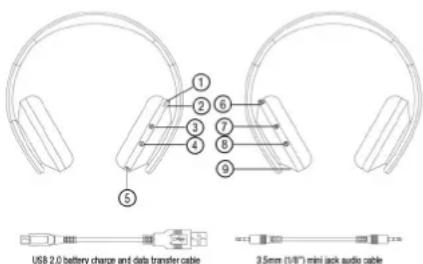
text_image
USB 2.0 battery charge and data transfer cable 3.5mm (1/8") mini jack audio cable① ON/OFF SWITCH
To switch the built-in MP3/WMA player or FM radio, toggle the switch to ON position. The diode glows blue showing that the device is active. For using external sound sources connect the audio cable and toggle the switch to OFF position.
MP3 PLAYER
② Micro SD/SDHC CARD PORT
Once the card is inserted the player will automatically list and play MP3 and WMA files (if on). The directories and subdirectories are listed in alphabetic order (the names of the directories followed by the names of files) to the 10th level deep.
NOTE: The device accepts cards with a maximum capacity of 32GB.
③ NEXT TRACK, VOLUME OF Press the button to move to the next track. Press and hold to increase volume.
④ PREVIOUS TRACK, VOLUME DOWN
Press the button to move to the previous track. Press and hold to decrease volume.
⑤ AUDIO INPUT: 3.5mm (1/8") MINI JACK
Connect your headphones to the external sound source (MR3 player, notebook, mobile phone) for a traditional listening experience. The headphones are not powered by batteries then.
⑥ USB PORT Connect us
Connect your headphones to a notebook or other device with a USB port to charge the in-built battery. The charging time is approx. 2 hours. Plug in the headphones with the inserted Micro SD/SDHC card to the computer USB port to allow data transfer. The headphones ON/OFF switch must be in ON position. Once inserted the headphones card will be automatically detected and installed. NOTE: Depending on the type of drivers supplied by the hardware manufacturer, in some cases the card in the headphones may be properly detected and installed only if connected to the USB 2.0 port.
FM RADIO
③ NEXT RADIO STATION
Press the button to move to the next saved radio station.
Press and hold to increase 1 4 PREVIOUS RADIO STATION
Press the button to move to the previous saved radio station.
⑦ Press and hold to decrease volume.
7 FUNCTION KEY Press the key to toggle between FM radio and MP3 player.
⑧ PLAY/PAUSE
Press and hold the button to start the search for radio stations. Radio stations will be automatically saved during the search. Press buttons 3 and 4 to select the saved radio stations.
⑨ LED INDICATOR
The diode glows blue showing that the device is active. Low battery is indicated by blinking red light.