Kuki - Kopfhörer XX.Y - Kostenlose Bedienungsanleitung
Finden Sie kostenlos die Bedienungsanleitung des Geräts Kuki XX.Y als PDF.


Benutzerfragen zu Kuki XX.Y
0 Frage zu diesem Gerät. Beantworten Sie die, die Sie kennen, oder stellen Sie Ihre eigene.
Eine neue Frage zu diesem Gerät stellen
Laden Sie die Anleitung für Ihr Kopfhörer kostenlos im PDF-Format! Finden Sie Ihr Handbuch Kuki - XX.Y und nehmen Sie Ihr elektronisches Gerät wieder in die Hand. Auf dieser Seite sind alle Dokumente veröffentlicht, die für die Verwendung Ihres Geräts notwendig sind. Kuki von der Marke XX.Y.
BEDIENUNGSANLEITUNG Kuki XX.Y
XX.Y®
HEADPHONES
www.xxy.eu
KUKI
User guide
KUKI BLUETOOTH HEADPHONES
OVERVIEW

text_image
Diagram of a red and black headband with numbered labels pointing to different sections① Function/On/Off Button
② Touchpad: Volume + / Next song
③ Touchpad: Volume - / Previous song
④ Microphone
⑤ USB port for charging the battery
⑥ mini jack 3.5mm input
KEY FEATURES
- Wireless listening: Bluetooth®, range: 10m
- Built-in microphone for telephone calls
- Touch control panel
- Light ergonomic design, foldable headband
- Built in battery (up to 8 hours of listening, up to 8 hours of phone calls)
- Bluetooth® low energy system
- Charging with USB cabel
- Possibility to connect outer music source (eg. MP3 player) with audio mini jack 3.5mm cable (included in a set) or to use headphones for voice communication with a computer through microphone (not included).
PAIRING
natural_image
Technical line drawing of a mechanical component with a highlighted part (no text or symbols)-
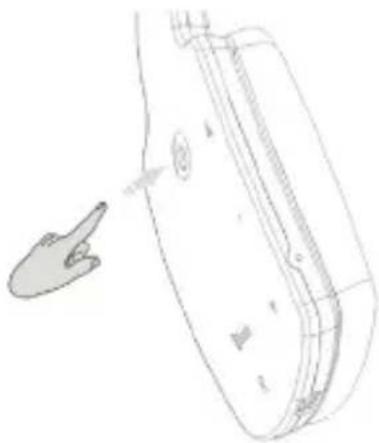
Press and hold ⚙ key for 5 seconds to start pairing mode, which is signaled with alternate blue and red light. Search Bluetooth device in your cell phone/tablet/PC, which you want to pair with the headphones. In need refer to the cell phone/tablet/PC's manual. Headphones will be detected as „Kuki..
-
After successful pairing you can wireless listen to music from the device, which the headphones were paired with. In a cell phone or a tablet (with 3G) it is possible to answer and run incoming calls.
LISTENING TO MUSIC
text_image
Bluetooth R-
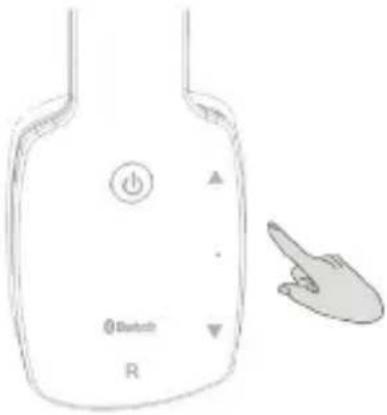
You can pause playing music by holding the ⏻ key and play again the same way.
-
Press quickly the touchpad 2 or 3 to skip to the next or previous song.
-
Press and hold the touchpad 2 or 3 to turn the volume up or down. Reaching maximum or minimum volume is signaled with the sound.
BLUETOOTH PHONE CALLS
-
Press the ⏻ key to answer an incoming phone call and talk directly via the butli-in microphone in the headphones.
-
Press and hold the ⏻ key for 3 seconds to turn to the cell phone mode and answer the incoming phone call. Repeat the action to go back to the Bluetooth mode and answer the phone call with the headphones.
-
Press twice the ⏻ key to dial the last phone number.
LISTENING TO MUSIC VIA THE EXTERNAL CABLE
natural_image
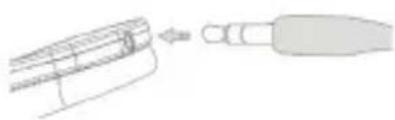
Diagram showing a mechanical component being inserted into a cylindrical part (no text or symbols present)It is possible to listen to music without the Bluetooth function (MP3 player, older types of laptops and so on). Connect the headphones and the device with the mini jack 3.5mm – USB cable.
NOTE! In this mode, the Bluetooth function will be switched of automatically. There is no possibility to turn it on as long as the cable is plugged.
CHARGING BUILT-IN BATTERY
natural_image
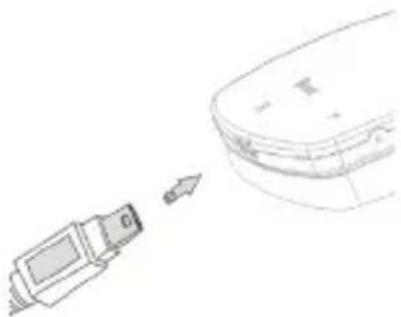
Simple line drawing of a device emitting a cable to a container (no text or symbols)Plug the USB cable to the headphones and the PC. Charging process is signaled with the red light, which turns of when charging is compiled.