
NT1-AI Kit - Mikrofon RODE - Kostenlose Bedienungsanleitung
Finden Sie kostenlos die Bedienungsanleitung des Geräts NT1-AI Kit RODE als PDF.


| Produkttyp | Kondensatormikrofon-Set mit Audio-Interface |
| Modell | NT1-AI Kit |
| Marke | Rode |
| Mikrofontyp | Großmembran-Kondensatormikrofon |
| Richtcharakteristik | Niere |
| Frequenzbereich | 20 Hz – 20 kHz |
| Empfindlichkeit | -32 dB re 1 V/Pa (25 mV/Pa) |
| Maximaler Schalldruckpegel | 145 dB SPL (1 kHz, 1% THD) |
| Ausgangsimpedanz | 100 Ω |
| Interface-Typ | USB-Audio-Interface (AI-1) |
| Wandler | 24 Bit / 96 kHz |
| Phantomspeisung | 48 V (über Interface, schaltbar) |
| Stromversorgung Interface | USB (Bus-powered) |
| Kopfhörerausgang | 3,5 mm Klinke, mit Direct-Monitoring |
| Anschlüsse | XLR (Mikrofon), USB-C (Interface), 6,3 mm Klinke (Monitor-Ausgang) |
| Zubehör im Lieferumfang | SMR Shockmount, XLR-Kabel, USB-C-Kabel |
| Gewicht Mikrofon | ca. 320 g |
| Gewicht Interface | ca. 200 g |
| Abmessungen Mikrofon | 190 mm x 50 mm (Länge x Durchmesser) |
| Abmessungen Interface | 105 mm x 75 mm x 40 mm |
| Reinigung und Pflege | Mit einem weichen, trockenen Tuch reinigen. Keine Flüssigkeiten oder Reinigungsmittel verwenden. |
| Sicherheitshinweise | Nicht fallen lassen, vor Feuchtigkeit schützen, nur mit der mitgelieferten Spannungsversorgung betreiben. |
| Reparatur und Ersatzteile | Reparaturen nur durch autorisiertes Fachpersonal. Keine vom Benutzer austauschbaren Teile. |
| Garantie | Siehe Garantiekarte des Herstellers. |
Häufig gestellte Fragen - NT1-AI Kit RODE
Benutzerfragen zu NT1-AI Kit RODE
0 Frage zu diesem Gerät. Beantworten Sie die, die Sie kennen, oder stellen Sie Ihre eigene.
Eine neue Frage zu diesem Gerät stellen
Laden Sie die Anleitung für Ihr Mikrofon kostenlos im PDF-Format! Finden Sie Ihr Handbuch NT1-AI Kit - RODE und nehmen Sie Ihr elektronisches Gerät wieder in die Hand. Auf dieser Seite sind alle Dokumente veröffentlicht, die für die Verwendung Ihres Geräts notwendig sind. NT1-AI Kit von der Marke RODE.
BEDIENUNGSANLEITUNG NT1-AI Kit RODE
R∅DE®
MICROPHONES

NT1 & AI 1 Quickstart Guide

6 Enable Phantom Power (P48) This is required for condenser microphones
A Enable P48 for NT1
Press left knob to enable,
P48 light illuminates red

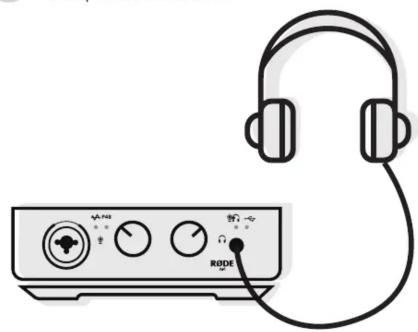
8 Connect headphones, adjust volume *headphones not included
natural_image
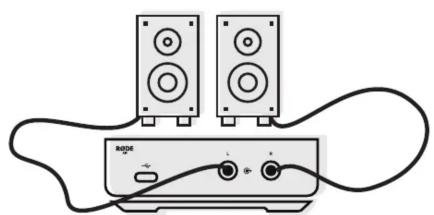
Illustration of a portable audio amplifier with headphones and control buttons (no text or symbols)10 If desired, connect powered speakers
*disconnect headphones to activate speaker output
natural_image
Line drawing of a audio equipment setup with two speakers and a speaker connected to a base (no text or symbols)NT1

AI-1 INTERFACE

B Disable P48 for dynamic microphones Press left knob to disable, P48 light darkens

9 Enable Direct Monitor by pressing right knob


natural_image
Simple circular icon with a white checkmark on a solid brown background (no text or symbols)You're now ready to create!
2 Mount NT1 in SMR Shock Mount
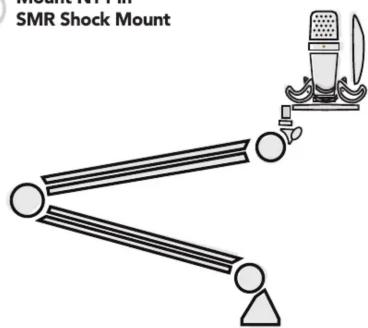
5 Connect NT1 to AI-1 Interface

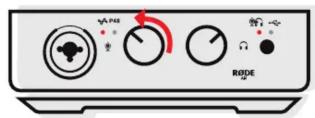
⑦ Set Input Level

B Turn down when Red

flowchart
graph TD
    A["Microphone"] --> B["Computer"]
    B --> C["Headphones"]
    C --> D["ON/OFF Signal goes from mic through computer to headphones"]
Love your new product? Share with us #rodeai1
@rodemic
@rodemics
f rodemic

Scan the QR code to find out more
www.rode.com


Marke : RODE
Modell : NT1-AI Kit
Kategorie : Mikrofon