2K DV - Kamera Align - Kostenlose Bedienungsanleitung
Finden Sie kostenlos die Bedienungsanleitung des Geräts 2K DV Align als PDF.


Benutzerfragen zu 2K DV Align
0 Frage zu diesem Gerät. Beantworten Sie die, die Sie kennen, oder stellen Sie Ihre eigene.
Eine neue Frage zu diesem Gerät stellen
Laden Sie die Anleitung für Ihr Kamera kostenlos im PDF-Format! Finden Sie Ihr Handbuch 2K DV - Align und nehmen Sie Ihr elektronisches Gerät wieder in die Hand. Auf dieser Seite sind alle Dokumente veröffentlicht, die für die Verwendung Ihres Geräts notwendig sind. 2K DV von der Marke Align.
BEDIENUNGSANLEITUNG 2K DV Align
text_image
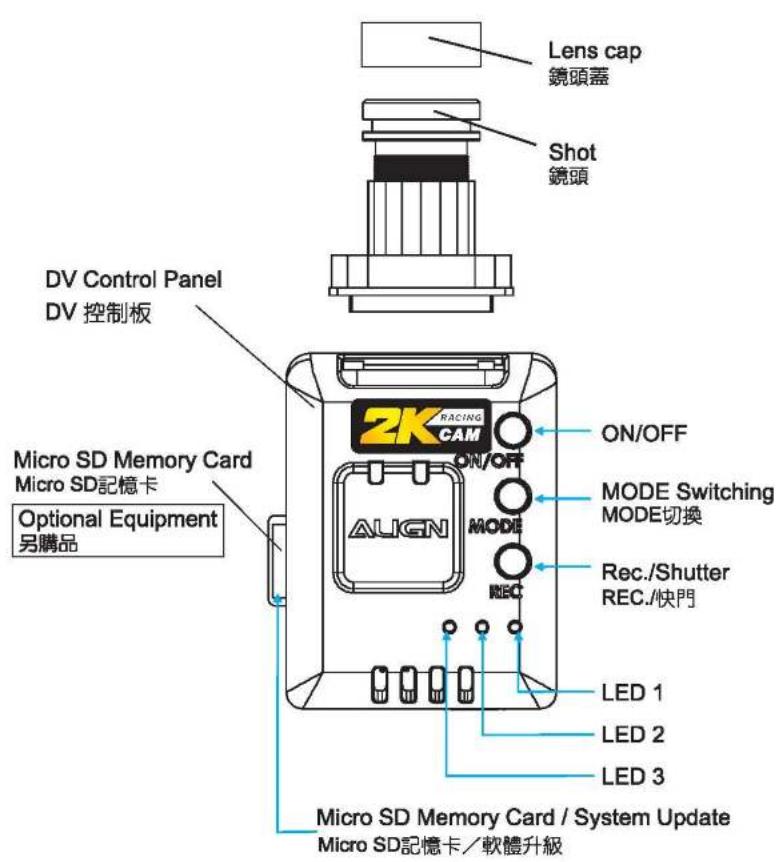
Lens cap 鏡頭蓋 Shot 鏡頭 DV Control Panel DV 控制板 Micro SD Memory Card Micro SD記憶卡 Optional Equipment 另購品 ON/OFF ON/OFF MODE Switching MODE切換 MODE REC./Shutter REC./快門 LED 1 LED 2 LED 3 Micro SD Memory Card / System Update Micro SD記憶卡/軟體升級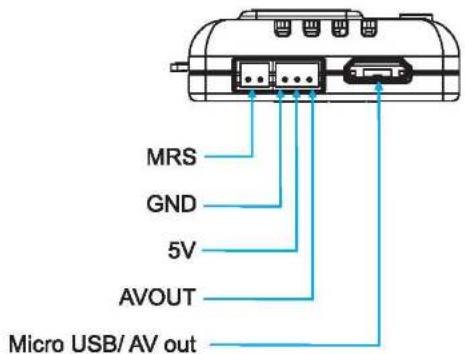
text_image
MRS GND 5V AVOUT Micro USB/ AV outCAUTION 注意
The lens cap can protect the lens and prevent scratching. Make sure to remove the lens cap before flying.
鏡頭蓋能有效保護鏡頭的清潔預防刮傷,在準備飛行時請取下鏡頭蓋,並妥善保存。
DV BUTTON FUNCTION DV設定鍵功能說明
| ON/OFF | ON/OFF: Press and hold the button長按-開機/關機 |
| MODE Switching MODE切換 | Mode switch: Momentary press the button短按-切換拍攝攝模式 |
| Rec./Shutter REC./快門 | Record/Shutter: Momentary press the button短按-開啓/結束錄影,或快門拍照 |
INDICATOR DESCRIPTION 指示燈說明
| LED 1 | 1440P Video Mode1440P錄影模式 |
| LED 2 | 1080/720P Video Mode1080/720P錄影模式 |
| LED 3 | Capture Mode拍照模式 |
CAUTION 注意
- 2K DV supports Micro SD memory card to record onboard video during flight.
- 2K DV support 32GB Micro SD memory card. (The maximum recording volume)
3.2K DV Aspect Ratio is 16:9 - 2K DV支援Micro SD記憶卡,可另購記憶卡記錄飛行中的影像。
- 最大支援至32GB Micro SD記憶卡。
- 2K DV顯示比例為16:9。
DV SETUP MENU DV選單設定說明
Allow to setup DV function on FPV display after power up DV camera.
DV攝影機開機後,可透過FPV螢幕顯示各項選單。
| ON/OFF | Briefly push the button to enter /leave currently folio.短按-進入或離開此層選單 |
| MODE Switching MODE切換 | Press the button-switching menu, Briefly push button-proceed to each function of menu.長按-切換選單;短按-切換選單項目 |
| Rec./Shutter REC./快門 | Briefly push button-select/confirm the function of menu, proceed to setup folio.短按-選取/確認選單項目,進入設定畫面 |
| 2K DV support PAL Video Output.2K DV支援PAL影像輸出。 | |
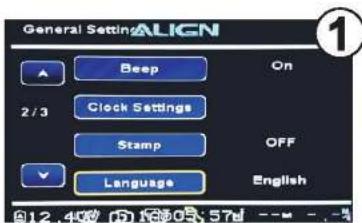
When enter into OSD menu, please press "MODE" button three times to proceed to "Language" setup folio, and briefly push "REC" shutter button to enter "Language" folio. And now please briefly push the button of "MODE" to select your language and proceed to each process of DV camera setup.
進入OSD選單,請長按"MODE"鈕三下跳至一般設定選單內的"語言",短按REC./快門鈕進入"語言"設定頁面。進入"語言"設定頁面後,請短按"MODE"鈕選擇您習慣使用的語言,來進行DV攝影機各項設定。
text_image
General Setting ALIGN Beep On 2/3 Clock Settings OFF Stamp Language English 012.45% 018:05:57d -- - -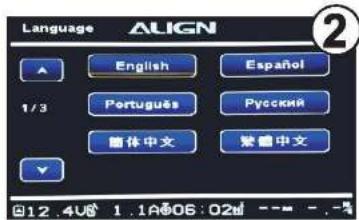
text_image
Language ALIGN English Español 1/3 Português Русский 简体中文 繁體中文 12.4US 1.1A00S:02ml --- -.%WIRING DIAGRAM 接線示意圖
text_image
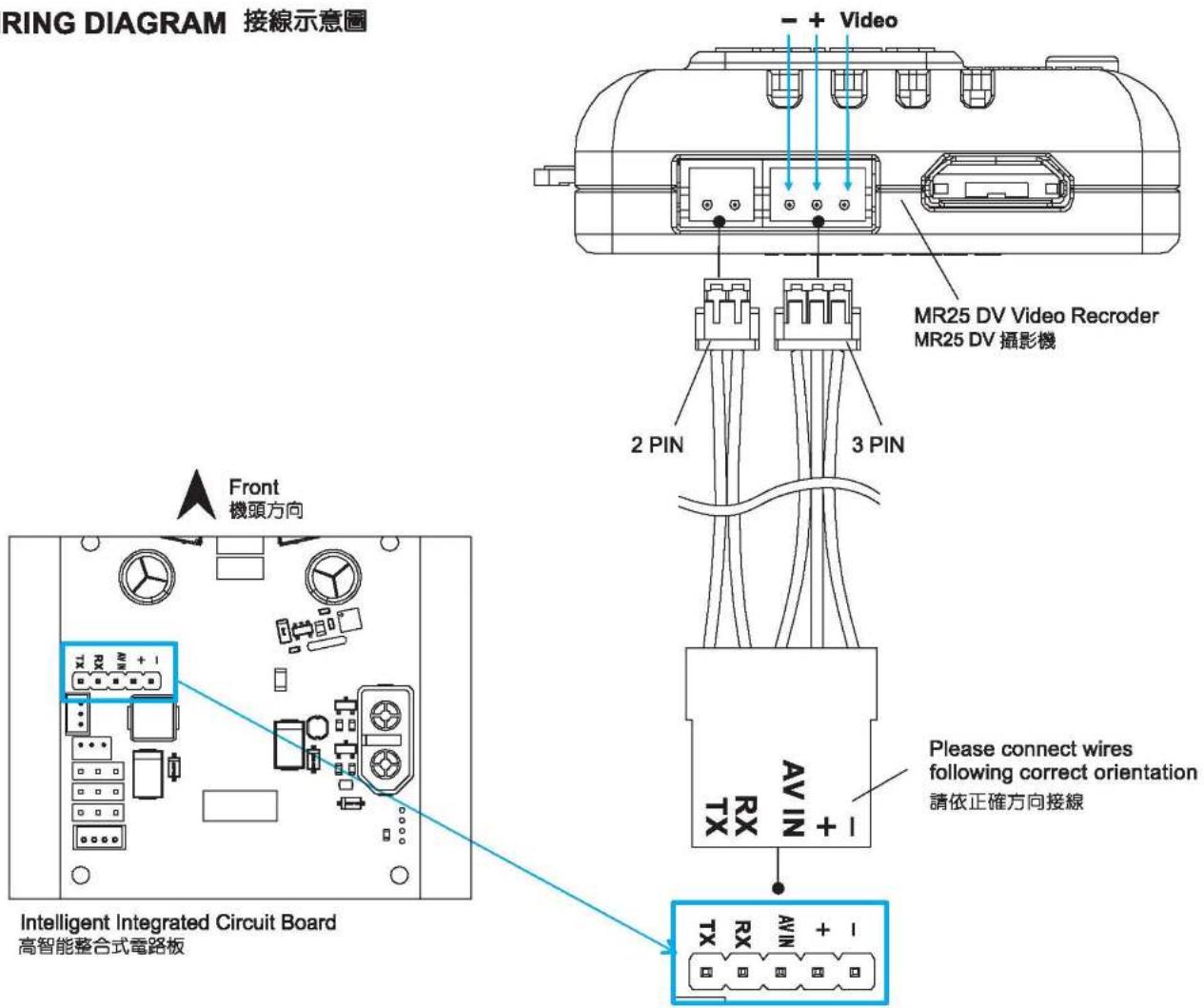
RING DIAGRAM 接線示意圖 FRONT 機頭方向 Intelligent Integrated Circuit Board 高智能整合式電路板 MR25 DV Video Recroder MR25 DV 攝影機 2 PIN 3 PIN Please connect wires following correct orientation 請依正確方向接線 AV IN + I TX RX RX AV IN + I TX RX RX AV IN + IWARNING 警告
After video recording, please make sure to turn off camera DV power firstly, then turn off MR25 power afterwards, to ensure and save the recording video in SD memory card, or it will loss the data.
當DV攝影機錄影結束後,必須先關關DV電源再關閉MR25電源,這樣才能將錄影檔儲存於SD記憶卡,否則錄影內容將會遺失。
WARNING 警告
This DV adapter cable has two connectors. Please plug 2pin/3pin connector(with fool-proofing) into 2K DV video recorder and plug the other end of the 5pin dupont connector into the intelligent integrated circuit board. Please note that the 5pin dupont connector has no fool-proofing design, so make sure to respect the laser print of TX,RX,AV in,+,-, on connector to plug to intelligent integrated circuit board with the same words in front of pin. If you insert upside that may burn the DV and main board. Therefore, please double check the polarity and plug to the main board correctly. And please do not to get the pin crooked, otherwise the crooked pin may cause a short circuit and malfunction.
DV連接線的兩端都有插頭,一邊分別是2pin/3pin端子(有防呆設計),插入2K DV攝影機;另一邊是5pin杜邦接頭,插入高智能整合式電路板。請注意5pin杜邦端子無防呆插頭設計,請務必將連接線端子上方鐳刻文字TX、RX、AV in、+、-對準插入整合式電路版上前方有相同文字的PIN針。若將插頭插反,將導致DV及主電路板燒毀,所以插入前請再三確認極性是否正確,並且將插針正確地插入主電路板,並請注意別把針腳弄歪,歪斜的針腳可能造成短路故障的原因。