Ashton 1085 - Uhr Gant - Kostenlose Bedienungsanleitung
Finden Sie kostenlos die Bedienungsanleitung des Geräts Ashton 1085 Gant als PDF.


Benutzerfragen zu Ashton 1085 Gant
0 Frage zu diesem Gerät. Beantworten Sie die, die Sie kennen, oder stellen Sie Ihre eigene.
Eine neue Frage zu diesem Gerät stellen
Laden Sie die Anleitung für Ihr Uhr kostenlos im PDF-Format! Finden Sie Ihr Handbuch Ashton 1085 - Gant und nehmen Sie Ihr elektronisches Gerät wieder in die Hand. Auf dieser Seite sind alle Dokumente veröffentlicht, die für die Verwendung Ihres Geräts notwendig sind. Ashton 1085 von der Marke Gant.
BEDIENUNGSANLEITUNG Ashton 1085 Gant
GANT
TIME
ASHTON
USER INSTRUCTIONS
SPECIFICATIONS
GANT ID NO: 1085
MOVEMENT NO: FS00
BATTERY: SR626SW
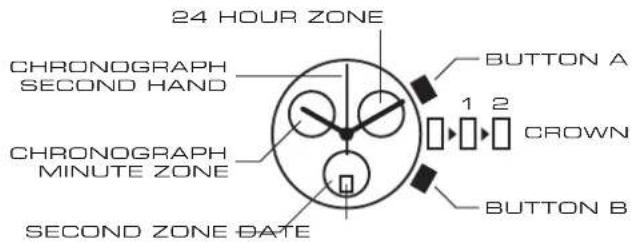
DISPLAYS AND BUTTONS
text_image
24 HOUR ZONE CHRONOGRAPH SECOND HAND CHRONOGRAPH MINUTE ZONE SECOND ZONE DATE BUTTON A 1 2 CROWN BUTTON BSETTING THE TIME
- Pull the crown out to position 2.
- Turn the crown to set hour and minute hands.
- When the crown is pushed back to the normal position, small second hand begins to run.
SETTING THE DATE
- Pull the crown out to position 1.
-
Turn the crown clockwise to set the date.*
-
After the date has been set, push the crown back to the normal position.
USING THE CHRONOGRAPH
This chronograph is able to measure and display time in 1/1 second units up to a maximum of 59 minutes and 59 seconds. The chronograph second hand keeps going continuously for 59 minutes 59 seconds after starting the measurement.
MEASURING TIME WITH THE CHRONOGRAPH
- The chronograph can be started and stopped each time button A is pressed.
- Pressing button B resets the chronograph and the chronograph second hand and chronograph minute hand return to zero position.
CHRONOGRAPH RESET
(INCL. AFTER REPLACING BATTERY)
This procedure should be performed when the chronograph second hand does not return to zero position after the chronograph has been reset, and including after the battery has been replaced.
- Pull the crown out to position2.
- Press button A to set the chronograph second hand to the zero position. The chronograph hand can be advanced rapidly by continuously pressing button A.
- Once the hand have been zeroed, return the crown to the normal position.