West Creek 1037 - Uhr Gant - Kostenlose Bedienungsanleitung
Finden Sie kostenlos die Bedienungsanleitung des Geräts West Creek 1037 Gant als PDF.


Benutzerfragen zu West Creek 1037 Gant
0 Frage zu diesem Gerät. Beantworten Sie die, die Sie kennen, oder stellen Sie Ihre eigene.
Eine neue Frage zu diesem Gerät stellen
Laden Sie die Anleitung für Ihr Uhr kostenlos im PDF-Format! Finden Sie Ihr Handbuch West Creek 1037 - Gant und nehmen Sie Ihr elektronisches Gerät wieder in die Hand. Auf dieser Seite sind alle Dokumente veröffentlicht, die für die Verwendung Ihres Geräts notwendig sind. West Creek 1037 von der Marke Gant.
BEDIENUNGSANLEITUNG West Creek 1037 Gant
GANT®
TIME
WEST CREEK
USER INSTRUCTIONS
SPECIFICATIONS
GANT ID NO: 1037
MOVEMENT NO: VX46
BATTERY: SR920SW
DISPLAY
text_image
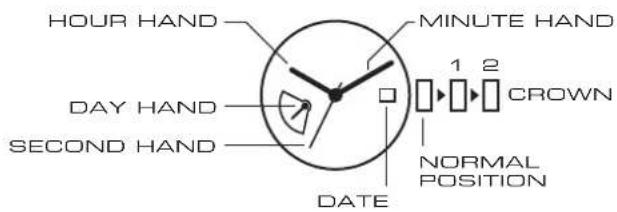
HOUR HAND MINUTE HAND DAY HAND CROWN SECOND HAND NORMAL POSITION DATESETTING THE TIME
- Pull the crown out to position2 when the second hand is at the 12 o'clock position.
- Turn the crown to set hour and minute hands.*
* When setting the minute hand, advance it 4 to 5 minutes ahead of the desired time and then turn it back to the exact time. - When the crown is pushed back to the normal position, second hand begins to run.
SETTING THE DATE & DAY
- Pull the crown out to position1.
- Turn the crown counter-clockwise to set the date.*
- Turn the crown clockwise to set the day.*
- After the date and day has been set, push the crown back to the normal position.
* Do not set the day and date between 9:00 p.m. and 1:00 a.m. Otherwise, it may not turn properly. After the day hand reaches the last day of the week, turn the crown clockwise and the hand will return to the first day of the week.