
XA101 - Sicherheitskamera XENA - Kostenlose Bedienungsanleitung
Finden Sie kostenlos die Bedienungsanleitung des Geräts XA101 XENA als PDF.


| Produkttyp | Sicherheitskamera (Einbruchmelder mit programmierbarer Tastatur) |
| Marke | XENA |
| Modell | XA101 |
| Stromversorgung | 4x AA-Batterien (nicht im Lieferumfang) oder 4,5V AC-Adapter (nicht im Lieferumfang) |
| Bewegungssensor | Ja |
| Alarmlautsprecher | Ja |
| Tastatur | Programmierbar, 4-stelliger Sicherheitscode |
| Batteriestatus-LED | Ja (leuchtet bei schwachen Batterien) |
| Externer Sirenenanschluss | Ja (für XA301 Fernsirene, nicht im Lieferumfang) |
| Erfassungswinkel | 110° |
| Maximale Reichweite | Getestet bei 25°C (kann bei höheren Temperaturen abweichen) |
| Montage | Wandmontage (Schrauben und Dübel im Lieferumfang) oder freistehend |
| Gehäusematerial | Kunststoff |
| Reinigung | Mit weichem, leicht feuchtem Tuch und Wasser, sofort trockenwischen. Keine Chemikalien verwenden. |
| Sicherheitshinweise | Batterien korrekt einlegen, Polarität beachten, keine verschiedenen Batterietypen mischen, bei längerer Nichtbenutzung Batterien entfernen. |
| Lieferumfang | Alarmeinhalt, Schrauben und Dübel, Bedienungsanleitung (Batterien und Adapter nicht enthalten) |
| Kompatibles Zubehör | XENA XA301 Fernsirene |
Häufig gestellte Fragen - XA101 XENA
Benutzerfragen zu XA101 XENA
0 Frage zu diesem Gerät. Beantworten Sie die, die Sie kennen, oder stellen Sie Ihre eigene.
Eine neue Frage zu diesem Gerät stellen
Laden Sie die Anleitung für Ihr Sicherheitskamera kostenlos im PDF-Format! Finden Sie Ihr Handbuch XA101 - XENA und nehmen Sie Ihr elektronisches Gerät wieder in die Hand. Auf dieser Seite sind alle Dokumente veröffentlicht, die für die Verwendung Ihres Geräts notwendig sind. XA101 von der Marke XENA.
BEDIENUNGSANLEITUNG XA101 XENA
INSTRUCTIONS MANUAL
XA101
INTRUDER ALARM with
programmable keypad
XENA
INTELLIGENT SECURITY

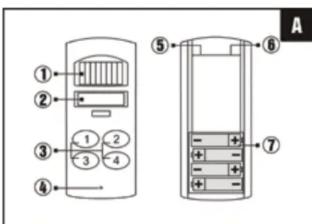
Controls
- Motion Sensor
- Alarm Speaker
- Keypad
- Battery Low LED
- External Siren Socket
- 4.5V AC Adaptor Socket (AC adaptor not included)
- Battery Compartment
Battery installation
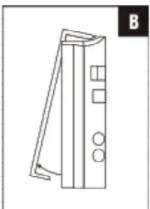
- The battery compartment is accessed from the rear of the alarm unit by removing the screw from the base and lifting the back cover B.
- Insert four (4) 'AA' size batteries (not included) following the polarity as shown C. When the last battery is inserted the alarm will beep very loudly to indicate that the batteries are installed properly.

- Replace the back cover and fix with screw.
The Battery Low LED will light when the batteries need replacing.
Programming the alarm
Immediately after inserting the batteries, the desired 4 digit security code must be set, simply press the desired 4 digits on the keypad.
Note: After removing the batteries, press number 4 before installing new ones. The alarm must be re-programmed with your security code each time the batteries are removed or replaced.
Installation
- Place the alarm in the desired location, preferably near the front or back door.
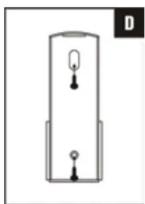
- Remove the back cover and fix it to the wall using the screws and rawplugs supplied, as shown D.
- The alarm body can then be snapped into place on to the back cover and secured base.
* Please note that this alarm can also be used free standing.
Operation
Leaving the protected area
Press keypad number 4 and a confirmation tone will indicate that the alarm is armed. You have 30 seconds in which to vacate the area. After this time, if motion is detected then the alarm will sound.
Entering the protected area
Type your 4 digit security code within 10 seconds. This will disarm the alarm.
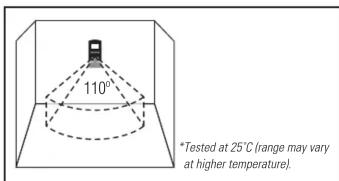
Detection Area
External siren socket
This socket can be used to connect the XA301 Remote Siren to the alarm (not included).
Care and maintenance
To clean the case, simply use a soft slightly damp cloth with water and wipe dry immediately.
Caution: Never use chemicals to clean the case, as they may cause damage to the plastic and cause the alarm not to function.
Troubleshooting
The unit does not sound when the batteries
are installed
Ensure that the batteries are connected correctly according to the diagram in the battery compartment
The alarm does not arm
Ensure that the back plate of the alarm unit is secure to hold the batteries in place and that the red light comes on when the keypad buttons are pressed
The red light on the base of the alarm is on
This is the 'Battery Low Indicator'. The batteries need replacing
Battery precautions
When using this product follow these precautions at all times.
- Use only the appropriate size batteries
- Be sure to follow the correct polarity when installing the batteries as indicated in the battery compartment. Incorrect polarity may cause damage to the alarm.
- Do not mix different types of battery such as Alkaline and Carbon-zinc or old batteries with new.
- If the alarm is not used for long periods of time, remove the batteries to prevent damage or injury from possible battery leakage.
- Do not recharge batteries not intended to be recharged as they can overheat and rupture. (Always follow the manufacturer's directions.)


www.xenasecurity.com
- INSTRUCTIONS MANUAL
- XA101
- INTRUDER ALARM with
- programmable keypad
- XENA
- INTELLIGENT SECURITY
- Controls
- Battery installation
- Programming the alarm
- Installation
- Operation
- Leaving the protected area
- Entering the protected area
- External siren socket
- Care and maintenance
- Troubleshooting
- The unit does not sound when the batteries
- are installed
- The alarm does not arm
- The red light on the base of the alarm is on
- Battery precautions
Marke : XENA
Modell : XA101
Kategorie : Sicherheitskamera