
Portable - Heftgerät Swingline - Kostenlose Bedienungsanleitung
Finden Sie kostenlos die Bedienungsanleitung des Geräts Portable Swingline als PDF.


| Produkttyp | Elektrische Heftklammer (Tacker) |
| Marke | Swingline |
| Modell | Portable (48200) |
| Stromversorgung | Netzadapter (120 VAC) oder 6 AA-Batterien |
| Batterietyp | 6 AA-Alkaline-Batterien |
| Batterielebensdauer | Bis zu 8.000 Heftungen |
| Heftkapazität (Papier) | Bis zu 20 Blatt (80 g/m²) |
| Heftklammerntyp | Standard-Heftklammern (Swingline S.F. 4 Premium empfohlen) |
| Hefttiefe | 6–38 mm (einstellbar) |
| Heftindikator | LED leuchtet bei niedrigem Klammerstand oder offenem Magazin |
| Gewicht | Ca. 0,5 kg (mit Batterien) |
| Abmessungen (ca.) | 15 × 5 × 10 cm |
| Farbe | Anthrazit/Weiß (typisch) |
| Garantie | 2 Jahre eingeschränkte Garantie |
| Reinigung und Pflege | Mit trockenem Tuch reinigen; keine Flüssigkeiten verwenden |
| Sicherheitshinweise | Vor Reinigung Netzstecker ziehen; nicht ohne Papier heften |
| Ersatzteile und Reparatur | Heftklammern leicht nachfüllbar; Reparatur nur durch autorisiertes Fachpersonal |
| Allgemeine Informationen | Hergestellt in China nach Swingline-Standards; ACCO Brands |
Häufig gestellte Fragen - Portable Swingline
Benutzerfragen zu Portable Swingline
0 Frage zu diesem Gerät. Beantworten Sie die, die Sie kennen, oder stellen Sie Ihre eigene.
Eine neue Frage zu diesem Gerät stellen
Laden Sie die Anleitung für Ihr Heftgerät kostenlos im PDF-Format! Finden Sie Ihr Handbuch Portable - Swingline und nehmen Sie Ihr elektronisches Gerät wieder in die Hand. Auf dieser Seite sind alle Dokumente veröffentlicht, die für die Verwendung Ihres Geräts notwendig sind. Portable von der Marke Swingline.
BEDIENUNGSANLEITUNG Portable Swingline
Limited Two-Year Warranty
ACCO Brands warrants to the original consumer purchaser for two-years that this product will be free from original defects in materials or workmanship under normal use. Should this product fail to perform for either of the above reasons, ACCO Brands, in its discretion, will repair or replace the defective product with an equivalent product at no charge to you, other than certain transportation charges. You are responsible for the costs of shipping the defective product to ACCO Brands or its designated repair center.
This warranty also does not cover damage to the product due to abuse, misuse, neglect, accident, modification or damage during shipping.
THIS WARRANTY IS THE EXCLUSIVE WARRANTY OF ACCO BRANDS, AND IS IN LIEU OF ALL OTHER WARRANTIES, EXPRESS OR IMPLIED, INCLUDING THOSE OF MERCHANTABILITY AND FITNESS FOR A PARTICULAR PURPOSE. IN NO EVENT SHALL ACCO BRANDS BE LIABLE FOR ANY DIRECT, INDIRECT, INCIDENTAL OR CONSEQUENTIAL DAMAGES. Some states do not allow the exclusion or limitation of incidental or consequential damages, so the above limitation or exclusion may not apply to you. This warranty gives you specific legal rights, and you may also have other rights which vary from state to state.
ACCO Brands will advise you of the procedure to follow in making warranty claims. Contact ACCO Brands using the telephone number below, with a model number/description of the product, description of the defect, proof of original purchase, and your name, address, and area code and telephone number.
swingline.com

ACCO Brands
300 Tower Parkway
Lincolnshire, IL
60069-3640
1 800 820 6220
Made to Swingline
Standards in China
©2007 ACCO Brands
OPERATING INSTRUCTIONS

portable electric stapler
model 48200
Register your product online @ www.swingline.com

48200E•11572•0307 SMP48200658R03K
Please read instruction manual before use. Please keep this manual in a safe place for easy reference.
How to Use:
Electric Power Source

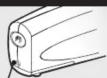
Insert adapter plug into input jack on back of stapler. Plug adaptor into electrical outlet (120 VAC). Use battery for portable applications.
Loading Staples
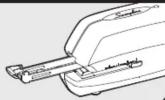
Press button on back of stapler to release staple channel. Pull channel forward and load standard staples. Push channel back until it clicks into place. For best results, always
use Swingline S.F. ^® 4 ^® Premium Staples.
LOW STAPLE INDICATOR
Plug-In Adaptor Power Operation
Light on: normal operation
Continuous flashing: Low on staples.
or open magazine
Light off: no power
Battery Power Operation
Light off: unit operating by power
Continuous flashing: Low on staples or
open magazine
(NOTE: batteries must be installed)


Avoiding Jams
Use only standard size staples.
Do not staple more than 20 sheets of 20 lb. paper at a time.
Allow stapler to complete its cycle before removing paper from front opening.
Use quality alkaline batteries.
Replace batteries if stapler stalls.

Loading Batteries


The battery cover in the direction of the arrow. Insert the batteries as shown on the battery compartment. Observe polarity. Load 6 AA alkaline batteries (do not mix old and new batteries). Maximum battery life 8,000 staples. When stapler is not in use for extended periods, remove the batteries.
Stapler Operation

Adjust the adjustment slide to the desired location. Slide can be adjusted from 1/4" to 1-1/2". Simply insert paper into front opening to staple documents instantly. This model staples up to 20 sheets of 20 lb. paper at a time.
Clearing Jams
If stapler jams, press button on back of stapler to release staple channel. Pull channel out and remove jammed staples.
Important
Do not remove documents during stapling. Do not attempt to staple without paper.

Marke : Swingline
Modell : Portable
Kategorie : Heftgerät