CP2000 - Taschenrechner Soennecken - Kostenlose Bedienungsanleitung
Finden Sie kostenlos die Bedienungsanleitung des Geräts CP2000 Soennecken als PDF.


Benutzerfragen zu CP2000 Soennecken
0 Frage zu diesem Gerät. Beantworten Sie die, die Sie kennen, oder stellen Sie Ihre eigene.
Eine neue Frage zu diesem Gerät stellen
Laden Sie die Anleitung für Ihr Taschenrechner kostenlos im PDF-Format! Finden Sie Ihr Handbuch CP2000 - Soennecken und nehmen Sie Ihr elektronisches Gerät wieder in die Hand. Auf dieser Seite sind alle Dokumente veröffentlicht, die für die Verwendung Ihres Geräts notwendig sind. CP2000 von der Marke Soennecken.
BEDIENUNGSANLEITUNG CP2000 Soennecken
| [M+] | Memory plus keySpeicher Plus |
| [M-] | Memory minus keySpeicher Minus |
| [#/P] | Date / number keyNummerntaste |
| [¬¬] | Paper feed keyPapiertransport |
| [∅/S] | Subtotal keyZwischensumme |
| [C/CE] | Clear entry/Clear keyGesamtlöschung/Eingabelöschung |
| [→] | Backspace keyStellen abschneiden |
| [+/-] | Inverts sign of the displayed number at key entryVorzeichenwechseltaste |
| [TAX+] or [TAX-] | * Prints TAX / Included TAX (TAX=3)Steuerrechnung Aufschlag/AbschlagA TAX+=A(3/100)=A+(A(3/100))* Prints TAX / Excluded TAX (TAX=3)Steuerrehnung Aufschlag/AbschlagA TAX-=A·A/(1+3/100)=A/(1+3/100) |
| [*/T] | Total keyGesamt |
| [COST] [SELL] [MARGIN] | Used for calculating the cost, selling price and profit margin amount. Enter the value of any 2 items to obtain the balance value item. (e.g. enter the value of the cost and the selling price to obtain the profit margin.)So nutzen Sie o.g. Verkaufskalkulationen, um die Kosten, den Verkaufspreis und den Gewinnspannenbetrag zu kalkulieren. |
| [TIME] | Used to switch between calendar or clock mode.Schaltet zwischen Kalender- und Uhrenfunktion um. |
| [SET] | Used to set the date and time in calendar & clock mode.Einstellen von Datum und Zeit in der Kalender- und Uhrenfunktion. |
| [AM/PM] | Used to switch between AM or PM at clock mode time setting.Schaltet zwischen AM (vormittags) und PM (nachmittags) beim Einstellen der Uhr um. |
| [12/24] | Used to switch between 12 or 24 hour at clock mode time setting.Schaltet zwischen 12- und 24-Stunden-Anzeige beim Einstellen der Uhr um. |
| [FORMAT] | Used to select date format between "YYYY/MM/DD","DD/MM/YYYY" or "MM/DD/YYYY" at calendar mode.Datumsformat DD/MM/YYYY (Tag/Monat/Jahr) oder MM/DD/YYYY (Monat/Tag/Jahr) in der Kalenderfunktion. |
| [GT] | In Grand Total mode, adds the total register to the GT register by the (*/T) key.Die GT Einstellung addiert mit der (*/T) Taste Teilergebnis zu einem Gesamtergebnis. |

Soennecken
CP 2000
INSTRUCTION MANUAL BEDIENUNGSANLEITUNG
12 Digits
2-COLOR PRINTING CALCULATOR
12 STELLIGER
ZWEIFARBIG DRUCKENDER TISCHRECHNER
ADDRESS:
Soennecken LogServe GmbH
51491 Overath
www.soennecken.de


SPECIFICATION
* Anzeige
* Druckgeschwindigkeit
* Papierrolle
• Spannung
* Betriebstemperatur
* Stromverbrauch
* Maße
* Fart
• Druck
* Gewicht
: 12 Stellen, LCD
: 2.7 Zeilen / Sek
: 57mm breit, Druchmesser 26mm
: 1)120V/60Hz (USA, CANADA)
2) 230V/50Hz (ECD)
: 0°C - 40°C (32° - 104°F)
: 120V/0.12A/14.4W
(230V/0.05A/11.5W)
:285mm×217mm×57mm(T×B×H)
:IR-40T
: Schwarz / rot
:970g
PREPARATION / VORINSTELLUNG
A. Power source Stromzufuhr
Diese Maschine wird an das Stromnetz angeschlossen. Wenn der Einschalter auf ON steht, drücken sie die [#/P] Taste und die Maschine druckt nur die Ziffern die im Display stehen.
B. Loading paper Papierrolle einlegen
Set the "NP/P/IP" switch to NP position Stellen Sie die "NP/P/IP" - Taste (Drucker) auf "NP"
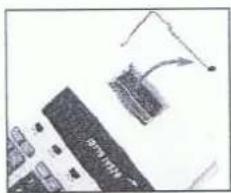
1) Place paper holders into position (Fig. 1).
Klappen Sie den Bügel der Papierhalterung heraus (Fig. 1).
2) Install the paper roll on the holders.
Setze Sie die Papierrolle auf den Bügel.
3) Insert the paper end into printer slot (Fig. 2).
Legen Sie das Papierende in den Drckerschlitz (Fig. 2).
4) Press [ □ ] key to feed the paper to an adequate length, and then fix the paper roll on the paper holders.
Drücken Sie die [ □ ] Taste und bringen Sie das Papier in die gewünschte Länge und setzen Sie die Papierrolle fest ein.
C. Replacing the ink roller Wechsel der Farbrolle
If the printing becomes faint, the ink roller may need to be replaced. Wenn der Druck verblasst, muß die Farbrolle ausgetauscht werden.
1) Open the printer cover (Fig. 3).
Öffnen Sie die obere Abdeckung durch zurückschieben. (Fig.3)
2) Remove the old ink roller by pulling it up (Fig. 4).
Entfernen Sie die alte Farbrolle, indem Sie sie hochziehen(Fig. 4).
3) Insert the new ink roller IR-40T in the compartment and gently press it down until it snaps into place. Setzen Sie die neue Farbrolle ein, drücken Sie sie vorsichtig heruner bis sie in der richtigen Position einrastet.

| MEMORY | : A number has been stored in memory: Werte sind gespeichert |
| ERROR | : Error or overflow of capacity: Fehler oder Kapazitätsüberschreitung |
| - | : The display value is negative: Wert im Display ist negativ |
OPERATION RECHENBEISPIELE
B. Constant multiplication and division calculation Rechnen mit konstantem Multiplikator und Divisor
| Example Beispiel | Operation Bedienung | Display Dispay | Printing-out Druck | |
| C/CE | 0. | 0. C | ||
| a) 25 x 3 = 75 | 25 | x | 25. | 25. × |
| 3 | = | 75. | 3. = 75. * | |
| 25 x 4 = 100 | 4 | = | 100. | 4. = 100. * |
| 25 x 5 = 125 | 5 | = | 125. | 5. = 125. * |
| b) 36 ÷ 4 = 9 | 36 | ÷ | 36. | 36. ÷ |
| 4 | = | 9. | 4. = 9. * | |
| 136 ÷ 4 = 34 | 136 | = | 34. | 136. = 34. * |
| 236 ÷ 4 = 59 | 236 | = | 59. | 236. = 59. * |
C. Percent calculation Prozenttaste
| Example Beispiel | Operation Bedienung | Display Dispay | Printing-out Druck | |
| a) 500x14.2%=71 | 50014.2 | x% | 500.71. | 500. x14.2 %71. * |
| b) 500x(1+14.2%)=571 | 50014.2 | x%+ | 500.71.571. | 500. x14.2 %71. *571. +% |
| c) 500x(1-14.2%)=429 | 50014.2 | x%- | 500.71.429. | 500. x14.2 %71. *429. -% |
D. Memory calculation
Rechnen mit Speicher
| Example Beispiel | Operation Bedienung | Display Dispay | Printing-out Druck | |
| (8732x3)-(42730+32)=24860.6875 | 87323 | xM+ | 8'732.MEMORY 26'196. | 8,732. ×3. =26,196. M+42,730. +32. =1,335.3125 M-24,860.6875 M024,860.6875 M* |
| 4273032 | +M-MSMT | MEMORY 42'730.MEMORY 1'335.3125MEMORY 24'860.687524'860.6875 | ||
E. Correcting mistaken entry
Korrektur fehlerhafter Eingabe
| Example Beispiel | Operation Bedienung | Display Dispay | Printing-out Druck | |
| 123+455=578 | 123 | + | 123. | 123. + |
| 456 | C/CE | 0. | ||
| 455 | + | 578. | 455. + | |
| */T | 578. | 578. * | ||
F. Decimal select
Dezimalstellenrechnung
| Example Beispiel | Operation Bedienung | Display Dispay | Printing-out Druck | |
| [▲5/4▼] = ▲[A0234F] = F1.4231x3=? | 1.42313 | x= | 1.42314.2693 | 1.4231 x3. =4.2693 * |
| [A0234F] = 4123x5=615 | 1235 | x= | 123.615.0000 | 123. ×5. =615.0000 * |
| 123+5=128 | 123598.10.10 | ++*/T+/-#/P | 123.0000128.0000128.0000-98.1010 | 123.0000 +5.0000 +128.0000 *#98.10.10...... |
| [▲5/4▼] = 5/4[A0234F] = 2 | 1.42313 | x= | 1.42314.27 | 1.4231 x3. =4.27 * |
| [A0234F] = 0 | 1.42313 | x= | 1.42314. | 1.4231 x3. =4. * |
| [NP/P/IP] = IP[A0234F] = A3.13+0.05+4.56+6.00=13.74 | 3135456600 | C/CE++*/T | 0.3.133.187.7413.7413.74 | 0. C3.13 +0.05 +4.56 +6.00 +004......13.74 * |
G. Rounding calculation
Rechnen mit Rundung
| Example Beispiel | Operation Bedienung | Display Display | Printing-out Druck | |
| [NP/P/IP] = P[▲5/4▼] = ▲[A0234F] = F3÷7x2=? | 372 | + x = | 3.0.428571428570.85714285714 | 3. + 7.x2. = 0.85714285714 * |
| 1).[A0234F] = 33÷7x2=? | 372 | + x = | 3.0.428571428570.858 | 3. + 7.x2. = 0.858 * |
| 2).[A0234F] = 2[▲5/4▼] = 5/43÷7x2=? | 372 | + x = | 3.0.428571428570.86 | 3. + 7.x2. = 0.86 * |
| 3).[▲5/4▼] = ▼3÷7x2=? | 372 | + x = | 3.0.428571428570.85 | 3. + 7.x2. = 0.85 * |
H. Application calculation
Kettenrechnung
| Example Beispiel | Operation Bedienung | Display Dispay | Printing-out Druck | |
| [NP/P/IP] = IP[A 0 2 3 4 F] = 0A = 5 x 2 = 10 | 52 | x= | 5.10. | 5. ×2. =10. *10. +10. ×5. =50. *50. +002....60. ◇5. ×6. =30. *30. +10. ×7. =70. *70. +004....160. * |
| + | ||||
| B = 10 x 5 =50 | 105 | x= | 10.10.50. | |
| Subtotal C | +◇/S | 60.60. | ||
| C = A + B = 60 | ||||
| D = 5 x 6 =30 | 56 | x= | 5.30. | |
| + | 90. | |||
| E = 10 x 7 = 70 | 107 | x= | 10.70. | |
| + | 160.160. | |||
| F = D + E =100G = C + F = $160 | */T | |||
I. Business sales calculation
Geschäftliche Verkaufskalkulation
J. Adds the total register to the GT register by the (^* / T) key
Addiere das Gesamtergebnis zum GT Ergebnis mit der (*/T) Taste.
| Example Beispiel | Operation Bedienung | Display Dispay | Printing-out Druck | |||
| *Clear GT Memory* | C/CE | 0. | 0. | C | ||
| GT | 0. | 0. | G◇ | |||
| GT | 0. | 0. | G* | |||
| [A 0 2 3 4 F] = F | 2 | + | 2. | 2. | + | |
| [NP/P/IP] = P | 3 | + | 5. | 3. | + | |
| [GT OFF/GT ON/TAX SET] =GT ON | 3 | */T | GT | 5. | 5. | *+ |
| - | GT | -3. | 3. | - | ||
| A = 2 + 3 = 5 | 4 | - | GT | -7. | 4. | - |
| + )B = -3 - 4 - 5 = -12 | 5 | - | GT | -12. | 5. | - |
| GT1 = A + B = -7 | */T | GT | -12. | -12. | *+ | |
| GT2 = A + B = -7 | GT | GT | -7. | -7. | G◇ | |
| GT3 = A + B = 0 | GT | -7. | -7. | G* | ||
| GT | 0. | 0. | G* | |||
L. Date and Time setting Kalender und Zeiteinstellung
| Example Beispiel | Operation Bedienung | Display Display |
| How to set date:29.Oct.2001 | TIME(Hold 2 seconds)SET29102001SET= | DD-MM-YYYY"D"D-MM-YYYY29-"M"M-YYYY29-10-"2"YYYY"2"9-10-200129-10-2001 |
| How to set time:a) 3:45AMb) 3:45PMc) 15:45 | C/CE TIME TIMESET(Hold 2 seconds)SET0.3 4 5SET=SET(Hold 2 seconds)AM x SET=1224+ | AM HH-MM-SSAM "H"H-MMAM "0"3-45AM 03-45-00AM "0"3-45PM 03-45-0015-45-00 |
* Do not press any key when there is no paper and the printer is on. (other than the feed key ( □ )
* Failure to observe this warning will damage the print head.
* Drücken Sie keine Taste, wenn kein Papier in der Maschine ist und das Druckwerk eingeschaltet ist. (Ausnahme das Betätigen der ▲ ▲ Taste)
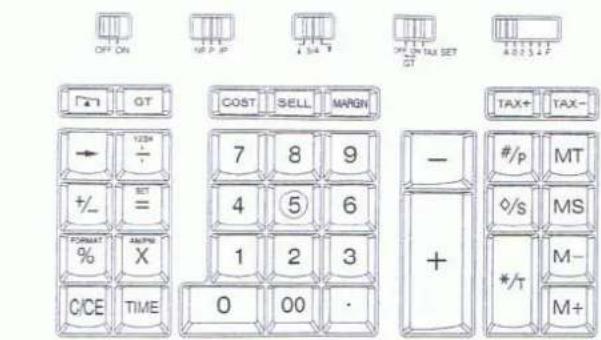
KEY IDENTIFICATION
TASTATURÜBERSICHT
text_image
OFF ON NET P -P 34 T ON ON TAX SET GT COST SELL MARGIN TAX+ TAX- TAX- 7 8 9 + #/p MT +/= SET 4 5 6 FORMAT X 1 2 3 % C/CE TIME 0 00 · */s MS */T M- M+
(OFF) Power OFF Anzeige AUS
(ON) Power ON Anzeige EIN

(NP) Printer off Schalter Drucken AUS
(IP) Printer item count Schalter für Postenzähler

(GT ON) In Grand total mode, adds the total register to the GT register by the (^/T) key Gesamtsummen - Speicher GT mit taste (^/T) gespeichert
(GT OFF) Grand total memory is not activated Ausgeschaltet
(TAX SET) Selects set mode for tax rate Modus-Einstellung für Steuerberechnung
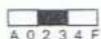
Decimal set (A) Accountant, Fixed (0,2,3,4), (F) Floating Schalter für Dezimalstellen (A) Add.Mode, (0,2,3,4) Festkomma, (F) Fileßkomma
[0]-[9][00]
Numeral keys Zifferntaste
[.]
Decimal point key Komma
[+]
Add key Plustaste
[-]
Subtract key Minustaste
[×]
Multiplication key Multiplikationstaste
[÷]
Equal key Ergebnistaste
[%]
Percent key Prozenttaste
[MS]
Memory subtotal recall key Speicher - Zwischensumme
[MT]
Memory total clear key Speicherergebnistaste