Ultra 555 - Stativ Velbon - Kostenlose Bedienungsanleitung
Finden Sie kostenlos die Bedienungsanleitung des Geräts Ultra 555 Velbon als PDF.


Benutzerfragen zu Ultra 555 Velbon
0 Frage zu diesem Gerät. Beantworten Sie die, die Sie kennen, oder stellen Sie Ihre eigene.
Eine neue Frage zu diesem Gerät stellen
Laden Sie die Anleitung für Ihr Stativ kostenlos im PDF-Format! Finden Sie Ihr Handbuch Ultra 555 - Velbon und nehmen Sie Ihr elektronisches Gerät wieder in die Hand. Auf dieser Seite sind alle Dokumente veröffentlicht, die für die Verwendung Ihres Geräts notwendig sind. Ultra 555 von der Marke Velbon.
BEDIENUNGSANLEITUNG Ultra 555 Velbon
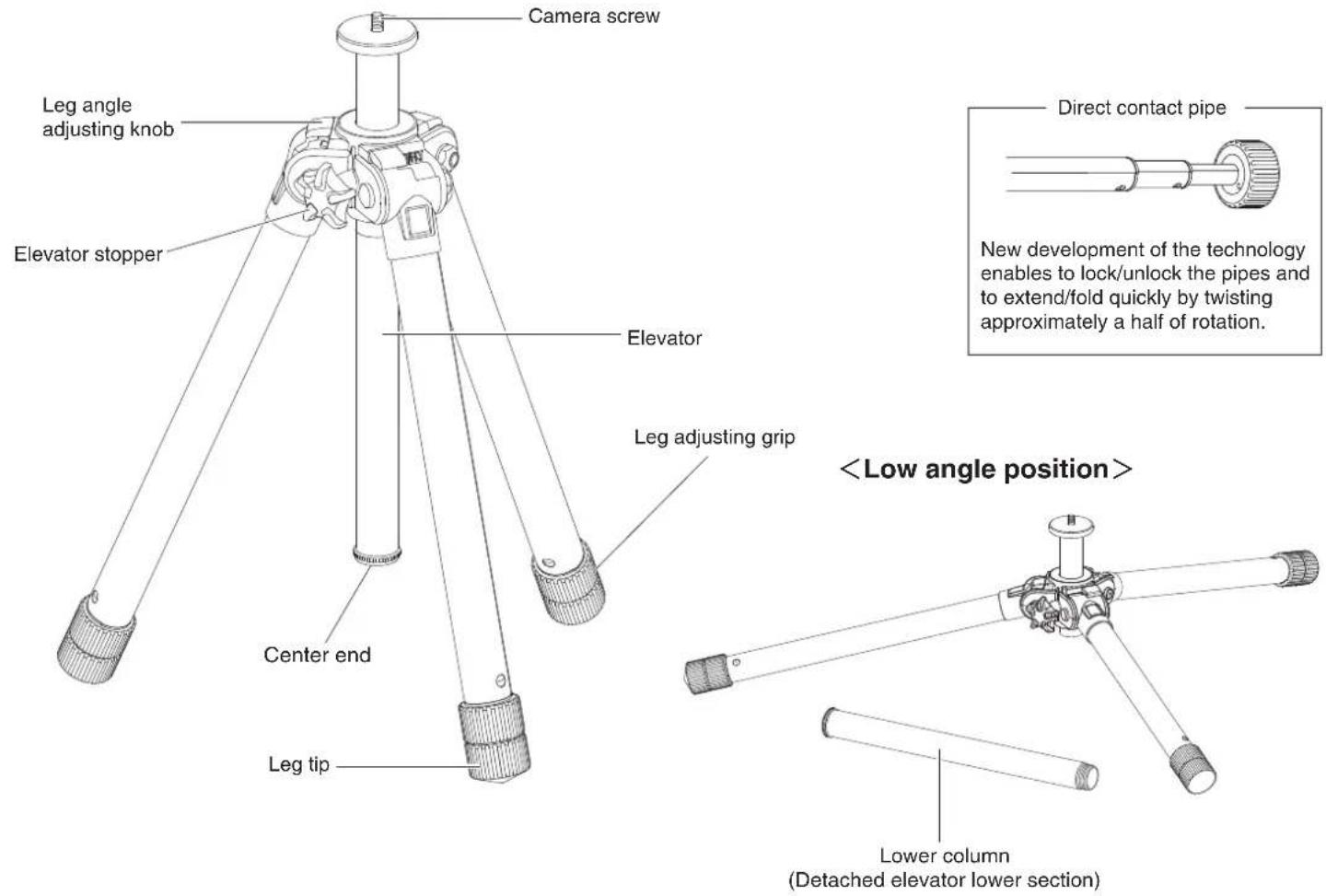
Identification of main parts
Thank you very much for choosing Velbon Tripod.
Please carefully read this manual before starting use so that you can handle this product correctly.
text_image
Camera screw Leg angle adjusting knob Elevator stopper Elevator Center end Leg tip Leg adjusting grip※ The manufacturer reserves the right to change specification, design, and size without prior notice.
| SPECIFICATIONS | ULTRA 655(A) | ULTRA 555(A) |
| Full extended height(Inc. EV) | 1563mm | 1558mm |
| 60.47inch. | 61.34inch. | |
| Extended height(Excl. EV) | 1288mm | 1312mm |
| 50.71inch. | 51.65inch. | |
| Elevator slide | 248mm | 246mm |
| 9.76inch. | 9.69inch. | |
| Minimum height | 124mm | 132mm |
| 4.88inch. | 5.20inch. | |
| Folded length | 372mm | 370mm |
| 14.65inch. | 14.57inch. | |
| Leg diameters | 30/27/24/21/18.2mm | 27/24/21/18.2/15.4mm |
| 1.18/1.08/0.94/0.83/0.72inch. | 1.08/0.94/0.83/0.72/0.61inch. | |
| Number of section | 5 | 5 |
| Weight | 1480g | 1307g |
| 3.26lbs. | 2.88lbs. | |
| Suggested loading weight | 3000g | 2500g |
| 6.61lbs. | 5.51lbs. |
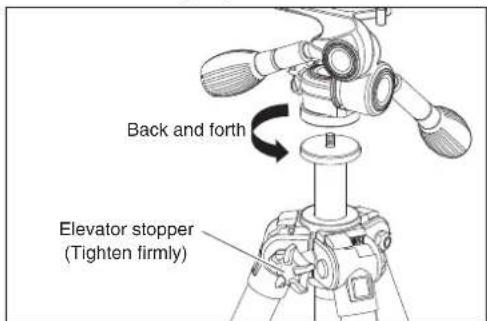
1.How to change panhead 2.How to use Elevator 3-1.How to adjust leg angle
text_image
Back and forth Elevator stopper (Tighten firmly)When changing panhead, tighten all the stoppers such as Panning handle, Side tilting handle, Panning stopper and Elevator stopper firmly.
Then turn the whole panhead anti-clockwise and detach it from tripod. Other panheads such as ball socket head can be set up.
※ Tripod screw socket=UNIC1/4
text_image
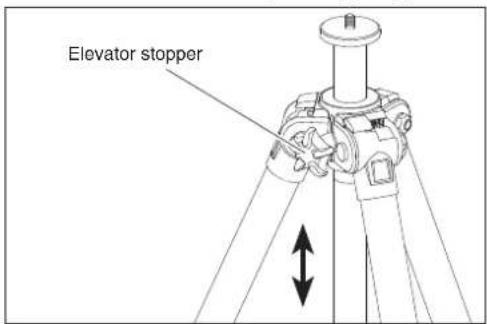
Elevator stopperLoosening Elevator stopper enables Elevator to go up and down. When the desired position is found, tighten Elevator stopper.

While operating Elevator, make sure to hold your camera securely.
text_image
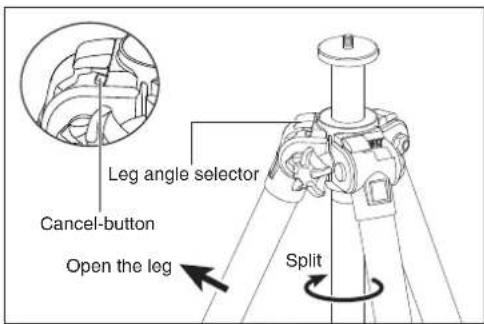
Leg angle selector Cancel-button Open the leg SplitWhile closing legs, slide Leg angle selector towards right completely until you hear click sound.
Then opening legs fully realizes low-position. While Elevator stopper is tightened, turn lower part of Elevator anti-clockwise.
Then Elevator is divided in two parts.
※ When Leg angle selector is slid by mistake, push down cancel-buttun. Leg angle selector returns to original position.
3-2.How to adjust leg angle 3-3.How to adjust leg angle 4.Lower column
text_image
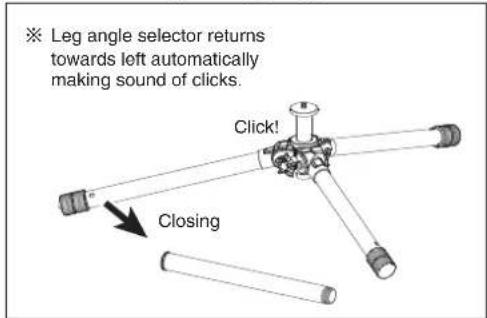
※ Leg angle selector returns towards left automatically making sound of clicks. Click! ClosingWhile closing leg slowly whose position is low-position(shown as above picture), Leg angle selector slides towards left automatically making a click sound. This position is semi low-position.
text_image
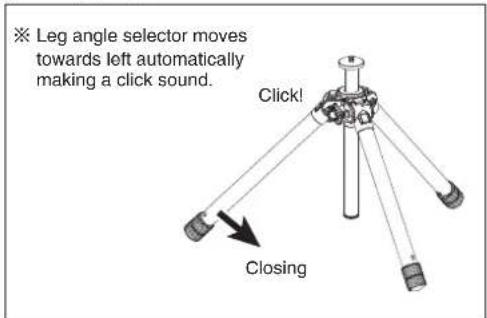
※ Leg angle selector moves towards left automatically making a click sound. Click! ClosingIf closing leg further, Leg angle selector slides automatically making a click sound. This makes standard position.
text_image
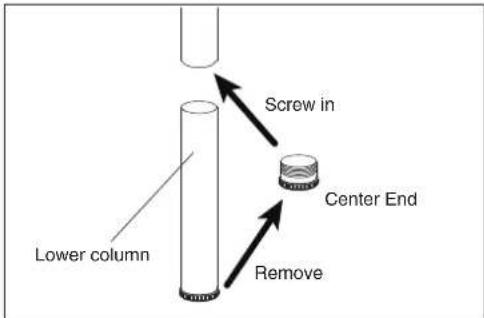
Lower column Screw in Center End RemoveLower part of Elevator which is divided is called Lower column.
Remove Center end by turning anti-clockwise and screw it into the part devided. This prevents dirt and so on.

Do not lose removed Lower column.
5.How to extend leg and lock How to adjust length of leg
text_image
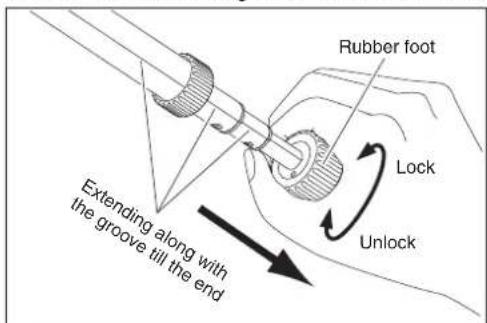
Rubber foot Lock Unlock Extending along with the groove till the endHold Rubber foot tightly and rotate it towards unlock direction and feel 4 clicks. This means that each leg section becomes loosen.
Extend legs till the end and twist them towards lock direction firmly. When closing legs, do this procedure in reverse order.
text_image
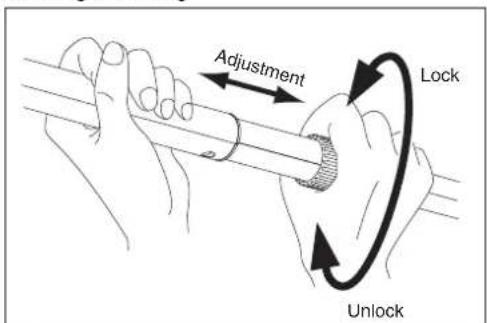
Adjustment Lock UnlockIn order to adjust length of leg, hold Adjustment grip of second leg and unlock by rotating it anti-clockwise. Then extend leg and find desired length.
Then lock it by rotating leg by clockwise firmly.
natural_image
Technical line drawing of a mechanical component with flanged base and cylindrical shaft (no text or symbols)
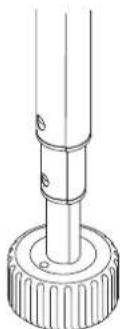
When holding Rubber foot, do not soil your hands. Do not pinch your fingers and hands between Rubber foot and legs.
When setting up your equipments on tripod, make sure that strength of leg-locking is good enough by suppressing from top of the tripod.