
TSP-502 - Auto Halterung DENVER - Kostenlose Bedienungsanleitung
Finden Sie kostenlos die Bedienungsanleitung des Geräts TSP-502 DENVER als PDF.


| Produkttyp | Trolley-Lautsprecher mit eingebautem Akku |
| Marke | Denver |
| Modell | TSP-502 |
| Abmessungen (B x H x T) | 350 x 535 x 340 mm |
| Gewicht | ca. 10 kg |
| Ausgangsleistung | 50 W |
| Lautsprechergröße | 10 Zoll (25,4 cm) |
| Frequenzbereich | 55 - 20.000 Hz |
| Signal-Rausch-Verhältnis | ≥ 71 dB |
| Stromversorgung | AC 100-240 V, 50/60 Hz |
| Akku-Ladezeit | ca. 6-10 Stunden |
| Bluetooth-Reichweite | bis zu 10 m (freie Sicht) |
| Wiedergabemodi | Bluetooth, USB, SD-Karte, AUX, FM-Radio |
| Mikrofoneingänge | 2x 6,3 mm Klinke |
| Gitarreneingang | 1x 6,3 mm Klinke |
| Line-Eingang | 1x 3,5 mm Klinke |
| USB/SD-Eingang | 1x USB-A, 1x SD-Kartenslot |
| Equalizer-Voreinstellungen | Ja (über Fernbedienung) |
| Fernbedienung | Ja, im Lieferumfang enthalten |
| Display | LED-Anzeige (Modus, Frequenz, Titelnummer) |
| Material | Kunststoffgehäuse mit Tragegriff und Rollen |
| Reinigung | Nur mit trockenem, weichem Tuch reinigen |
| Lagertemperatur | 0 °C bis 40 °C |
| Besonderheiten | USB-Aufnahme, Mikrofonpriorität, Echo-Regler |
Häufig gestellte Fragen - TSP-502 DENVER
Benutzerfragen zu TSP-502 DENVER
0 Frage zu diesem Gerät. Beantworten Sie die, die Sie kennen, oder stellen Sie Ihre eigene.
Eine neue Frage zu diesem Gerät stellen
Laden Sie die Anleitung für Ihr Auto Halterung kostenlos im PDF-Format! Finden Sie Ihr Handbuch TSP-502 - DENVER und nehmen Sie Ihr elektronisches Gerät wieder in die Hand. Auf dieser Seite sind alle Dokumente veröffentlicht, die für die Verwendung Ihres Geräts notwendig sind. TSP-502 von der Marke DENVER.
BEDIENUNGSANLEITUNG TSP-502 DENVER
MANUAL
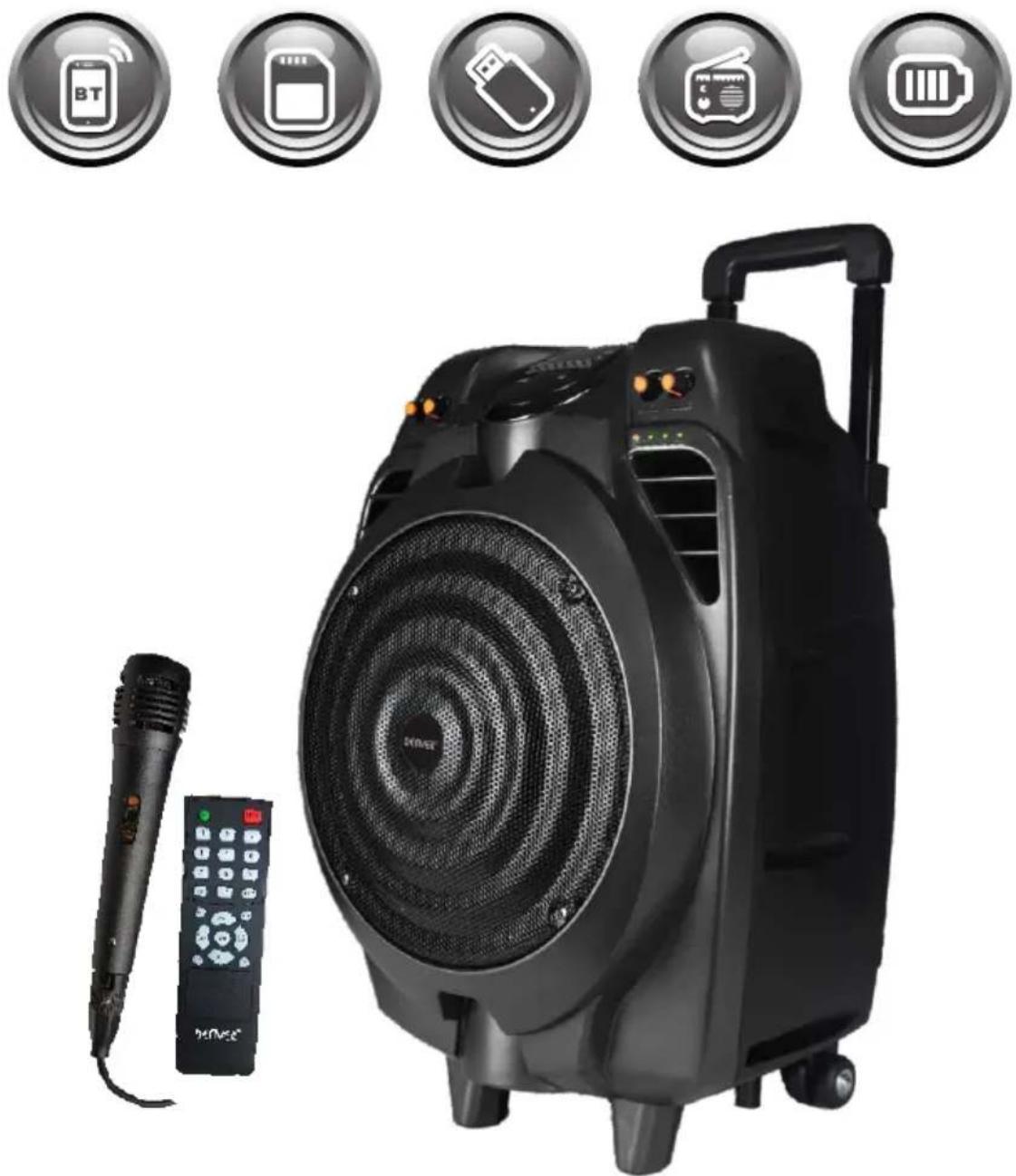
TSP-502
Trolley speaker with built-in battery
www.facebook.com/denverelectronics
Bluetooth Speaker – Please read this manual before use
Display Description:
"LINE" when operating in AUX mode;
"FM Frequency" when operating in FM mode;
"Time" when operating in USB& SD mode.
"Blue" when operating in BT mode.
Flashing when the power is low, charging is needed.
Panel Function
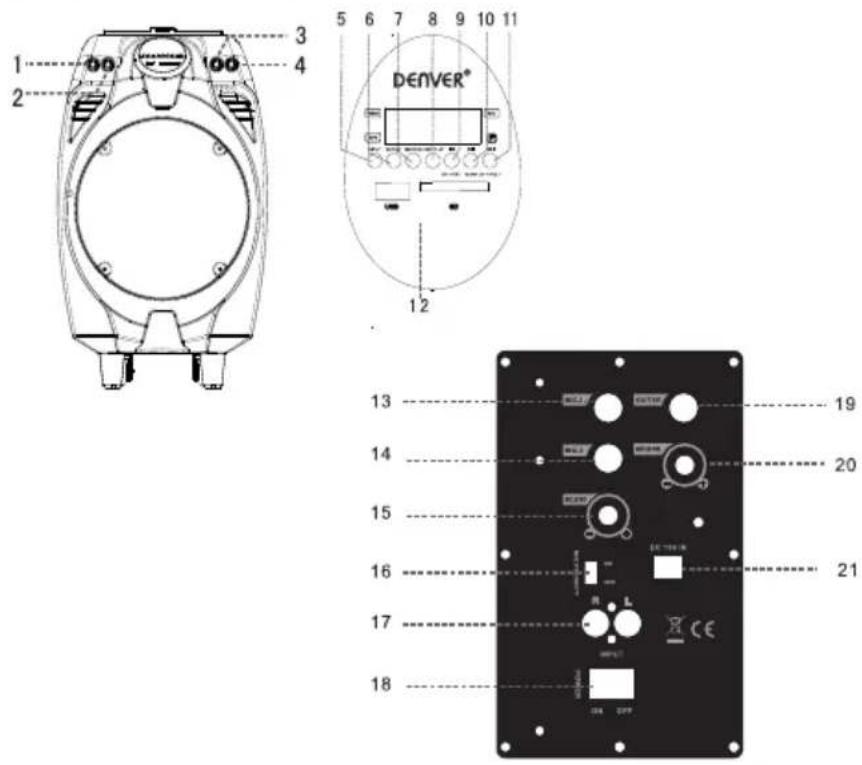
- BASS Volume Control Dial
- Mic Volume Control Dial
- Input selection
7.Record - Previous
- Next
- Mic Input Jack 1
- Echo Volume Control Dial
- Line-In Port
- Guitar Input
-
DC Input Port
-
Treble Volume Control Dial
- Master Volume Control Dial
6.Repeat - Play the recordings
- Play/Pause/Scan
- USB/SD Input Port
- Mic Input Jack 2
- MIC Priority
- Power off/on
- Guitar Volume Control Dial
Remote Control Functions
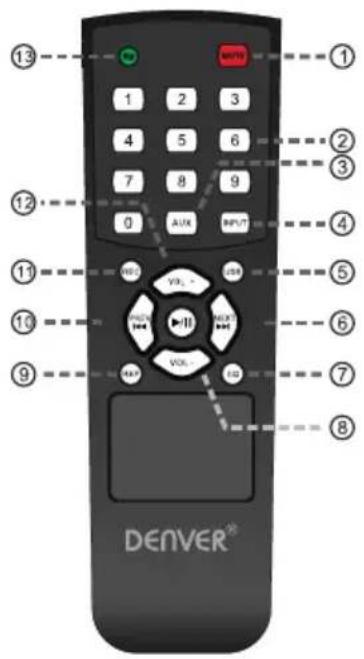
- Mute
- Track number
- AUX mode
- Input selection
- USB input
- Next
- EQ
- Decrease volume
- Play the recording
- Previous
- Record
- Increase the volume
- Repeat
General Function Description
- Volume: Turning to adjust master volume.
- Treble: Turning to adjust treble.
- Echo: Turning to adjust echo.
- Mic. Vol: Turning to adjust mic volume.
- INPUT: Change to other mode when operating sequence: LINE-BT-FM-USB/SD. Priority to play in USB or SD card mode when insert the USB or SD.
MP3 Function Description
- USB: Playing when insert A USB stick with MP3 music.
- SD: Playing when insert SD card with MP3 music.
- AUX: Playing when plug in the audio cable and connected with music device.
- Play/Pause Button: In USB or SD mode, press to play or pause, in Line in mode, press to mute.
- PREV & NEXT Button: While playing music in USB or SD mode, short press to skip to next or previous track. Long press to decrease or increase volume.
Recording function
In record mode, press “REC/”INPUT” to stop recording. Press “REC.PLAY” to play the recordings in the external memory, press PREV and NEXT to choose the recordings to play.
Bluetooth Function Description
-
Pairing: Press INPUT button to Bluetooth mode, speaker will be under automatic pairing mode, LED display shows "BT", pair the Bluetooth compatible device by selecting "TSP-502" from the listed devices, speaker will prompt "tick" tone. To ensure continuous stability of the music signal, try to keep the BT and the mobile phone facing one another.
-
Music Playing: Press Play/Pause, PREV & NEXT Button to play music.
-
The BT of the unit can be used up to 10 meters if there are no barriers.
FM Function Description
- Choose "INPUT" to switch to FM radio.
- Choose "PLAY/PAUSE" for automatic searching and saving.
- Choose "PREV" and "NEXT" to switch channels.
Battery Volume and Charging Indication
When charging, connect a matched power adapter to AC100V - AC240V. Charging time is approximately 6 to 10 hours. Once fully charged unplug the power supply as leaving a full battery on charge may cause damage to the battery.
Warning: If the battery is under voltage, please fully charge it within 48 hours. If the speaker has to be left unused for a long time, please let the battery fully charged, otherwise it will cause damage to the battery!
In the process of playing, keep unit away from high temperature environments, high magnetic fields and high frequencies. If the system is fails to work, turn off the power source or pull out the USB disc/SD card, then reinsert it and it will resume play.
Remarks: Please charge the speaker when the unit is off or lower the volume to avoid sound distortion.
Warning
- Do not use product in high temperature or wet environments. It will be damaged if getting wet.
- Please do not open the speaker, as there is risk for electric shock or other accidents.
- If it needs to be fixed, please contact the store where it is bought.
- If any liquid comes into the speaker, please turn the power off right away. It has to be checked by certified staff.
- When the device is not used, please turn the power off and pull out power plug.
- Do not put anything on top of the speaker.
- If the battery is incorrectly replaced an explosion could happen, so please replace it with the same type or equivalent type of battery.
Specification
| Power Output | 50W |
| Speaker Size | 10” |
| R. Frequency | 55-20KHz |
| S/N Ratio | ≥slant 71 dB |
| Power Input | AC100-240V |
| Dimension | 350x340x535 mm |
ALL RIGHTS RESERVED, COPYRIGHT DENVER ELECTRONICS A/S
DENVER®
www.denver-electronics.com


Electric and electronic equipment and included batteries contains materials, components and substances that can be hazardous to your health and the environment, if the waste material (discarded electric and electronic equipment and batteries) is not handled correctly.
Electric and electronic equipment and batteries is marked with the crossed out trash can symbol, seen below. This symbol signifies that electric and electronic equipment and batteries should not be disposed of with other household waste, but should be disposed of separately.
As the end user it is important that you submit your used batteries to the appropriate and designated facility. In this manner you make sure that the batteries are recycled in accordance with legislature and will not harm the environment.
All cities have established collection points, where electric and electronic equipment and batteries can either be submitted free of charge at recycling stations and other collection sites, or be collected from the households. Additional information is available at the technical department of your city.
Imported by:
DENVER ELECTRONICS A/S
Omega 5A, Soeften
DK-8382 Hinnerup
Denmark
www.facebook.com/denverelectronics



Marke : DENVER
Modell : TSP-502
Kategorie : Auto Halterung