
ACD-AMFM - Hi-Fi DENON - Kostenlose Bedienungsanleitung
Finden Sie kostenlos die Bedienungsanleitung des Geräts ACD-AMFM DENON als PDF.


| Produkttyp | Option Board (FM Stereo/AM Tuner) |
| Kompatible Modelle | Denon TU-604CI |
| Frequenzbänder | FM Stereo, AM |
| Antenneneingänge | FM (75 Ohm), AM (Schleifenantenne) |
| Steckplatz | Option Slot 3 bis 6 auf der Rückseite des Hauptgeräts |
| Befestigung | 2 Schrauben (im Lieferumfang enthalten) |
| Stromversorgung | Über das Hauptgerät (kein externes Netzteil) |
| Abmessungen (ca.) | 100 x 50 x 20 mm (geschätzt) |
| Gewicht (ca.) | 50 g (geschätzt) |
| Lieferumfang | Bedienungsanleitung, Garantie (nur Nordamerika), Servicestellenliste, Audiokabel, AM-Schleifenantenne, FM-Zimmerantenne, Handschrauben (2) |
| Sicherheitshinweise | Netzkabel vor Installation trennen; Kleinteile von Kindern fernhalten; Gerät nicht zerlegen oder modifizieren |
| Wartung | Keine spezielle Wartung erforderlich; bei Bedarf trocken reinigen |
| Zubehör nachrüstbar | FM- oder AM-Antenne optional erhältlich |
| Garantie | Herstellergarantie (Details in der Bedienungsanleitung) |
Häufig gestellte Fragen - ACD-AMFM DENON
Benutzerfragen zu ACD-AMFM DENON
0 Frage zu diesem Gerät. Beantworten Sie die, die Sie kennen, oder stellen Sie Ihre eigene.
Eine neue Frage zu diesem Gerät stellen
Laden Sie die Anleitung für Ihr Hi-Fi kostenlos im PDF-Format! Finden Sie Ihr Handbuch ACD-AMFM - DENON und nehmen Sie Ihr elektronisches Gerät wieder in die Hand. Auf dieser Seite sind alle Dokumente veröffentlicht, die für die Verwendung Ihres Geräts notwendig sind. ACD-AMFM von der Marke DENON.
BEDIENUNGSANLEITUNG ACD-AMFM DENON
DENON ACD-AMFM [Option Board]
ENGLISH
Owner's manual
CAUTION:
- Because of risk of accidental ingestion, please keep small components such as screws out of reach of children.
-
Never disassemble or modify the unit in any way.
-
The ACD-AMFM is an option board exclusively for the TU-604CI.
- This option board can be used as an FM stereo/AM tuner when inserted in one of the option slots on the main unit's rear panel.
- The option board can be inserted into any of the option slots (3 to 6) on the rear panel.
- Read the main unit's manual carefully before assembling.
- For operating instructions, see the TU-604CI's owner's manual.
NOTE
Always be sure to turn off the power and unplug the power cord before mounting or removing option boards. Doing so with the power turned on could cause damage.
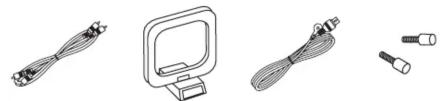
Accessories
Check that the following parts are supplied with the product.
① Owner's manual
② Warranty (for North America model only) 1
③ Service station list .... 1
④ Audio cord .... 1
⑤ AM loop antenna 1
⑥ FM indoor antenna 1
⑦ Hand screw 2
④⑤⑥
natural_image
Illustration of four different cable and connector components (no text or symbols)Installing
1 Unplug the power cord.
2 Make the preparations for mounting the option board.
☐ When mounting an option board for the first time
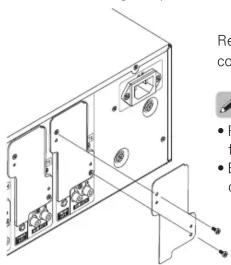
Remove the two screws fixing the cover, then remove the cover.

- Reuse the two fixing screws to fasten the option board.
- Be sure to keep the removed cover for future use.
☐ When replacing option boards
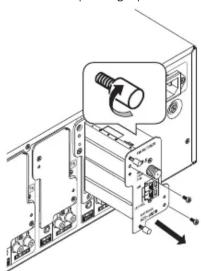
① Remove the two screws fixing the option board.
② Screw in the two hand screws about 5 mm, then pull out the option board.
③ Remove the two hand screws.

Reuse the two fixing screws to fasten the option board.
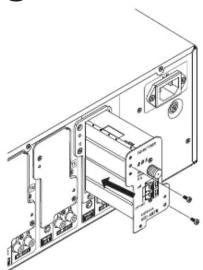
3 Insert the option board.
natural_image
Technical line drawing of an electronic device with ports and connectors (no text or symbols)NOTE
Push the option board all the way in.
4 Use the two fixing screws to fasten the option board to the main unit.
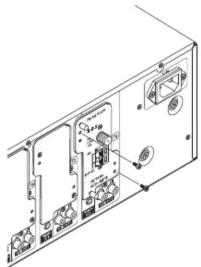
NOTE
Not fixing the option board with the two screws could lead to poor contact or other problems.

When replacing an option board, we recommend mounting the two hand screws removed in step 2 to the option board to store them. (See the diagram above.)

Marke : DENON
Modell : ACD-AMFM
Kategorie : Hi-Fi