Polar Breeze - Klimaanlage Andrews - Kostenlose Bedienungsanleitung
Finden Sie kostenlos die Bedienungsanleitung des Geräts Polar Breeze Andrews als PDF.


| Produkttyp | Mobile Klimaanlage |
| Marke | Andrews |
| Modell | Polar Breeze |
| Stromversorgung | 230 V, 50 Hz |
| Kühlleistung | Nicht näher angegeben |
| Betriebsmodi | Kühlen, Entfeuchten, Lüften (nur Kühlen-Modell) |
| Temperaturbereich | 17 °C bis 31 °C |
| Gebläsestufen | Hoch, Mittel, Niedrig |
| Timer-Funktion | Ein-/Ausschaltverzögerung 1–12 Stunden |
| Schwenkfunktion | Automatischer Luftstrom (Swing) |
| Abluftschlauchlänge | 600–1800 mm |
| Filterreinigung | Wöchentlich mit warmem Wasser und Neutralreiniger |
| Wassertank | Herausnehmbar, regelmäßig reinigen |
| Sicherheitshinweise | Freie Lüftungsöffnungen, kein direkter Sonneneinfall, keine Abdeckung |
| Elektrische Sicherheit | Nur mit unbeschädigtem Kabel und Stecker verwenden, FI-Schalter empfohlen |
| Abmessungen (ca.) | Nicht angegeben |
| Gewicht (ca.) | Nicht angegeben |
Häufig gestellte Fragen - Polar Breeze Andrews
Benutzerfragen zu Polar Breeze Andrews
0 Frage zu diesem Gerät. Beantworten Sie die, die Sie kennen, oder stellen Sie Ihre eigene.
Eine neue Frage zu diesem Gerät stellen
Laden Sie die Anleitung für Ihr Klimaanlage kostenlos im PDF-Format! Finden Sie Ihr Handbuch Polar Breeze - Andrews und nehmen Sie Ihr elektronisches Gerät wieder in die Hand. Auf dieser Seite sind alle Dokumente veröffentlicht, die für die Verwendung Ihres Geräts notwendig sind. Polar Breeze von der Marke Andrews.
BEDIENUNGSANLEITUNG Polar Breeze Andrews
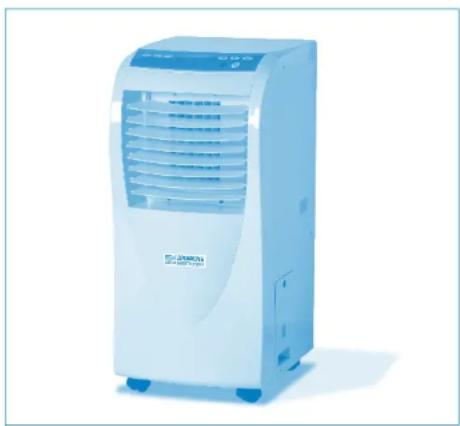
Polar Breeze Portable Air Conditioning
natural_image
White portable air conditioner unit with blue control panel and ventilation slots (no visible text or symbols)Operating Instructions & Safety Guide
ANDREWS AIR CONDITIONING
General Safety
- Keep children and animals away from air conditioning units. Never leave them alone in a room where the units in use.
This equipment should only be used by a competent person who has read and understood these instructions.
Never operate this equipment if you are ill, feeling tired or under the influence of alcohol or drugs. - Keep the Air Conditioning vents clear of all obstructions.
Never put anything on top of the unit or block the air outlets.
Make sure equipment is switched off and unplugged after use.
Never leave switched on or unattended.
Do not use the unit where sunlight is shining directly onto it.
Check condition of equipment before use. If unit is showing signs of damage contact your supplier immediately.
Electrical safety
This unit requires a 230 volt electrical supply. It plugs into a standard domestic socket.
Always inspect plugs and leads for damage before plugging into power supply. DO NOT USE IF ANY DAMAGE IS FOUND.
Ensure cables are installed so as not to cause a hazard.
If an extension lead is used, ensure it to the correct standard and fully unwound before use.
Do not lay electrical cables in wet/damp areas.
Do not move equipment whilst operating.
Do not pull equipment by the power lead.
It is recommended that an RCD is used whilst operating this unit.
Getting started and operation
Never operate the unit in very hot or cold conditions - It works properly at temperatures between 17 and 30^ .
Always allow the unit to stand/settle for 15 minutes before switching on when either setting up or restarting.
Put the mobile air conditioner in a flat location where the air outlets cannot be covered up. Place the unit no less than 50cm away from a wall or other obstacle
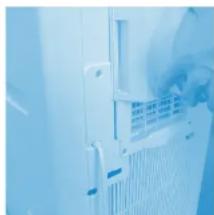
Fit the square end of the exhaust duct to the exhaust terminal of the unit (fig. 1).
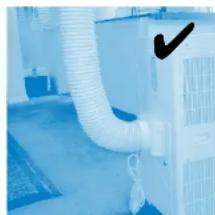
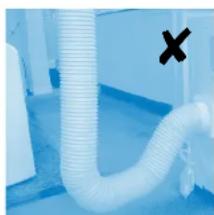
Put the other end (discharge) to the nearest window. The length of the air exhaust between 600 - 1800mm. Use the min length when working. When mounting, try to keep the air exhaust horizontal, sloping up or down. Never operate if the hose is kinked or sagging (fig. 2 & 3).
If mounting through the wall, the height of the hole should be 40 - 130cm.
natural_image
Close-up of a white industrial ventilation duct with ventilation grilles and ventilation grilles (no visible text or symbols)Fig. 1
natural_image
Interior view of an air conditioning room with a white duct and ventilation unit (no visible text or symbols)Fig. 3
natural_image
Close-up of a white plastic pipe with a black 'X' mark on the side (no text or symbols visible)Fig. 2
Click www.andrews-sykes.com
or Call Us Free 0800 211 611
Operating Instructions - Polar Breeze
Cooling Operation
- Ensure that the drain tank is property placed in the unit.
- Repeatedly press 📋 button to choose the cooling mode, LCD window will show "cool". During the cooling operation, always place the duct through an open window open to exhaust warm air from the room.
- Repeatedly press 📐 button to set a proper room TEMP at 17°C-31°C (or 63°F-58°F).
- Press 🏠 button to choose either high, middle, low fan speed.
- Press 📄 button to adjust the air delivery direction. The LCD
window will show o

Note:
In order to improve the cooling efficiency, be careful that:
a) If your room is directly exposed to the sun, draw the curtains.
b) Do not place near other heat source.
Time Set Function
With machine off (but power supplied), press Ⓑ button, the LCD window will show ⬤ OK press the TIME button, set the time to start as you like. The setting range is 1-12 hours.
To set time to stop the machine with the unit running, press button, the LCD window will show Ⓓ️, press the TIME button set the time to stop the machine as you like. The setting range is 1-12 hours.
Auto Swing Function
-
Press button, LCD window will show o and then begin to swing automatically.
-
Press once again 📁 button, the symbol o in the LCD window will disappear, the swing stops.
Attention:
Press buttons together for more than 2 seconds to lock the keys. The LCD window will show a padlock, press the two buttons again to unlock the keys, the padlock symbol will disappear.
Caution
-
When in cooling or dehumidifying mode, do not take out the water tank, or the buzzer will sound and the compressor stops, and the mode changes to FAN.
-
If you want to take out the tank before the water becomes full,
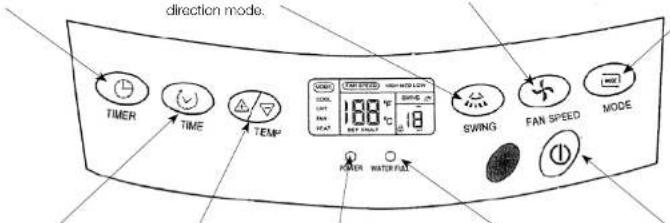
TIMER button
Press this button to set the time for switch-on. switch-off or to delete the timing.
SWING button
Selection of this button will determine the air delivery in swinging mode or fixed direction mode.
FAN SPEED button
Press this button will choose high, middle or low speed of air delivery.
MODE button
Press this button will select among the modes of cooling, dry or heating (or fan mode for the cooling-only model).
text_image
direction mode. TIMER TIME TEMP 168 °C 18 SWING FAN SPEED MODE POWER WATER/FALLTIME button
This button sets the present time and timer.
TEMP button
This button sets the room temperature.
POWER
Indication light.
WATER FULL
Indication light.
ON/OFF button
Pressing this button will turn the machine on or off.
please stop the machine first, and wait for 3 minutes, to prevent the dew water spilling into the unit.
- There is a plastic pipe inside where the tank is placed. Do not remove the stopper while the unit is working because the water is used for cooling the copper duct.
Maintenance methods
Disconnect from power supply before any cleaning or maintenance. Do not use chemical solvent (like benzene, alcohol glazer) to clean surface of unit.
Air Filter
Clean the filter once every week.
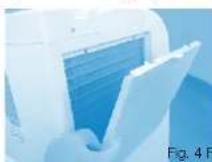
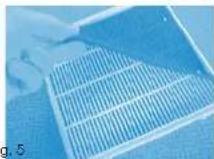
Open the air filter (fig. 4). Take the air filter out of filter cover (fig. 5)
Wash the air filter by immorsing it in warm (about 40°C) water with a neutral detergent, rinse and dry it thoroughly in a shaded place.
Reattach the filter to the filter cover with the attachment hooks on the inside surface of the cover.
Place the hooks at the bottom of the filter cover into the holes in the case, push it back to its original position.
Water tank
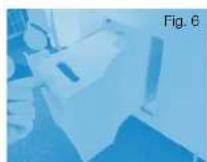
Hold the handle in water tank and draw out slowly. Pour out the water, clean away any dirt with neutral detergent. Wash and dry it carefully and then push the tank back (fig. 6).
End of season operation
Clean filter
Clean all surfaces
Drain water tank
Run on Ian only for 1hr
Check water tank is empty and clean
Slow cable and cover unit