
HD621 - Hi-Fi-System MERIDIAN - Kostenlose Bedienungsanleitung
Finden Sie kostenlos die Bedienungsanleitung des Geräts HD621 MERIDIAN als PDF.


Benutzerfragen zu HD621 MERIDIAN
0 Frage zu diesem Gerät. Beantworten Sie die, die Sie kennen, oder stellen Sie Ihre eigene.
Eine neue Frage zu diesem Gerät stellen
Laden Sie die Anleitung für Ihr Hi-Fi-System kostenlos im PDF-Format! Finden Sie Ihr Handbuch HD621 - MERIDIAN und nehmen Sie Ihr elektronisches Gerät wieder in die Hand. Auf dieser Seite sind alle Dokumente veröffentlicht, die für die Verwendung Ihres Geräts notwendig sind. HD621 von der Marke MERIDIAN.
BEDIENUNGSANLEITUNG HD621 MERIDIAN

HD621
HDMI Audio Processor
text_image
MDGen HDMI Audio Processor MERIDIAN Power Manual 1 2 3 4 5 6 WEIDIVIUser Guide
MERIDIAN
Important safety instructions
- Read the instructions.
- Keep these instructions.
- Follow all instructions.
- Do not use this apparatus near water.
- Clean only with a dry cloth.
- Install only in accordance with the manufacturer's instructions.
- Refer all servicing to approved service personnel.
WARNING: TO REDUCE THE RISK OF FIRE OR ELECTRIC SHOCK, DO NOT EXPOSE THIS APPARATUS TO RAIN OR MOISTURE.
This apparatus has been designed with Class 1 construction and must be connected to a mains socket outlet with a protective earthing connection (the third, grounding pin).
This apparatus uses a single-pole power switch. As a result it is not isolated from AC mains power when switched off at the rear panel.
The apparatus may be isolated from mains power either by unplugging the power connector from the rear of the unit, or by unplugging the connector at the opposing end of the power cord or cable from its supply outlet. As a result, either or both of these connectors should remain accessible.
Safety warnings
- Do not expose the product to dripping or splashing.
- Do not place any object filled with liquid, such as a vase, on the product.
- Do not place naked flame sources, such as lighted candles, on the product.
To avoid interference
Do not position the product:
- Near strong magnetic radiation, such as near a power amplifier.
- Near to a television, or where connecting cables may be subject to or cause interference.
To avoid overheating
Do not position the product:
In direct sunlight.
- Near heat sources, such as a radiator.
Radio interference
FCC Warning: This equipment generates and can radiate radio frequency energy and if not installed and used correctly in accordance with our instructions may cause interference to radio communications or radio and television reception. It has been type-tested and complies with the limits set out in Subpart J, Part 15 of FCC rules for a Class B computing device. These limits are intended to provide reasonable protection against such interference in home installations.
EEC: This product has been designed and type-tested to comply with the limits set out in EN55013 and EN55020

Sales and service in the UK
Meridian Audio Ltd, Latham Road, Huntingdon, Cambridgeshire PE29 6YE England Tel +44 (0)1480 445678 · Fax +44 (0)1480 445686
Sales and service in the USA
Meridian America Inc, 8055 Troon Circle Suite C, Austell GA30168-7849, USA Tel +1 (404) 344 7111 • Fax +1 (404) 346 7111
Web: www.meridian-audio.com
Copyright © 2009 Meridian Audio Ltd
Designed and manufactured in the UK by Meridian Audio Ltd.
Meridian Audio reserves the right to make changes and improvements to any of the products described in this document without prior notice. Errors and omissions excepted.
Dolby, Dolby Digital, and the double-D symbol are trademarks of Dolby Laboratories Licensing Corporation. DTS is a registered trademark of Digital Theatre Systems Inc. HDMI, the HDMI logo, and High-Definition Multimedia Interface are trademarks or registered trademarks of HDMI Licensing LLC. Boothroyd|Stuart Meridian, Meridian, and Meridian Digital Theatre are registered trademarks of Meridian Audio Ltd.
MHR: This product incorporates patented copyright protection technology and intellectual property of Meridian Audio Ltd. This technology is provided for the express purpose of securely containing copyright audio within the Meridian System only. Reverse engineering or circumvention of this protection is strictly prohibited.

The HD621 incorporates High-Definition Multimedia Interface (HDMI™) technology. HDMI, the HDMI Logo and High-Definition Multimedia Interface are trademarks or registered trademarks of HDMI Licensing LLC.
HD621 Product highlights
■ Six-input HDMI switch.
- HDMI video output.
- Extracts up to eight channels of high-resolution audio from the HDMI data stream, supplying them to separate audio-only outputs.
- Connects HDMI audio direct to a Meridian processor.
- SmartLink coaxial digital audio output (up to 8 channels).
- Multichannel Meridian High Resolution (MMHR): balanced digital audio output via RJ45/Cat 5 cable (up to 8 channels).
- Up/downsampling of digital audio.
- Audio FIFO buffering and resolution enhancement improves PCM audio received via HDMI.
- Lip-sync control compensates for latency resulting from external digital video processing.
- Keeps HDMI video signals away from your audio equipment, minimising signal degradation.
Outline specification
Form factor
■ 1U 19in rack mounting. Available with or without racking ears.
Power
- Internal universal power supply, 100–250Vac
Connections
■ Power input (IEC connector)
- DB9M Sub RS232 serial connector
■ BNC and DIN Meridian Comms
■ Six HDMI input sockets
- HDMI output
■ 8-channel MMHR digital audio out (RJ45)
■ 8-channel coax digital audio out (4 x phono)
Front-panel Indicators
Power LED
- 6 x HDMI Input LEDs (selected input lights)
About the HD621 HDMI Audio Processor

text_image
HDG HDSI Auto Receiver MERIDIAN Enter Manual 1 2 3 4 5 6Standby indicator Manual input select Active input indicators 1–6
Front panel
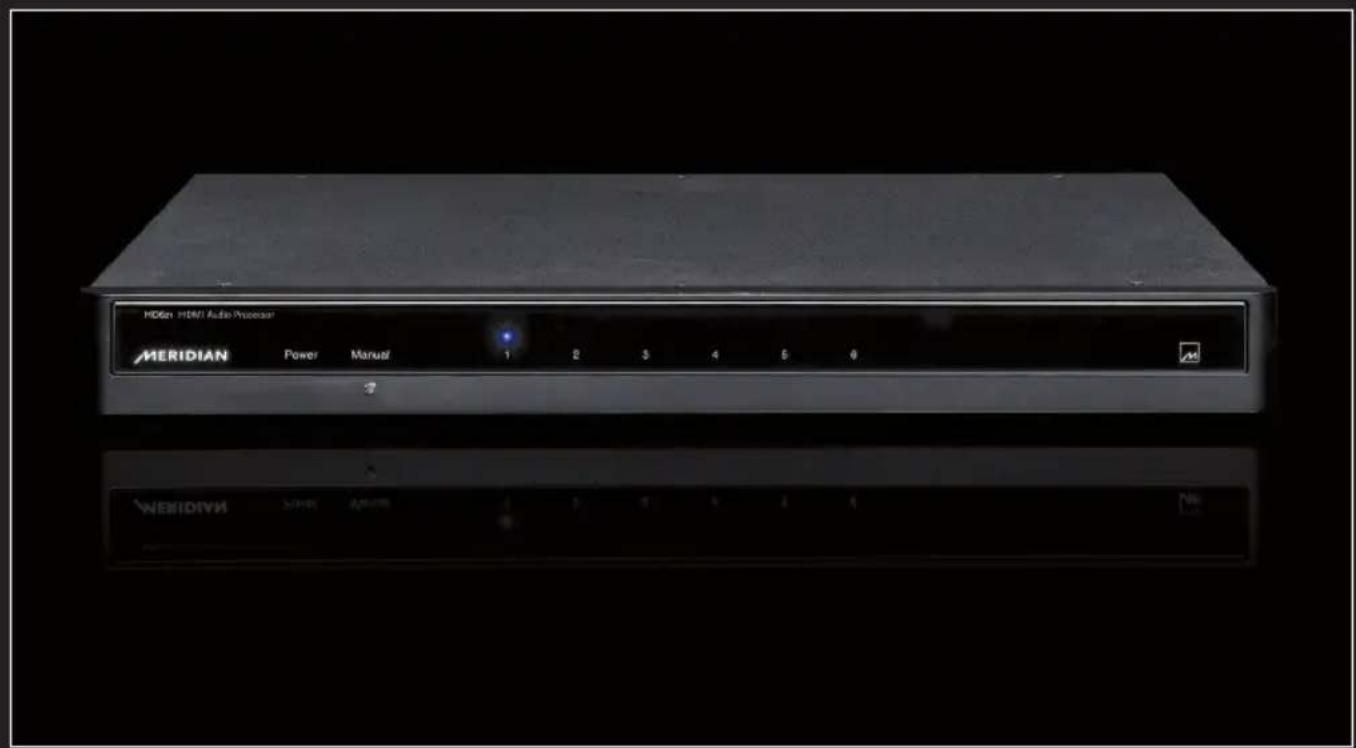
The front panel (see above) simply shows a Standby LED (which shows that the unit has power but is not active: it goes out when the unit is activated), plus six LEDs indicating which input is currently active. A manual select button allows you to step through the inputs.

text_image
RS232 Meridian Comms H6 Game H5 VCR1 H4 Sat H3 Cable H2 TV H1 DVDRear panel views. Above: left-hand half. Below: right-hand half.

text_image
DVD HDMI Output Video Meridian HD621 HDMI Audio Processor Designed and made by Meridian Audio C2008 MMHR Output 1/2 5/6 3/4 7/8 Smartlink Power input 100-240V ~50-60Hz 40W Max Replace with same type Fuse TI.6AL 250VRear Panel
The rear panel (above) features the following connections (L to R):
RS232 DB-9M Sub connector - this enables the processor to be controlled remotely via serial command and configured using the Meridian Configuration Application (Windows). It also permits the installation of firmware updates.
Meridian Comms BNC and DIN connectors – these enable the processor to be integrated with a Meridian audio/video system and controlled by it, for example, switching the HDMI input when the appropriate selection is made via the system controller.
HDMI Inputs H1–H6 – These follow the standard input identification in a Meridian system (this can be overridden when the system is being configured):
H1 DVD
H2 TV
H3 Cable
H4 Satellite
H5 VCR1
H6 Game
HDMI Output: Video – This outputs the video information present on the selected HDMI input. By default, it does not carry the audio information, but can be configured to do so.
MMHR Output – This RJ45 connector carries up to eight channels of balanced digital audio data at up to 96 kHz sample rate conforming to the Meridian Multichannel High Resolution (MMHR) specification, with encryption where required to carry high-resolution audio data.
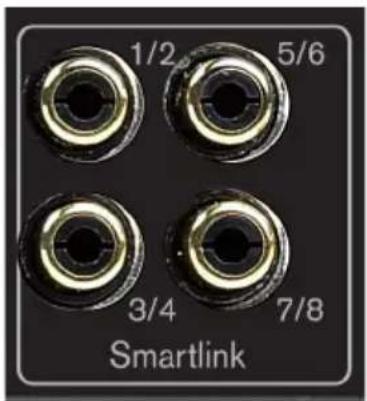
SmartLink Output – These four phono sockets each carry a pair of digital audio channel signals at up to 96 kHz sample rate: 1/2, 3/4, 5/6 and 7/8. These are encrypted to Meridian High Resolution (MHR) specifications when carrying high resolution data.
text_image
1/2 5/6 3/4 7/8 SmartlinkDetail of SmartLink output section.
Power input socket, power switch and fuse holder – the power supply accepts a standard IEC power connector and is a universal voltage type accepting voltages between 100 and 250V AC at 50/60 Hz.
Up/downsampling of digital audio
The MMHR and SmartLink outputs can be set to deliver either standard (44.1/48 kHz) or high resolution (88.2/96 kHz) sample rate digital audio, with resolution enhancement of up to 24-bit.
When set to standard rates, the output is either 44.1 or 48 kHz irrespective of the input rate, high sample rates being downsampled by a factor of two or four as appropriate. 44.1 and 48 kHz rates are unchanged.
When set to high rates, the output is always either 88.2 or 96kHz , irrespective of the input rate. Standard sample rates are upsampled by a factor of two using Meridian's powerful DSP technology, so that input signals of 44.1 and 48kHz are output at 88.2 and 96kHz respectively.
FIFO Buffering
In addition to the features noted above, the HDMI audio processor de-jitters digital audio received via HDMI using two FIFO (First In, First Out) buffer systems. This ensures that the audio extracted from the HDMI stream is of the highest quality.
Lip-sync Delay
The processor also includes a configurable audio delay of up to 85ms to allow lip-syncing in the event that the display introduces an appreciable delay in the video presentation.
Initial system installation
Using the default factory settings, the HD621 is optimised for a Meridian system environment. It allows up to six HDMI sources to connect to a Meridian system while supplying HDMI video (and optionally audio) to a display.
While installing the unit, please be sure to follow the safety instructions provided at the front of this Guide.
The HD621 can simply be placed on a flat surface; a version with ears is alternatively available for rack-mount installation.
Initial connections
Using the BNC or DIN connector provided, connect Meridian Comms to the unit from the rest of your system.
Connect an HDMI source to each of the inputs you wish to use. You will see that the connectors are named according to the standard convention adopted by Meridian equipment. If you connect your sources as suggested by the labels, you will not need to change them in the Meridian Configuration application.
If you have Meridian source components, connect their audio direct into the rest of the system using SmartLink: see overleaf. For non-Meridian sources, see below.
Connect an HDMI cable between the HDMI Output of the HD621 and an input on your display system.
Connect the Smartlink MHR (Meridian High Resolution) output to a suitable digital input on your Meridian processor or DSP Loudspeakers. Be sure to observe the channel allocation correctly. Each socket carries two channels and you should connect the appropriate number of sockets for the maximum number of audio channels to be used.
If you have a Meridian processor with MMHR (Meridian Multichannel High Resolution) capability, connect the HD621 to the processor with a single Cat 5 or Cat 6 Screened Twisted Pair (STP) RJ45-terminated cable. Do not connect the phono sockets.
Connect power (100–240V AC) to the unit via the IEC mains connector.
Setting up non-Meridian sources
Non-Meridian sources sending audio via HDMI should in most cases be configured to decode the audio to PCM in the source component to take advantage of the resolution enhancement features of the HD621.
For best results you need to configure your source components to get the highest possible quality audio from your HD621. The HD621 contains sophisticated DSP-based FIFO buffering, reclocking and up/down-sampling, so best results will be obtained by configuring your sources so that the HD621 carries out these processes when required, and not the source.
Here are some points to bear in mind when setting up non-Meridian sources feeding the HD621:
- Make sure that the HDMI source is turned on, and that its HDMI output is providing audio as well as video.
- Configure the source to output PCM.
- Pay special attention to the way that the source handles different content. Check the configuration to ensure that multichannel material is not downmixed.
The HD621 accepts a maximum input sample rate of 192kHz. - If possible, set the output sample rate of your source to match the sample rate of the content being played. Meridian up/downsampling offers exceptionally high performance and you will benefit from allowing the HD621 to carry out any conversion that is required.
Setting up Meridian sources
In the case of a Meridian source component, you should run the audio from the MHR Smartlink output on the source to suitable inputs on the Meridian system.
How sources and displays behave
The HDMI interconnection system uses handshaking to establish a dialogue between a source and a display. Typically the display signals its capabilities to the source, and the source then generates the highest quality signal it can to meet those capabilities. This is why, when you first activate a system, there may be a succession of blank and blue screens while the two components work out how to communicate with each other at the highest level of quality common to both.
When the HD621 is added to the system, it reads the display capabilities and passes them to the source, but at the same time adds a description of its own enhanced audio capabilities. Essentially, the HD621 tells a source what audio it is capable of handling (or is configured to handle), but it is left up to the source how it satisfies those capabilities. For example, if you configure the HD621 for 2-channel audio but also specify that it can handle bitstreams, you will need to configure the source as to whether it should send a 2-channel PCM track on the disc or a 5.1 DTS bitstream, if both are possible.
The HD621 also has a “receiver” mode, which it will enter automatically if the display device is switched off or disconnected. This allows music to play or continue to play without a display. It may take a few seconds while the units handshake to establish this mode. It may also take a few seconds to re-establish communications if the display is re-activated, because of the HDMI handshaking procedure. Also see Note 1 in the Operational Notes section at the end of this guide.
System defaults
By default, the unit is set to work with Meridian processors and DSP Loudspeakers, and to enhance up to 6-channel PCM inputs. If they have not been decoded in the player or source (decoding in the source is the preferred configuration), Dolby Digital, DTS and AAC bitstreams are passed through untouched. If you are using the HD621 with other equipment that does not support Meridian's MHR, then you will need to run Meridian Config to disable MHR.
To reconfigure the HD621 from its standard defaults, you will need to connect a Windows computer via the RS232 connector and use the Meridian Mconfig application to set it up. See below for details.
Controlling the HD621
The HD621 can be controlled via Meridian Comms, from the front panel and via RS232 serial commands.
The front panel allows you to step through the active inputs. An input that has been disabled will not be included as you step through. No other functions are accessible from the front panel.
RS232 can be used to control the HD621 in conjunction with a home automation system. The unit responds to standard Meridian commands to select named sources, enter Standby and other functions. An RS232 command table is available on request.
Setting up the HD621 with Meridian's Configuration Application
Meridian's Configuration Application is a Windows application that is used to set up Meridian components and systems, and is supplied on the CD that accompanies many Meridian products. For details on how to use it, see its built-in Help files. You can also download its User Guide from the Support section of the Meridian Web Site at http://www.meridian-audio.com. Move the mouse over the Support option in the main menu and select "Release notes and Guides", then click the link to download the Acrobat PDF file. The Configuration Application is installed by the Common Installer which can also be downloaded from the Support section of the web site (choose "Download Installer" from the Support menu). Web addresses may change over time. Contact Meridian if you cannot locate the information described.
Connections
Connect your computer to the HD621 via RS232 and run the Meridian Configuration Application.
The HD621 is set up in the same way as any other Meridian component.
- Note: the HD621 can act as a Controller. However you will only use it as such in a non-Meridian system. If you select the HD621 as the controller in a Meridian system, the available inputs on a Meridian processor you add subsequently will be limited to those defined for the HD621.
To configure the capabilities of the HD621, bring up the Properties dialog for the product.
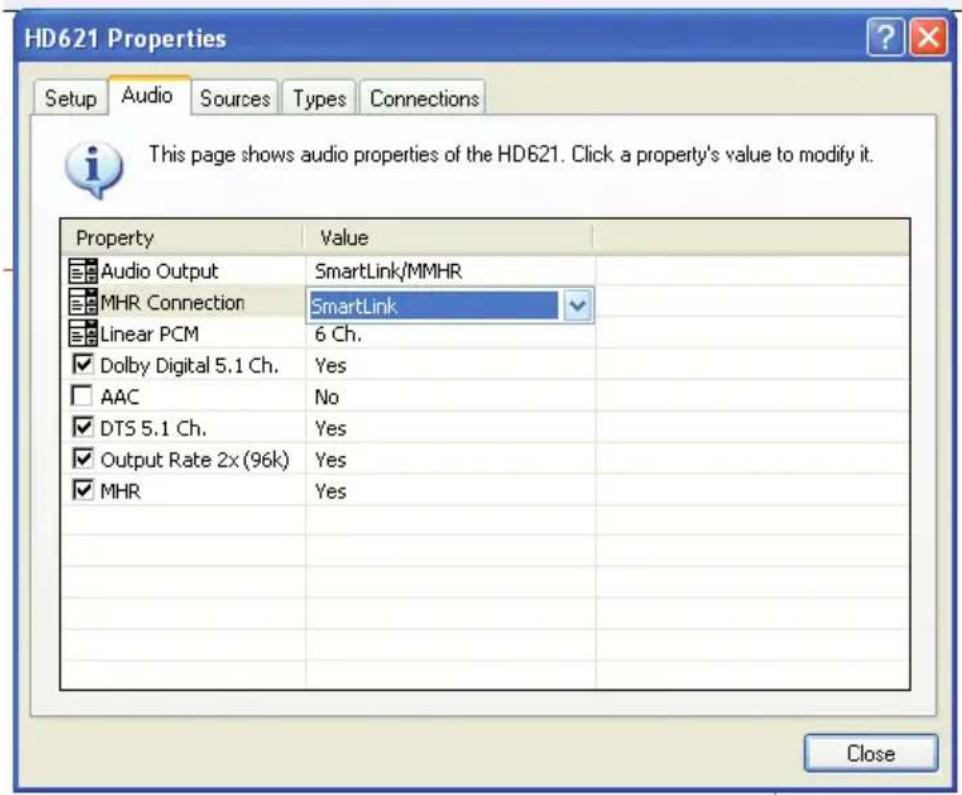
The Audio tab is used to define the audio behaviour of the HD621 (see illustration overleaf).
The first row, Audio Output, selects the output port used to interface with the system, using the pop-up menu in the "Value" column. This will either be "SmartLink/MMHR" (normally, to use the phono or RJ45 outputs) or, exceptionally, "Video HDMI", which retains the audio on the the HDMI output along with the video. All the following rows describe to the HD621 the capabilities of the product(s) it is feeding.
text_image
HD621 Properties Setup Audio Sources Types Connections This page shows audio properties of the HD621. Click a property's value to modify it. Property Value Audio Output SmartLink/MMHR MHR Connection SmartLink Linear PCM 6 Ch. Dolby Digital 5.1 Ch. Yes AAC No DTS 5.1 Ch. Yes Output Rate 2x (96k) Yes MHR Yes CloseThe second row, "MHR Connection" offers "SmartLink", "SpeakerLink compatible" and "None". Select "SmartLink" to feed a Meridian processor such as the C61R, G61R, G68 or 861, and select "None" here to feed Meridian DSP Loudspeakers directly.
The next row determines the number of output channels. The options are 8-, 6- and 2-channel out. This will generally be determined by the capabilities of your system. Note that the HD621 advertises how many channels it wants to receive. For example, in the case that 6 are chosen here and 8 are available from the source, then the HD621 will instruct the player to output the 6-channel version.
You only need to make physical connections between the HD621 and the system that correspond to the number of channels selected here. So, for example, if you have a 2-channel system and limit the PCM output here to 2-channel, you only need to connect the "1/2" SmartLink output from the HD621 to the system.
The next three rows inform the source about the decoding capability of the products fed by the HD621. Select all three for Meridian processors such as the C61R, G61R and G68, leave "AAC" unchecked for the 861, and leave all three unchecked if you are driving Meridian DSP Loudspeakers direct from the HD621.
The “Output Rate” row determines the capability of the product fed by the HD621 and whether the unit outputs high sample rates (88.2 or 96kHz) or standard rates (44.1 or 48 kHz). Check the box to set this to “Yes”: in this case the unit will always output high sample rates, by upsampling standard sample rates or downsampling super-high sample rates (176.4 or 192kHz). If set to “No”, all outputs are at standard rates, with higher-rate sources downsampled accordingly. Set to “No” for early DSP loudspeakers, D600s and the 561.
The final row determines whether MHR is active or not. Checking the box allows the HD621 to protect copyrighted audio or to enhance the quality of others.
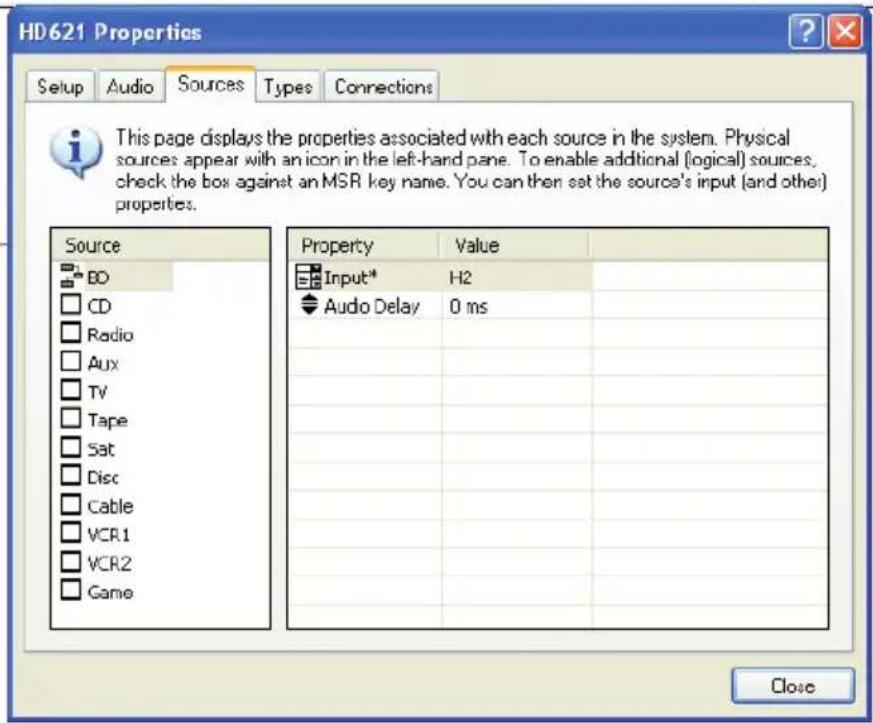
Next to the Audio tab is the Sources tab:
text_image
HD621 Properties Setup Audio Sources Types Connections This page displays the properties associated with each source in the system. Physical sources appear with an icon in the left-hand pane. To enable additional (logical) sources, check the box against an MSR key name. You can then set the source's input (and other) properties. Source BO CD Radio Aux TV Tape Sat Disc Cable VCR.1 VCR.2 Game Property Value Input* H2 Audio Delay 0 ms CloseThis panel displays the logical sources associated with each physical input and allows them to be assigned. Each physical source shows as an icon – in this example there is only one, the BD player, so there is only one icon. However you can assign more than one “logical” source to a physical input.
The penultimate tab in the Properties dialog accesses the Types section. This shows the Meridian Types stored in the product. You can reset the HD621 to a Type by selecting the desired Type from the list and right-clicking on it, then choosing "Reset to this Type" from the resulting pop-up menu.
The final tab is "Connections". This displays the inputs and outputs available on the device and what they are connected to. You can filter the results shown here by right-clicking on an item (any item) in the list and checking the items you want to display, or unchecking them to hide them.
Complete the configuration process by Storing the settings to the HD621. Finally, click the Close button to finish working with the HD621 Properties and continue to set up the system as required.
Operational Notes
-
Some source/display combinations may not return cleanly from "receiver" mode, due to the way in which they handle handshaking. If you do not get the expected result (eg no audio is heard) even after several seconds have elapsed, it may help to switch to another input and then back again. This is not a fault in the HD621: it is a function of how the source and display communicate with each other.
-
Handshaking between a display and a source can take some time and you may, for example, see a series of alternating blank and blue screens. This is not a fault.

Meridian Audio Limited, Latham Road, Huntingdon, Cambridgeshire PE29 6YE, UK. T +44(0)1480 445678 F +44(0)1480 445686 E info@meridian-audio.com
Meridian America Inc., 8055 Troon Circle, Suite C, Austell, GA 30168-7849, USA. T +1(404) 344 7111 F +1(404) 346 7111
www.meridian-audio.com