Z5M - Mixer Citronic - Kostenlose Bedienungsanleitung
Finden Sie kostenlos die Bedienungsanleitung des Geräts Z5M Citronic als PDF.


Benutzerfragen zu Z5M Citronic
0 Frage zu diesem Gerät. Beantworten Sie die, die Sie kennen, oder stellen Sie Ihre eigene.
Eine neue Frage zu diesem Gerät stellen
Laden Sie die Anleitung für Ihr Mixer kostenlos im PDF-Format! Finden Sie Ihr Handbuch Z5M - Citronic und nehmen Sie Ihr elektronisches Gerät wieder in die Hand. Auf dieser Seite sind alle Dokumente veröffentlicht, die für die Verwendung Ihres Geräts notwendig sind. Z5M von der Marke Citronic.
BEDIENUNGSANLEITUNG Z5M Citronic
CITRONIC®
Zoning Mixer
Z5M 953.019
User Manual

text_image
ON CITRONIC ZEM POWER ZONE 1 LINE 1 MANGO LINE 2 LINE 2 MANGO LINE 3 LINE 3 MANGO LINE 4 LINE 4 MANGO LINE 5 LINE 5 MANGO LINE 6 LINE 6 MANGO LINE 7 S-ZONE MIXERFeatures:
• Fully balanced signal path
- Stereo/mono operation
- Dual stereo line inputs
- Separate A & B source level per channel
Introduction:
Thank you for choosing this Citronic zoning mixer. The Z5M is a professional 1U mixer offering many features to give versatile control for up to 5 stereo output zones. In order to achieve the best results from this equipment and avoid damage through misuse, please read and follow these instructions and retain for future reference.
Warning:
To prevent the risk of fire or electric shock, do not expose any part of the unit to rain or moisture.
If liquids are spilled on the surface, stop using immediately, allow unit to dry out and have checked by qualified personnel before further use.
Avoid impact, extreme pressure or heavy vibration to the unit.
There are no user serviceable parts inside the Z5M – refer all servicing to qualified service personnel.
Safety
- Check that the supplied mains lead is in good condition and the supply voltage is correct.
- Ensure signal leads are of good condition and connected to appropriate inputs/outputs
- Do not allow any foreign particles to enter the unit through control or connector apertures
Placement
- Keep out of direct sunlight and away from heat sources.
- Keep away from damp or dusty environments.
- When rack-mounting, avoid placing heavy units above the unit and ensure all connectors and controls are accessible
Cleaning
- Use a soft cloth with a neutral detergent to clean the casing as required
- Use a soft brush to clear debris from the control surface
- Do not use strong solvents for cleaning the unit.
text_image
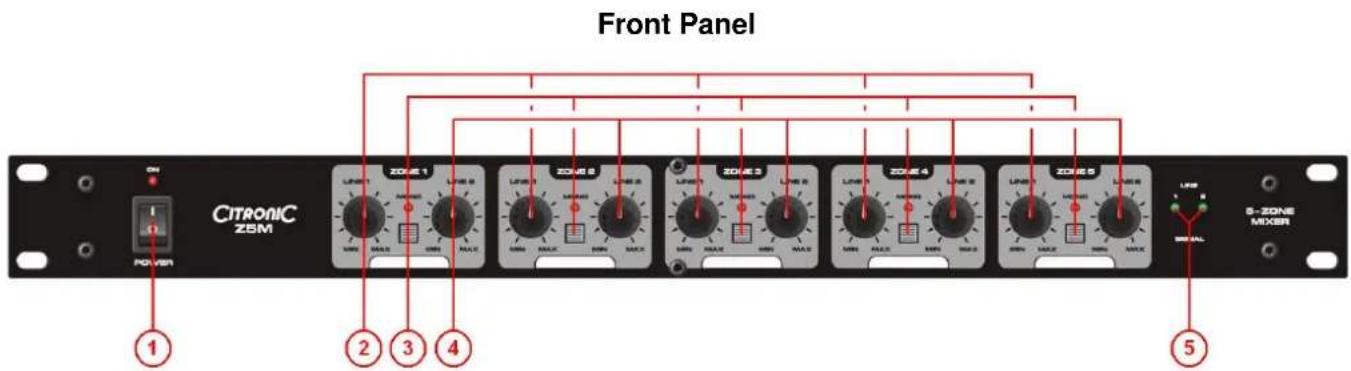
Front Panel CITRONIC ZEM ON POWER 1 2 3 4 5 S-ZONE MIXER- POWER switch and indicator
- LINE 1 source volume controls per channel
- MONO mode switch and indicator
- LINE 2 source volume controls per channel
- LINE 1 and 2 signal indicators
Rear and Side Panels

text_image
IN R LINE 0 L IN R LINE 1 L OUT R ZONE 0 L OUT R ZONE 4 L OUT R ZONE 9 L OUT R ZONE 8 L OUT R ZONE 1 L HUB THERM/WHY 6 7 8 9 10- LINE 2 left & right inputs (balanced XLRF)
- LINE 1 left & right inputs (balanced XLRF)
- ZONES 1 to 5 left & right outputs (balanced XLRM)
- IEC mains inlet and fuse
- Side panel voltage switch
Applications
The Z5M can be used for any multi-output setup and is ideally suited to controlling a multi-room zoning sound system with up to 5 stereo or mono zones. Individual zones can be selected as mono if speaker placement is not conducive to stereo imaging. 2 separate stereo inputs can be selected or blended at will for each zone, opening up the possibility of separate program material for specific zones. Prior to rack-mounting the unit, it is important to know what the mains supply voltage will be, since the voltage selector is situated on the side panel towards the rear of the unit.
Connection
All connections are via balanced XLR and operate at line level. Use good quality XLR signal leads to connect the source signals to LINE 1 and LINE 2 inputs. Each output should be connected to the respective amplifier or active speakers for the particular zone, again using good quality XLR signal leads. Connect mains using the supplied IEC lead.
Operation
Set amplifier and active speaker volume levels fully down
Set LINE 1 and LINE 2 levels for each zone to "MIN"
Select MONO for any zones that are better suited to mono output.
Press the POWER switch on and play the signals connected to LINE 1 and LINE 2 inputs.
The LINE SIGNAL LEDs should indicate the presence of each input signal.
Gradually increase and then decrease the volume for LINE1 and LINE 2 to each zone in turn to check the output.
Set the volumes and adjust for each source to each zone as required.
Before powering the Z5M down, turn down amplifier and active speaker volumes to avoid loud noises through the speakers.
| SPECIFICATIONS | |
| Item | Value |
| Power supply | 115/230Vac 50/60Hz - selectable (IEC) |
| Inputs | Line 1 L+R, Line 2 L+R, balanced XLRF |
| Outputs | Zone 1 to 5 L+R, balanced XLRM |
| Input impedance | 40kohms |
| Output impedance | 220ohms |
| Frequency response | 20Hz - 25kHz, +0/-1dB |
| Signal to noise ratio | >100dB |
| THD | <0.005% |
| Dimensions | 483 x 175 x 44mm |
| Weight | 2.2kg |
| TROUBLESHOOTING | |
| No function and Power switch LED is not lit | Ensure mains voltage is correct (check selector) and connected properly |
| Ensure front panel power switch and mains outlet switch are on | |
| Power is on but no audio output | Check all XLR leads are OK and connected properly |
| Check that LINE 1 and LINE 2 controls are not all turned fully down | |
| Check that inputs and outputs are connected the correct way around | |
| Distorted output | Reduce LINE 1 and LINE 2 level controls, increasing amp level to compensate |
| Reduce level of source signal(s) connected to LINE 1 and LINE 2 inputs | |
| Ensure correct line level is selected on amplifier/active speaker inputs | |
| Output is very low level | Ensure input source is line level (0.775Vrms) |
| Increase LINE 1 and/or LINE 2 level controls, | |
| Increase signal source level | |
Note: for further troubleshooting, refer equipment to qualified service personnel for testing