
GV-R667D3-1GI - Grafikkarte GIGABYTE - Kostenlose Bedienungsanleitung
Finden Sie kostenlos die Bedienungsanleitung des Geräts GV-R667D3-1GI GIGABYTE als PDF.


| Produkttyp | Grafikkarte |
| Marke | GIGABYTE |
| Modell | GV-R667D3-1GI |
| GPU | AMD Radeon HD 6670 |
| Speicher | 1 GB DDR3 |
| Schnittstelle | PCI Express 2.1 x16 |
| DirectX-Unterstützung | DirectX 11 |
| CrossFire-Unterstützung | Ja (CrossFireX) |
| Ausgänge | 1x Dual-Link DVI-D, 1x D-Sub, 1x HDMI |
| Maximale Auflösung | 2560x1600 (über DVI-D) |
| Minimale Systemstromversorgung | 400 W (empfohlen) |
| Minimaler Systemspeicher | 1 GB (für beste Leistung) |
| Unterstützte Betriebssysteme | Windows 7, Windows Vista, Windows XP (32/64-bit) |
| Treiberinstallation | Über beiliegende CD oder Download von der GIGABYTE/AMD-Website |
| Übertaktungsprogramm | ATI Overdrive (über Catalyst Control Center) |
| Grafikspeicher-Schnittstelle | 128-bit |
| Formfaktor | Standard ATX (einzelner Steckplatz) |
| HDMI-Audioausgang | Ja (HDMI überträgt Audio) |
| Zertifizierungen | FCC Class B, CE, RoHS, WEEE |
Häufig gestellte Fragen - GV-R667D3-1GI GIGABYTE
Benutzerfragen zu GV-R667D3-1GI GIGABYTE
0 Frage zu diesem Gerät. Beantworten Sie die, die Sie kennen, oder stellen Sie Ihre eigene.
Eine neue Frage zu diesem Gerät stellen
Laden Sie die Anleitung für Ihr Grafikkarte kostenlos im PDF-Format! Finden Sie Ihr Handbuch GV-R667D3-1GI - GIGABYTE und nehmen Sie Ihr elektronisches Gerät wieder in die Hand. Auf dieser Seite sind alle Dokumente veröffentlicht, die für die Verwendung Ihres Geräts notwendig sind. GV-R667D3-1GI von der Marke GIGABYTE.
BEDIENUNGSANLEITUNG GV-R667D3-1GI GIGABYTE
GV-R667OC-1GI/ GV-R667D3-1GI/ GV-R657OC-1GI
AMD Radeon™ HD 6670 / 6570 Graphics Accelerator
User's Manual
Rev. 102
12MM-R667S-102ER
Copyright
© 2011 GIGABYTE TECHNOLOGY CO., LTD
Copyright by GIGA-BYTE TECHNOLOGY CO., LTD. ("GBT"). No part of this manual may be reproduced or transmitted in any form without the expressed, written permission of GBT.
Trademarks
Third-party brands and names are the properties of their respective owners.
Notice
Please do not remove any labels on this graphics card. Doing so may void the warranty of this card.
Due to rapid change in technology, some of the specifications might be out of date before publication of this this manual.
The author assumes no responsibility for any errors or omissions that may appear in this document nor does the author make a commitment to update the information contained herein.
Rovi Product Notice:
This product incorporates copyright protection technology that is protected by U.S. patents and other intellectual property rights. Use of this copyright protection technology must be authorized by Rovi Corporation, and is intended for home and other limited viewing uses only unless otherwise authorized by Rovi Corporation. Reverse engineering or disassembly is prohibited.
| ☐ EN 55011 | Links and methods of reassessment of radio standards ------------------------------------------------- | ☐ EN 51000-3-2 | Debtances in supply systems caused |
| ☐ EN 55013 | Links and methods of reassessment of radio standards ------------------------------------------------- | ☐ EN 39024 | Incentive Technology requirement, requirements and methods of transactions |
| ☐ EN 55014.1 | Links and methods of reassessment of radio standards ------------------------------------------------- | ☐ EN 50082-1 | Generic Monthly Standard Part 1 |
| ☐ EN 55020 | Links and methods of reassessment of radio standards ------------------------------------------------- | ☐ EN 50091-2 | Basic requirements for unmetable power systems (JWQ) |
| ☒ EN 55022 | Links and methods of reassessment of radio standards ------------------------------------------------- | ☐ EN 55074-2 | Incentive requirements for Household appliances and businesses |
| ☐ EN 6005 | Safety requirements for trans operateas and radio apparatus for households and smaller general use | ☐ EN 50950 | Safety for information encodings and industry sector business equipment |
| ☐ EN 60335 | Safety of household and similar operating conditions | ☐ EN 5090-1 | General and Safety Requirements for unmetable power systems (JWQ) |
| ☐ EN 60065 | Safety requirements for trans operateas and radio apparatus for households and smaller general use | ☐ EN 50950 | Safety for information encodings and businesses equipment |
Date: Apr. 08, 2011
Signature: Eric Lu
Representative Person's Name: ERIC LU
including that may cause undesired operation.
cause harmful and (2) this device must accept any interest received,
subject to the following two conditions: (1) This device may not
This device completes with part 15 of the FCC Rules. Operation is
Supplementary Information:
(a),Class B Digital Device
FCC Part 15, Subpart B, Section 15.107(a) and Section 15.109
Confirms to the following specifications:
Model Number: GV-R6670C-1G1
Product Name: VGA Card
herchy declares that the product
Phone/Fax No:(818) 854-9338/ (818) 854-9339
City of Industry, CA 91748
Address: 17358 Railroad Street
Responsible Party Name: G.B.T.INC. (U.S.A.)

Per FCC Part 2 Section 2.1077(a)
DECILARATION OF COMPANY
| (Stamp) | Date: Apr. 08, 2011 | Name: | Timmy Huang | |
| Manufacturer/Operator | Signee | Lung Zhang | ||
| Manufacture/Improper | ||||
| ☐ EN 60335 | Safety of Household and similar deconso apploners | ☐ EN 5009-1.1 | General and Safety requirement for undetriepest power operation (LPG) | |
| ☐ EN 60055 | Safety requirements for trans operated educous and niseed apparatus or households and smaller general use | ☐ EN 50950 | Safety for information technology equipment industry deccal business equipment | |
| ☐ EN 60055 | Safety requirements for trans operated educous and niseed apparatus or households and smaller general use | ☐ EN 50950 | Safety for information technology equipment industry deccal business equipment | |
| ☐ EN 60055 | Safety requirements for trans operated educous and niseed apparatus or households and smaller general use | ☐ EN 50950 | Safety for information technology equipment industry desecal business equipment | |
| ☐ EN 60055 | Safety requirements for trans operated educous and niseed apparatus or households and smaller general use | ☐ EN 50950 | Safety for information technology equipment industry desecal business equipment | |
| ☐ EN 60055 | Safety requirements for trans operated educous and niseed apparatus or households and smaller general use | ☐ EN 50950 | Safety for information Technology equipment industry desecal business equipment | |
| ☐ EN 60055 | Safety requirements for trans operated educous and niseed apparatus or households and smaller general use | ☐ EN 50950 | Safety for information Technology equipment industry desecal business equipment | |
| ☐ EN 60055 | Safety requirements for trans operated educous and niseed apparatus or households and smaller general use | ☐ EN 50950 | ||
| ☐ EN 60055 | Safety requirements for trans operated educous and niseed apparatus or households and smaller general use | ☐ EN 50950 | Safety for information Technology equipment industry desecal business equipment | |
| ☐ EN 60055 | Safety requirements for trans operated educous and niseed apparatus or households and smaller general use | ☐ EN 50950 | Safety for information Technology equipment industry deccal business equipment | |
| ☐ EN 60055 | Safety requirements for trans operated educous and niseed apparatus or households and smaller general use | ☐ EN 50950 | Safety for information Technology equipment industry desecal business equipment | |
| ☐ EN 60055 | Safety requirements for trans operated educous and niseed apparatus or households and smaller general use | ☐ EN 50950 | Safety for information Technologies equipment industry desecal business equipment | |
| ☐ EN 60055 | Safety requirements for trans operated educous and niseed apparatus or households and smaller general use | ☐ EN 50950 | Safety for information Technologies equipment industry desecal business equipment | |
| ☐ EN 60055 | Safety requirements for trans operated educous and niseed apparatus or households and smaller general use | ☐ EN 50950 | ||
| ☐ EN 60055 | Safety requirements for trans operated educous and niseed apparatus or households and smaller general use | ☐ EN 50950 | Safety for information Technologies equipment industry desecal business equipment | |
| ☐ EN 60055 | Safety requirements for trans operated educous and niseed apparatus or households and smaller general use | ☐ EN 50950 | Safety for information Technologies equipment industry deccal business equipment | |
| ☐ EN 60055 | Safety requirements for trans operated educous and niseed apparatus or households and smaller general use | ☐ EN 50950 | Safety for information Technologies equipment industry desecal business equipment | |
| ☐ EN 60055 | Safety requirements for trans operated educous and niseed apparatus or households and smaller general use | ☐ EN 50950 | Safety for information Technology equipment industry desecal business equipment | |
| ☐ EN 60055 | Safety requirements for trans operated educous and niseed apparatus or households and smaller general use | ☐ EN 50950 | ||
| ☐ EN 60055 | Safety requirements for trans operated educous and niseed apparatus or households and smaller general use | ☐ EN 50950 | ||
| ☐ EN 60055 | Safety requirements for trans operated educous and niseed apparatus or households and smaller general use | ☐ EN 50950 | ||
| ☐ EN 60055 | Safety requirements for trans operating equipment | ☐ EN 50952 | Intensive Technology equipment management | VGA C&D |
| ☐ EN 60013 | Lunds and methods of maintenance of radio stationing deconsoners and associated hardware controllers and associated equipment | ☐ EN 50924 | Intensive Technology equipment management | GV-R6b70C-1G1 |
| ☐ EN 60013 | Lunds and methods of maintenance of radio stationing deconsoners and associated hardware controllers and associated equipment | ☐ EN 50924 | Intensive Technology equipment management | in cooperation with (reference to the reception under which concavity is dedicated) in accordance with BB200 ECG-EMC Directive |
| ☐ EN 60011 | Lunds and methods of maintenance of radio stationing deconsoners and industrial high frequency equipment | ☐ EN 51004-3-2 | Dustances in supply systems caused | in cooperation with (reference to the reception under which concavity is dedicated) in accordance with BB200 ECG-EMC Directive |
| ☐ EN 60011 | Lunds and methods of maintenance of radio stationing deconsoners and industrial high frequency equipment | ☐ EN 51004-3-2 | Dustances in supply systems caused | in cooperation with (reference to the reception under which concavity is dedicated) in accordance with B8200 ECG-EMC Directive |
| ☐ EN 60011 | Lunds and methods of maintenance of radio stationing deconsoners and industrial high frequency equipment | ☐ EN 51004-3-2 | Dustances in supply systems caused | in cooperation with (reference to the reception under which concavity is dedicated) in accordance with BB200 ECG-EMC Directive |
| ☐ EN 60011 (reference to the reception under which concavity is dedicated) in accordance with BB200 ECG-EMC Directive | ||||
Date: Apr. 08, 2011
Signature: Eric Lu
Representative Person's Name: ERIC LU
including that may cause undesired operation.
cause harmful and (2) this device must accept any interest received,
subject to the following two conditions: (1) This device may not
This device completes with part 15 of the FCC Rules. Operation is
Supplementary Information:
(a), Class B Digital Device
FCC Part 15, Subpart B, Section 15.107(a) and Section 15.109
Conforms to the following specifications:
Model Number: GV-R6570C-1G1
Product Name: VGA Card
herchy declares that the product
Phone/Fax No:(818) 854-9338/ (818) 854-9339
City of Industry, CA 91748
Address: 17358 Railroad Street
Responsible Party Name: G.B.T.INC. (U.S.A.)

Per FCG Part 2 Section 2.1077(a)
DECILLATION OF COOPERITY
| (Stamp) | Date: Jun. 20, 2011 | Name: Thamy Huangs | ||
| Manufacturer/Operator | Signature: Luany Hwang | |||
| ☐ DN 60005 | Draft requirements for service applies to households and transfer agencies or units and warehouse units | ☐ EN 30096 | Draft for construction services required including securor business equipment | Manufacturing/Operator |
| ☐ DN 60335 | Draft of construction and serial orders applies | ☐ EN 5009-1 | General and Safety Requirements for unmanageable power salaries (LPS) | |
| ☐ DN 60002 | Draft requirements for service applies to households and transfer agencies or units and warehouse units | ☐ EN 30096 | Draft for construction services required including securor business equipment | |
| ☐ DN VCE G855 | Filed derivative system Equipment for recovery and disbursement from units and warehouse units | IE Corp timely making | ||
| ☐ DE marketing | The manufacturer also declares the certificate of above receiving product with the total required safety standards in accordance with LJD 2008/06C | |||
| ☐ DE TO | ☐ Part 10 | |||
| ☐ DE 12 | ☐ Part 10 | |||
| ☐ DE 60022 | Links and methods of reassessment of and distribution counterparties of transmission shipping equipment | |||
| ☐ EN 60020 | Incentiv fin and infrastructure of broadcast cameras and associated equipment | ☐ EN 30091-2 | E&C requirements for unmanageable power salaries (LPS) | |
| ☐ EN 60025 | Incentiv fin and infrastructure of broadcast cameras and associated equipment and communications | ☐ EN 30091-2 | E&C requirements for unmanageable power salaries (LPS) | |
| ☐ EN 60026 | Incentiv fin and infrastructure of broadcast cameras and communications | ☐ EN 30091-2 | E&C requirements for unmanageable power salaries (LPS) | |
| ☐ EN 60027 | Incentiv fin and infrastructure of broadcast cameras and associated equipment and communications | ☐ EN 30091-2 | E&C requirements for unmanageable power salaries (LPS) | |
| ☐ EN 60028 | Links and methods of reassessment of and distribution counterparties of household sectors and similar sectors | ☐ EN 50082-2 | General Monthly Standard Part 2 industry sector and similar sectors | |
| ☐ EN 60029 | Links and methods of reassessment of and distribution counterparties of household sectors and associated equipment and communications | ☐ EN 30082-1 | General Monthly Standard Part 1 retail, commercial and light industry | |
| ☐ EN 60031 | Links and methods of reassessment of and distribution counterparties of broadcast cameras and associated equipment and communications | ☐ EN 30082-1 | General Monthly Standard Part 1 retail, commercial and light industry | |
| ☐ EN 60032 | Links and methods of reassessment of and distribution counterparties of broadcast cameras and associated equipment and communications | ☐ EN 30082-1 | General Monthly Standard Part 2 retail, commercial and light industry | |
| ☐ EN 60034 | Links and methods of reassessment of and distribution counterparties of households and associated equipment and communications | ☐ EN 30082-1 | General Monthly Standard Part 1 retail, commercial and light industry | |
| ☐ EN 60035 | Links and methods of reassessment of and distribution counterparties of households and associated equipment and communications | ☐ EN 30082-1 | General Monthly Standard Part 2 retail, commercial and light industry | |
| ☐ EN 60036 | Links and methods of reassessment of and distribution counterparties of households and associated equipment and communications | ☐ EN 30082-1 | General Monthly Standard Part 2 retail, commercial and light industry | |
| ☐ EN 60037 | Links and methods of reassessment of and distribution counterparties of households and associated equipment and communications | ☐ EN 30082-1 | General Monthly Standard Part 2 retail, commercial and light industry | |
| ☐ EN 60038 | Links and methods of reassessment of and distribution counterparties of households and associated equipment and communications | ☐ EN 30082-1 | General Monthly Standard Part 2 retail, commercial and light industry | |
| ☐ EN 60039 | Links and methods of reassessment of and distribution counterparties of households and associated equipment and communications | ☐ EN 30082-1 | General Monthly Standard Part 2 retail, commercial and light industry | |
| ☐ EN 60040 | Links and methods of reassessment of and distribution counterparties of households and associated equipment and communications | ☐ EN 30082-1 | General Monthly Standard Part 2 retail, commercial and light industry | |
| ☐ EN 60041 | Links and methods of reassessment of and distribution counterparties of households and associated equipment and communications | ☐ EN 30082-1 | General Monthly Standard Part 2 retail, commercial and light industry | |
| ☐ EN 60042 | Links and methods of reassessment of and distribution counterparties of households and associated equipment and communications | ☐ EN 30082-1 | General Monthly Standard Part 2 retail, commercial and light industry | |
| ☐ EN 60043 | Links and methods of reassessment of and distribution counterparties of households and associated equipment and communications | ☐ EN 30082-1 | General Monthly Standard Part 2 retail, commercial and light industry | |
| ☐ EN 60044 | Links and methods of reassessment of and distribution counterparties of households and associated equipment and communications | ☐ EN 30082-1 | General Monthly Standard Part 2 retail, commercial and light industry | |
| ☐ EN 60045 | Links and methods of reassessment of and distribution counterparties of households and associated equipment and communications | ☐ EN 30082-1 | General Monthly Standard Part 2 retail, commercial and light industry | |
| ☐ EN 60046 | Links and methods of reassessment of and distribution counterparties of households and associated equipment and communications | ☐ EN 30082-1 | General Monthly Standard Part 2 retail, commercial and light industry | |
| ☐ EN 60047 | Links and methods of reassessment of and distribution counterparties of households and associated equipment and communications | ☐ EN 30082-1 | General Monthly Standard Part 2 retail, commercial and light industry | |
| ☐ EN 60048 | Links and methods of reassessment of and distribution counterparties of households and associated equipment and communications | ☐ EN 30082-1 | General Monthly Standard Part 2 retail, commercial and light industry | |
| ☐ EN 60049 | Links and methods of reassessment of and distribution counterparties of households and associated equipment and communications | ☐ EN 30082-1 | General Monthly Standard Part 2 retail, commercial and light industry | |
| ☐ EN 60050 | Links and methods of reassessment of and distribution counterparties of households and associated equipment and communications | ☐ EN 30082-1 | General Monthly Standard Part 2 retail, commercial and light industry | |
| ☐ EN 60051 | Links and methods of reassessment of and distribution counterparties of households and associated equipment and communications | ☐ EN 30082-1 | General Monthly Standard Part 2 retail, commercial and light industry | |
| ☐ EN 60052 | Links and methods of reassessment of and distribution counterparties of households and associated equipment and communications | ☐ EN 30082-1 | General Monthly Standard Part 2 retail, commercial and light industry | |
| ☐ EN 60053 | Links and methods of reassessment of and distribution counterparties of households and associated equipment and communications | ☐ EN 30082-1 | General Monthly Standard Part 2 retail, commercial and light industry | |
| ☐ EN 60054 | Links and methods of reassessment of and distribution counterparties of households and associated equipment and communications | ☐ EN 30082-1 | General Monthly Standard Part 2 retail, commercial and light industry | |
| ☐ EN 60055 | Links and methods of reassessment of and distribution counterparties of households and associated equipment and communications | ☐ EN 30082-1 | General Monthly Standard Part 2 retail, commercial and light industry | |
| ☐ EN 60056 | Links and methods of reassessment of and distribution counterparties of households and associated equipment and communications | ☐ EN 30082-1 | General Monthly Standard Part 2 retail, commercial and light industry | |
| ☐ EN 60057 | Links and methods of reassessment of and distribution counterparties of households and associated equipment and communications | ☐ EN 30082-1 | General Monthly Standard Part 2 retail, commercial and light industry | |
| ☐ EN 60058 | Links and methods of reassessment of and distribution counterparties of households and associated equipment and communications | ☐ EN 30082-1 | General Monthly Standard Part 2 retail, commercial and light industry | |
| ☐ EN 60059 | Links and methods of reassessment of and distribution counterparties of households and associated equipment and communications | ☐ EN 30082-1 | General Monthly Standard Part 2 retail, commercial and light industry | |
| ☐ EN 60060 | Links and methods of reassessment of and distribution counterparties of households and associated equipment and communications | ☐ EN 30082-1 | General Monthly Standard Part 2 retail, commercial and light industry | |
| ☐ EN 60061 | Links and methods of reassessment of and distribution counterparties of households and associated equipment and communications | ☐ EN 30082-1 | General Monthly Standard Part 2 retail, commercial and light industry | |
| ☐ EN 60062 | Links and methods of reassessment of and distribution counterparties of households and associated equipment and communications | ☐ EN 30082-1 | General Monthly Standard Part 2 retail, commercial and light industry | |
| ☐ EN 60063 | Links and methods of reassessment of and distribution counterparties of households and associated equipment and communications | ☐ EN 30082-1 | General Monthly Standard Part 2 retail, commercial and light industry | |
| ☐ EN 60064 | Links and methods of reassessment of and distribution counterparties of households and associated equipment and communications | ☐ EN 30082-1 | General Monthly Standard Part 2 retail, commercial and light industry | |
| ☐ EN 60065 | Links and methods of reassessment of and distribution counterparties of households and associated equipment and communications | ☐ EN 30082-1 | General Monthly Standard Part 2 retail, commercial and light industry | |
| ☐ EN 60066 | Links and methods of reassessment of and distribution counterparties of households and associated equipment and communications | ☐ EN 30082-1 | General Monthly Standard Part 2 retail, commercial and light industry | |
| ☐ EN 60067 | Links and methods of reassessment of and distribution counterparties of households and associated equipment and communications | ☐ EN 30082-1 | General Monthly Standard Part 2 retail, commercial and light industry | |
| ☐ EN 60068 | Links and methods of reassessment of and distribution counterparties of households and associated equipment and communications | ☐ EN 30082-1 | General Monthly Standard Part 2 retail, commercial and light industry | |
| ☐ EN 60069 | Links and methods of reassessment of and distribution counterparties of households and associated equipment and communications | ☐ EN 30082-1 | General Monthly Standard Part 2 retail, commercial and light industry | |
| ☐ EN 60070 | Links and methods of reassessment of and distribution counterparties of households and associated equipment and communications | ☐ EN 30082-1 | General Monthly Standard Part 2 retail, commercial and light industry | |
| ☐ EN 60071 | Links and methods of reassessment of and distribution counterparties of households and associated equipment and communications | ☐ EN 30082-1 | General Monthly Standard Part 2 retail, commercial and light industry | |
| ☐ EN 60072 | Links and methods of reassessment of and distribution counterparties of households and associated equipment and communications | ☐ EN 30082-1 | General Monthly Standard Part 2 retail, commercial and light industry | |
| ☐ EN 60073 | Links and methods of reassessment of and distribution counterparties of households and associated equipment and communications | ☐ EN 30082-1 | General Monthly Standard Part 2 retail, commercial and light industry | |
| ☐ EN 60074 | Links and methods of reassessment of and distribution counterparties of households and associated equipment and communications | ☐ EN 30082-1 | General Monthly Standard Part 2 retail, commercial and light industry | |
| ☐ EN 60075 | Links and methods of reassessment of and distribution counterparties of households and associated equipment and communications | ☐ EN 30082-1 | General Monthly Standard Part 2 retail, commercial and light industry | |
| ☐ EN 60076 | Links and methods of reassessment of and distribution counterparties of households and associated equipment and communications | ☐ EN 30082-1 | General Monthly Standard Part 2 retail, commercial and light industry | |
| ☐ EN 60077 | Links and methods of reassessment of and distribution counterparties of households and associated equipment and communications | ☐ EN 30082-1 | General Monthly Standard Part 2 retail, commercial and light industry | |
| ☐ EN 60078 | Links and methods of reassessment of and distribution counterparties of households and associated equipment and communications | ☐ EN 30082-1 | General Monthly Standard Part 2 retail, commercial and light industry | |
| ☐ EN 60079 | Links and methods of reassessment of and distribution counterparties of households and associated equipment and communications | ☐ EN 30082-1 | General Monthly Standard Part 2 retail, commercial and light industry | |
| ☐ EN 60080 | Links and methods of reassessment of and distribution counterparties of households and associated equipment and communications | ☐ EN 30082-1 | General Monthly Standard Part 2 retail, commercial and light industry | |
| ☐ EN 60081 | Links and methods of reassessment of and distribution counterparties of households and associated equipment and communications | ☐ EN 30082-1 | General Monthly Standard Part 2 retail, commercial and light industry | |
| ☐ EN 60082 | Links and methods of reassessment of and distribution counterparties of households and associated equipment and communications | ☐ EN 30082-1 | General Monthly Standard Part 2 retail, commercial and light industry | |
| ☐ EN 60083 | Links and methods of reassessment of and distribution counterparties of households and associated equipment and communications | ☐ EN 30082-1 | General Monthly Standard Part 2 retail, commercial and light industry | |
| ☐ EN 60084 | Links and methods of reassessment of and distribution counterparties of households and associated equipment and communications | ☐ EN 30082-1 | General Monthly Standard Part 2 retail, commercial and light industry | |
| ☐ EN 60085 | Links and methods of reassessment of and distribution counterparties of households and associated equipment and communications | ☐ EN 30082-1 | General Monthly Standard Part 2 retail, commercial and light industry | |
| ☐ EN 60086 | Links and methods of reassessment of and distribution counterparties of households and associated equipment and communications | ☐ EN 30082-1 | General Monthly Standard Part 2 retail, commercial and light industry | |
| ☐ EN 60087 | Links and methods of reassessment of and distribution counterparties of households and associated equipment and communications | ☐ EN 30082-1 | General Monthly Standard Part 2 retail, commercial and light industry | |
| ☐ EN 60088 | Links and methods of reassessment of and distribution counterparties of households and associated equipment and communications | ☐ EN 30082-1 | General Monthly Standard Part 2 retail, commercial and light industry | |
| ☐ EN 60089 | Links and methods of reassessment of and distribution counterparties of households and associated equipment and communications | ☐ EN 30082-1 | General Monthly Standard Part 2 retail, commercial and light industry | |
| ☐ EN 60090 | Links and methods of reassessment of and distribution counterparties of households and associated equipment and communications | ☐ EN 30082-1 | General Monthly Standard Part 2 retail, commercial and light industry | |
| ☐ EN 60091 | Links and methods of reassessment of and distribution counterparties of households and associated equipment and communications | ☐ EN 30082-1 | General Monthly Standard Part 2 retail, commercial and light industry | |
| ☐ EN 60092 | Links and methods of reassessment of and distribution counterparties of households and associated equipment and communications | ☐ EN 30082-1 | General Monthly Standard Part 2 retail, commercial and light industry | |
| ☐ EN 60093 | Links and methods of reassessment of and distribution counterparties of households and associated equipment and communications | ☐ EN 30082-1 | General Monthly Standard Part 2 retail, commercial and light industry | |
| ☐ EN 60094 | Links and methods of reassessment of and distribution counterparties of households and associated equipment and communications | ☐ EN 30082-1 | General Monthly Standard Part 2 retail, commercial and light industry | |
| ☐ EN 60095 | Links and methods of reassessment of and distribution counterparties of households and associated equipment and communications | ☐ EN 30082-1 | General Monthly Standard Part 2 retail, commercial and light industry | |
| ☐ EN 60096 | Links and methods of reassessment of and distribution counterparties of households and associated equipment and communications | ☐ EN 30082-1 | General Monthly Standard Part 2 retail, commercial and light industry | |
| ☐ EN 60097 | Links and methods of reassessment of and distribution counterparties of households and associated equipment and communications | ☐ EN 30082-1 | General Monthly Standard Part 2 retail, commercial and light industry | |
| ☐ EN 60098 | Links and methods of reassessment of and distribution counterparties of households and associated equipment and communications | ☐ EN 30082-1 | General Monthly Standard Part 2 retail, commercial and light industry | |
| ☐ EN 60099 | Links and methods of reassessment of and distribution counterparties of households and associated equipment and communications | ☐ EN 30082-1 | General Monthly Standard Part 2 retail, commercial and light industry | |
| ☐ EN 60100 | Links and methods of reassessment of and distribution counterparties of households and associated equipment and communications | ☐ EN 30082-1 | General Monthly Standard Part 2 retail, commercial and light industry | |
| ☐ EN 60101 | Links and methods of reassessment of and distribution counterparties of households and associated equipment and communications | ☐ EN 30082-1 | General Monthly Standard Part 2 retail, commercial and light industry | |
| ☐ EN 60102 | Links and methods of reassessment of and distribution counterparties of households and associated equipment and communications | ☐ EN 30082-1 | General Monthly Standard Part 2 retail, commercial and light industry | |
| ☐ EN 60103 | Links and methods of reassessment of and distribution counterparties of households and associated equipment and communications | ☐ EN 30082-1 | General Monthly Standard Part 2 retail, commercial and light industry | |
| ☐ EN 60104 | Links and methods of reassessment of and distribution counterparties of households and associated equipment and communications | ☐ EN 30082-1 | General Monthly Standard Part 2 retail, commercial and light industry | |
| ☐ EN 60105 | Links and methods of reassessment of and distribution counterparties of households and associated equipment and communications | ☐ EN 30082-1 | General Monthly Standard Part 2 retail, commercial and light industry | |
| ☐ EN 60106 | Links and methods of reassessment of and distribution counterparties of households and associated equipment and communications | ☐ EN 30082-1 | General Monthly Standard Part 2 retail, commercial and light industry | |
| ☐ EN 60107 | Links and methods of reassessment of and distribution counterparties of households and associated equipment and communications | ☐ EN 30082-1 | General Monthly Standard Part 2 retail, commercial and light industry | |
| ☐ EN 60108 | Links and methods of reassessment of and distribution counterparties of households and associated equipment and communications | ☐ EN 30082-1 | General Monthly Standard Part 2 retail, commercial and light industry | |
| ☐ EN 60109 | Links and methods of reassessment of and distribution counterparties of households and associated equipment and communications | ☐ EN 30082-1 | General Monthly Standard Part 2 retail, commercial and light industry | |
| ☐ EN 60110 | Links and methods of reassessment of and distribution counterparties of households and associated equipment and communications | ☐ EN 30082-1 | General Monthly Standard Part 2 retail, commercial and light industry | |
| ☐ EN 60111 | Links and methods of reassessment of and distribution counterparties of households and associated equipment and communications | ☐ EN 30082-1 | General Monthly Standard Part 2 retail, commercial and light industry | |
| ☐ EN 60112 | Links and methods of reassessment of and distribution counterparties of households and associated equipment and communications | ☐ EN 30082-1 | General Monthly Standard Part 2 retail, commercial and light industry | |
| ☐ EN 60113 | Links and methods of reassessment of and distribution counterparties of households and associated equipment and communications | ☐ EN 30082-1 | General Monthly Standard Part 2 retail, commercial and light industry | |
| ☐ EN 60114 | Links and methods of reassessment of and distribution counterparties of households and associated equipment and communications | ☐ EN 30082-1 | General Monthly Standard Part 2 retail, commercial and light industry | |
| ☐ EN 60115 | Links and methods of reassessment of and distribution counterparties of households and associated equipment and communications | ☐ EN 30082-1 | General Monthly Standard Part 2 retail, commercial and light industry | |
| ☐ EN 60116 | Links and methods of reassessment of and distribution counterparties of households and associated equipment and communications | ☐ EN 30082-1 | General Monthly Standard Part 2 retail, commercial and light industry | |
| ☐ EN 60117 | Links and methods of reassessment of and distribution counterparties of households and associated equipment and communications | ☐ EN 30082-1 | General Monthly Standard Part 2 retail, commercial and light industry | |
| ☐ EN 60118 | Links and methods of reassessment of and distribution counterparties of households and associated equipment and communications | ☐ EN 30082-1 | General Monthly Standard Part 2 retail, commercial and light industry | |
| ☐ EN 60119 | Links and methods of reassessment of and distribution counterparties of households and associated equipment and communications | ☐ EN 30082-1 | General Monthly Standard Part 2 retail, commercial and light industry | |
| ☐ EN 60120 | Links and methods of reassessment of and distribution counterparties of households and associated equipment and communications | ☐ EN 30082-1 | General Monthly Standard Part 2 retail, commercial and light industry | |
| ☐ EN 60121 | Links and methods of reassessment of and distribution counterparties of households and associated equipment and communications | ☐ EN 30082-1 | General Monthly Standard Part 2 retail, commercial and light industry | |
| ☐ EN 60122 | Links and methods of reassessment of and distribution counterparties of households and associated equipment and communications | ☐ EN 30082-1 | General Monthly Standard Part 2 retail, commercial and light industry | |
| ☐ EN 60123 | Links and methods of reassessment of and distribution counterparties of households and associated equipment and communications | ☐ EN 30082-1 | General Monthly Standard Part 2 retail, commercial and light industry | |
| ☐ EN 60124 | Links and methods of reassessment of and distribution counterparties of households and associated equipment and communications | ☐ EN 30082-1 | General Monthly Standard Part 2 retail, commercial and light industry | |
| ☐ EN 60125 | Links and methods of reassessment of and distribution counterparties of households and associated equipment and communications | ☐ EN 30082-1 | General Monthly Standard Part 2 retail, commercial and light industry | |
| ☐ EN 60126 | Links and methods of reassessment of and distribution counterparties of households and associated equipment and communications | ☐ EN 30082-1 | General Monthly Standard Part 2 retail, commercial and light industry | |
| ☐ EN 60127 | Links and methods of reassessment of and distribution counterparties of households and associated equipment and communications | ☐ EN 30082-1 | General Monthly Standard Part 2 retail, commercial and light industry | |
| ☐ EN 60128 | Links and methods of reassessment of and distribution counterparties of households and associated equipment and communications | ☐ EN 30082-1 | General Monthly Standard Part 2 retail, commercial and light industry | |
| ☐ EN 60129 | Links and methods of reassessment of and distribution counterparties of households and associated equipment and communications | ☐ EN 30082-1 | General Monthly Standard Part 2 retail, commercial and light industry | |
| ☐ EN 60130 | Links and methods of reassessment of and distribution counterparties of households and associated equipment and communications | ☐ EN 30082-1 | General Monthly Standard Part 2 retail, commercial and light industry | |
| ☐ EN 60131 | Links and methods of reassessment of and distribution counterparties of households and associated equipment and communications | ☐ EN 30082-1 | General Monthly Standard Part 2 retail, commercial and light industry | |
| ☐ EN 60132 | Links and methods of reassessment of and distribution counterparties of households and associated equipment and communications | ☐ EN 30082-1 | General Monthly Standard Part 2 retail, commercial and light industry | |
| ☐ EN 60133 | Links and methods of reassessment of and distribution counterparties of households and associated equipment and communications | ☐ EN 30082-1 | General Monthly Standard Part 2 retail, commercial and light industry | |
| ☐ EN 60134 | Links and methods of reassessment of and distribution counterparties of households and associated equipment and communications | ☐ EN 30082-1 | General Monthly Standard Part 2 retail, commercial and light industry | |
| ☐ EN 60135 | Links and methods of reassessment of and distribution counterparties of households and associated equipment and communications | ☐ EN 30082-1 | General Monthly Standard Part 2 retail, commercial and light industry | |
| ☐ EN 60136 | Links and methods of reassessment of and distribution counterparties of households and associated equipment and communications | ☐ EN 30082-1 | General Monthly Standard Part 2 retail, commercial and light industry | |
| ☐ EN 60137 | Links and methods of reassessment of and distribution counterparties of households and associated equipment and communications | ☐ EN 30082-1 | General Monthly Standard Part 2 retail, commercial and light industry | |
| ☐ EN 60138 | Links and methods of reassessment of and distribution counterparties of households and associated equipment and communications | ☐ EN 30082-1 | General Monthly Standard Part 2 retail, commercial and light industry | |
| ☐ EN 60139 | Links and methods of reassessment of and distribution counterparties of households and associated equipment and communications | ☐ EN 30082-1 | General Monthly Standard Part 2 retail, commercial and light industry | |
| ☐ EN 60140 | Links and methods of reassessment of and distribution counterparties of households and associated equipment and communications | ☐ EN 30082-1 | General Monthly Standard Part 2 retail, commercial and light industry | |
| ☐ EN 60141 | Links and methods of reassessment of and distribution counterparties of households and associated equipment and communications | ☐ EN 30082-1 | General Monthly Standard Part 2 retail, commercial and light industry | |
| ☐ EN 60142 | Links and methods of reassessment of and distribution counterparties of households and associated equipment and communications | ☐ EN 30082-1 | General Monthly Standard Part 2 retail, commercial and light industry | |
| ☐ EN 60143 | Links and methods of reassessment of and distribution counterparties of households and associated equipment and communications | ☐ EN 30082-1 | General Monthly Standard Part 2 retail, commercial and light industry | |
| ☐ EN 60144 | Links and methods of reassessment of and distribution counterparties of households and associated equipment and communications | ☐ EN 30082-1 | General Monthly Standard Part 2 retail, commercial and light industry | |
| ☐ EN 60145 | Links and methods of reassessment of and distribution counterparties of households and associated equipment and communications | ☐ EN 30082-1 | General Monthly Standard Part 2 retail, commercial and light industry | |
| ☐ EN 60146 | Links and methods of reassessment of and distribution counterparties of households and associated equipment and communications | ☐ EN 30082-1 | General Monthly Standard Part 2 retail, commercial and light industry | |
| ☐ EN 60147 | Links and methods of reassessment of and distribution counterparties of households and associated equipment and communications | ☐ EN 30082-1 | General Monthly Standard Part 2 retail, commercial and light industry | |
Date: Jun. 20, 2011
Signature: Eric Liu
Representative Person's Name: ERIC LU
including that may cause undesired operation.
cause harmful and (2) this device must accept any interference received.
subject to the following two conditions: (1) This device may not
This device complies with part 15 of the FCC Rules. Operation is
Supplementary Information:
(a),Class B Digital Device
FCC Part 15, Subpart B, Section 15.107(a) and Section 15.109
Confirms to the following specifications:
Model Number: GV-R667D3-1G1
Product Name: VGA Card
herely declares that the product
Phone/Fax No:(818) 854-9338/ (818) 854-9339
City of Industry, CA 91748
Address: 17358 Railroad Street
Responsible Party Name: G.B.T.ING (U.S.A.)

Per FCC Part 2 Section 2.1077(a)
DECILARATION OF COMPANY
Table of Contents
1. Introduction ...... 6
1.1. Features 6
1.2. Minimum System Requirements 6
2. Hardware Installation....7
2.1. Board Layout 7
2.2. Hardware Installation 11
3. Software Installation 12
3.1.Driver and Utility Installation.... 12
3.1.1. Driver Installation 12
3.2. Taskbar Icon 14
3.3. Display Properties Pages 16
4. Troubleshooting Tips 30
5. Appendix 31
5.1. Resolutions and Color Depth Tables 31
5.2. Regulatory Statements ...... 32
1. Introduction
1.1. Features
- Powered by AMD Radeon TM HD 6670 / 6570 Graphics Processing Unit (GPU)
• Supports PCI Express 2.1 - Integrated with 1 GB DDR3 memory
• Supports DirectX 11 - Supports CrossFireX TM
• Supports 1 Dual-Link DVI-D connector
• Supports 1 D-Sub connector
• Supports 1 HDMI connector
1.2. Minimum System Requirements
- Hardware
- Intel Pentium 4/Core TM 2 or AMD Athlon TM /Phenom TM
- 1 GB or more of system memory for best performance
- Optical drive for software installation (CD-ROM or DVD-ROM drive)
- A power supply that provides at least 400-watt is required. The power supply should be with a known brand and certified to conform to safety regulations. (For the list of certified power supplies, go to http://ati.amd.com/certifiedpsu.)
- Operating System
- Windows ® 7.0
- Windows ® Vista
- Windows XP with Service Pack 2 (SP2)
- Windows ® XP Professional x64 Edition
2. Hardware Installation
2.1. Board Layout
- GV-R667OC-1GI
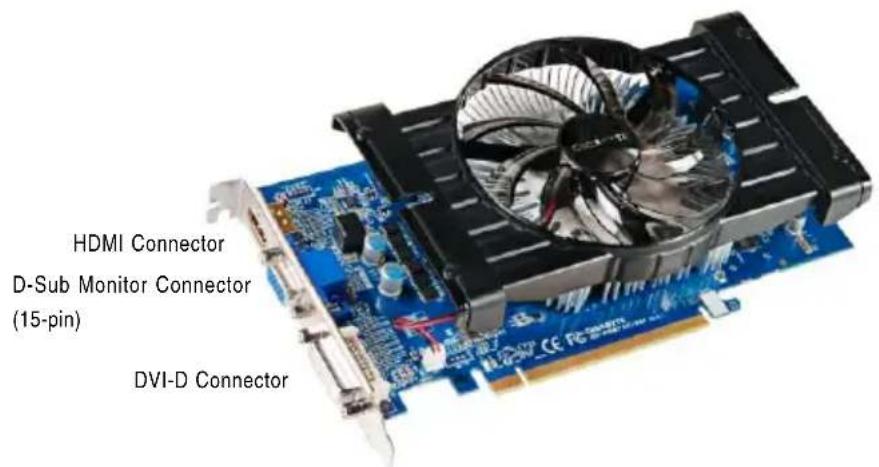

flowchart
graph LR
    A["HDMI TV"] --> B["Switch"]
    C["Analog LCD Monitor"] --> D["D-Sub Output"]
    E["Digital LCD Monitor"] --> F["DVI Output"]
    B --> G["Connector"]
    D --> H["Connector"]
    F --> I["Connector"]
    G --> J["HDMI Connector"]
    H --> K["D-Sub Monitor Connector (15-pin)"]
    I --> L["DVI-D Connector"]
- GV-R667D3-1GI

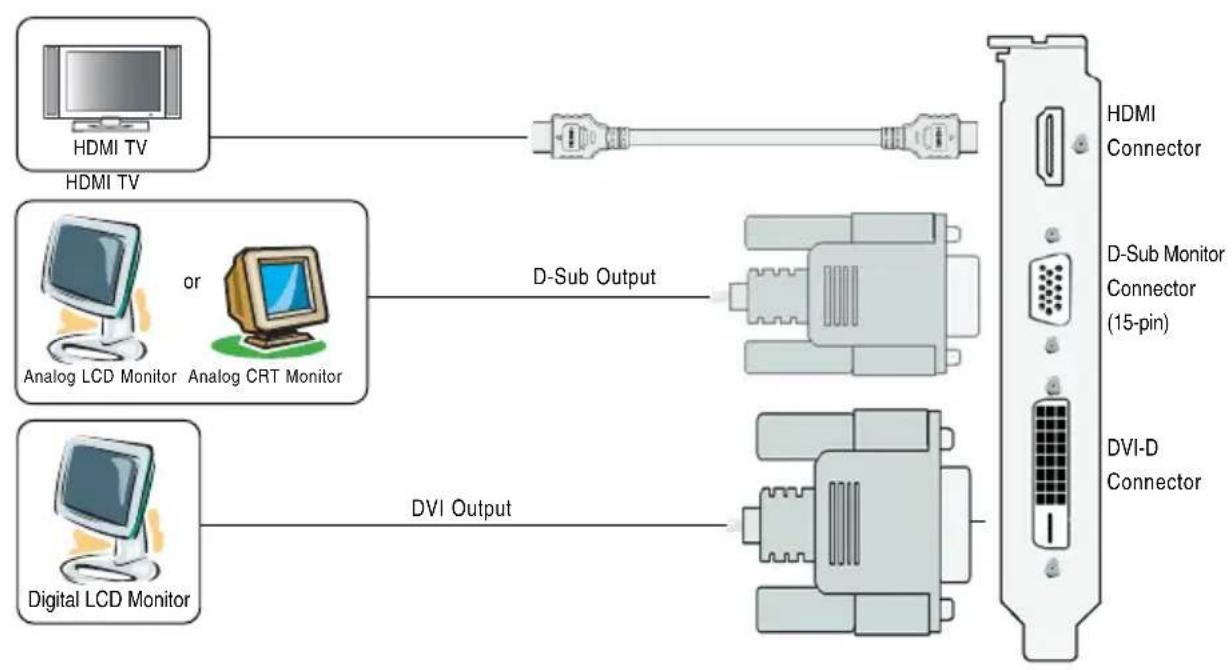
flowchart
graph LR
    A["HDMI TV"] --> B["Analog LCD Monitor"]
    C["Digital LCD Monitor"] --> D["DVI Output"]
    E["HDMI Connector"] --> F["Connector (15-pin)"]
    G["D-Sub Monitor Connector"] --> H["Connector (15-pin)"]
    I["DVI-D Connector"] --> J["Connector"]
    B --> K["D-Sub Output"]
    D --> L["DVI Output"]
3.GV-R657OC-1GI

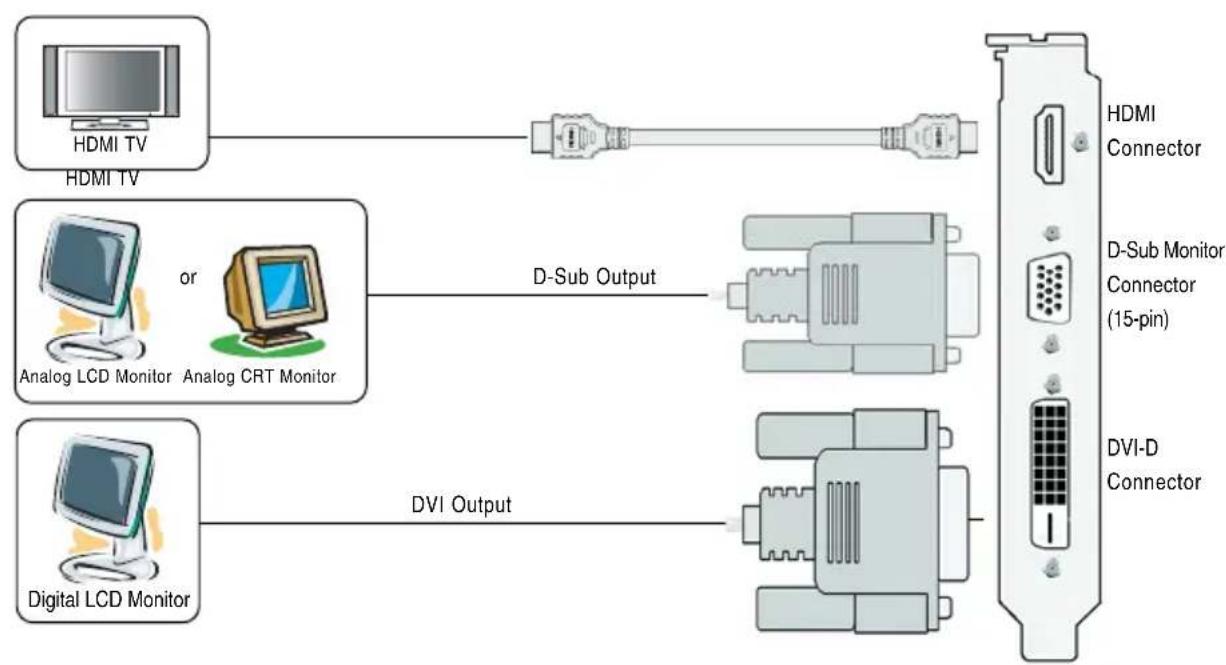
flowchart
graph LR
    A["HDMI TV"] --> B["Analog LCD Monitor"]
    C["Digital LCD Monitor"] --> D["DVI Output"]
    E["HDMI Connector"] --> F["Connector (15-pin)"]
    G["D-Sub Monitor Connector (15-pin)"] --> H["Connector"]
    I["DVI-D Connector"] --> J["Connector"]
    B --> K["D-Sub Output"]
    D --> L["DVI Output"]
The entire Radeon HD 6670 / 6570 series support HDMI output which can handle both audio and video signals. However, audio output from the onboard audio controller or the external sound card will be disabled when HDMI output is activated.
If no need for HDMI output function, set the onboard audio controller or the external sound card to be the default Sound Playback device to obtain audio output from your system. For more details, refer to page15.

Expansion cards contain very delicate Integrated Circuit (IC) chips. To protect them against damage from static electricity, you should follow some precautions whenever you work on your computer.
- Turn off your computer and unplug power supply.
- Use a grounded wrist strap before handling computer components. If you do not have one, touch both of your hands to a safely grounded object or to a metal object, such as the power supply case.
- Place components on a grounded antistatic pad or on the bag that came with the components whenever the components are separated from the system.
The card contains sensitive electric components, which can be easily damaged by static electricity, so the card should be left in its original packing until it is installed.
Unpacking and installation should be done on a grounded anti-static mat. The operator should be wearing an anti-static wristband, grounded at the same point as the anti-static mat.
Inspect the card carton for obvious damage. Shipping and handling may cause damage to your card. Be sure there are no shipping and handling damages on the card before proceeding.

DO NOT APPLY POWER TO YOUR SYSTEM IF THE GRAPHICS CARD IS DAMAGED.

In order to ensure that your graphics card can work correctly, please use official GIGABYTE BIOS only. Using non-official GIGABYTE BIOS might cause problem(s) on the graphics card.
2.2. Hardware Installation
Now that you have prepared your computer, you are ready to install your graphics card.
Step 1.
Locate the PCI Express x16 slot. If necessary, remove the metal cover from this slot; then align your graphics card with the PCI Express x16 slot, and press it in firmly until the card is fully seated.

Make sure that the gold edge connector of the graphics card is securely inserted.
Step 2.
Replace the screw to fasten the card in place, and replace the computer cover.
Step 3.
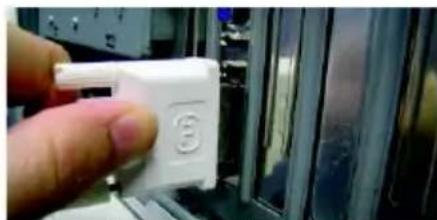
Plug the display cable into your card; then turn on the computer and monitor. To connect a D-Sub monitor to your graphics card, use the D-Sub connector. To connect a flat panel display to your graphics card, use the DVI-D connector. To connect an HDMI monitor to your graphics card, use the HDMI connector.

natural_image
Close-up of hands holding a computer motherboard with a fan blade and CPU socket (no visible text or symbols)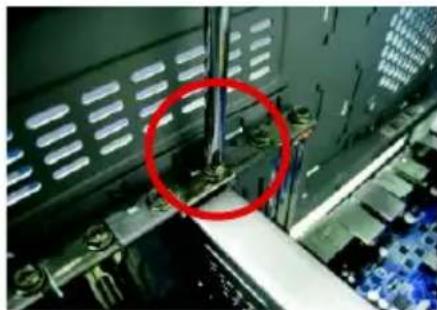
natural_image
Close-up of a mechanical assembly with a red circle highlighting a component, no visible text or symbols
natural_image
Close-up of a finger pressing a blue plastic component into a mechanical housing (no visible text or symbols)Connect a D-Sub monitor

natural_image
Close-up of a hand holding a black plastic clip against a metallic wall (no text or symbols visible)Connect an HDMI monitor
natural_image
Close-up of a hand holding a white plastic electronic component with a small circular mark on its side (no visible text or symbols)Connect a flat panel display

To D-Sub Monitor

To HDMI Monitor

To Flat Panel Display
You are now ready to proceed with the installation of the graphics card driver. Please refer to next chapter for detailed instructions.
3. Software Installation
Notice the following guidelines before installing the drivers:
- First make sure your system has installed DirectX 9 or later version.
- Make sure your system has installed the appropriate motherboard drivers (for the motherboard drivers, please contact the motherboard manufacturer.)
3.1. Driver and Utility Installation
3.1.1. Driver Installation
After installing the operating system, insert the driver disk into your optical drive. The driver Autorun screen is automatically displayed which looks like that shown in the screen shot below. (If the driver Autorun screen does not appear automatically, go to My Computer, double-click the optical drive and execute the setup.exe program.)

Step 1:
Click the Install Display Driver item.


Step 3:
Click the Install button.
Step 2:
Select the displayed language and then click Next.

For software MPEG support in Windows XP, you must install DirectX first. Users who run Windows XP with Service Pack 2 or above do not need to install DirectX separately.

Setp 4:
Click the Express or Custom icon and then click Next.

Step 5:
Click the Accept button.

The system is installing the components.

Step 6:
Click the Finish button to restart the computer. Then the driver installation is completed.
3.2. Taskbar Icon
After installation of the display driver, you will find an ATI ATI icon in the notification area. Right-click the icon to enter the ATI Catalyst Control Center. The ATI Catalyst Control Center is used to configure all your graphics card settings.
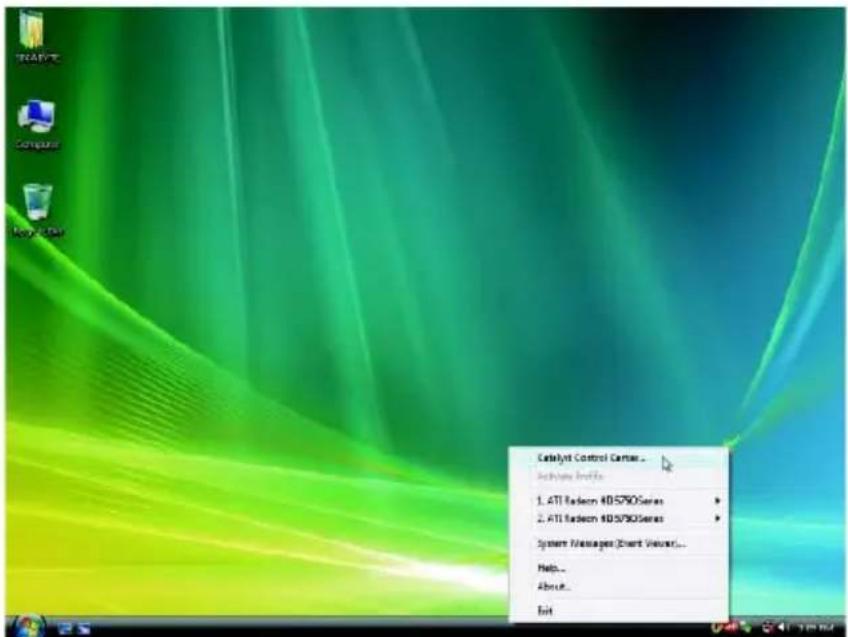
Right-click the ATI icon to enter the ATI Catalyst Control Center.

Or you can right-click on the desktop and select Catalyst(TM) Control Center.
Configuring Audio Output
Configure the default audio output device based upon your needs.
Step 1:
Go to Start > Control Panel > Hardware and Sound > Manage audio devices.

Figure 1
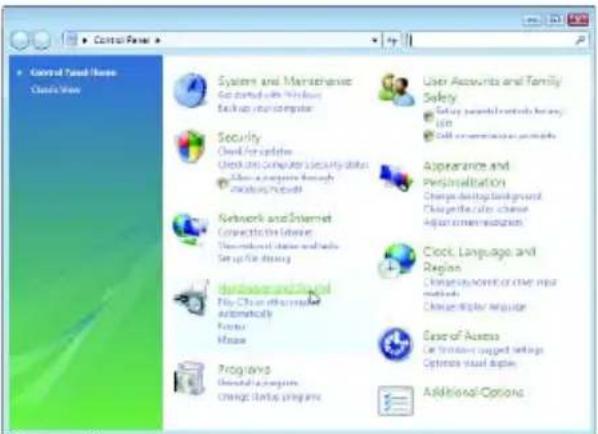
Figure 2
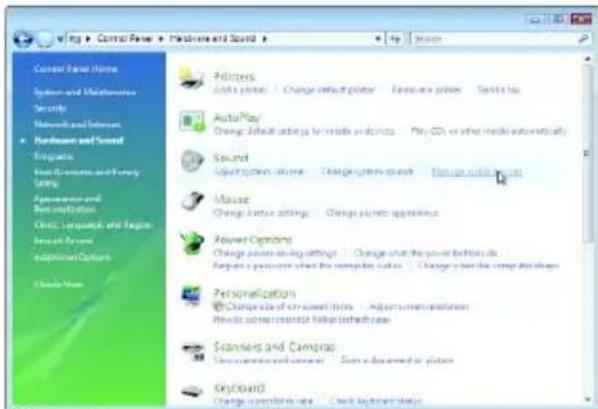
Figure 3
Step 2:
In the Manage audio devices dialog box, click the Playback tab.

Using the picture to the left as the example, to set HDMI audio to be the default Sound Playback device, select Digital Output Device (HDMI). Otherwise, select Digital Output Device (SPDIF), which is the onboard audio controller.
3.3. Display Properties Pages
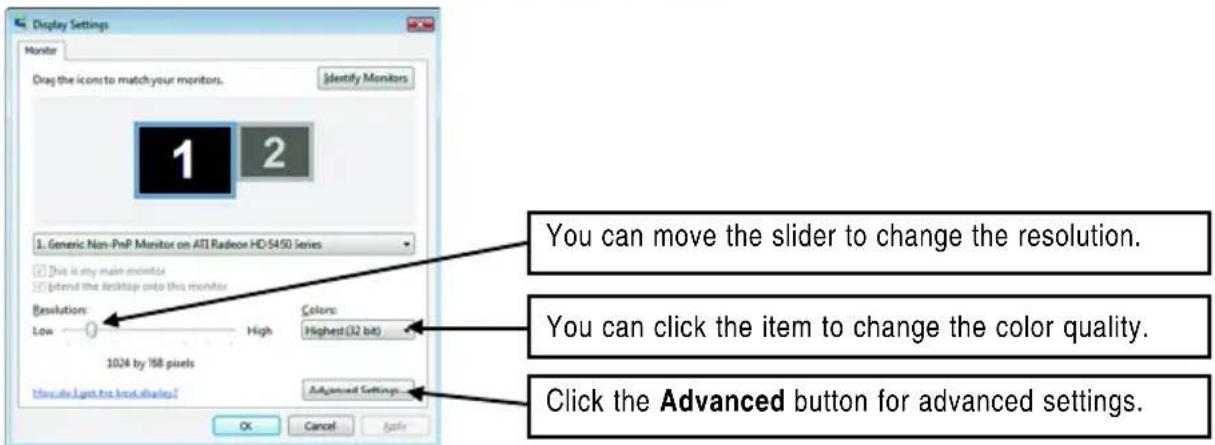
Display Settings (Resolutions and Color Quality for Windows)
To access Display Settings page, right-click on desktop and select Personalize, then the Personalization windows will show up. Select Display Settings to adjust the screen resolution and color quality settings.

| Display Matrix | Model | GV-R667OC-1GI | GV-R667D3-1GI | GV-R657OC-1GI |
| CRT+DVI-D | Yes | Yes | Yes | |
| DVI-D+DVI-D (Note1) | Yes | Yes | Yes | |
| HDMI+DVI-D | Yes | Yes | Yes | |
| HDMI+CRT | Yes | Yes | Yes |
(Note 1) By a HDMI to DVI adapter.(optional)
ATI Catalyst® Control Center Basic View :
The Basic View is the default view when ATI Catalyst Control Center is launched for the first time. This interface provides access to the basic settings and advanced features of your ATI graphics products. You can switch between Basic View and Advanced View at any time.
![Catalyst™ Control Center - None Welcome to the ATI Catalyst® Control Center What would you like to use? Basic [Easy Setup Wizards and Quick Settings] Provides both step-by-step assistance and Quick Settings for changing your display setup, and other common tasks. Advanced Allows you to configure all of the many available settings of our ATI graphics product. Don't show this page again You can choose between "Back" [Easy and Quick] or "Advanced" at any time. Click Next to continue Edit Next >](/content/2026/05/1046449/images/aa5c6e37fe229aea7c95b6d7ea1a4a2dbbd3a5c1b3f98b44a1ec9000d18e3555.jpg)
To access more settings in Basic View, click Basic, and then click Next.
Easy Setup Wizards:
Choose a wizard from the central list and click Go for step-by-step assistance.
■ Avivo Video Converter
This wizard assists you to convert videos from one file format to another.

Step 1:
Select Avivo Video Converter, then click Go.

Step 2:
Select the video file to be converted.

Step 3:
In the Output Folder area, select the destination folder where the new file will be located. Click Next.
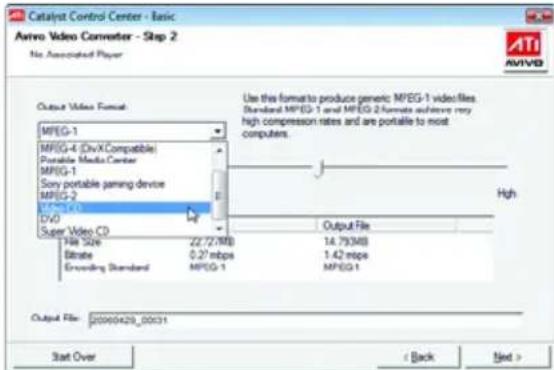
Step 4:
In the Output Video Format list, select a file format for the new file. If you wish to change the name of the new file, enter the new name in the Output File area. Finally, click Next to start file conversion.

The video file has been successfully converted.

■ Setup my display configuration
This wizard allows you to configure display setting for desktop viewing.
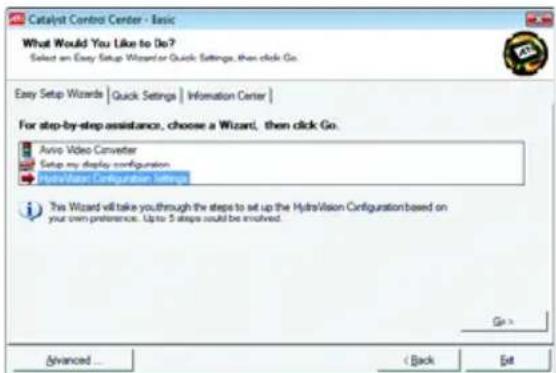
■ HydraVision Configuration Settings
This wizard will take you to set up the HydraVision Configuration based on your own preference.
Quick Settings:
The Quick Settings page provides access to three main settings.

■ 3D Quality
3D Performance and Quality Settings allows your 3D games and applications to get faster performance and better quality with a more balanced setting.
■ Video Playback
Use this option to optimize video playback in different room environment or to select how video playback appears on the second display.
■ Display Setup
This option allows you to configure your desktop, including changing desktop resolution and desktop mode, setting up extended desktop (requires more than one display), and rotating desktop image to match new display orientation.
Information Center:
The Information Center page in Basic and Advanced View provides hardware and software information about the installed graphics card.
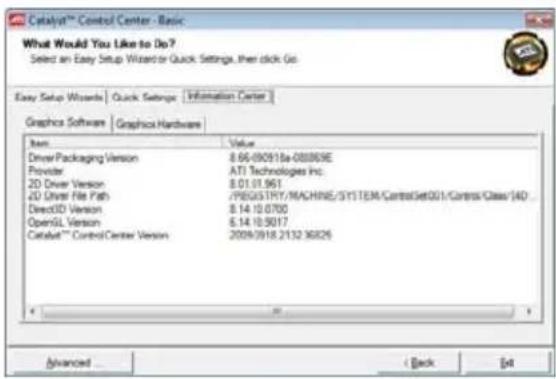
■ Graphics Software
Provides software information including driver version, CATALYST version, Direct 3D version and so on.
■ Graphics Hardware
Provides hardware information including graphics chipset, BIOS version, memory size, core clock and so on.
ATI Catalyst Control Center Advanced View
The Advanced page allows you to configure all of the many available settings of your ATI graphics card.
View Properties:
The CATALYST Control Center dashboard supports three types of views.
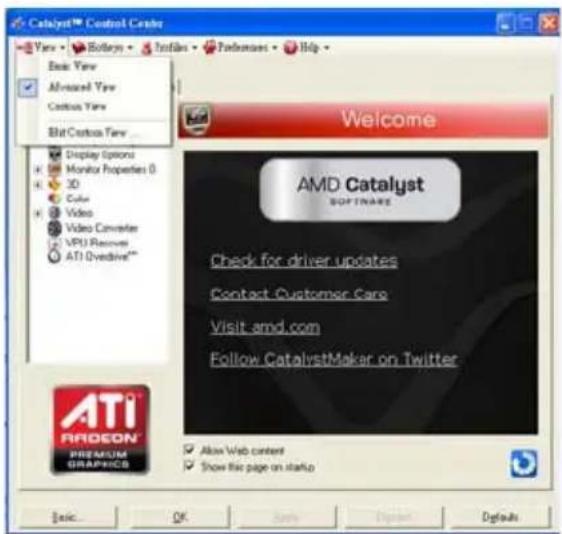
Hotkeys Properties:
The Hotkeys Manager allows you to create shortcut key combinations to quickly perform tasks such as changing a graphics setting or opening an application. A Hotkey is a combination of a modifier key or keys, such as Ctrl, Alt, or Shift, and any letter from the alphabet.

Profiles Properties:
You can use profiles to create customized environments for your desktop, video, and 3D applications. Define and save your own personal video settings that can be quickly activated manually, through a Hotkey, or by file association.
![Caledaf™ Control Center View • Botarys • Notfiles • Performers • Help • Graphics Settings | Hydrovision | Welcome Information Center Displays Manager Display Options Monitor Properties (0 3D Color Video Video Converter VRU Recover ATI Overline** Profiles Manager Create or Edit a Profile Enter or select a profile name: Profile description Composition | Activation | Applications | This profile includes: all Catalyst™ Control Center settings the following settings: AMD Radeon Hi 6600 times [L315] Basic... Active & Close Close Help](/content/2026/05/1046449/images/d52040e259dcbdf21b711b0ce0f5d490437757dc86fd5865970c5eb4e1f25c58.jpg)
Note:
A profile applies to a specific graphics card. If there is more than one graphics card installed in your computer, you need to select the appropriate card before creating, loading, or activating a Profile.
Preferences Properties:
The Preferences page helps to restore defaults, change skins, and update the Catalyst Control Center. The Catalyst Control Center Preferences page contains the following options:

■ Always on Top
■ Hide Tooltips
■ Hide Splash Screen
■ Enable System Tray Menu
■ Select a Language ...
■ Restore Factory Defaults ...
Help Properties:
The Catalyst Control Center Help feature allows you to access the comprehensive online help, register your product, or generate a problem report should you require technical support.

The Catalyst Control Center Help feature offers the following options:
■ Help for this Page
■ Help Contents ...
■ Go to AMD.com
■ About Catalyst Control Center ...
Displays Manager:
Displays Manager is the central location for configuring your display devices and arranging your desktop. Use Displays Manager to change your display setup and arrange your desktop in a multi-monitor environment.
![Catalyst™ Control Center View • Bodeys • Instles • Preferences • Help Graphics Settings | Hydration Welcome Information Center Displays Manager Dispers Properties Display Options Monitor Properties 0 3D Color Video Video Converter VPU Recover ATI Overdrive** Displays Properties Graphics Adapter 1.AM0 Radeon HD 6000 series [ L365 ] Desktop and Display Setup Main Attached display currently disabled. To make changes, drag or right-click the display score Detect Displays Selected Display on: AMD Radeon HD 6000 series L365 [ Single ] Desktop area: Color quality: Refrachcale 1024 x 768 High (32-bit) 60 Hz Rotation: Standard Landscape (87) Force ... ASIC OK Apply Print Tools Sign Up](/content/2026/05/1046449/images/4e14520501aa860d3b956eae9203a7e11434a7f4b05c8515d80be9d2e07c27cd.jpg)
Note:
The stretch vertically and horizontally options are not supported on systems running Windows Vista.
Display Options:
The Display Options aspect gives you additional control to optimize performance of OpenGL and Direct 3D applications. Choose one of the Display Detection Option to prevent screen flicker when detecting a display.
![Cableyst™ Control Center Tay - Bldkys - Profiles - Performers - Help Graphics Settings | Hydvision Welcome Information Center Display Manager Create Options Monks Properties 0 3D Color Video Video Converter VPU Recovers ATI Overdrive™ Display Options Graphics Adapter 1 AMD Radeon HD 6000 series [L365] Display Detection Option Select from Catalyst™ Control Center will detect display devices: Detect whenever Catalyst™ Control Center is opened. Use manual detection only(8 must click the Detect Display button) ID Refresh Rate Ovside by default, some full screen applications operate at a refresh rate of 60 Hz, instead of the desktop refresh rate. To resolve this, select the desired refresh rate override. Disabled Display Management Options For displays of limited resolution capabilities: Only allow panning on limited resolution displays ATI PROEION PREMIUM GRAPHICS Basic... OK Buy Print... Default](/content/2026/05/1046449/images/5791e07a9ef66f65d14a6be0a51681820b3e5d02fd48e8bc2cf6e40a8e63262a.jpg)
Note:
On systems Windows XP, this page will show up the 3D Refresh Rate Override item. Use 3D Refresh Rate Override to set a refresh rate of your choice when a full-screen application or game has a default refresh rate that is lower than optimal.
Monitor Properties 1:
![CATAYNT Control Center View • Redays • Textiles • Preferences • Help Graphics Settings | HydraulVision Monitoring Graphics Adapter 1.AH40 Platform HD 6000 series [ L365 ] Monitor Information Display Data Channel (DDC) Supported Display Name: L365 Maximum reported resolution: 1280x768 Maximum reported refresh rate: 75 Hz Monitor Attributes Use Extended Display Identification Data (EDDI) or drive defaults Maximum resolution Maximum refresh rate 1.00x768 75 Hz Basic OK Apply Edit Modify Options ATI RADEON PREMIUM GRAPHICS](/content/2026/05/1046449/images/59ee344d67820eb154b7a3bb6f99fdd321bdc53b451b922bad6410c71edbde4d.jpg)
■ Attributes
Monitor Attributes provides information about the attached monitor. You can also enable Extended Display Identification Data (EDID). EDID uses the information provided by the attached monitor to determine the limits for the resolution and refresh rate.
![Catalyst™ Control Center Yave + Windows + Iodark + Fudemeni + Help Graphics Settings | Hydration Welcome Information Center Display Managers Display Options Monitor Properties 0 Attributes Adjustments HOTV Support Color 3D Color Video Video Converter VPU Recover ATI Dynamics™ Monitor Properties Graphics Adapter 1.AHD Radeon HD 6000 sees [L385] Screen Position and Side Click the box and move R, or use the arrows to adjust position or size Synchronization Horizontal Vertical Composite sync: Basic OK Apply Down Optimize Defaults](/content/2026/05/1046449/images/5433a00bf545adae32bc62c06609d1b5f0d017cf0959e8745b8a89cb261891b6.jpg)
■ Adjustments
Use Monitor Adjustments to resize and reposition the computer desktop on your monitor's display screen. You can also adjust the horizontal and vertical sync or enable composite sync.
![Cabinet® Control Center Yay - Dotyrs - Profiler - Predators - Help Graphics Settings | HydroVision Welcome Information Center Display Manager Display Options Monitor Properties: 0 Attributes Adjustments HDTV Support Color 3D Color Video Video Converter VPU Recover ATI Overactive™ Monitor Properties Graphics Adapter 1AMD Radion HD 6500 series [1365] Color Correction Heat: 30 —— 30 —— 0 —— Saturation: 0 —— 200 —— 180 —— Adjustments Brightness: 100 —— 101 —— 5 —— Contrast: 0 —— 200 —— 130 —— Color Temperature Control Use Extended Display Identification Data (CDID) Temperature: 4000K —— 10000K —— 6500K —— Basic OK Cancel Preview Default](/content/2026/05/1046449/images/e72fed46ff31fb6b29f18139956fbcaf076d3e724ef21667c684e110c3bcb041.jpg)
Avivo™ Color
Use Avivo™ Color for AMD graphics cards that support per-display color settings. Independently set the hue, saturation, and temperature for each attached and enabled display.
3D:
![CableJet™ Control Center Yave Hotkeys Indias Forderman Help Graphics Settings HydroVision Standard Settings Graphics Adapter 1.4M Radeon RD 6000 series [L365] 3D Preview Color Video Video Converter VPU Recover ATI Ovdrive** Standard Settings Use custom settings Performance Quality Balanced Basic... OK Draft... Edit... Defaults](/content/2026/05/1046449/images/449972d9bd4558a2151583f07d7458a2f2b7fd5985e15a684afc742ab85ec5a7.jpg)
Standard Settings
The Standard Settings page provides access to a universal slider control where you can simultaneously adjust all of the standard 3D settings for any type of 3D application. The slider enables you to adjust for overall system performance, overall 3D image quality, or a balance between the two. This page is useful when you are not aware of which type of 3D settings your application uses, or when you want to use an overall adjustment control that rapidly configures your application.
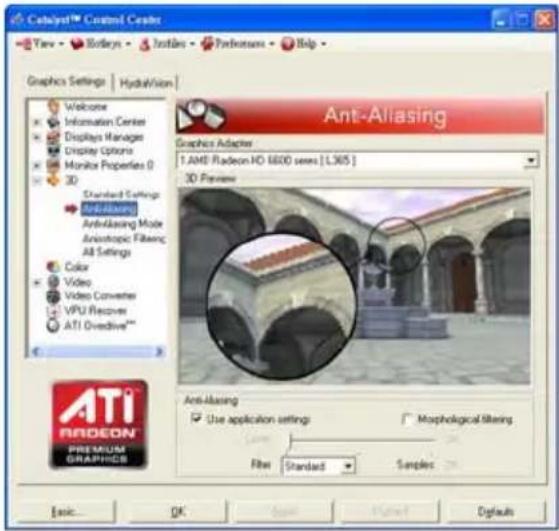
Anti-Aliasing
Anti-Aliasing (AA) is a rendering technique designed to remove jagged edges, shimmering, and pixelation problems that are common in rendered 3D images. Rather than determining the color to display for each pixel by sampling a single location at the pixel's center, anti-aliasing samples multiple locations within each pixel and blends the results together to produce the final color.
Anti-Aliasing can be set to favor either system processing performance or image quality, or the application can decide:
- Setting for performance is best used when the 3D image is animated and smooth motion is the most important consideration.
- Setting for quality is best used when highly detailed and realistic 3D objects is the most important consideration.
- If you are unsure of how to configure anti-aliasing, use the Use application settings option. Your display will automatically adjust to the application's requirements.

■ Adaptive Anti-Aliasing
Adaptive anti-aliasing is a technique that applies a combination of multi-sampling (MSAA) and super-sampling (SSAA) on 3D objects to improve edge smoothness and fine detail.
This feature renders 3D objects containing transparencies more realistic, providing exceptional levels of image quality while maintaining performance.
![Catalyst™ Control Center Yave • Redays • Inflan • Performance • Help Graphics Settings | Hydraulism Anisotropic Filtering Graphics Adapter 1.AMB Radeon HD 6600 sees [L365] 3D Placing Anisotropic Filtering Use application settings ATI RADEON PREMIUM GRAPHICS Basic OK Buy Print Delete Customize](/content/2026/05/1046449/images/3964ebaf3019b926dcf100cb5e0a07b0ca0d92017e87c406a0965893a5b4b27a.jpg)
■ Anisotropic Filtering
Anisotropic Filtering is a technique that preserves detail on surfaces that have three-dimensional perspective and fade away into the background. It works best when used in conjunction with Mipmapping. Anisotropic Filtering can be set to favor either an increase in system processing performance or improved image quality:
- Setting for performance is best used with applications that display objects with smooth, simple surfaces, like those seen in CAD applications.
- Setting for quality is best used with applications that display highly detailed scenes, backgrounds, and textured objects, like those seen in 3D games.
- If you are unsure how to configure anisotropic filtering, use the Use application settings option. Your display will automatically adjust to the application's requirements.
![Catalyst™ Control Center View • Botarys • Notlist • Preferences • Help Graphics Settings | Hydration All Settings Graphics Adapter 1.AMD Radeon HD 6000 series [L365] Anti-Ablasing Use application settings Morphological filtering Filter Standard Samples Annotropic Filtering Use application settings File power spectrum Catalyst™ A.1 Texture Filing Quality Quality Basic OK Apply Print Copy Defaults](/content/2026/05/1046449/images/27510877307630e1caaa70a900fd3652b7aeaff498574d9907c54c6cf2ad8fbe.jpg)
All Settings
The All Settings page combines all of the principal 3D features onto a single page, without any preview window, allowing for quick access and adjustment. This page is useful when it is not necessary to preview the adjusted settings because the effect is already known or understood.
Color:
Adjust the overall richness of color by using the Gamma control. To adjust the overall brightness use the Brightness control, and the overall contrast use the Contrast control.
![Catalyst™ Control Center View Redlarys Profiles Performance Help Graphics Settings HybridVision Welcome Information Centre Display Manager Display Options Monitor Properties (I) 3D Video Video Converter VPU Recovers ATI Overdrive™ Color Graphics Adapter 1.24HD Radeon HD 6000 series [.365] Color Adjustments Color correction curve Set color correction for: Desktop AI Channels Gamma Reset 0.5 2.5 100 Click to change image Brightness: -180 100 0 Context: 0 200 100 Basic OK Cancel Help Default](/content/2026/05/1046449/images/94af9945c0afe5de9dd5d3b2044fdf4a0d525dcafc2e94085a61250b205ffb6b.jpg)
Avivo™ Video:
![Catalyst™ Control Creator View - Botarys - Portiles - Preferences - Help Graphics Settings | HydrationVision Welcome Information Center Displays Manager Display Options Monitor Properties 0 3D Color Video Retro Basic Color Advanced Color Basic Quality Theater Mode All Settings Video Converter VPU Recover ATI Overactive™ Presets Graphics Adapter 1.AM0 Radeon HD 6000 series [L365] Video Preview Presets To quickly adjust your video setting, choose one if the video presets. Use Application Settings Video Preset: ATI RODEON® PREMIUM GRAPINGS Edit... OK View Refresh Defaults](/content/2026/05/1046449/images/e9e5475440ff8d08e2d2fbea46a9dad4dbb9332fe1379d5df6c52bb5ab22b739.jpg)
Presets
To quickly adjust your video settings choose one of the video presets.
Note:
These settings will only affect applications with video overlay support.
![Catalyst™ Control Center Views Botryx Bottles Performance Help Graphics Settings Hydration Basic Color Graphics Adapter 1.AH3 Radeon HD 6600 series [ L365 ] Video Preview Basic Color Highness Lowness None None ATI RADEON PREMIUM GRAPINGS ATI RADEON PREMIUM GRAPINGS Basic OK Down Updown Default](/content/2026/05/1046449/images/0fad57dea1a90d284cfb355087a9a7f750115c424119551b91ef74b0870f10e7.jpg)
Basic Color
Use the Avivo Color: Basic option to manually set Gamma, Brightness, Contrast, Saturation, and Tint for video playback.
Note:
Certain video formats do not support these adjustments. These settings will only affect applications with video overlay support.

■ Advanced Color
Use the Advanced Color page to fine tune the color of standard definition video (720x480) to make the color more or less vibrant and to remove excess red from skin tones. You can preview your changes before applying them.
Note:
This page is only for Windows Vista.
![Catalyst™ Control Creator Yavv Ridarys Jnflas Pretensans Help Graphics Settings Hydvision Basic Quality Graphics Adapter 1.AM0 Radeon HD 6000 series [L305] Video Preview Basic Quality Use automatic disinfecting Pulldown detection Basic... OK Apply Export Defaults](/content/2026/05/1046449/images/ccf061ee87108fce923ca0b24e8f943111ad92fee0c0f7e9d3201c1bd1a86e9d.jpg)
Basic Quality
You can control the deinterlacing settings by checking the Use automatic deinterlacing item. The bar determines how the two interlaced video fields are converted into a non-interlaced form.
Note:
These settings will only affect applications with video overlay support.
![Celayst™ Control Center View Modem Infiles Performance Help Graphics Settings Hydration Welcome Information Center Displays Managers Display Options Monitor Properties 0 3D Color Video Physics Basic Color Advanced Color Basic Quality Theater Mode All Settings Video Converter VPU Receiver ATI Overdrive** Theater Mode Graphics Adapter 1 AMD Radeon HD 6600 series [ L365 ] Single Display Mode Theater Mode requires Dual Display. To select another node, click Displays Manager Main Display Imported Change Select Desktop Module name: Theater Mode Settings Add the video output code for Add the video output code to Cancel All User access ATI RADEON® PREMIUM GRAPHICS OK Apply Delete Options](/content/2026/05/1046449/images/7bbdd9c44ee395f01eb9fea8e8d2de556b54f232e1545f7775ea2807a34790e6.jpg)
■ Theater Mode
Use Theater Mode to change the way you view streaming video.
Note:
- These settings will only affect applications with video overlay support. Extended Desktop Mode is not supported on systems running Windows Vista.
- This item will be available when you connect two monitors.
![Catalyst™ Control Center View Rotary Toolbox Findmeers Help Graphics Settings Hydration All Settings Graphics Adapter 1.AMD Radeon HD 6000 server [1.385] Basic Color Use application settings Advanced Color Video Gamma Baseline Modules Basic... OK Apply Help Default ATI RADEON® PREMIUM GRAPHICS](/content/2026/05/1046449/images/8cf178f473c65d67cd2e6f9082c8f5f11bbee8132e1cfa377fa88adbab6e8995.jpg)
All Settings
The All Settings page combines all of the principal Video features onto a single page, without any preview window, allowing quick access and adjustment. This page is useful when it is not necessary to preview the adjusted settings because the effect is already known or understood.
Note:
These settings will only affect applications with video overlay support.
ATI Overdrive:
Use Overdrive to maximize your viewing experience by dynamically and safely overclocking the graphics processor and memory. Use the Automated clock configuration utility to obtain the ATI recommended speeds for the graphics processor clock and video memory clock. Alternatively, manually set these speeds to meet your specific requirements. Finally, Overdrive can be configured to run when the computer is booted or only when running 3D applications. Note:
![Catalyst™ Control Creator View Bolaryx Junctions Padraevens Help Graphics Settings | Hydration/Video Welcome Information Center Display Manager Display Options Monix Properties D 3D Color Video Video Converter VPSI Receiver ATI Overdrive® Graphics Adapter 1 AMI Radeon HD-6600 views [L385] Athens ATI Overdrive™ High Performance of APCI (see version 2) 400 8000mm High Performance of Maximize Super Command 800 1000mm Athens Hardware for Camera 800 800 Current Options ATI Connection Maximize Option 8000mm 8000mm Transaction ATI Radeon® PREMIUM GRAPHICS OK Cancel Delete Defaults](/content/2026/05/1046449/images/d81cf99dfb3570cd5651f31317de10c74a02202f2e139d9a0d7bd2671a1296c9.jpg)
If your computer cannot restart after setting a higher clock speed, press and hold the
CrossFireX™:
CrossFireX delivers exceptional performance on a single display by combining the processing power of two or more Graphics Processing Units (GPUs).

Configure
When an ATI CrossFireX configuration is detected for the first time by the ATI Catalyst display driver, ATI CrossFireX support is automatically enabled. If ATI CrossFireX is not enabled, select the Enable CrossFireX™ check box.

■ Diagnostics
Use this page to determine whether your ATI CrossFireX configurations are configured properly and functioning optimally. You can also use the page to view performance issues and suggested solutions specific to a particular configuration.
Note:
This page is only for ATI CrossFireX configuration.
4. Troubleshooting Tips
The following troubleshooting tips may help if you experience problems. Contact your dealer or GIGABYTE for more advanced troubleshooting information.
- Check that the card is seated properly in the PCI Express x16 slot.
■ Ensure that the display cable is securely fastened to the card's display connector.
■ Make sure that the monitor and computer are plugged in and receiving power.
If necessary, disable any built-in graphics capabilities on your motherboard. For more information, consult your computer's manual or manufacturer.
(NOTE: Some manufacturers do not allow the built-in graphics to be disabled or to become the secondary display.)
■ Make sure you selected the appropriate display device and graphics card when you install the graphics driver.
■ For more troubleshooting information, please right-click the ATI icon in the notification area.
■ Restart your computer.
Press
After getting into Safe Mode, in Device Manager check whether the driver for the graphics card is correct.
For more assistance, use the Troubleshooting Guide located in the Windows Help or contact your computer manufacturer.
■ If you are not able to find the desired monitor color/resolution settings:
The color and screen resolution options available for selection depend on the graphics card being installed.

If necessary, adjust your monitor's setting using monitor's adjust panel to make the screen look focused, crisp, and sharp. (Please refer to the monitor's manual.)
5. Appendix
5.1. Resolutions and Color Depth Tables
Radeon™ HD 6670 / 6570 Series 2D Single Display Modes
| Display Refresh Color Depth (bpp)Screen Rate 8bpp(256 color) 16bpp(65K color) 32bpp(16.7M) | ||||
| Resolution | (Hz) | Standard mode | High mode | True mode |
| 640 x 480 200 √ | √ | √ | ||
| 800 x 600 200 √ | √ | √ | ||
| 1024 x 768 200 √ | √ | √ | ||
| 1152 x 864 100 √ | √ | √ | ||
| 1280 x 768 85 √ | √ | √ | ||
| 1280 x 960 160 √ | √ | √ | ||
| 1280 x 1024 120 √ | √ | √ | ||
| 1440 x 900 60 √ | √ | √ | ||
| 1600 x 1200 100 √ | √ | √ | ||
| 1680 x 1050 100 √ | √ | √ | ||
| 1792 x 1344 85 √ | √ | √ | ||
| 1800 x 1440 70 √ | √ | √ | ||
| 1856 x 1392 75 √ | √ | √ | ||
| 1920 x 1080 75 √ | √ | √ | ||
| 1920 x 1200 85 √ | √ | √ | ||
| 1920 x 1400 75 √ | √ | √ | ||
| 2048 x 1536 66 √ | √ | √ | ||
5.2. Regulatory Statements
Regulatory Notices
This document must not be copied without our written permission, and the contents there of must not be imparted to a third party nor be used for any unauthorized purpose. Contravention will be prosecuted. We believe that the information contained herein was accurate in all respects at the time of printing. GIGABYTE cannot, however, assume any responsibility for errors or omissions in this text. Also note that the information in this document is subject to change without notice and should not be construed as a commitment by GIGABYTE.
Our Commitment to Preserving the Environment
In addition to high-efficiency performance, all GIGABYTE motherboards fulfill European Union regulations for RoHS (Restriction of Certain Hazardous Substances in Electrical and Electronic Equipment) and WEEE (Waste Electrical and Electronic Equipment) environmental directives, as well as most major worldwide safety requirements. To prevent releases of harmful substances into the environment and to maximize the use of our natural resources, GIGABYTE provides the following information on how you can responsibly recycle or reuse most of the materials in your "end of life" product.
Restriction of Hazardous Substances (RoHS) Directive Statement
GIGABYTE products have not intended to add and safe from hazardous substances (Cd, Pb, Hg, Cr+6, PBDE and PBB). The parts and components have been carefully selected to meet RoHS requirement. Moreover, we at GIGABYTE are continuing our efforts to develop products that do not use internationally banned toxic chemicals.
Waste Electrical & Electronic Equipment (WEEE) Directive Statement
GIGABYTE will fulfill the national laws as interpreted from the 2002/96/EC WEEE (Waste Electrical and Electronic Equipment) directive. The WEEE Directive specifies the treatment, collection, recycling and disposal of electric and electronic devices and their components. Under the Directive, used equipment must be marked, collected separately, and disposed of properly.
WEEE Symbol Statement

The symbol shown below is on the product or on its packaging, which indicates that this product must not be disposed of with other waste. Instead, the device should be taken to the waste collection centers for activation of the treatment, collection, recycling and disposal procedure. The separate collection and recycling of your waste equipment at the time of disposal will help to conserve natural resources and ensure that it is recycled in a manner that protects human health and the environment. For more information about where you can drop off your waste equipment for recycling, please contact your local government office, your household waste disposal service or where you purchased the product for details of environmentally safe recycling.
- When your electrical or electronic equipment is no longer useful to you, "take it back" to your local or regional waste collection administration for recycling.
- If you need further assistance in recycling, reusing in your "end of life" product, you may contact us at the Customer Care number listed in your product's user's manual and we will be glad to help you with your effort.
Finally, we suggest that you practice other environmentally friendly actions by understanding and using the energy-saving features of this product (where applicable), recycling the inner and outer packaging (including shipping containers) this product was delivered in, and by disposing of or recycling used batteries properly. With your help, we can reduce the amount of natural resources needed to produce electrical and electronic equipment, minimize the use of landfills for the disposal of "end of life" products, and generally improve our quality of life by ensuring that potentially hazardous substances are not released into the environment and are disposed of properly.
China Restriction of Hazardous Substances Table
The following table is supplied in compliance with China's Restriction of Hazardous Substances (China RoHS) requirements:

关于符合中国《电子信息产品污染控制管理办法》的声明
Management Methods on Control of Pollution from Electronic Information Products
(China RoHS Declaration)
产品中有毒有害物质或元素的名称及含量
Hazardous Substances Table
| 部件名称(Parts) | 有毒有害物质或元素(Hazardous Substances) | |||||
| 铅(Pb) | 汞(Ng) | 镉(Cd) | 六价铬(Cr(VI)) | 多溴联苯(PBB) | 多溴二苯醚(PBDE) | |
| PCB板PCB | ○ | ○ | ○ | ○ | ○ | ○ |
| 结构件及风扇Mechanical parts and Fan | × | ○ | ○ | ○ | ○ | ○ |
| 芯片及其他主动零件Chip and other Active components | × | ○ | ○ | ○ | ○ | ○ |
| 连接器Connectors | × | ○ | ○ | ○ | ○ | ○ |
| 被动电子元器件Passive Components | × | ○ | ○ | ○ | ○ | ○ |
| 线材Cables | ○ | ○ | ○ | ○ | ○ | ○ |
| 焊接金属Soldering metal | ○ | ○ | ○ | ○ | ○ | ○ |
| 助焊剂,散热膏,标签及其他耗材Flux,Solder Paste,Lebel and other Consumable Materials | ○ | ○ | ○ | ○ | ○ | ○ |
| ○:表示该有毒有害物质在该部件所有均质材料中的含量均在SJ/T11363-2006标准规定的限量要求以下。Indicates that this hazardous substance contained in all homogenous materials of this part is below the limit requirement SJ/T 11363-2006 | ||||||
| ×:表示该有毒有害物质至少在该部件的某一均质材料中的含量超出SJ/T11363-2006标准规定的限量要求。Indicates that this hazardous substance contained in at least one of the homogenous materials of this part is above the limit requirement in SJ/T 11363-2006 | ||||||
| 对销售之日的所受售产品,本表显示我公司供应链的电子信息产品可能包含这些物质。注意:在所售产品中可能会也可能不会含有所有所列的部件。This table shows where these substances may be found in the supply chain of our electronic information products, as of the date of the sale of the enclosed products. Note that some of the component types listed above may or may not be a part of the enclosed product. | ||||||


- GV-R667OC-1GI/ GV-R667D3-1GI/ GV-R657OC-1GI
- User's Manual
- Copyright
- Trademarks
- Notice
- Rovi Product Notice:
- Date: Apr. 08, 2011
- Date: Jun. 20, 2011
- Supplementary Information:
- Table of Contents
- Introduction ...... 6
- Hardware Installation....7
- Software Installation 12
- Troubleshooting Tips 30
- Appendix 31
- Introduction
- Features
- Minimum System Requirements
- - Hardware
- - Operating System
- Hardware Installation
- Board Layout
- Hardware Installation
- Software Installation
- Driver and Utility Installation
- Driver Installation
- Taskbar Icon
- Configuring Audio Output
- Display Properties Pages
- Display Settings (Resolutions and Color Quality for Windows)
- ATI Catalyst® Control Center Basic View :
- Easy Setup Wizards:
- ■ Avivo Video Converter
- ■ Setup my display configuration
- ■ HydraVision Configuration Settings
- Quick Settings:
- ■ 3D Quality
- ■ Video Playback
- ■ Display Setup
- Information Center:
- ■ Graphics Software
- ■ Graphics Hardware
- ATI Catalyst Control Center Advanced View
- View Properties:
- Hotkeys Properties:
- Profiles Properties:
- Note:
- Preferences Properties:
- Help Properties:
- Displays Manager:
- Display Options:
- Monitor Properties 1:
- ■ Attributes
- ■ Adjustments
- Avivo™ Color
- Standard Settings
- Anti-Aliasing
- ■ Adaptive Anti-Aliasing
- ■ Anisotropic Filtering
- All Settings
- Color:
- Avivo™ Video:
- Presets
- Basic Color
- ■ Advanced Color
- Basic Quality
- ■ Theater Mode
- ATI Overdrive:
- CrossFireX™:
- Configure
- ■ Diagnostics
- Troubleshooting Tips
- Appendix
- Resolutions and Color Depth Tables
- Regulatory Statements
- Regulatory Notices
- Our Commitment to Preserving the Environment
- Restriction of Hazardous Substances (RoHS) Directive Statement
- Waste Electrical & Electronic Equipment (WEEE) Directive Statement
- WEEE Symbol Statement
- China Restriction of Hazardous Substances Table
Marke : GIGABYTE
Modell : GV-R667D3-1GI
Kategorie : Grafikkarte