
HT-SL75 - Soundbar SHARP - Kostenlose Bedienungsanleitung
Finden Sie kostenlos die Bedienungsanleitung des Geräts HT-SL75 SHARP als PDF.


| Produkttyp | Soundbar |
| Marke | Sharp |
| Modell | HT-SL75 |
| Abmessungen (B x H x T) | ca. 900 x 75 x 110 mm |
| Gewicht | ca. 2,5 kg |
| Stromversorgung | 100-240 V AC, 50/60 Hz |
| Leistungsaufnahme | 30 W (Betrieb), < 0,5 W (Standby) |
| Lautsprecherkonfiguration | 2.1-Kanal (integrierter Subwoofer) |
| Gesamtausgangsleistung | 60 W RMS |
| Bluetooth | Ja, Version 5.0 |
| HDMI | 1x HDMI ARC |
| Optischer Eingang | Ja |
| USB-Wiedergabe | Ja (MP3) |
| Fernbedienung | Ja, im Lieferumfang enthalten |
| Reinigung und Pflege | Mit einem weichen, trockenen Tuch reinigen. Keine aggressiven Reinigungsmittel verwenden. |
| Sicherheitshinweise | Nicht in der Nähe von Wasser aufstellen. Keine Gegenstände in die Öffnungen stecken. |
| Ersatzteile | Fernbedienung, Netzkabel (beim Hersteller erhältlich) |
| Reparatur | Nur durch autorisiertes Fachpersonal. Keine eigenmächtigen Reparaturen. |
Häufig gestellte Fragen - HT-SL75 SHARP
Benutzerfragen zu HT-SL75 SHARP
0 Frage zu diesem Gerät. Beantworten Sie die, die Sie kennen, oder stellen Sie Ihre eigene.
Eine neue Frage zu diesem Gerät stellen
Laden Sie die Anleitung für Ihr Soundbar kostenlos im PDF-Format! Finden Sie Ihr Handbuch HT-SL75 - SHARP und nehmen Sie Ihr elektronisches Gerät wieder in die Hand. Auf dieser Seite sind alle Dokumente veröffentlicht, die für die Verwendung Ihres Geräts notwendig sind. HT-SL75 von der Marke SHARP.
BEDIENUNGSANLEITUNG HT-SL75 SHARP
SHARP
Quick Start Guide
HT-SL70 / HT-SL75
SOUND BAR HOME THEATER SYSTEM
This product has HDMI CEC (Consumer Electronics Control), a feature which will enable you to use your TV's remote control to power on/off and adjust the volume of this product.
Recommended Connection:
| Your TV Type HDMI | CEC function Connection | Quick Start Guide Connection method | Connection method refer operation manual | |
| HDMI (with Audio Return Channel) | MUST BE ENABLED | HDMI IN (ARC) Method 1 Page 8, Method 1 | ||
| with HDMI HDMI | Method 2 Page 8, Method 2 | |||
| HDMI TV without CEC & ARC or non HDMI TV | NONE | HEADPHONE OUT | Method 3 Page 9, Method 1 | |
| RCA (VARIABLE OUT) | Method 3 Page 9, Method 2 | |||
Notes:
- This product is controlled via HDMI CEC (Consumer Electronics Control) specification, therefore for HDMI connection, your TV's CEC must be enabled. For details, refer to the operation manual of the TV.
● For TV without HDMI CEC, headphone or RCA (variable output) analogue connection is available.
● For TV without HDMI, headphone or RCA (variable output) connection is required.
● Volume level can be controlled via TV remote control.
Accessories
The following accessories are included. This product has no remote control.
 |  |  | 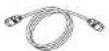 |  |
| RCA to Headphone Cable (1 pin - 2 pins) x 1 | Subwoofer Stand x 2 | Audio Cable x 1 | HDMI Cable x 1 | Wall Mount Bracket x 2 |
Accessories

Wall Mount Angle x 2

Pattern Paper

Speaker Wire

Sound Bar Stand x 2

Screw for Brackets x 6

Sound Bar Stand
Cushlon x 2
For HT-SL75 only.
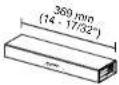 Sound bar cover joint for 60° (152 cm) TV (short) x 1 Sound bar cover joint for 60° (152 cm) TV (short) x 1 | 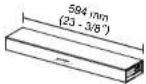 Sound bar cover joint for 70° (177 cm) TV (long) x 1 Sound bar cover joint for 70° (177 cm) TV (long) x 1 |  Stand Cover x 2 Stand Cover x 2 |  Stand Base x 2 Stand Base x 2 |
For HT-SL70 only.
| Sound bar cover joint for 46° (117 cm) TV (short) x 1 | Sound bar cover joint for 52° (132 cm) TV (long) x 1 | Stand Cover x 2 | Stand Base x 2 |
The illustrations printed in this operation manual are for the model HT-SL70.
System connections
Method 1. Recommended connection: Connecting a TV with ARC (Audio Return Channel)
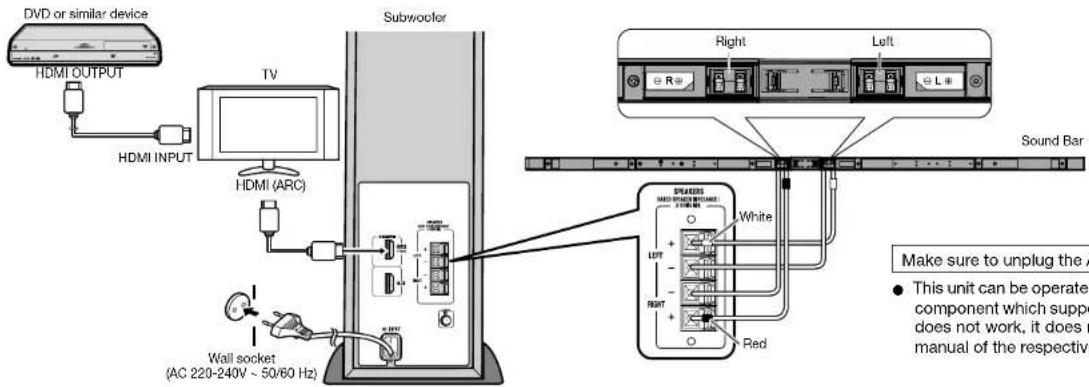
Example for your TV setting
1. Activation of CEC (e.g.: AQUOS TV (LC40LE810E))
1 Go to the MENU of the TV and the MENU screen will be displayed.
2 Press ◀/▶ (or ▲/▼) to select "Link Operation".
3 Press ▼/▲ (or ◀/▶) to select "AQUOS LINK Setup".
(For Sharp LCD TV, the HDMI CEC is named as AQUOS LINK)
4 Press ▲/▼ (or ◀/▶) to select "AQUOS LINK Control".
5 Press ▲/▼ (or ◀/▶) to select "On".
6 Press MENU to exit.
Method 2. Connecting a TV without ARC (Audio Return Channel)
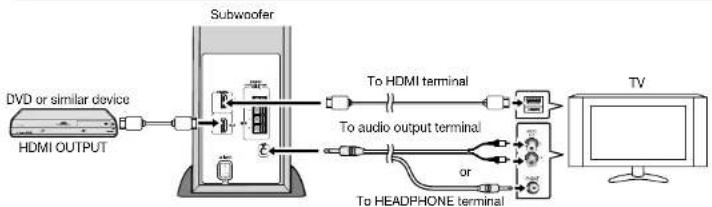
flowchart
graph LR
    A["DVD or similar device"] --> B["HDMI OUTPUT"]
    B --> C["Subwoofer"]
    C --> D["To HDMI terminal"]
    C --> E["To audio output terminal"]
    C --> F["or"]
    C --> G["To HEADPHONE terminal"]
    G --> H["TV"]
- Activate the CEC feature of your TV and select the appropriate speaker output. For details, refer to the operation manual of the TV.
To turn the power on
Plug the AC power lead into a wall socket, the stand-by indicator turns RED.
This unit will automatically power on it:
1. DVD which supports HDMI CEC, is turned on.
2. Audio signal is detected from TV (DVD must POWER OFF).
The stand-by indicator will turn BLUE if TV signal is detected.
Power Off
This unit will automatically go to stand-by mode (indicator turns RED) if:
1. DVD which supports HDMI CEC, is turned off.
2. No signal from TV is detected after 20 minutes.
2. Selection of speaker
Listening with the Sound Bar System
1 Select OPTION and the AQUOS LINK menu screen will be displayed.
2 Press ▲/▼ to select "By AQUOS AUDIO SP", and then press OK.
To turn the power on/off
Plug the AC power lead into a wall socket, the stand-by indicator turns RED.
This unit will automatically power on/off if TV is turned on/off.
The stand-by indicator will turn BLUE if TV signal is detected.
Method 3. Connecting a TV (with AUDIO IN (TV))
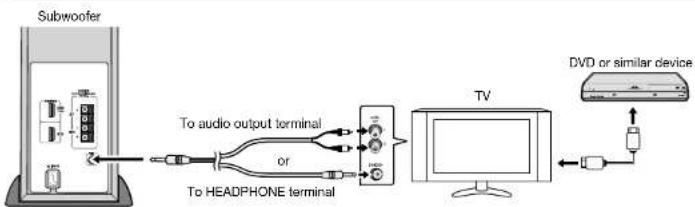
flowchart
graph LR
    A["Subwoofer"] --> B["To audio output terminal"]
    B --> C["TV"]
    C --> D["DVD or similar device"]
    C --> E["To HEADPHONE terminal"]
    E --> F["To audio output terminal"]
    F --> G["To headphones"]
- Select the appropriate speaker output on your TV. For details, refer to the operation manual of the TV.
To turn the power on
Plug the AC power lead into a wall socket, the stand-by indicator turns RED. This unit will automatically power on if audio signal is detected from TV. The stand-by indicator will turn BLUE if TV signal is detected.
Power Off
This unit will automatically go to stand-by mode (indicator turns RED) if no signal from TV is detected after 20 minutes.
Note:
In some cases, a small background noise could emit from the sound bar, when you use the headphone connection with a TV-Set. In such case, please change the connection to the HDMI/ARC or RCA-connection! This effect depends on the used TV-Brand, model and age, and it is not a quality matter from the sound bar!

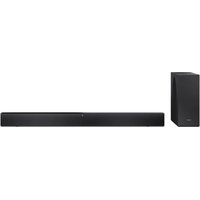
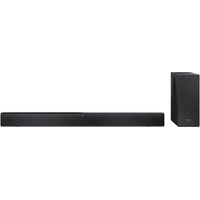
Marke : SHARP
Modell : HT-SL75
Kategorie : Soundbar