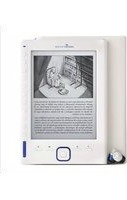
Book 2160 - E-Book-Reader ENERGY SISTEM - Kostenlose Bedienungsanleitung
Finden Sie kostenlos die Bedienungsanleitung des Geräts Book 2160 ENERGY SISTEM als PDF.


| Produkttyp | E-Reader (E-Book-Reader) |
| Marke | Energy Sistem |
| Modell | Book 2160 |
| Display | 6 Zoll E-Ink (elektronische Tinte), 8 Graustufen |
| Auflösung | 600 x 800 Pixel |
| Interner Speicher | 2 GB (nicht näher spezifiziert, ca. 1,6 GB nutzbar) |
| Erweiterbarer Speicher | MicroSD/SDHC bis 32 GB |
| Unterstützte E-Book-Formate | TXT, PDF, EPUB, FB2, HTML, PDB, WTXT |
| Unterstützte Audio-Formate | MP3, WMA, WAV, FLAC, AAC, OGG |
| Unterstützte Bildformate | JPEG, BMP |
| Akku | Lithium-Polymer, 1400 mAh |
| Lesezeit | Bis zu 20 Stunden |
| Ladezeit | 3–6 Stunden (via USB oder Netzteil) |
| Abmessungen (B x H x T) | ca. 120 x 172 x 9 mm |
| Gewicht | ca. 180 g |
| Anschlüsse | Micro-USB (Daten/Laden), 3,5-mm-Kopfhöreranschluss, MicroSD-Kartenslot |
| Besondere Funktionen | Hintergrundmusik beim Lesen, Lesezeichen, Zoom (5 Stufen), Bildschirmrotation, automatische Abschaltung, Schnellzugriffstasten |
| Reinigung und Pflege | Bildschirm nur mit weichem, trockenem Tuch reinigen; keine Chemikalien oder Scheuermittel verwenden |
| Sicherheitshinweise | Nicht fallen lassen, nicht in feuchter Umgebung betreiben, von Magnetfeldern fernhalten |
| Reparatur und Rücksetzung | Reset-Knopf auf der Rückseite; Garantie 36 Monate; Support per E-Mail oder online |
Häufig gestellte Fragen - Book 2160 ENERGY SISTEM
Benutzerfragen zu Book 2160 ENERGY SISTEM
0 Frage zu diesem Gerät. Beantworten Sie die, die Sie kennen, oder stellen Sie Ihre eigene.
Eine neue Frage zu diesem Gerät stellen
Laden Sie die Anleitung für Ihr E-Book-Reader kostenlos im PDF-Format! Finden Sie Ihr Handbuch Book 2160 - ENERGY SISTEM und nehmen Sie Ihr elektronisches Gerät wieder in die Hand. Auf dieser Seite sind alle Dokumente veröffentlicht, die für die Verwendung Ihres Geräts notwendig sind. Book 2160 von der Marke ENERGY SISTEM.
BEDIENUNGSANLEITUNG Book 2160 ENERGY SISTEM

User Manual
PRECAUTIONS
We strongly recommend reading the points below before operating this product:
- Back up the data periodically to another safe media. Under no circumstances there is any liability regarding to data damage or loss.
- Do not place the reader near devices that emit strong magnetic fields. It may cause data damage or loss.
Do not disassemble or remodel the device.
Do not let the device drop or shock.
Do not use the device under heavy moisture or wet.
Do not press the device screen.
Do not use the device in a dirty or dusty environment.
Do not use chemicals to clean the device screen. Clean the screen with a soft cloth; be careful not to wipe it with anything abrasive.
Do not remove micro SD card or turn off the device during data writing or reading to prevent damage to data and to the device.
Make sure the micro SD card is unlocked before writing or deleting data in the micro SD card.
INTRODUCTION
Thank you for purchasing Energy Book II60/2160. You are reading the welcome section of the Energy Book's User's Manual. This section provides an overview of the device and its basic features.
Electronic ink (E-Ink):
It is a screen printing technology without backlit which does not cause eye strain when reading. Electronic ink displays power consumption is very low, so you can read thousands of pages with a single charge. In addition, electronic paper is not affected by sun reflections and has a wider viewing angle than a conventional screen.
All these advantages multiply the comfort during the reading time, providing a sensation equal to traditional books. Experiences that enhance the pleasure of reading.
VISUALIZATION
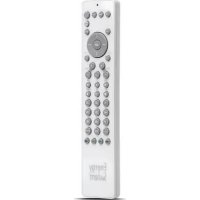
- Enter button: To confirm selection
- Music shortcut button: To access the audio player menu.
- Option button: To display the Option menu for extra functions such as: save bookmark, open from bookmark, delete bookmark, page jumping etc.
- Joystick: Press up/down/left/right direction to move cursor. Press left / right to flip page when reading.
- Return/cancel button: To cancel selection or return to previous menu.
- Zoom in/out button: To zoom in or zoom out the picture and text.
- Previous page button: To go to previous page when reading.
- Next page button: To turn to the next page when reading.
- Direct access buttons / number buttons: To select items or options dedicated to the corresponding buttons.
- Screen rotation: Rotate the screen vertically/horizontally.
II. Power button: To power on / off. - Headphone jack: To connect with headphone.
- Micro usb jack: Mini USB jack for data transfer or battery charging via computer or AC/DC adapter.
- Micro sd card slot: To insert micro SD card for memory expansion.
- Reset button.


GETTING STARTED
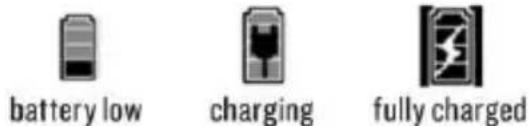
Fully charge the E-book's battery prior to the first use, as there might be insufficient power in the battery for normal operations. Connect the eBook using the USB cable supplied to the computer or from the power adapter (optional adapter included in the 2160 model) computer must be switched on.
2. Press and hold the [Power] button for 2 seconds to turn on your eBook. It may take a few moments for turn on and loading the content.
3. Takes around 4 hours to fully charge the battery using the power adaptor rating 5V, I.5A and 6 hours with the USB port.
4. During charging, LED indicator turns Red. When fully charged, LED turns blue.
5. Please handle the device with care to prevent damage to the display screen.
6. Read all the User Manual.
The charging status is shown as below:
TRANSFERRING DATA FROM COMPUTER
Connect your Energy Book II60/2160 to computer via the micro USB port with the supplied USB cable
The computer will detect your Energy Book and recognize it as a removable storage device.
Simply copy / paste / delete files to and from your Energy Book as any other normal external storage.
INSERTING A MICRO SD CARD
Your Energy Book II60/2160 supports micro SD card.
To view content inside the card, insert the card into the Micro SD card slot.
Make sure the card is inserted in the correct direction or you will damage the slot and card.
MAIN MENU
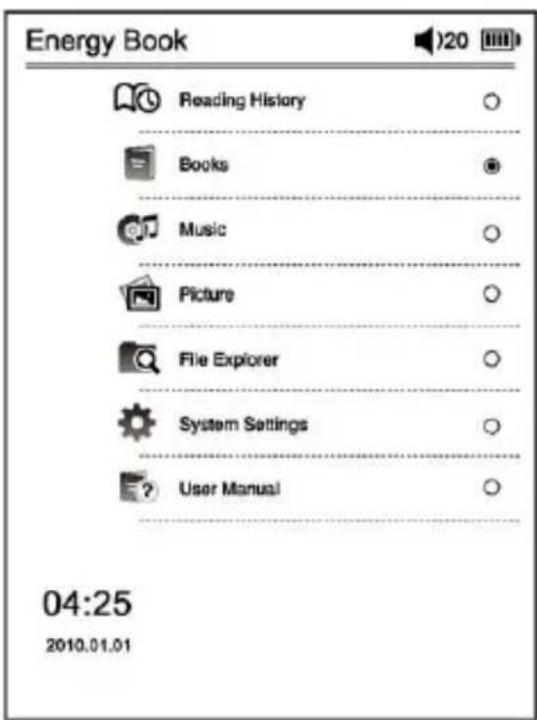
- Reading History: Displays files that have been read/view recently.
- Books: Displays eBooks stored in the and micro SD card.
- Music: Enter into music playback interface.
- Photo: Displays photos stored in the memory and micro SD card.
- File explorer: Displays all the files or folders in the memory and micro SD card.
- System settings: You can configure various settings in the System Settings.
- User manual: To read the user manual.

READING HISTORY
These function show recently read items in a list. Use the joystick to select the desired file and press the center joystick button to confirm.
The listing books are descending sorted, from the book of more recent date and time of reading. It also shows the last page of reading stored in the automatic bookmark.
If the file has been deleted from the memory or has been removed external memory card, will appear in the list may but not be open and it will be automatically deleted from the list if you selected.


BOOKS
Display all the books included in the internal memory or external micro SD memory.
- Press the M key to enter the sub-menu that allows you to search and sort the library file.
To open a eBook select it from the list and press the ENTER button.
Note: Energy Book II60/2160 does not support copyright protected file or DRM content.
SEARCH BOOK: Find a book in the library select "Find File", use the direct access button to type the file name to search, will search in all files that include the selected words and displayed on the screen those books that have the exact words to your search.
SORT ITEMS: To sort the books list in your bookstore press M inside books from the library and select "Order File", select your preference after sorting: by date, title, by file type.
EBOOK READING FEATURES:
PAGE JUMP: To go to the desired page enter the exact page number, use the direct access button to select the page number appears on the screen and to confirm press the enter button.
- On the book page screen, press [Menu] button and select "Page Jump".
- Press [Enter] and an Input window will pop out.
| Mr Phileas Fogg lived, in 1872, at No. 7 Burlington Gardens, the house in which St 1814. He was one of the most noticeable n Reform Club, though he seemed alw attracting attention; an enigmatical per whom little was known, except that he w man of the world. People said that he res- - at least that his head was Byronic; bearded, tranquil Byron, who might live e years without growing old.Certainly an Englishman, it was more do Phileas Fogg was a Londoner. He was o 'Change, nor at the Bank, nor in the cou the 'City'; no ships ever came into Lon which he was the owner; he had no publie he had never been entered at any of the either at the Temple, or Lincoln's Inn, or 9 had his voice ever resounded in the Cour or in the Exchequer, or the Queen's Ecclesiastical Courts. He certainly manufacturer; nor was he a merchant of farmer. His namnds resting on his kn | • 1abc 2def 3ghi 4jkl 5mno 6pqrs 7tuv 8wxyz 9_ 0 |
BOOKMARK: For readability, you can set markers. Bookmarks are sorted and accessible when you are reading the corresponding book. The total ok bookmark for each book is 5.
Add a Bookmark:
- On the book page screen, press [Option] button and the Bookmark menu will appear.
- Select "Add Bookmark" on the menu to add a bookmark on the current reading page.
Open a Bookmark:
- On the book page screen, press [Option] button and the Option menu will appear.
- Select "Bookmarks" from the menu. Press [Up/Down] to select the desired bookmarks and press [Enter] to read the bookmark.
Delete a Bookmark:
- On the book page screen, press [Option] key and the Bookmark Menu will appear.
- Select "Delete Bookmark" from the menu, selects the bookmark that you want to delete and press [Enter] to confirm.
DISPLAY MODE: You can change the location of the header bar information on the screen, select the location in the upper or lower part of the screen.
BROWSER MODE: On/Off the automatic page turning.
FLIP TIME: You can define the time lap for page turning (30, 50, 80, 120 y 150 seconds).
QUICK NOTES:
- Use the joystick to select the desired book and press the center button to open.
- During the reading change page press [up] / [down] in the joystick or [previous] / [next] button.
SCREEN ROTATION: Your Energy Book II60 / 2160 allows you to change the orientation of the text on-screen reading vertical to horizontal. Press the top right button to change orientation.
Note: Books and files in PDF format consume many processor resources memory, so it do not allow images rotation or music playback simultaneously when you have open an PDF extension eBook.
ZOOM: Press [Zoom] to zoom in or zoom out books or documents. Once you reach the maximum magnification level the following keystroke causes return to the original scale. Your Energy Book II60/2160 has 5 levels of zoom.
This application let you access and play audio files stored on the eBook.

- On the main menu, select "Music" and press [Enter] to confirm.
- Songs stored in micro SD card and built in memory are displayed in the song. Select the desired music file and press "Confirm" (joystick centre) to start.
- It supports background music playing when reading books or viewing pictures. In the Music menu, press [Play] key to start music playing. During music playing, press [Return] key to return to the main menu. Music playback continues and you can now select other functions like Books or Photos.
Note: Books and files in format PDF consume many resources processor memory, so it's not allow the images rotation or music playback simultaneously when you have opened an extension PDF eBook.
Adjust volume: Push up/down on joystick to increase/decrease the volume.
Options: Press [Menu] key to access the music player options such as "Repeat Mode", "Play Mode", "MSEQ" and "EQ Sel".


PICTURE
Select "Picture" from main menu and press [Enter]. Select a photo and press "ENTER" button to explore. Your Energy Book II60/2160 support JPG, BMP file.
In photo list, press [Option] button to enter Option Menu.
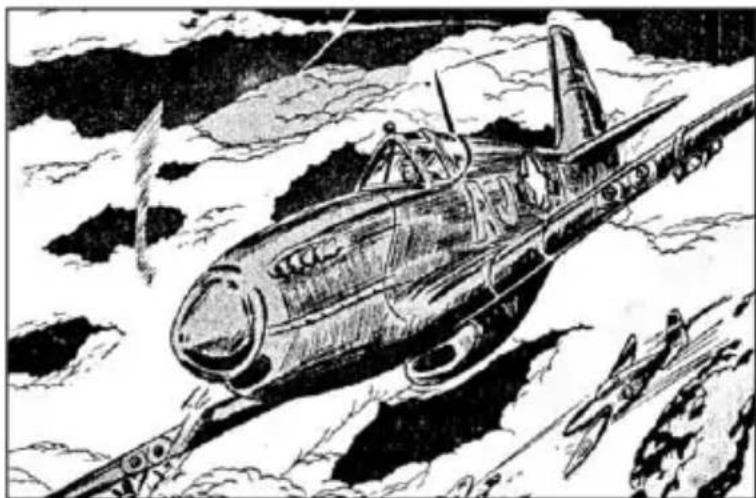
Zoom In/Out: Press [Zoom] button to zoom in or zoom out the image

FILE EXPLORER
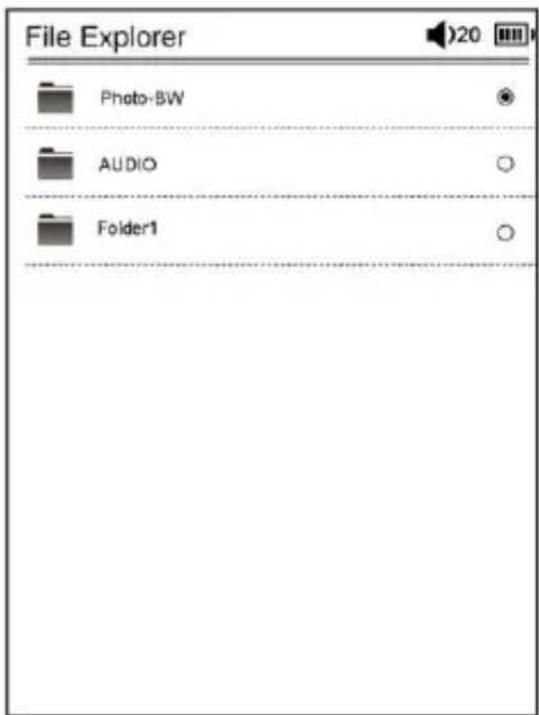
Select "File Explorer" from the main menu and press [Enter] button to enter. All the files and folders stored in the device (Flash) and microSD card will be listed. Select the desired option to browse folders or files and press [Enter] to open your selection.

SETTINGS
A4 Language:
It supports languages: English, Deustch, Italiano, Portuguese, French, Spanish, Polski, Turkce.
Time:
Press [Left/Right] to select "Year, Month, Day, Hour, Minute" and press [Up/Down] to input the date and time and then press [Enter] to confirm.

Calendar:
To view built in calendar of the reader.

Recent file settings:
- Select "Keep Reading History" to save the recent readings in Recent File list.
- Select "Disable" to deactivate this function. The recent file list will remain empty.
- Select "Clear History" to empty and delete all the document titles from the Recent File List.

Screen Refresh mode:
Full Refresh: Refresh the entire screen when you turn a page.
Partial Refresh: Only refresh the content part.

Auto shutdown settings:
Define the time when the reader has not activity. If you select disable the reader will never shutdown automatically.

Restore default settings:
Restore the system to default settings. To avoid data lost, please backup your data before doing.

System information:
To display Energy Book II60/2160 information: ID, Disk Volume, Memory Card size, Firmware version.

USER MANUAL
From the Main Menu, select User Manual to access the content of digital User's Manual.
DOCUMENT MANAGEMENT
Connecting to computer:
Use the supplied USB cable to plug into Energy Book II60/2160, and connect the other end to computer. A "USB Connected" window will pop out upon successful connection to computer. Computer will detect both the built in memory and microSD card on Energy Book II60/2160 as a removable disk.
Managing files:
You will be able to access built in memory and microSD card (if microSD card is plugged in) from "My Computer" after your eBook is connected to computer. You can move, copy or delete the existing files or folders from computer. At this moment, II60/2160 is under key lock mode. Will resume normal operation automatically after disconnected from computer.
micro SD card.
▶ Backup your files and data before formatting the micro SD card. Please format the micro SD card in FAT/FAT32.
Why do some EPUB documents not look right on my Energy Book?
Many publishers and convert software are supporting this format, but without maintaining a single standar set. One of the most common problems is when the creator puts everything EPUB e-book content in a "chapter" in EPUB. This can cause the document reading differs with formatted text, margins, gaps, etc.
Is Matter the size of supported file by my Energy Book?
Yes, less than 10 MB TXT files. EPUB 4 MB. PDF 4 MB. PDB 4 MB. When more images and graphics are in the ebook the response of your device will be slow
Can I listen music while reading?
Yes, expect in PDF format.
| Specifications | ||
| Chipset | RK2706B | |
| Display | Type | E-Ink |
| Resolution | 600*800 | |
| Colors | 8 grey scale | |
| Size | 6.0 inch (diagonal) | |
| Power | Battery type | Lithium Polymer 1400 mAH |
| Reading time | Up to 20 Hours of reading time | |
| Charging time | 3 - 6 hours | |
| Music Image | Supported eBook formats | TXT, PDB, PDF, HTML, FB2, EPUB, WTXT |
| Supported audio formats | MP3(8-392kbps), WMA (5-192kbps), WAV, FLAC, AAC, OGG | |
| Supported image formats | JPEG, BMP | |
| Storage | Card reader | Micro SD/SDHC, up to 32 GB |
| USB | Micro USB | |
| Dimensions | 120 x 172 x 9 mm | |
WARRANTY
Energy Sistem Soyntec S.A. warrants its products to be free from defects in materials and workman ship at the time of purchase.
The warranty period is 36 months from the date of purchase.
WARRANTY PROCEDURE
Visit the Support section at http://support.energysistem.com and select your product to view the FAQ (Frequently Asked Questions). The solution to your problem is very likely to have been already published there. You will also be able to download user manuals, user guides, drivers and updates.
If you cannot find an appropriate solution in the Support section, you may send us your enquiry or warranty service request by email: support@energysistem.com
Alternatively, you may prefer to contact the distributor from which you purchased the product, presenting the purchase receipt or invoice.
Specifications are subject to change without notice.
© 2010 by Energy Sistem®. All rights reserved.
TRADEMARKS.
All company, brand and product names are trademarks or registered trademarks of their respective companies.
DECLARATION OF CONFORMITY
Manufacturer Name: Energy Sistem Soyntec S.A.
Address: Pol. Ind. Finestrat, C/.Calpe n°I, 03509, Finestrat Alicante (Spain)
Tel: 902 388 388 Fax: 902 119 034
NIF: A53107488
We declare under our own exclusive responsibility that the product:
Energy Sistem® Electronic Book reader Energy™ 1160/2160
Manufacturing country: China
Is in compliance with the essential directives, norms and standards of the European Union 89/336/EEC (EMC Directive).

www.energysistem.com


- PRECAUTIONS
- WE STRONGLY RECOMMEND READING THE POINTS BELOW BEFORE OPERATING THIS PRODUCT
- INTRODUCTION
- ELECTRONIC INK (E-INK)
- VISUALIZATION
- GETTING STARTED
- TRANSFERRING DATA FROM COMPUTER
- INSERTING A MICRO SD CARD
- MAIN MENU
- READING HISTORY
- BOOKS
- EBOOK READING FEATURES
- ADD A BOOKMARK
- OPEN A BOOKMARK
- DELETE A BOOKMARK
- QUICK NOTES
- PICTURE
- FILE EXPLORER
- SETTINGS
- A4 LANGUAGE
- TIME
- CALENDAR
- RECENT FILE SETTINGS
- SCREEN REFRESH MODE
- AUTO SHUTDOWN SETTINGS
- RESTORE DEFAULT SETTINGS
- SYSTEM INFORMATION
- USER MANUAL
- DOCUMENT MANAGEMENT
- CONNECTING TO COMPUTER
- MANAGING FILES
- WHY DO SOME EPUB DOCUMENTS NOT LOOK RIGHT ON MY ENERGY BOOK
- IS MATTER THE SIZE OF SUPPORTED FILE BY MY ENERGY BOOK
- CAN I LISTEN MUSIC WHILE READING
- WARRANTY
- WARRANTY PROCEDURE
- TRADEMARKS
- DECLARATION OF CONFORMITY
Marke : ENERGY SISTEM
Modell : Book 2160
Kategorie : E-Book-Reader