Trend 1 - Telefon BINATONE - Kostenlose Bedienungsanleitung
Finden Sie kostenlos die Bedienungsanleitung des Geräts Trend 1 BINATONE als PDF.


| Produkttyp | Telefon |
| Marke | Binatone |
| Modell | Trend 1 |
| Abmessungen (ca.) | 20 x 15 x 10 cm |
| Gewicht (ca.) | 0,5 kg |
| Stromversorgung | Über Telefonleitung (kein Netzteil erforderlich) |
| Anzeige | LCD-Display mit Anzeige von Rufnummer und Uhrzeit |
| Tasten | Großtasten für einfache Bedienung |
| Wahlwiederholung | Ja (letzte gewählte Nummer) |
| Mute-Funktion | Ja |
| Lautstärkeregelung | Ja (Hörer und Klingelton) |
| Freisprechen | Ja |
| Anrufbeantworter | Nein |
| Installation | Einfach an Telefonbuchse (RJ11) anschließen |
| Reinigung | Mit weichem, trockenem Tuch abwischen |
| Sicherheit | Nur für Innenräume geeignet |
| Reparatur | Keine vom Benutzer zu reparierenden Teile |
Häufig gestellte Fragen - Trend 1 BINATONE
Benutzerfragen zu Trend 1 BINATONE
0 Frage zu diesem Gerät. Beantworten Sie die, die Sie kennen, oder stellen Sie Ihre eigene.
Eine neue Frage zu diesem Gerät stellen
Laden Sie die Anleitung für Ihr Telefon kostenlos im PDF-Format! Finden Sie Ihr Handbuch Trend 1 - BINATONE und nehmen Sie Ihr elektronisches Gerät wieder in die Hand. Auf dieser Seite sind alle Dokumente veröffentlicht, die für die Verwendung Ihres Geräts notwendig sind. Trend 1 von der Marke BINATONE.
BEDIENUNGSANLEITUNG Trend 1 BINATONE

Guarantee and service
The Binstone Trend is fully guaranteed for 12 months from the date of purchase. The Guarantees does not cover damage by misuse or negligence, or by excessive voltages – for example, faults on the British Telecom line, or lightning.
If you think your Trend has developed a fault, please return it to the shop you bought it from.
Trend
Wallmounting instructions

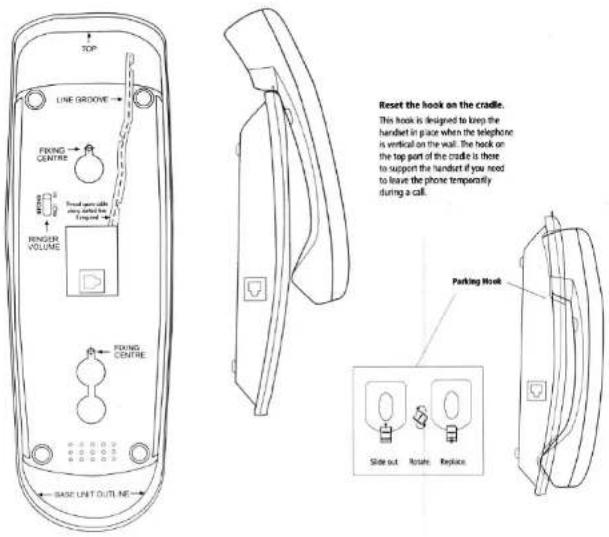
Please read the instructions on this template carefully before you start to wallmount your telephone. If you prefer, you can stand your telephone on a level surface. BE CAREFUL - check that there are no electrical wires hidden in the wall.
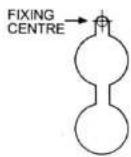
1 Use this template for wallmounting, marking the wall at the fixing centres. The marks should be 81.5 mm apart.
2 Using screws supplied with the unit, screw in at the two marked locations, leaving approx. 7mm (1/4") between the wall and underside of screw head.
3 Tuck the telephone line cord into the grooves on the cradle.
4 Hang the cradle unit on the screws using the wallmounting slots on the underside of the unit. You may need to remove the telephone from the wall and tighten the screws so that the cradle is securely fixed and does not wobble.
5 Rest the handset on the cradle using the parking hook on the cradle and the parking recess under the earpiece on the handset.
Connection and conditions for use
You can connect your Trend, to public networks in the UK; or to an approved PBX using DTMF signalling.
Each item of telephone equipment (phones, fax machines, etc.) has a ringer equivalence numbers (REN). The RENs of all equipment connected to an exchange line must not add up to more than 4 otherwise, one or more phones may not ring and/or answer calls correctly. Trend has a REN of 1, and most other telephones have a REN of 1 unless marked otherwise.
Care of your Trend
• Do not clean your Trend with solvent chemicals,
abrasives or spray cleaners which might get inside the case and cause damage not covered by the Guarantee. When necessary, clean it with a damp cloth.
- Keep your Trend away from hot, humid conditions or strong sunlight.
- Every effort has been made to ensure high standards of reliability for your Trend. However, if something does go wrong, please do not try to repair it yourself - consult your supplier or the Binatone Help Line.
Electrical safety
- DO NOT install the Trend near a sink, bath or shower or anywhere it could get wet. Electrical equipment can cause serious injury used while you are wet or standing in water.
- If the unit ever falls into water, DO NOT retrieve it until you have unplugged the telephone line plug from the telephone socket; then pull it out by the unplugged cable.
Buralane Telecom plc operates a policy of continuous product improvement, and so reserves the right to make changes to the product and functions without notice.
text_image
TOP LINE GROOVE FIXING CENTRE FINGER VOLUME FIXING CENTRE BASE UNIT OUTLINE Reset the hook on the cradle. This hook is designed to keep the handset in place when the telephone is vertical on the wall. The hook on the top part of the cradle is there to support the handset if you need to leave the phone temporarily during a call. Parking Hook Slide out Rotate Replace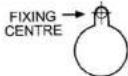
Trend
Model 0119
User Guide
text_image
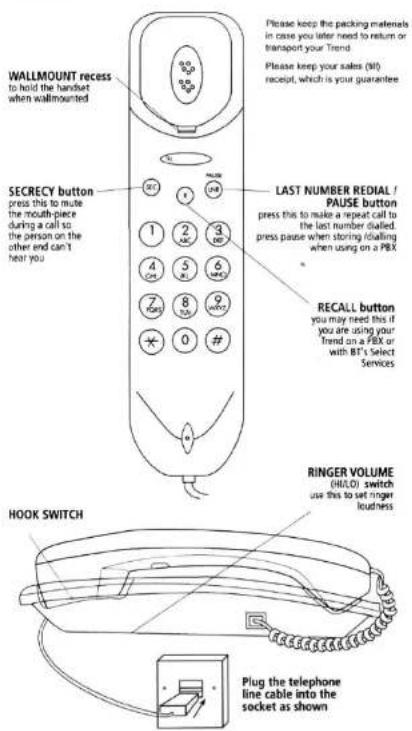
WALLMOUNT recess to hold the handset when wallmounted Please keep the packing materials in case you later need to return or transport your Trend Please keep your sales (NO) receipt, which is your guarantee SECRECY button press this to mute the mouth-piece during a call so the person on the other end can't hear you LAST NUMBER REDIAL / PAUSE button press this to make a repeat call to the list number dialled. press pause when storing idalling when using on a PBX RECALL button you may need this if you are using your trend on a PBX or with BT's Select Services RINGER VOLUME (HULO) switch use this to set ringer touchless HOOK SWITCH Plug the telephone line cable into the socket as shown

king and answering calls
To make a call
1 Lift the handset and wait for Dial tone
2 Dial the telephone number using the keypad
Last Number Redial
To make a repeat call to the last number you dialled (up to 32 digits):
1 Lift the handset and wait for Dial tone
2 Press LNR
Secrecy
While you are on a call, to mute the mouthpiece so that your voice cannot be heard
1 Press and hold SEC
Use on a PBX
If you are using your Trend on a PBX, and the PBX User Guide tells you to press RECALL, press the Ⓚ button on your Trend.
When making calls on some PBXS, you need to wait for a second Dial tone after dialling the outside line access digit (e.g. 9). If your PBX is of this type, you can use the PAUSE button when making calls, so that last Number Redial will work later.
To make a call:
1 Key in the outside line access digit then press INR
2 Dial the telephone number
Technical details
Temperature range Operating 0°C to 40°C Storage -20°C to 60°C
Approvals
ETS 300-001, CTR 38
PBX compatibility
Pause length: 3 seconds. Signalling type: DTMF (dual tone multifrequency), also called tone dialling.

Troubleshooting

The Trend must be serviced by trained engineers. NEVER attempt any repairs or adjustments yourself - you could invalidate the Guarantee.
If the phone does not ring
Make sure your Trend is fully plugged into the telephone line socket.
Check that the ringer volume switch under the base is set to HI.
Check that the total REN value of all equipment connected to your telephone line is no more than 4. Disconnect one or more telephones and see whether that helps.
If you cannot make Calls ...
Make sure your Trend is fully plugged into the telephone line socket.
Disconnect all other instruments connected to the same line as the Trend and see whether you can make a call.
Disconnect the Trend from the telephone line and plug a different phone into the socket. Try making a call. If this works, the line is OK.
If you are using a two-way socket adapter, remove it and plug a telephone directly into the socket. if the call now works, the adapter may be faulty.
If you think the fault may be on the exchange line, contact the service provider (the BT engineers on 151, or your cable company).
If you still cannot identify the cause of the problem, contact the Binatone Help Line on 01325 304473. The Help line is open from 9.00 am to 5.00 pm, Monday to Friday.